
On this page
Start here
Quick answer
A washer dryer that is not heating needs two separate checks: is the wash water not getting warm, or is the drying air not warming the load? First identify the appliance design from its rating label and manual: a vented dryer needs an open exhaust path, while a condenser or heat-pump combo may use water, a drain path, a heat exchanger, and a lower-temperature drying process. Check the selected wash or dry function, load size, care label, and washer spin result; then check only the model-approved filter, inlet, drain, condenser or heat-exchanger access. A cold wash load can be normal when the incoming water is cold or a timed energy-saving cycle advances, while a drying system may stop or show a code when its fan or heater has a fault. Stop for gas odor, burning smell, smoke, sparks, unusual heat, water near electricity, or a repeated breaker trip. Do not open the cabinet, probe live wiring, bypass a thermal control, or assume another brand's code or part applies.
Before you begin
Safety first
- This article supports ordinary-access checks of cycle selection, load, spin, visible water or drain conditions, documented filters, and accessible airflow only. Do not open the cabinet, access live wiring, bypass thermal controls, or work on gas or sealed heat-pump circuits.
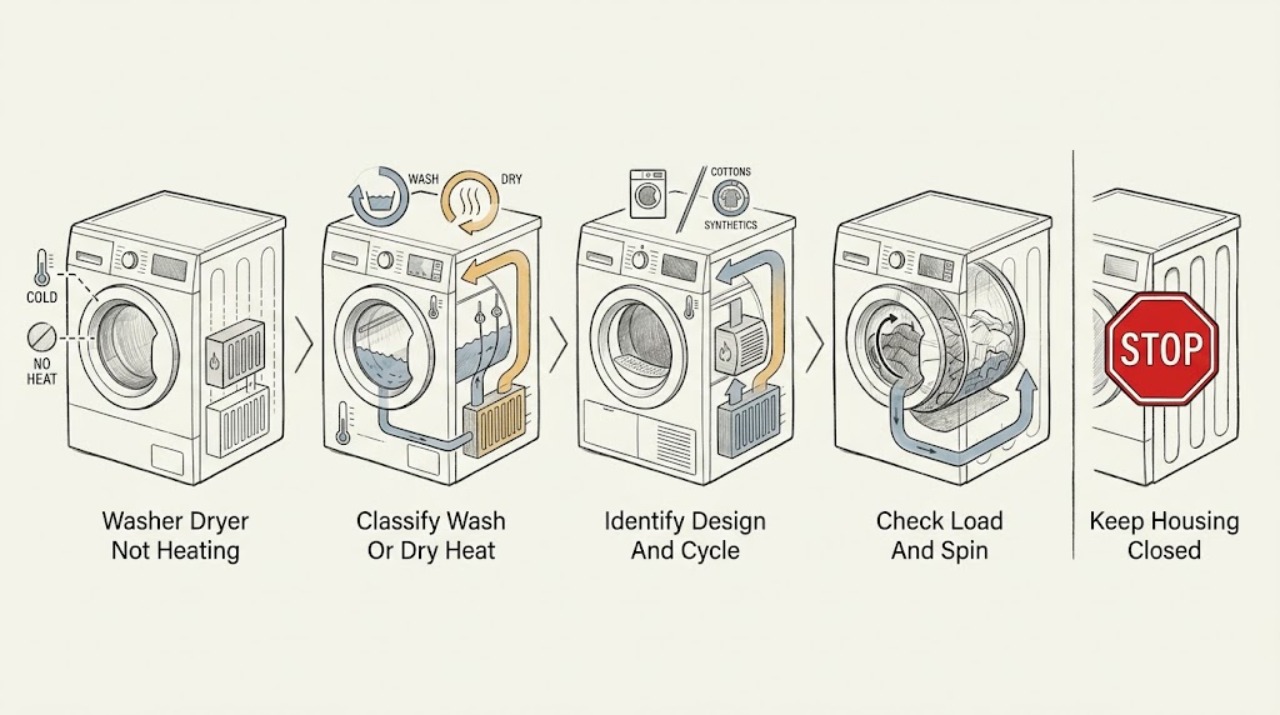
Work through in order
Diagnostic checks
Use only checks that match the exact appliance or system and its official guide.
-
Check 1
With the washer dryer stopped and the area dry, identify whether the complaint is cold wash water, a dry cycle with no warm air, damp laundry after a complete cycle, or both phases; record the selected temperature, dry option, drum motion, fill, drain, and exact display.
Expected result: Record warm or cold wash water if the model provides a safe external indication, warm or cold dry air without touching a heater, a load that is wet from poor spin, a normal cool-down phase, an error code, or any gas odor, smoke, burning smell, spark, unusual heat, water near electricity, or breaker trip.
Next step: Follow the immediate stop branch for any safety symptom. Otherwise continue with the design and cycle check, keeping wash and dry observations separate.
Stop if: Stop immediately for gas odor, smoke, burning smell, sparks, unusual heat, water near electrical parts, visible damage, or a repeated breaker trip.
Why this matters
Why: A wash-water symptom points to inlet temperature, cycle timing, or the wash heater path. A dry symptom points to load moisture, airflow, condenser or heat-pump operation, drying fan, heater, or temperature control. A safety symptom overrides all routine checks.
-
Check 2
Read the model manual and rating information to determine whether the unit is a vented, condenser, heat-pump, or water-assisted washer dryer; note the selected wash or dry function and whether it is a low-temperature, delicate, air, refresh, or timed program.
Expected result: Record a visible exhaust duct, a water tank or drain path, a heat-exchanger or condenser access point, a heat-pump or low-temperature dry setting, a wash temperature setting, or a design that cannot be identified without removing panels.
Next step: Use only the checks listed for that design and function in the manual. If the dry method or the expected temperature cannot be confirmed, stop and provide the model information to qualified service.
Stop if: Do not remove panels, disconnect the exhaust or drain, bypass a sensor, or select a high-heat or service mode just to compare temperatures.
Why this matters
Why: The design determines what “heating” should feel like and which airflow, water, drain, or filter observations are relevant. A heat-pump or delicate cycle may use lower heat than a conventional heated cycle. An unknown design is not permission to apply another appliance's test or code meaning.
-
Check 3
For a dry complaint, check the care label and reduce the load to the model's stated dry capacity; confirm the wash portion completed a strong permitted spin before starting a dry-only or combined cycle.
Expected result: Record a load above the dry limit, laundry that is dripping or heavy from poor spin, delicate items on a low-temperature setting, or a correctly spun moderate load that remains cold and wet.
Next step: Run one correctly sized load on the manual's suitable dry setting. If it still has no heat, an error, or a safety symptom, stop and proceed to the design-specific service branch.
Stop if: Do not exceed the dry capacity, dry an item prohibited by its care label, or continue when the load or cabinet becomes unusually hot, smoky, or wet around electrical parts.
Why this matters
Why: Excess water and an oversized load can make drying take much longer and can mask normal heat. A suitable, well-spun load that remains cold points more strongly to airflow, water-assisted condensation, fan, heater, heat-pump, or control diagnosis.
-
Check 4
For a condenser, heat-pump, or water-assisted design, inspect only the accessible water tap, inlet hose, filter screen, tank indicator, drain hose, and pump-filter area described by the manual; keep the floor and outlet dry.
Expected result: Record an open or closed tap, a kinked visible inlet or drain hose, a water-supply or tank message, a dirty accessible filter, water collected in the drain hose, or normal water and drain conditions with no dry heat.
Next step: Correct only a clearly closed tap, visible kink, full tank, or manual-approved accessible filter condition, then make one controlled dry observation. If the symptom remains or a leak appears, stop and arrange service.
Stop if: Do not disconnect hoses on a wet floor, open a pump or filter with retained water unless the manual provides a safe procedure, touch water near electricity, or continue after a leak.
Why this matters
Why: Some combo designs use water to condense moisture during drying, so a closed or restricted water path or poor drain path can reduce dry performance without proving the heater failed. A normal water path with a cold, suitable load shifts the check toward fan, heater, heat pump, sensor, or service.
-
Check 5
For a vented design, clean the lint filter and inspect the accessible exhaust path for crushing, kinks, lint, or a blocked outlet; for a condenser or heat-pump design, clean only the filter or heat-exchanger area the manual marks as user-serviceable.
Expected result: Record a blocked filter, restricted or disconnected exhaust, a blocked outside outlet, a dirty accessible heat exchanger, a clear path, or a warning that returns after cleaning.
Next step: Restore only the safe external path and run no more than the manual-approved controlled check. If a warning returns, the fan is abnormal, or the load remains cold and wet, stop heated operation and request service.
Stop if: Do not run with a disconnected exhaust, reach into a fan, use heat or solvents to clear a condenser, remove guards, or bypass an airflow or thermal warning.
Why this matters
Why: Restricted airflow can reduce heat transfer, extend drying, and trigger a fan or airflow protection state. A clear, model-approved path with no heat suggests an internal heater, fan, heat-pump, sensor, or control fault rather than a reason to open the cabinet.
-
Check 6
For a wash complaint, compare the chosen wash temperature and incoming water condition with the model manual; do not open the tub or heater area to feel or measure the water.
Expected result: Record a cold incoming supply, a low-temperature or energy-saving cycle, a cycle that advances after a long heating phase, a temperature-related code, or a correctly supplied suitable cycle that never warms.
Next step: Use the model's intended water connection and cycle setting, then observe one suitable wash. If the temperature problem persists, record the model and code and arrange service.
Stop if: Do not disconnect water lines on a wet floor, expose the heater, use a high-temperature cycle to force a test, or continue if water leaks or the machine overheats.
Why this matters
Why: The opened LG example guidance says colder incoming water can take longer to reach a target and an internal timer may advance the wash to limit energy use. A persistent temperature code or a suitable cycle that never warms requires model-specific service rather than a generic heater replacement.
-
Check 7
If the washer dryer remains cold after the relevant load, design, water, drain, filter, airflow, and cycle checks, document the exact model, phase, setting, code, load, hose or duct result, and whether the drum, fan, water path, and cool-down behaved normally.
Expected result: Record a repeatable dry-fan or heater code, a wash temperature code, a no-code cold cycle, a fan that does not run, a heater that remains active, or a panel that resets or trips the breaker.
Next step: Leave the unit off when the fault persists or any hazard occurred, and arrange qualified appliance service. Provide the model and the complete observation record; do not order a generic heater or sensor.
Stop if: Do not open the cabinet, probe live wiring, bypass a thermal control, run repeated cycles, or use another brand's error-code procedure.
Why this matters
Why: The exact code and phase distinguish wash heating from drying fan, heater, heat-pump, water, drain, sensor, or control diagnosis. A no-code cold cycle still needs professional diagnosis when user checks are complete.
Use your observations
Decision map
Find the observation that best matches what you see, then follow the next safe action.
-
PATH 01Safety boundary
What you see
There is gas odor, burning smell, smoke, sparks, unusual heat, water near electricity, visible damage, or a repeated breaker trip.
Do this next
Stop the washer dryer. From a dry, safe position, isolate power or gas only if this does not involve touching wet or damaged parts; leave for gas odor, smoke, or fire and request emergency or utility help from outside the affected area. Arrange qualified service before any restart.
Why this path and its safety boundary
Why it matters: This is a fire, gas, shock, flood, or thermal risk, not a routine heating adjustment.
Safety stop: Do not restart, operate a switch in a gas-filled area, spray water, open panels, touch wet electrical parts, or bypass a safety device.
-
PATH 02Safety boundary
What you see
Only the wash water seems cool, the incoming supply is cold, the selected cycle is low temperature, and no code or safety symptom is present.
Do this next
Use the exact model's intended connection and cycle, then observe one suitable wash. Request service if a temperature code appears or a suitable cycle never warms.
Why this path and its safety boundary
Why it matters: The opened LG guidance is a brand-specific example that incoming water temperature and a timed energy-saving limit can make a target take longer or not be fully reached before the cycle advances.
Safety stop: Do not open the tub, expose the heater, force a high-temperature test, or continue after a leak or overheat symptom.
-
PATH 03Safety boundary
What you see
The dry load is too large, overly wet from a weak spin, or placed on a low-temperature or delicate function.
Do this next
Reduce the load to the manual's dry capacity, complete a permitted spin, use the care-label setting, and make one controlled dry observation.
Why this path and its safety boundary
Why it matters: Drying capacity, residual water, and fabric protection can make a working dryer feel cold or leave items damp.
Safety stop: Stop if the load or cabinet becomes unusually hot, smoky, or wet around electrical parts, or if a suitable load remains cold.
-
PATH 04Safety boundary
What you see
The combo uses water-assisted condensation and the tap, inlet, tank, drain hose, or accessible pump filter is closed, restricted, full, or kinked.
Do this next
Correct only a manual-approved external condition, keep the floor dry, and observe one controlled cycle. Request service for a leak, recurring water code, or persistent cold drying.
Why this path and its safety boundary
Why it matters: In the opened LG example, water is part of the dry process; a restricted water or drain path can reduce drying without proving a failed heater.
Safety stop: Do not disconnect hoses on a wet floor, open a water-filled filter without the manual procedure, or touch water near electricity.
-
PATH 05Safety boundary
What you see
The design has a dirty filter, restricted exhaust or heat-exchanger path, abnormal fan, or a drying-fan warning.
Do this next
Clean only the documented accessible path, stop heated operation if the warning returns, and arrange qualified service for a persistent restriction, fan fault, or cold load.
Why this path and its safety boundary
Why it matters: Heat and moisture cannot move as intended, or a protective fan circuit has detected a fault. The model's warning and maintenance procedure control the next step.
Safety stop: Do not reach into a fan, remove guards, use improvised heat or solvents, run with a disconnected exhaust, or bypass a warning.
-
PATH 06Safety boundary
What you see
A suitable wash or dry cycle remains cold after design-specific external checks, a code returns, the fan or heater is abnormal, or the panel resets or trips power.
Do this next
Leave the washer dryer off and arrange qualified appliance service with the exact model, phase, setting, code, load, and checks performed.
Why this path and its safety boundary
Why it matters: An internal heater, heat pump, fan, sensor, control, wiring, or thermal safety fault remains possible and cannot be confirmed safely from outside.
Safety stop: Do not probe live wiring, open panels, bypass a thermal control, install a generic part, or run repeated cycles.
Helpful context
Understand the symptom
Separate wash heating from dry heating
A wash cycle may use an internal heater to warm incoming water, while the dry cycle may use a heater, heat pump, fan, condenser, or a combination of these. Feeling cool laundry after a rinse does not prove the wash heater failed. Conversely, a wash that reaches its next phase without warm water is not the same fault as a dry cycle that tumbles with no warm air. Record the phase, selected temperature or dry setting, and whether the drum tumbles, fills, drains, or shows a code.
The appliance design changes the checks
Vented designs move warm, humid air through an exhaust path. Condenser and heat-pump designs manage moisture inside the appliance; some combo designs use water during drying and discharge it through the drain. LG's opened combo guidance is a brand-specific example of water-assisted condensation, not a universal rule. Confirm the exact design, filter locations, water path, drain arrangement, and allowed user maintenance in the model manual before moving a hose or opening a service flap.
Load preparation can make a working heater seem cold
A washer dryer has one drum but separate wash and drying capacities on many models. Laundry that did not spin out well carries excess water into drying, and an oversized load can prevent air from reaching the fabric. A low-temperature or delicate setting may also feel cooler by design. Use the care label and the model's maximum dry-load guidance; do not use a high-heat setting as a test for a fault.
Safety limits come before heat testing
If the unit smells of gas, burns, smokes, sparks, trips a breaker, becomes unusually hot, or has water near an outlet or control, stop immediately. Do not run another cycle to reproduce the condition. Isolate power or gas only from a safe position and only when doing so does not involve touching wet or damaged parts; then arrange qualified appliance, electrical, or gas service.
Safety boundary
Stop conditions
- Stop immediately for gas odor, burning smell, smoke, sparks, unusual heat, water near electricity, visible damage, or a repeated breaker trip.
- Do not restart after a fire, gas, water, or electrical symptom; isolate power or gas only from a safe position and request qualified or emergency help as appropriate.
- Do not open the cabinet, probe live wiring, bypass a thermal or door control, access a heater or fan, or use another brand's error-code procedure.
- Do not disconnect wet hoses, open a water-filled filter without the model procedure, run with a disconnected exhaust, or bypass an airflow or fan warning.
- Keep the unit off and arrange qualified service when the correct wash or dry cycle remains cold after safe load, design, water, drain, filter, and airflow checks.
Only after diagnosis
Potential parts
- wash-water heater
Consider this category only when a suitable wash cycle and model-specific diagnosis confirm that the wash heater is not reaching the commanded condition.
Confirm the exact brand, model, electrical rating, and service diagnosis before ordering; do not expose the heater or test it while energized. - drying fan or heater
Consider this category only when a suitable dry load, clear documented airflow path, and model-specific diagnosis identify a fan or heater fault.
Confirm the exact model and design type before ordering; a vented, condenser, and heat-pump appliance may use different assemblies. - temperature sensor
Consider this category only when a repeatable temperature code or qualified diagnosis links the cold or overheat symptom to the sensor circuit.
Confirm the exact model and diagnosis before ordering; do not bypass or alter a temperature sensor.
When checks do not resolve it
Need a professional?
Arrange qualified appliance service when a suitable wash or dry cycle remains cold, a temperature or drying-fan code returns, the unit has no heat after design-specific checks, the panel resets, a breaker trips again, the fan or heater is abnormal, a water or drain fault persists, or any gas, smoke, burning, spark, overheat, leak, or electrical symptom occurs.
Safety scope: This article supports ordinary-access checks of cycle selection, load, spin, visible water or drain conditions, documented filters, and accessible airflow only. Do not open the cabinet, access live wiring, bypass thermal controls, or work on gas or sealed heat-pump circuits.
Common questions
FAQ
Why is my washer dryer not heating during the wash?
First confirm that the complaint is about wash water, not a cold rinse. Check the selected wash temperature and incoming water condition from the manual. A brand-specific LG example says cold incoming water can take longer and a timed energy-saving limit can advance the cycle; a persistent code or suitable cycle that never warms needs service.
Why is my washer dryer not heating clothes during drying?
Check the dry-load limit, washer-spin result, selected dry setting, appliance design, filter, exhaust or heat-exchanger path, water supply, and drain path. Condenser or water-assisted combos may need water to condense moisture, while vented designs need an open exhaust. If a suitable load remains cold, request service.
Can a washer dryer dry without a water supply?
It depends on the design. Some combo appliances use water during drying to condense moisture, while other designs use a different moisture path. Confirm the exact model manual; an opened LG combo guide is a brand-specific example and says water supply affects drying performance.
Can a full load make a washer dryer seem like it has no heat?
Yes. A load above the dry capacity or laundry that did not spin out well can remain wet even when the drying system produces heat. Reduce the load to the manual's dry limit, run a permitted spin, and use the care-label setting. Persistent cold drying after that needs service.
What does a drying-fan code mean on a washer dryer?
Use the exact model manual. In an opened LG example, dHE identifies a drying-fan condition and the surrounding parts may be hot or high voltage. Do not open the cabinet; follow the model's one documented restart only, and request service if the code returns.
When should I stop using a washer dryer that is not heating?
Stop for gas odor, burning smell, smoke, sparks, unusual heat, water near electricity, visible damage, or a repeated breaker trip. Do not run another cycle, probe wiring, bypass a thermal control, or assume another brand's code or part applies. Arrange qualified appliance, electrical, or gas service.
Read the exact guide
Official sources
- [LG Washer] Dryer Performance TroubleshootingLG USA Support · LG washer-dryer combo example; settings, water use, and maximum dry capacity vary by model.
- Why the dHE error code appears during a dry cycle on your LG washer dryer combo, and how to fix itLG USA Support · LG washer-dryer combo example for models that display dHE; another brand's code meanings must come from its manual.
- LG Frontload Washer - Sanitary Cycle Not WorkingLG USA Support · LG front-load washer example; cycle and code behavior vary by model and brand.
- Long Dry Time - Washer / Dryer Combo UnitLG USA Support · LG washer-dryer combo example; not all washer dryers use water-assisted condensation or the same hose layout.
- [LG Washing Machine] Why Isn’t the Water Heating Up During a Wash?LG USA Support · LG washer and washer-dryer example only; another brand's water-heating behavior and controls require its own manual.
Community feedback
Share a repair observation
Share a plain-text repair observation. Accepted observations are published automatically; this page may take a moment to update.