
On this page
Start here
Quick answer
First determine what is still running. A Whirlpool oven's cooling fan can continue during or after a bake, broil, or cleaning cycle while the cavity and controls cool, and warm air from the vent can be normal. A display or oven light remaining on is also different from active heating. If the heating element remains energized, a gas flame continues, the temperature keeps rising after Cancel, the control will not stop a cycle, or there is smoke, a burning smell, gas odor, arcing, or a breaker trip, stop using the oven. Press Cancel or Off once if it is safe, keep the door closed if the oven is overheating, and do not repeatedly restart it. For an uncontrolled heater or flame, use the accessible electrical disconnect or breaker only from a safe, dry position; on a gas model, do not approach a suspected leak or manipulate a gas connection. Leave and get emergency or qualified service help when there is gas, smoke, fire, or an electrical hazard.
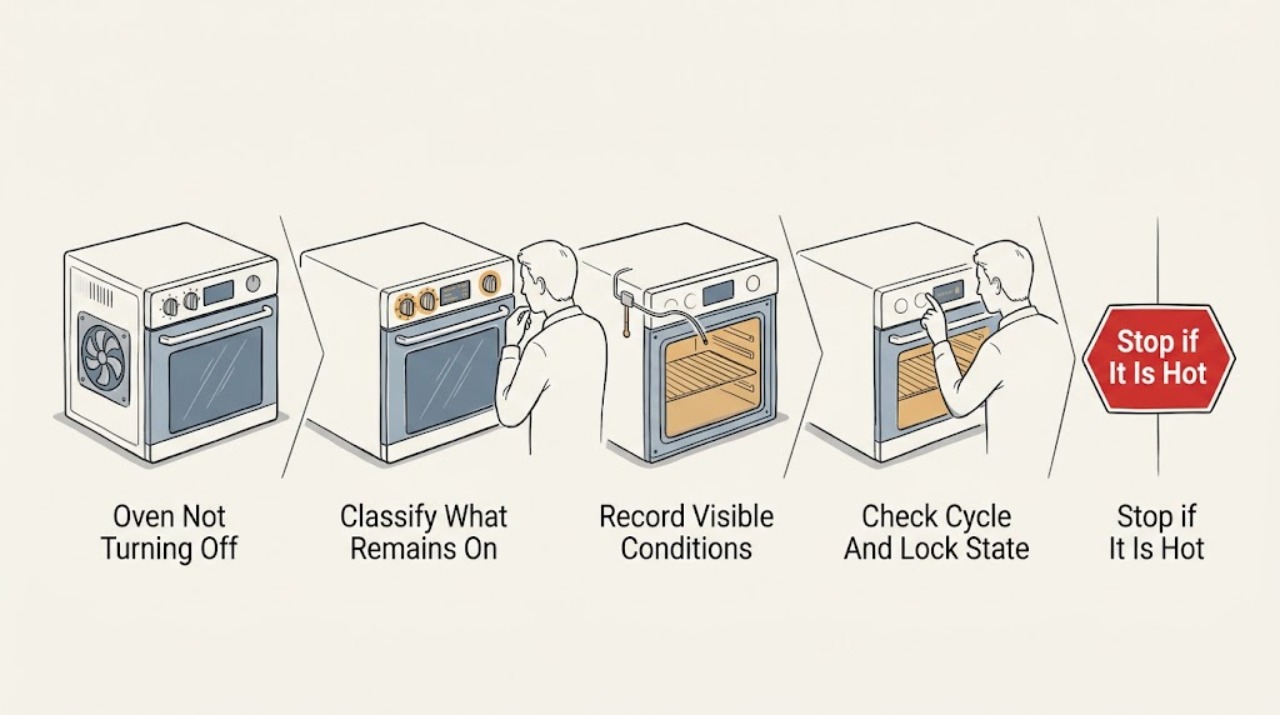
Work through in order
Diagnostic checks
Use only checks that match the exact appliance or system and its official guide.
-
Check 1
From a safe position, identify whether the remaining symptom is only a fan, vent air, display, or light, or whether the oven is still making heat. Do not put a hand into the cavity or touch an element, burner, door glass, or vent.
Expected result: The fan runs and the vent is warm but heat production has stopped; only the display or light remains; or the element is glowing, the gas flame is present, food is continuing to cook, or the cavity is getting hotter.
Next step: If only cooling or an indicator remains, allow the oven to cool and continue with the control-state check. If active heat remains, do not run another cycle; press Cancel or Off once only if the controls are safe to touch, then arrange service.
Stop if: Stop immediately for smoke, a burning or electrical odor, gas odor or hissing, an uncontrolled flame, visible arcing, a hot damaged control, or a CO or smoke alarm.
Why this matters
Why: A cooling fan or warm vent after a cycle can be normal while the oven cools. Continued heat indicates a possible control, relay, thermostat, sensor, heating-element, or gas-control fault and needs a safety-first response.
-
Check 2
If there is no immediate hazard, press the model's normal Cancel or Off control once and record the time and response. Stay outside the oven opening; do not repeatedly press controls, open the bottom panel, or restart the cycle.
Expected result: The heat stops and only the cooling fan, display, or light remains; the control is ignored; the element or flame continues; or a code appears or returns.
Next step: For normal cooling, allow the fan to finish and use the manual for the indicator or code. For continued heat or a returning code, keep the oven off and give the recorded sequence to qualified appliance service.
Stop if: Do not keep trying Cancel, do not bypass a control lock or door interlock, and stop if the oven becomes hotter, smokes, smells of gas or burning, arcs, or trips the circuit.
Why this matters
Why: A normal cancellation followed by cooling points away from a stuck heater. An ignored cancellation, continuing heat, or recurring code points to a control or heating fault that cannot be safely diagnosed by repeated testing.
-
Check 3
After the oven is cool, read the display and identify the selected mode, delay or timed setting, Control Lock, Demo Mode, Sabbath or other special state, and whether Self-Clean is active. Use the exact Whirlpool owner's manual; do not force the door or defeat an interlock.
Expected result: The oven is in Self-Clean or a cooling phase, a delayed or timed cycle is active, a lock or demonstration indicator is shown, the display is in an unexpected mode, or no such state is present.
Next step: Follow the model manual to cancel a delay or exit a permitted mode once. If the lock remains after the oven is cool, the display is unresponsive, or the oven keeps heating, stop and request service rather than forcing the door or control.
Stop if: Do not pry open a locked or hot door, interrupt a cleaning lock mechanically, bypass a safety interlock, or continue if there is smoke, gas, fire, abnormal heat, or electrical damage.
Why this matters
Why: Self-Clean has its own high-speed cooling and door-lock behavior, while delay, lock, and demonstration states vary by model. A normal special state may explain an indicator or fan; an unexplained state or failed control response is a service clue.
-
Check 4
Without blocking vents or opening the cabinet, listen to the fan and observe from outside whether the oven is cooling after the cycle. Do not use a hand, thermometer, or a new cooking cycle to test a suspected overheat condition.
Expected result: The fan gradually stops after the cavity cools; the fan runs for an unusually long time with increasing heat; or heat production continues even though only the fan was expected.
Next step: If the oven is cooling normally, do not interfere with the fan. If it is not cooling, stays excessively hot, or keeps heating, leave it off and arrange qualified appliance service; internal fan work belongs to a professional.
Stop if: Stop for smoke, scorched food or material, burning odor, gas odor, abnormal flame, arcing, a hot control area, or a repeated breaker trip.
Why this matters
Why: Whirlpool describes post-cycle fan operation as temperature-controlled. A fan that is cooling a hot cavity can be normal, but increasing heat or a fan that cannot control the temperature can indicate a sensor, thermostat, cooling, or control problem.
-
Check 5
If heat is uncontrolled but there is no gas odor, fire, smoke, wetness, or electrical damage, move people away and use only the normal accessible electrical disconnect or breaker from a dry, safe position. Do not open a panel, pull a hot plug, test live wiring, or repeatedly reset the breaker.
Expected result: The accessible disconnect turns the appliance off without danger; the breaker is already off; the breaker trips again; or the panel, cord, receptacle, or appliance shows heat, smoke, arcing, or damage.
Next step: Leave the oven isolated and arrange appliance service; use a licensed electrician for a recurring trip, hot receptacle, damaged cord, or household circuit problem. For gas odor or fire symptoms, leave immediately and contact emergency or gas help from outside instead of approaching a valve or appliance.
Stop if: Do not reset a breaker repeatedly, touch wet or hot electrical parts, operate switches near a suspected gas leak, use water on an electrical fire, or manipulate a gas connection.
Why this matters
Why: Removing power can stop an electrically energized heater when it is safe to reach the normal disconnect, but a recurring trip or visible damage indicates an electrical fault. A gas oven may still require gas-supply action by a qualified professional; an electrical disconnect does not make a suspected gas leak safe.
-
Check 6
Once the oven is cool and the heat has stopped, note whether only the display, clock, or interior light remains on. Check the model manual for the expected light, clock, lock, and standby behavior without removing a bulb cover or control panel.
Expected result: The oven is cold and safe but an indicator or light remains on as expected; an indicator cannot be canceled; the display shows a code; or the display is dark while the appliance behaves unexpectedly.
Next step: Follow the exact manual for one permitted light or display control. If the indication persists outside the documented state, keep the oven off and have appliance service diagnose the control and wiring.
Stop if: Stop for smoke, burning odor, gas odor, a hot control, exposed or damaged wiring, arcing, or a breaker trip; do not remove panels or defeat a lock.
Why this matters
Why: An indicator alone is not proof that a heating element or gas burner is on. A stuck light, unresponsive control, or returning code can still point to a control, lock, or wiring problem and should not be repaired by bypassing it.
-
Check 7
With the oven isolated and cool, record the full model, fuel type, cycle and temperature, whether the symptom was fan, display, light, element, or flame, the response to one Cancel press, any code, self-clean or recent installation history, and whether a breaker operated. Do not open the appliance to collect more evidence.
Expected result: A technician can review a clear sequence without a second heat test, gas-line inspection, live measurement, or internal disassembly.
Next step: Keep the oven off until qualified appliance service reviews the information. Use a licensed electrician for a confirmed circuit problem and a qualified gas professional for gas-supply or combustion work.
Stop if: Stop documenting and leave if gas, smoke, fire, an alarm, uncontrolled heat, or arcing appears.
Why this matters
Why: The sequence separates normal cooling from a stuck heating command, a control-state problem, a household power fault, and a model-specific gas or electrical service issue without guessing at a part.
Use your observations
Decision map
Find the observation that best matches what you see, then follow the next safe action.
-
PATH 01Next step
What you see
The element or flame is off, the oven is cooling, and only the fan or warm vent air remains after a cycle.
Do this next
Allow the cooling fan to finish without blocking vents. If it does not settle as the oven cools or heat returns, keep the oven off and request service.
-
PATH 02Next step
What you see
An electric element remains energized or the cavity continues to heat after Cancel or Off.
Do this next
Do not run another cycle. If there is no immediate hazard and the normal disconnect is safely accessible, isolate power once; otherwise move away and get qualified appliance or electrical service.
-
PATH 03Next step
What you see
A gas flame continues unexpectedly, gas is smelled or heard, or ignition or combustion is abnormal.
Do this next
Do not operate switches, use a flame, test the leak, or approach a gas connection. Leave immediately and contact local gas or emergency help from outside; arrange qualified service after the area is cleared.
-
PATH 04Next step
What you see
The oven is cool and heat has stopped, but the display, clock, or light remains on.
Do this next
Check the exact Whirlpool manual for normal indicator and light behavior. Use one documented control only; persistent or unexplained behavior needs appliance service.
-
PATH 05Next step
What you see
Self-Clean, a cooling phase, delay, Control Lock, Demo Mode, Sabbath setting, or another model-specific state is active.
Do this next
Follow the model manual and wait for the documented cooling or lock release. Never pry the door, bypass an interlock, or interrupt a hot cleaning cycle by disassembly.
-
PATH 06Next step
What you see
There is smoke, a burning smell, a hot or damaged control, visible arcing, a recurring breaker trip, an alarm, or heat that cannot be stopped.
Do this next
Stop using the oven and move to safety. Leave and seek emergency help for fire, gas, or alarm conditions; use qualified appliance service or a licensed electrician once the area is safe.
Helpful context
Understand the symptom
Separate fan noise from heat that will not stop
The first question is whether the oven is still producing heat or only cooling itself. Whirlpool's Product Help guidance says the cooling fan can run during and after a cycle, and its duration depends on the cavity temperature. A convection fan can also operate in cycles that are not labeled convection on some models. Warm air at the vent and a fan that winds down after the oven cools can therefore be normal. Do not block the vent or remove a panel to look for the fan. If the oven is still heating food, a heating element remains visibly energized, a gas flame continues, or the cavity temperature is rising after Cancel, treat that as a control or heating fault.
Cancel once, then record the state
Press Cancel or Off once using the normal control for the exact model, provided there is no smoke, gas odor, fire, or electrical danger. Note whether the display changes, whether the light is merely on, whether the fan continues, and whether the element or flame actually stops. Do not keep pressing buttons or restarting the oven to reproduce a symptom. Whirlpool manuals use Cancel to clear some displayed faults, but a code that returns requires service; controls, locks, self-clean, and demonstration behavior vary by model.
Treat real overheating as a safety issue
If food is smoking, the cavity keeps getting hotter after the cycle is canceled, the door or controls become abnormally hot, or the oven has a burning smell, stop using it. Keep the door closed while it is hot; do not reach inside, spray water, or open the back panel. Whirlpool's overheating guidance identifies sensor, thermostat, cooling-fan, vent, and gas-supply problems as possible causes and places internal fan and gas-line work with a professional. A gas odor, visible flame outside the normal burner area, smoke, arcing, or a CO or smoke alarm requires leaving the area and getting help from a safe location.
Safety boundary
Stop conditions
- If gas is smelled or heard leaking, leave immediately without operating switches or electronics near the oven and contact local gas or emergency help from outside.
- Stop for an element or flame that remains on after Cancel, smoke, a burning or electrical odor, an abnormal flame, visible arcing, an alarm, a hot damaged receptacle, or a repeated breaker trip.
- Do not repeatedly start the oven, repeatedly reset a breaker, use a match or lighter, test for gas, spray water into a hot oven, or keep the door open to cool an overheating oven.
- Do not remove panels, test live wiring, replace controls or sensors, adjust gas pressure, loosen a gas fitting, move a hard-piped range, or bypass a door or control interlock.
When checks do not resolve it
Need a professional?
Request qualified appliance service for continuing heat, a flame that does not stop, a returning fault, abnormal fan or temperature behavior, a failed lock or control, or any diagnosis beyond safe external observation. Use an electrician for a confirmed circuit fault and a qualified gas professional for gas-supply or combustion work.
Have this ready
- Provide the Whirlpool model and fuel type, cycle and temperature, the exact symptom that remained on, response to one Cancel press, display code, fan timing, whether the element or flame continued, self-clean or recent-installation history, and any breaker or alarm event.
Common questions
FAQ
Why is my Whirlpool oven still running after I turn it off?
If the oven is no longer producing heat, the cooling fan may continue while the cavity and controls cool. Warm vent air and a fan that later stops can be normal. If an element or gas flame continues, the cavity keeps heating, or the control does not respond, stop using the oven and arrange qualified service.
Is it normal for a Whirlpool oven fan to run after a cycle?
Yes, Whirlpool says a cooling fan can run during and after a cycle until the oven reaches a safe temperature. Do not block the vent. If heat is increasing rather than dissipating, or the fan does not control an abnormally hot oven, keep the oven off and request service.
What if the heating element or gas flame stays on after Cancel?
Treat continuing heat as a fault. Press Cancel or Off once only if there is no immediate hazard, do not restart the oven, and use the safe external disconnect only if it can be reached without approaching danger. Keep the oven off and have a qualified technician diagnose the control and heating system; do not open panels or gas connections.
Why is my Whirlpool oven light or display still on when the oven is off?
An indicator or light alone does not prove that the oven is heating. Once the oven is cool, check the exact model manual for normal clock, standby, lock, and light behavior. If the control cannot be canceled, a code returns, or heat is present, keep the oven off and arrange service.
When should I stop using a Whirlpool oven immediately?
Stop for gas odor or hissing, smoke, fire, a CO or smoke alarm, an abnormal flame, a burning or electrical odor, visible arcing, a hot damaged control or receptacle, a heating element that will not stop, or a repeated breaker trip. Leave for a gas, fire, or alarm emergency and contact the appropriate help from a safe location.
Read the exact guide
Official sources
- Fan is Running During Non Convection CyclesWhirlpool Product Help · Official Whirlpool guidance for ranges and ovens; model instructions control for differences.
- Oven overheating: possible causes and solutionsWhirlpool Home Delivery · Official Whirlpool-owned guidance; diagnosis and repair depend on the exact oven and fuel configuration.
- Oven Not Shutting OffWhirlpool Product Help · Official Whirlpool Product Help guidance; exact model behavior and controls can vary.
- Owner's ManualWhirlpool · Official Whirlpool owner's manual for a representative oven family; the manual for the user's exact model controls.
Community feedback
Share a repair observation
Share a plain-text repair observation. Accepted observations are published automatically; this page may take a moment to update.