
On this page
Start here
Quick answer
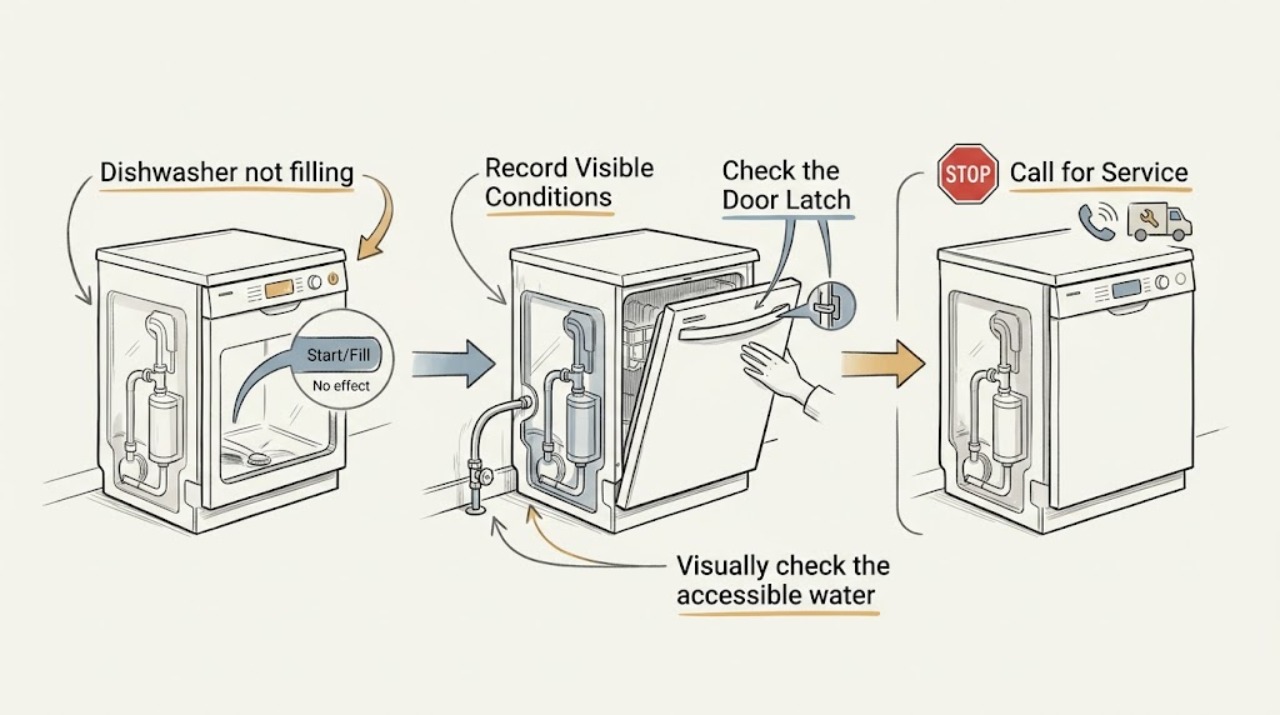
If a dishwasher runs without taking in water, first record the display or indicator state, confirm the door is fully latched without force, and visually check the accessible water-supply valve and hose for an obvious closed position, kink, or leak. A drain-hose routing issue can also make water siphon away, while a float, inlet valve, or door switch may require service. Do not open panels, touch wet connections, test live electrical parts, pull the appliance out, repeat cycles, or force a valve or latch. Stop immediately for a leak or flooding risk.
Work through in order
Diagnostic checks
Use only checks that match the exact appliance or system and its official guide.
-
Record the control and cycle state
Without starting another cycle, note whether the control panel has power, whether a child lock, delay, clean, or water-related indicator is displayed, and whether the current or last cycle was interrupted. Photograph the display or blinking pattern if one is present.
Expected result: Record a blank panel, a specific code, a flashing start/resume light, a delay indicator, or normal-looking controls with no water in the tub. Note whether the issue occurred on the first use, after plumbing work, or after a power interruption.
Next step: Use the model-specific owner information for the displayed code or indicator, and give the exact pattern to a technician if no model guidance is available. Do not keep restarting the appliance to reproduce the symptom.
Stop if: Stop if the panel is hot, smells burned, shows arcing, or the appliance behaves erratically; disconnecting power is professional work unless the manufacturer explicitly provides a safe, accessible procedure for that model.
Why this matters
Why: A door or interrupted-cycle indication can prevent filling even when the water system is intact. GE notes that its H20 display indicates insufficient or absent water during the timed fill phase, while exact codes and indicators vary by model.
-
Observe the door and latch condition
Look at the door gasket, racks, and front edge for an item or rack obstruction. Close the door once using normal hand pressure and observe whether the latch reaches its ordinary closed position. Do not slam, force, lift, or disassemble the latch.
Expected result: Record a normal latch, a door that springs back, a visible obstruction, an uneven gasket, or a start/resume indicator that remains in an interrupted state. Note whether the door sits squarely against the frame.
Next step: Remove only a clearly visible rack or dish obstruction without reaching into moving parts, then follow the model’s normal resume instruction once if applicable. If the latch remains abnormal, stop and request appliance service.
Stop if: Stop if the door, gasket, or latch is damaged, the door needs force, or the dishwasher could open during operation.
Why this matters
Why: Whirlpool lists an open or unlatched door and a flashing start/resume indicator among reasons a dishwasher will not fill. A latch that cannot engage normally points toward alignment, obstruction, or switch service rather than a replacement water part.
-
Visually check the accessible water supply
From a dry position under the sink, look at the dishwasher’s labeled shutoff area and the visible portion of the supply hose. Do not touch a wet connection, turn an unknown valve, remove a fitting, or pull the dishwasher forward.
Expected result: Record whether the valve appears open or closed according to its existing handle position, whether the hose has a visible sharp kink or crush point, and whether there is moisture, pooling, corrosion, or cabinet swelling around the connection.
Next step: If the valve position is clearly labeled and dry, use the owner’s instructions for that model; otherwise have a plumber or appliance technician verify the supply. If there is any water, keep the appliance off and arrange prompt leak service.
Stop if: Stop immediately for water, a wet cabinet base, a damaged hose, an unknown valve, or any need to move the appliance or handle a pressurized connection.
Why this matters
Why: Whirlpool and Frigidaire identify a closed water supply or a pinched/restricted supply line as possible no-fill causes. A wet connection or damaged hose is a leak risk, not a cue to tighten or replace the line while it is connected.
-
Use the last cycle’s sound and tub clues
With the appliance off and door opened normally, observe the tub for an unusual empty condition, standing water, or visible debris around the filter or float area. Recall or record what happened during the last single attempt: a brief drain sound, a hum, a fill sound, silence, or water that appeared and then disappeared. Do not run another cycle to test it.
Expected result: A brief drain sound with no fill, silence after the latch, or a hum without water are different symptoms. Standing water or a visibly obstructed float area can affect the next fill, but do not reach into the pump, force the float, or handle sharp debris.
Next step: Photograph only what is plainly visible, record the model and symptom sequence, and request service if the cause is not resolved by the model’s ordinary user instructions. Keep the tub empty and the appliance off if water behavior is uncertain.
Stop if: Stop if standing water is outside the tub, the float is stuck or damaged, debris is sharp, the pump area is exposed, or any inspection would require disassembly.
Why this matters
Why: GE notes that a drain problem can prevent new water from entering and that a flood float may stop filling; Bosch identifies the inlet valve, float, and door switch as possible causes. These observations narrow the service diagnosis but cannot prove which component has failed.
Use your observations
Decision map
Find the observation that best matches what you see, then follow the next safe action.
-
PATH 01Safety boundary
What you see
The display or indicator points to an interrupted cycle, delay, or door condition, and there is no leak or electrical hazard.
Do this next
Follow the model-specific normal resume or delay-cancel instruction once, without forcing the door or repeating cycles. If the indicator returns, provide a photo and model number to appliance service.
Why this path and its safety boundary
Safety stop: Stop if the door will not latch, the control behaves erratically, or the appliance starts without a secure door.
-
PATH 02Safety boundary
What you see
The accessible supply appears closed, the hose is visibly kinked, or plumbing work recently interrupted the supply, with no water present.
Do this next
Have the dry, labeled supply condition verified against the owner’s instructions. A plumber or appliance technician should handle any hose service, valve movement, or connection work.
Why this path and its safety boundary
Safety stop: Do not touch the connection if it is wet, corroded, damaged, or not clearly identified.
-
PATH 03Safety boundary
What you see
The door latches normally and the supply appears available, but the dishwasher makes a drain or hum sound and no water enters.
Do this next
Stop further testing and request appliance service. The inlet valve, float, door switch, control, or drain routing may need model-specific diagnosis; none can be confirmed safely from sound alone.
Why this path and its safety boundary
Safety stop: Do not open panels, test voltage, bypass a switch, or replace a valve based only on the symptom.
-
PATH 04Safety boundary
What you see
Water appears briefly and then disappears, or standing water and a visible float or drain concern are present.
Do this next
Keep the appliance off and request service to assess drain routing, float operation, and the fill system. Provide the observed water level and whether the drain hose was recently changed.
Why this path and its safety boundary
Safety stop: Stop immediately for water outside the tub, a leak, flooding risk, or any need to reach into the pump or disassemble the appliance.
Helpful context
Understand the symptom
What “not filling” can mean
A dishwasher may be silent, show a fault, hum or drain without taking in water, or take in water and then lose it. Supply interruption, an unlatched door, a drain hose that siphons, a flood float, or a failed inlet component can look similar from the outside. The safest first step is to preserve the exact symptom and visible clues for the owner’s manual or a qualified appliance technician.
Keep water and power boundaries clear
Use only dry, accessible controls and visual checks. Do not touch a wet hose, pooled water, exposed wiring, or a valve connection; do not remove panels or move the dishwasher. If water is present outside the normal tub area, stop the appliance and arrange service or plumbing help.
Only after diagnosis
Potential parts
- dishwasher water inlet valve
Only consider this part after a qualified diagnosis confirms that the water supply, door/latch signal, float, and wiring path are appropriate and the inlet valve is the failed component.
Match the dishwasher model, valve configuration, connector, hose fitting, and manufacturer fit information; do not infer compatibility from appearance. - dishwasher float switch
Only consider this category when the model’s service information identifies the float or float switch as the cause and the visible float is not simply obstructed or damaged by another condition.
Confirm the exact model and switch style before ordering; a float or switch is not a substitute for correcting a leak or drain problem. - dishwasher inlet hose
Only consider a replacement hose when a technician confirms that the existing hose is damaged, restricted, leaking, or incompatible with the installation.
Match length, connection type, leak protection, routing requirements, and appliance model; water must be shut off before any hose service.
When checks do not resolve it
Need a professional?
Request appliance service when a dishwasher still will not fill after safe control, latch, and visible supply checks, or when the symptom involves a float, inlet valve, drain routing, wiring, a leak, or an unusual sound. Use a plumber for a supply-side leak or uncertain house-water issue.
Have this ready
- Provide the model and serial information, displayed code or indicator pattern, door/latch result, visible valve and hose condition, last-cycle sound sequence, tub water level, and photos of any dry, accessible clues.
Common questions
FAQ
Why does my dishwasher sound like it is running but not fill with water?
The sound may be a brief drain phase or a motor hum before the timed fill. A closed supply, unlatched door, drain-routing issue, float condition, inlet valve, or control problem can produce similar symptoms. Record the sound and display once, then use the model-specific service path instead of repeating cycles.
Can I test the dishwasher inlet valve myself?
Do not test it with live electrical measurements or open the appliance based only on a no-fill symptom. First document the safe, visible supply, latch, float, and indicator clues; a qualified technician can isolate water and power and test the valve using the correct model procedure.
What should I do if the dishwasher has water under it?
Stop using it and do not touch wet connections or move the appliance. Keep people away from the area and arrange appliance or plumbing service, providing photos only from a dry, safe position.
Read the exact guide
Official sources
- Will Not Fill With Water - DishwasherWhirlpool Product Help · Supports checking water-supply status, drain-hose siphoning clues, and door or start/resume indicators; model-specific instructions still control.
- Dishwasher Troubleshooting: Dishwasher is not getting waterBosch Home Appliances · Supports treating the inlet valve, float, and door switch as different possible causes that need assessment; it does not authorize disassembly of an unknown model.
- Dishwasher - H20 in DisplayGE Appliances · Supports recording a water-related code and checking the labeled supply status without assuming that every model uses the same code or procedure.
- Dishwasher – Not Filling with WaterGE Appliances · Supports the possibility that a drain issue or flood float can prevent filling; model age and design determine which user checks are allowed.
Community feedback
Share a repair observation
Share a plain-text repair observation. Accepted observations are published automatically; this page may take a moment to update.