
On this page
Start here
Quick answer
A GE dryer that takes too long to dry is most often affected by exhaust airflow, a coated lint screen, an unsuitable load or cycle, or clothing that enters the dryer wetter than usual. GE says drying time depends on heat source, load size, fabric, moisture, selected cycle, and vent condition; its support guidance specifically calls out crushed or obstructed ducting, a blocked hood, plastic or unsuitable flexible venting, poor front clearance, and lint buildup. Clean the accessible lint screen, check the visible duct and outside hood, use the cycle and load size intended for the fabric, and check whether the washer is leaving excess water. If the dryer is unusually hot, smells burnt, smokes, sparks, has a hot plug, or still takes too long after accessible airflow and load checks, stop using it and arrange qualified service. Do not open the cabinet or replace a thermal or sensor part based on drying time alone.
Before you begin
Safety first
- Keep the dryer off for smoke, burning or electrical odor, unusual heat, sparks, a hot plug, damaged wiring, repeated breaker trips, or a blocked vent with overheating. Do not open the cabinet, bypass safety devices, or repeat powered tests in a hazardous condition.
Work through in order
Diagnostic checks
Use only checks that match the exact appliance or system and its official guide.
-
Check 1
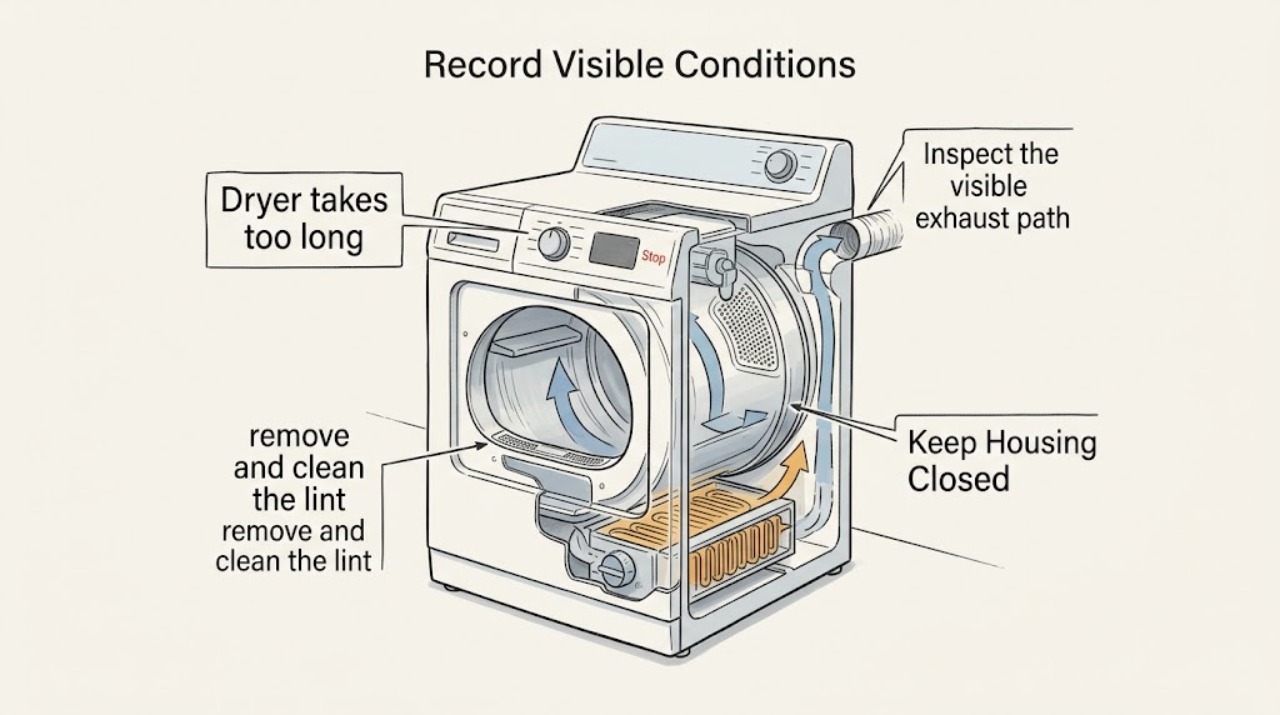
Stop and cool the GE dryer before diagnosing the long-dry complaint. Record the selected cycle, heat setting, load size and fabric mix, whether clothes are still wet at the end, and whether the cabinet, plug, or laundry room feels unusually hot. Look from outside for smoke, a burning odor, sparks, a hot plug or outlet, or a damaged cord.
Expected result: The clothes are dry but the displayed estimate changed, the clothes are wet after a long run, the dryer is hot, airflow is weak, a vent warning appears, or smoke, odor, sparks, or cord damage is present.
Next step: Keep the dryer off for smoke, burning or electrical odor, unusual heat, sparks, a hot connection, or damaged wiring and arrange qualified help. Otherwise continue with the low-risk load, lint, vent, and cycle checks that match the pattern.
Stop if: Do not run another cycle to investigate a dryer that is smoking, unusually hot, sparking, producing a burning odor, or has a hot plug or damaged cord.
Why this matters
Why: A changing estimate can be normal model behavior, while wet clothes, weak airflow, or overheating indicates a performance or safety path that needs attention. Hazard symptoms override all further drying tests.
-
Check 2
With the dryer off and cool, remove and clean the lint screen according to the exact GE model guide. Check whether fabric-softener residue has coated the mesh and whether lint is packed around the accessible screen opening. Reinstall the screen fully before any permitted use.
Expected result: The screen is visibly full, has a smooth residue film, is damaged or loose, the opening contains packed lint, or the screen and accessible area are clear.
Next step: Clean and fully dry the screen as the model guide directs. Arrange qualified cleaning or appliance service for packed internal lint, a damaged screen, or long drying that continues with a clear screen.
Stop if: Do not operate without the lint screen, with a loose or damaged screen, or with lint packed where it cannot be safely reached from the normal screen opening.
Why this matters
Why: A coated or blocked screen can reduce the air path and extend drying. A damaged or missing screen can also create a safety problem; a clear screen does not rule out a restricted house vent or internal lint.
-
Check 3
Inspect the visible exhaust path without opening the dryer cabinet: check for a crushed or kinked duct behind the appliance, unsuitable combustible duct material, excessive bends or length relative to the installation guide, an obstructed outside hood, or a flap that does not open freely. Check that the dryer front and closet or alcove have the model-required air clearance.
Expected result: The duct is crushed, kinked, obstructed, or made from unsuitable material; the hood flap is blocked or barely moves; front clearance is blocked; or the visible path appears open.
Next step: Restore only obvious external clearance and have a persistent or inaccessible vent restriction cleaned by a qualified vent professional. If the accessible path is clear but drying remains long, continue with the load, washer, and service checks rather than dismantling the dryer.
Stop if: Do not disconnect ducts, move a heavy connected dryer, use a combustible exhaust path, or run a heated test when the duct is crushed, blocked, or the dryer is overheating.
Why this matters
Why: GE directly links restricted or unsuitable venting and blocked clearances with longer drying, lint accumulation, and rising heat. An apparently open hood does not prove that the full duct or internal connection is clear.
-
Check 4
Compare one correctly sorted load with the GE cycle intended for its fabric and moisture level. Do not combine wash loads; avoid overloading, and if the load is only one or two items, follow the model guidance for a timed cycle or suitable tumbling load. Note whether heavy cottons, towels, or mixed fabrics are the items that remain damp.
Expected result: Only heavy or mixed loads take longer, the drum is overloaded, a tiny load tumbles poorly, or a normally sized and sorted load is still damp.
Next step: Split heavy items, use the model's appropriate dryness level and cycle, and compare the result without repeated hot testing. Escalate persistent long drying after a normal load and clear accessible vent path.
Stop if: Do not dry items contaminated with gasoline, oil, solvent, or other flammable substances, and stop if the load or dryer develops a burning odor or abnormal heat.
Why this matters
Why: GE says cottons hold more water than synthetics and that load size, fabric, sorting, and cycle selection change drying time. A normal load that remains damp after these variables are corrected makes an appliance or vent fault more likely.
-
Check 5
Check how wet the clothes are when they leave the washer. Without opening or servicing the washer, note whether water can be squeezed from the load, whether the washer used a low spin setting, and whether the same load dries normally after a stronger permitted spin. Follow the garment care label and the GE dryer cycle guidance.
Expected result: Clothes enter the dryer unusually wet, the washer spin was low or incomplete, only one load from the washer is affected, or every load arrives normally damp.
Next step: Use the washer's appropriate spin setting or arrange washer service when it leaves excessive water. If incoming moisture is normal and the dryer remains slow, document the load and continue toward vent or appliance service.
Stop if: Do not keep running the dryer to compensate for a washer that is leaving water in clothes, and do not operate the dryer if heat, smoke, odor, or electrical damage appears.
Why this matters
Why: GE identifies incoming moisture and washer spin performance as major contributors to dryer time. If normal washer output still produces long drying, the dryer load and exhaust paths remain more likely than washer settings.
-
Check 6
Observe the GE display and cycle behavior for a SENSE message, a changing estimated time, a VENT BLOCKED alert, or an option such as Eco Dry or eDry. Compare the message with the exact model manual; do not assume an estimate or feature exists on every GE dryer.
Expected result: The displayed time increases after sensing, SENSE remains while warm air blows, a VENT BLOCKED alert appears, Eco Dry is enabled, or no model-specific message appears.
Next step: Follow only the option and message instructions for the exact model, and address any vent warning before evaluating parts. If the alert persists or a normal cycle stays slow with clear airflow, arrange qualified service.
Stop if: Do not disable or bypass a vent or safety alert, and do not keep using the dryer when an alert accompanies unusual heat, smoke, odor, or damaged wiring.
Why this matters
Why: GE says electronic models can revise estimated time based on vent conditions and that Vent Sensing alerts on applicable front-load models. Eco Dry can reduce energy use and leave loads slightly damp on supported sensor cycles; these facts are model-specific.
-
Check 7
After the lint, external vent, load, washer-moisture, and cycle checks, compare the result across two ordinary loads without opening the cabinet. Record whether drying is slow from the beginning, becomes slower as the dryer warms, produces no heat, or leaves the drum and clothes at an unusual temperature.
Expected result: The dryer is consistently slow despite normal loads and clear accessible airflow, becomes slow after warming, produces little or no heat, or has unusual heat or odor.
Next step: Leave the dryer off for unusual heat, odor, smoke, sparks, or a hot connection. Otherwise arrange qualified GE appliance service and provide the recorded cycle, load, airflow, washer-spin, display, and temperature pattern.
Stop if: Do not remove panels, test live terminals, bypass thermal or door controls, or buy a sensor, fuse, or thermostat solely because drying is slow.
Why this matters
Why: Persistent performance after user-level checks can involve the moisture-sensing circuit, cycling thermostat, thermal protection, heating system, drive system, or an inaccessible vent restriction; drying time alone cannot identify one part.
Use your observations
Decision map
Find the observation that best matches what you see, then follow the next safe action.
-
PATH 01Next step
What you see
The load is dry at the end, but an electronic display revises the estimate or shows SENSE while warm air blows and no hazard symptom is present.
Do this next
Use the exact model guide and compare the completed load rather than the first estimate. Escalate if clothes remain wet, a vent warning appears, or the run time continues increasing with ordinary loads.
Why this path and its safety boundary
Why it matters: Estimated-time recalculation or normal sensor-cycle behavior is more likely than a failed dryer, especially when the load finishes dry.
-
PATH 02Next step
What you see
The screen is coated or full, the visible duct is crushed or kinked, the hood is blocked, front clearance is poor, or a vent-sensing alert appears.
Do this next
Clean the accessible screen and restore only obvious external clearance. Have persistent, long, or inaccessible duct restrictions professionally addressed before further heated use.
Why this path and its safety boundary
Why it matters: Restricted exhaust airflow is the leading explanation for long drying and can also raise temperature or cause internal lint accumulation.
-
PATH 03Next step
What you see
Only heavy cottons, towels, mixed loads, or a tiny load dry slowly, while a correctly sorted normal load dries acceptably.
Do this next
Separate heavy from light fabrics, avoid combining wash loads, use the cycle and dryness level intended for the load, and follow the model guidance for very small loads.
Why this path and its safety boundary
Why it matters: Load moisture, fabric, sorting, capacity, or tumbling distribution is more likely than a dryer component failure.
-
PATH 04Next step
What you see
Clothes are unusually wet when removed from the washer, a lower spin setting was used, or the washer leaves water that can be squeezed from the load.
Do this next
Use the appropriate washer spin setting or arrange washer service, then reassess a normally spun load. Escalate the dryer only if normal washer output still dries slowly.
Why this path and its safety boundary
Why it matters: Incoming moisture or a washer-spin problem is more likely than a dryer fault; the dryer cannot remove water efficiently when the load starts excessively wet.
-
PATH 05Next step
What you see
A normal load remains damp with a clear accessible screen and vent, the dryer becomes slow after warming, or the problem occurs in multiple cycles.
Do this next
Leave the dryer off if it overheats or smells abnormal; otherwise arrange qualified appliance service with the documented cycle and temperature pattern. Do not select a part by symptom alone.
Why this path and its safety boundary
Why it matters: An inaccessible airflow restriction, moisture-sensing issue, thermal or heating fault, drive problem, or control issue is more likely than load selection alone.
-
PATH 06Next step
What you see
Smoke, burning or electrical odor, unusual heat, sparks, a hot plug or outlet, damaged wiring, or repeated breaker trips accompanies the long-dry complaint.
Do this next
Stop immediately, keep clear, isolate power only from a safe dry location, and obtain qualified or emergency help. Do not restart to test.
Why this path and its safety boundary
Why it matters: This is a fire, shock, or injury hazard, not a routine drying-performance adjustment.
Helpful context
Understand the symptom
First separate a long cycle from a misleading estimate
Automatic GE cycles do not have one universal run time. The control uses load moisture and temperature behavior, while the displayed estimate can change as the dryer learns the vent and load conditions. A cycle that finishes with dry clothing can be normal even if its estimate changes. The useful failure pattern is clothing that remains wet after an unusually long run, a vent-blocked message, weak outside airflow, or a dryer that becomes hot and repeatedly needs extra cycles.
Airflow is the highest-value accessible check
A dryer must move moist air out as it dries. GE identifies a kinked, crushed, restricted, or unsuitable exhaust path as a cause of longer drying and lint buildup, and says a blocked front can also contribute to overheating. With the machine off and cool, inspect the lint screen, visible duct, outside hood, and front clearance. Do not push a vacuum or tool into the cabinet or treat a clear outside flap as proof that the whole vent is clear.
Load moisture and cycle choice can mimic a dryer fault
Heavy cottons hold more water than synthetics, mixed loads dry unevenly, and a washer with a low or ineffective spin can send excess water into the dryer. GE also warns against combining multiple wash loads and notes that very small loads may tumble poorly or migrate away from sensors on some models. Compare a correctly sorted, normally spun load on the appropriate cycle before buying a part.
Safety boundary
Stop conditions
- Stop immediately for smoke, burning or electrical odor, unusual heat, sparks, a hot plug or outlet, damaged wiring, or repeated breaker trips. Keep clear, isolate power only from a safe dry location, and arrange qualified or emergency help.
- Leave the dryer off when a vent warning is accompanied by overheating, when the dryer becomes progressively hotter, or when long drying persists after a clear accessible airflow path.
- Do not open the cabinet, test live terminals, remove heating or drive parts, bypass a door or thermal control, or repeatedly reset the dryer as a homeowner performance test.
- Do not operate without the lint screen, with a loose or damaged screen, with blocked front clearance, with crushed or combustible exhaust ducting, or with clothing contaminated by flammable substances.
Only after diagnosis
Potential parts
- dryer lint screen
Consider this only if the installed screen is damaged, loose, or no longer fits correctly after the long-dry cause is confirmed; a slow cycle alone does not prove the screen needs replacement.
Lint screens differ by GE dryer model and opening design. Confirm the exact model and correct screen fit before selecting a replacement. - dryer vent hose
Consider this only when inspection confirms a crushed, kinked, unsuitable, or damaged external vent section and the model installation guidance supports replacement.
Vent material, routing, length, and clearances are installation-specific. Confirm the model instructions and local requirements; do not substitute a combustible or restricted duct. - dryer moisture sensor
Consider this only after qualified diagnosis shows a sensor or sensor circuit fault on a model that uses moisture sensing, with load, cycle, lint, and airflow causes ruled out.
Sensor design and fit vary by GE dryer model. Confirm exact model compatibility and measured fault before ordering.
When checks do not resolve it
Need a professional?
Request service for persistent long drying, a normal load that stays wet, a recurring vent alert after accessible checks, cooling or heat-related performance changes, no heat or no tumble, or any odor, smoke, electrical, or overheating symptom.
Safety scope: Keep the dryer off for smoke, burning or electrical odor, unusual heat, sparks, a hot plug, damaged wiring, repeated breaker trips, or a blocked vent with overheating. Do not open the cabinet, bypass safety devices, or repeat powered tests in a hazardous condition.
Common questions
FAQ
Why is my GE dryer taking so long to dry clothes?
Start with the lint screen and visible exhaust path, then check load size, fabric mix, cycle selection, and how wet the clothes are coming from the washer. GE says vent condition, lint, incoming moisture, and load factors all affect drying time. If a normal load remains damp after those checks, arrange qualified service.
Can a blocked vent make a GE dryer take longer to dry?
Yes. GE identifies crushed, kinked, obstructed, or unsuitable exhaust venting as a cause of long drying and lint buildup. Check only the visible path and outside hood, keep the dryer off if it overheats, and have persistent or inaccessible restrictions professionally addressed.
Why does my GE dryer estimate get longer while it runs?
On applicable electronic models, GE says SENSE appears while the dryer blows warm air and that the remaining estimate can be recalculated based on vent conditions. Judge the completed load and airflow pattern, not the first estimate alone; wet clothes or a vent alert indicate a problem path.
Can the washer make my GE dryer take too long?
Yes. GE notes that washer spin performance affects how much moisture enters the dryer. If clothes are unusually wet or water can be squeezed from them, use the appropriate washer spin setting or arrange washer service before blaming the dryer.
Does load size affect GE dryer drying time?
Yes. Heavy cottons and towels hold more moisture, mixed loads dry unevenly, and an overloaded drum restricts free tumbling. GE also notes that very small loads can tumble poorly or move away from sensors on applicable models. Sort the load and use the model's recommended cycle.
Should I replace the GE dryer moisture sensor or thermal fuse?
Not from long drying alone. Airflow, lint, load moisture, cycle settings, thermal protection, heating, moisture sensing, and drive components can overlap. Correct accessible load and vent causes first, then have a qualified person diagnose the model-specific circuit before selecting a part.
When should I stop using a GE dryer that takes too long to dry?
Stop for smoke, burning or electrical odor, unusual heat, sparks, a hot plug or outlet, damaged wiring, repeated breaker trips, a blocked vent with overheating, or a dryer that becomes progressively hotter. Isolate power only from a safe dry location and arrange qualified or emergency help; do not open panels or bypass safety devices.
Read the exact guide
Official sources
- Problem | Possible Causes | What to DoGE Appliances · Official GE owner manual for specified older dryer models; consult the matching manual for another model.
- Dryer - Explanation of Dryer TemperaturesGE Appliances · GE Appliances dryer temperature guidance; exact thermostat behavior and service procedure vary by model.
- Front Load Dryers - Vent SensingGE Appliances · GE front-load models equipped with Vent Sensing; alert wording and behavior vary by model.
- Dryer - Taking Too Long To Dry Clothes or Not Drying at AllGE Appliances · GE Appliances dryer support article; exact settings and vent requirements vary by model.
- Dryer - SENSE Scrolling in DisplayGE Appliances · GE dryer models with the described electronic estimated-cycle-time display.
- Dryer - Cycle Dry TimesGE Appliances · GE Appliances dryer cycle-time guidance; cycle names and available settings vary by model.
Community feedback
Share a repair observation
Share a plain-text repair observation. Accepted observations are published automatically; this page may take a moment to update.