
On this page
Start here
Quick answer
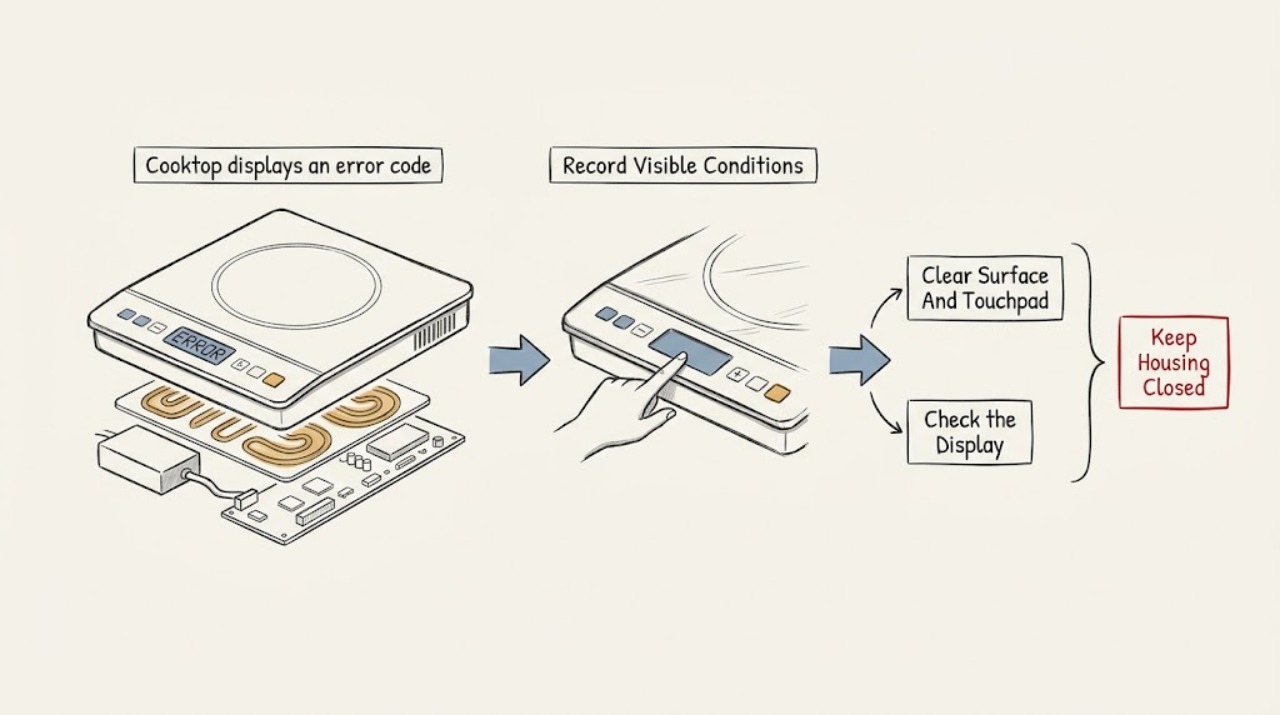
Record the exact code, when it appears, the LG cooktop type, and whether one zone or the whole control responds. Compare that information with LG's error-code list and the exact model manual because the meaning and reset procedure are model-specific. Once the surface is cool, remove obvious metal objects and dry visible water or residue from the touch-control area using the manual's approved method, then check whether a control lock is active. If the manual permits a power reset, perform it once from a safe, dry position; a code that returns, is not listed, or is paired with a blank or distorted display, low-voltage indication, breaker trouble, heat, smoke, sparking, or burning odor needs qualified appliance or electrical service. Do not open the cooktop, take live measurements, rewire it, or keep resetting a breaker.
Before you begin
Safety first
- This article covers code recording, visible surface and lock observations, and model-approved external reset guidance only. Internal electronics, heating circuits, sensors, terminals, supply wiring, live measurements, and breaker-panel work belong to qualified appliance or electrical professionals.
Work through in order
Diagnostic checks
Use only checks that match the exact appliance or system and its official guide.
-
Check 1
From a safe, dry position, photograph or write down the complete code exactly as shown and note the LG cooktop type, the affected zone or zones, and whether it appears immediately after power-on or during cooking. Do not keep touching the controls to make the code recur.
Expected result: The code is stable and readable, changes between attempts, appears only on one zone, appears across the display, or is accompanied by a blank or distorted display.
Next step: Use the exact LG model manual and the LG error-code list for the matching range type. If there is smoke, sparking, burning odor, a hot or discolored panel, shock, or cracked glass, stop using the cooktop and arrange urgent qualified help instead of continuing checks.
Stop if: Do not open the cooktop, remove a cover, touch wiring, or make a live electrical measurement to identify the code.
Why this matters
Why: A stable code and exact appliance identity allow the model-specific LG list or manual to be used. A changing, unreadable, or whole-display symptom is not safely identified by a generic code table.
-
Check 2
After the cooktop and touch area are cool and no hazard is present, remove pans or metal objects from the touch controls and wipe visible water, food residue, or cleaner film using only the exact model's approved soft cleaning method. Keep liquid out of seams and controls.
Expected result: The code clears after the area is dry and unobstructed, returns when the surface is clear, or the panel is visibly damaged, wet inside, or discolored.
Next step: If the code remains after the surface is safely clear, continue only with the model's control-lock and power guidance. If moisture has entered the controls or there is damage, leave the appliance off and call qualified service.
Stop if: Do not scrape the glass, use abrasive tools, pour cleaner into the controls, remove the panel, or touch a wet electrical area.
Why this matters
Why: Surface moisture or an object can interfere with touch input for some LG error-code conditions. A code that returns on a dry, clear panel makes an internal control, sensor, display, or power issue more likely; visible damage is a stop condition.
-
Check 3
Look for a control-lock or child-lock indicator and use only the unlock gesture stated in the exact LG model manual; do not guess at a long-press combination. Observe whether normal controls respond after the documented unlock step.
Expected result: A lock indicator is present and controls respond after unlocking, no lock indicator is present but the panel remains unresponsive, or the code returns as soon as normal input is attempted.
Next step: If the lock clears, use the cooktop normally only if no code or hazard returns. If the panel remains unresponsive or the error returns, stop experimenting and provide the code and model number to LG or a qualified appliance technician.
Stop if: Do not force the controls, remove the control panel, or bypass a lock or interlock.
Why this matters
Why: A lock indicator with restored input points to a control setting rather than proof of a failed part. No lock or a recurring code after unlocking keeps a display, touch-control, sensor, or power fault in scope.
-
Check 4
From a safe position, note whether the display, zone indicators, and other household equipment have power, and look only at the normal external breaker or fuse indication if it is plainly accessible. Do not remove a panel, terminal cover, or hardwired enclosure.
Expected result: The display is blank or intermittent, a breaker has tripped, the cooktop shows a low-voltage or power-interruption code, only one zone loses operation, or the external power indication looks normal.
Next step: If a breaker trips again or the cooktop shows a low-voltage indication, leave it off and call a licensed electrician. Otherwise use the exact LG manual for the next safe step, without taking live measurements or opening the appliance.
Stop if: Do not repeatedly reset a breaker, test live voltage, touch terminals, or alter wiring.
Why this matters
Why: A power-interruption or low-voltage pattern can involve the supply and needs electrical assessment; a single-zone code may instead focus service on that zone's circuit. A normal external indication does not prove that internal power or wiring is safe or correct.
-
Check 5
With the cooktop off, the surface dry, and no heat, odor, smoke, or electrical damage, follow the exact LG model's documented power-reset procedure once. LG support describes a brief breaker power cycle for some control-panel and cooktop symptoms; do not substitute an unverified procedure.
Expected result: The code clears and normal controls return, the code returns immediately, the display remains blank, or the breaker trips during or after the reset.
Next step: If the code returns or power does not remain stable, stop resetting and arrange qualified appliance service; use a licensed electrician when the evidence points to the supply, breaker, or wiring.
Stop if: Do not repeat the reset, bypass a protective device, or open the cooktop to look for the fault.
Why this matters
Why: A one-time clear can indicate a temporary control state, but an immediate return, blank display, or trip indicates a persistent control, sensor, heating, or supply problem that a reset has not repaired.
-
Check 6
If the code persists, record the code, affected zone, whether heating starts, the display behavior, and any recent spill, cleaning, installation, outage, or breaker event. Give those observations and the full model number to LG or a qualified technician instead of selecting a replacement part from the code alone.
Expected result: The code points in the model manual to a display, touch-control, sensor, heating, communication, or voltage category, or it is not listed or cannot be matched to the exact model.
Next step: Keep the cooktop off when the code recurs or any hazard is present and arrange model-specific qualified service. Ask the technician to confirm the failed component and safe power boundary before ordering anything.
Stop if: Do not continue operating through a recurring error, use a guessed part, or access internal electronics, sensors, or heating connections.
Why this matters
Why: The same visible symptom can have different repair boundaries across LG models and cooktop types. A persistent or unlisted code is evidence for diagnosis, not proof that one named part has failed.
Use your observations
Decision map
Find the observation that best matches what you see, then follow the next safe action.
-
PATH 01Safety boundary
What you see
The code appeared after water, cleaner, food residue, or an object touched the touch controls and clears after the cool surface is dry and unobstructed.
Do this next
Use the exact model guidance and monitor one normal use. If the code returns on a dry, clear panel, arrange service rather than repeatedly cleaning or resetting.
Why this path and its safety boundary
Why it matters: Surface interference is more likely than a confirmed internal part failure for that episode.
Safety stop: Stop for liquid inside controls, visible damage, heat, smoke, sparking, or a burning odor.
-
PATH 02Safety boundary
What you see
A lock indicator is visible and the panel responds after the exact model's documented unlock gesture.
Do this next
Leave the setting unchanged and use the cooktop only if the code does not return. If the lock will not clear or a code persists, call qualified appliance service.
Why this path and its safety boundary
Why it matters: The controls were likely locked; this does not establish an error-code or hardware failure.
Safety stop: Do not force buttons or bypass a lock or interlock.
-
PATH 03Safety boundary
What you see
The display is blank or intermittent, a breaker trips again, or the model manual identifies a low-voltage or power-interruption code.
Do this next
Leave the cooktop off and contact a licensed electrician for the supply or breaker boundary, with appliance service if the external supply is confirmed sound.
Why this path and its safety boundary
Why it matters: The electrical supply, protective device, wiring, or internal power section may be involved; the code does not justify a live test by the homeowner.
Safety stop: Do not repeatedly reset the breaker, open a panel, touch terminals, or measure live voltage.
-
PATH 04Safety boundary
What you see
Only one zone shows the error or stops heating, while the rest of the controls work, or the whole display and multiple zones are affected.
Do this next
Record which zones respond and provide that pattern to a qualified LG appliance technician, who can use the exact model service information.
Why this path and its safety boundary
Why it matters: A one-zone pattern focuses diagnosis on that zone's sensor, heating circuit, or control path; a shared display or whole-cooktop pattern keeps common control and power causes in scope. Neither pattern proves a specific part.
Safety stop: Do not swap internal connections, run the cooktop with a recurring error, or order an element or board from the symptom alone.
-
PATH 05Safety boundary
What you see
The exact code returns after the model-approved single reset, is not listed for the matching cooktop type, or the display behavior cannot be matched to the model manual.
Do this next
Stop troubleshooting and arrange qualified appliance service with the code, model number, timing, affected zone, and safe-distance photos. Use an electrician when the evidence includes low voltage, breaker, or wiring concerns.
Why this path and its safety boundary
Why it matters: A model-specific internal fault or unresolved identity is more likely than a temporary surface condition, but the failed component remains unconfirmed.
Safety stop: Do not keep resetting, guess at a replacement part, or access internal electronics.
Helpful context
Understand the symptom
Start with the exact code and appliance identity
An error display is a diagnostic clue, not a universal part diagnosis. Photograph the code before clearing it and note whether the cooktop is induction, radiant electric, or another LG configuration, whether one zone or all controls are affected, and whether the code appears at startup or during cooking. Use the exact model manual and LG's range-type selector; do not apply a code meaning from a different model.
Rule out only visible surface and lock conditions
A wet touch area, an object resting on a touch pad, or an active control lock can make a control panel appear faulty. After the glass and controls are cool, use the model-approved soft cleaning method and remove only obvious objects. LG warns that abrasive cleaners or tools can damage the panel; do not let liquid run into the controls and do not remove a panel to inspect wiring.
Treat a reset as a single diagnostic step
LG documents a short breaker power cycle for some persistent control-panel and cooktop symptoms, but the exact model instructions govern. A reset that clears a temporary display state is different from a code that returns immediately. Repeated resets, a recurring breaker trip, low-voltage indication, or an abnormal display moves the problem into qualified appliance or electrical service.
Use the one-zone versus whole-cooktop pattern
If only one element or zone is affected, record that pattern for the technician; if every control or the display is affected, record that instead. LG's cooktop guidance separates one-element behavior from broader power and control symptoms, but neither pattern alone proves a failed element, sensor, or control board.
Safety boundary
Stop conditions
- Stop immediately for smoke, sparking, flame, burning odor, a hot or discolored control area, electric shock, water inside the controls, damaged wiring, or cracked cooktop glass; keep clear and arrange urgent qualified help.
- Do not open the cooktop, remove a terminal or control cover, touch wiring, take live measurements, or alter hardwired connections.
- Do not repeatedly reset a breaker or continue operating through a recurring error, blank display, unstable power, or a breaker that trips again.
- Do not scrape the glass, use abrasive tools, pour liquid into the touch controls, force buttons, or bypass a control lock or safety device.
- Stop when the code is unlisted, unreadable, or cannot be matched to the exact model and cooktop type; leave diagnosis to LG or a qualified appliance technician.
Only after diagnosis
Potential parts
- touch-control or display panel
Consider this category only if the exact model documentation and qualified diagnosis confirm that the display or touch-control assembly is the failed point.
Confirm the complete LG model and revision with the technician before ordering; do not infer fit from a similar-looking panel. - temperature sensor or zone heating assembly
Consider this category only when the exact code and diagnosis isolate one zone's sensor or heating circuit rather than a shared display or power fault.
Confirm the exact cooktop model, zone configuration, and approved part information before ordering. - electronic control board
Consider this category only after a recurring shared display or control symptom is confirmed by model-specific diagnosis.
Control boards are model-specific; have the technician confirm the exact model and revision before any purchase or installation. - cooktop power-supply or terminal component
Consider this category only if a licensed electrician or qualified appliance technician confirms a supply, terminal, or internal power fault.
Do not order or install electrical components from an error code alone; confirm ratings, model fit, enclosure, and local requirements with the professional.
When checks do not resolve it
Need a professional?
Call a qualified LG appliance technician for any persistent, recurring, unlisted, or model-mismatched code; a blank or distorted display; controls that remain unresponsive; or one or more zones that stop heating. Call a licensed electrician when a breaker trips, the model indicates a power or low-voltage issue, or supply and wiring assessment is needed. For smoke, sparking, burning odor, hot or wet electrical areas, shock, or cracked glass, stop using the cooktop and obtain urgent help from a safe location.
Safety scope: This article covers code recording, visible surface and lock observations, and model-approved external reset guidance only. Internal electronics, heating circuits, sensors, terminals, supply wiring, live measurements, and breaker-panel work belong to qualified appliance or electrical professionals.
Common questions
FAQ
What should I check first when an LG cooktop displays an error code?
Record the exact code, cooktop type, affected zone, and timing before clearing it. Then compare the code with the matching LG range type and exact model manual; do not assume that a code has the same meaning on every cooktop.
Can water or a metal object cause an LG cooktop error code?
LG identifies water or metal contacting the touch pads as a possible cause for one error-code class. After the surface is cool, remove the object and dry the controls using the model-approved method. If the code returns on a dry, clear panel, arrange service.
What if the LG cooktop error code returns after a reset?
Stop repeating the reset. Record the code and affected zone and arrange qualified LG appliance service. Use a licensed electrician when the model indicates low voltage, a breaker trips, or the supply and wiring need assessment.
Does an LG cooktop error code prove that the heating element failed?
No. The displayed code may relate to the display, touch controls, a sensor, a heating circuit, communication, or power, and the exact meaning depends on the model and cooktop type. A one-zone versus whole-cooktop pattern helps the technician but does not prove a part by itself.
When should I call an electrician instead of an appliance technician?
Call a licensed electrician when a breaker trips again, the exact model identifies a power or low-voltage issue, or supply and wiring assessment is needed. Call a qualified appliance technician for a persistent or unlisted code, display or control fault, or a zone that stops heating. Stop immediately for smoke, sparking, burning odor, shock, hot or wet electrical areas, or cracked glass.
Read the exact guide
Official sources
- LG Range – Why is My Electric Cooktop Not Heating?LG USA Support · LG electric cooktop guidance for one or all elements, power connection, breaker reset, and service; do not generalize heating behavior to a different model or gas cooktop.
- LG Range - Error Codes ListLG USA Support · LG's support list for selecting the range type and interpreting displayed codes; exact code meanings and steps vary by model.
- LG Range – Troubleshooting the Control PanelLG USA Support · LG control-panel guidance for lock states, unresponsive controls, display problems, breaker reset, and escalation; use exact model instructions.
Community feedback
Share a repair observation
Share a plain-text repair observation. Accepted observations are published automatically; this page may take a moment to update.