
On this page
Start here
Quick answer
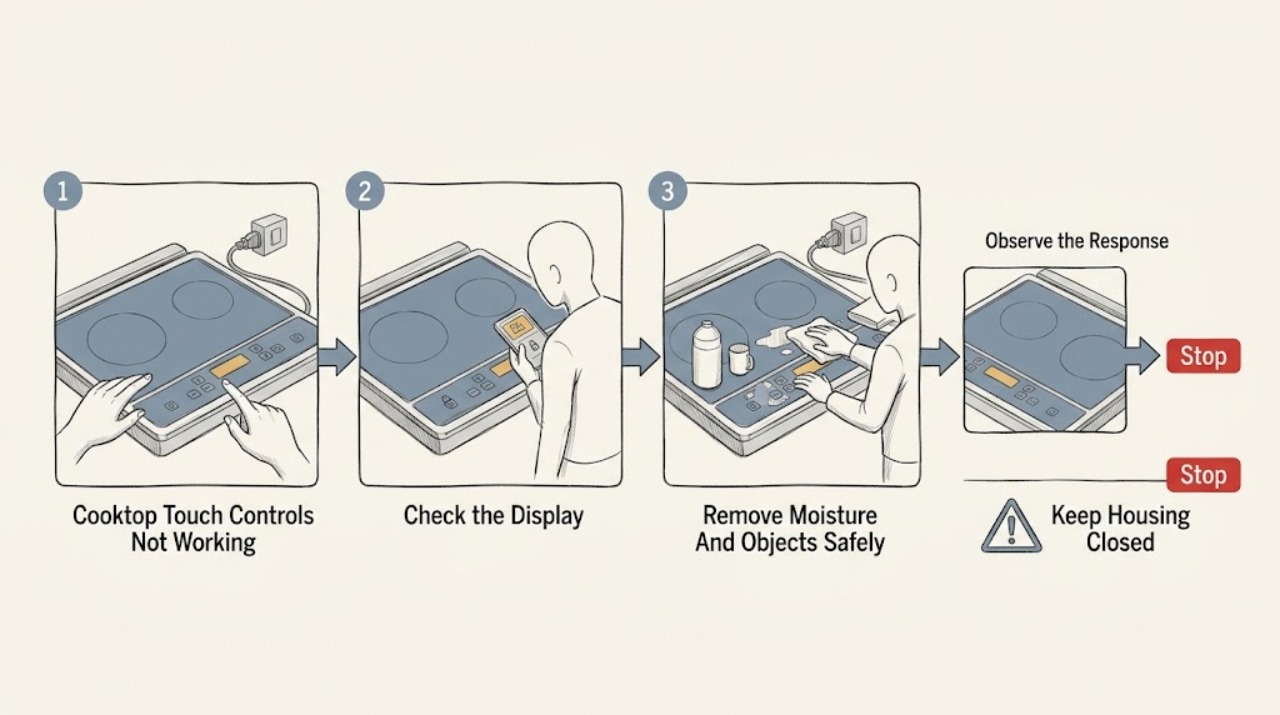
First determine whether the LG cooktop has power and is locked, or whether the touch panel is not recognizing input at all. If only the Power or Lock control responds, use the exact model's manual to unlock the panel; LG's general guidance says the Lock or Child Lock button is commonly held for 3 seconds. If the panel is dirty or wet, turn the cooktop off, let it cool, and remove objects and moisture without spraying into the controls. Then follow the normal sequence of turning the cooktop on, selecting a cooking zone, and setting its power. If the display shows an error, or the controls remain unresponsive after the model-appropriate reset, stop testing and arrange qualified service. Do not remove the glass, open the control panel, touch wiring, or bypass the lock or safety controls.
Before you begin
Safety first
- This article supports only ordinary-access observation, model-manual checks, safe surface drying when cool, and a clearly identified external power reset when the exact manual and conditions permit it. Do not remove panels, touch wiring, measure live power, bypass controls, or continue operating a cooktop with physical or liquid damage.
Work through in order
Diagnostic checks
Use only checks that match the exact appliance or system and its official guide.
-
Check 1
From a safe position, note whether the LG cooktop display, Power indicator, hot-surface indicator, or any other indicator is visible, and try only the normal Power control once without touching the glass repeatedly.
Expected result: Record whether the display is completely blank, the display is on but zone controls do nothing, only Power or Lock responds, or an error or lock symbol appears.
Next step: If there is smoke, arcing, burning smell, unexpected heat, liquid at the controls, or a damaged glass panel, stop and arrange urgent or qualified help. Otherwise continue with the matching low-risk branch below.
Stop if: Do not keep pressing controls, move the appliance, or open a panel to investigate a blank display.
Why this matters
Why: A blank panel suggests a power or control-panel issue; a lit panel with only selected controls responding makes a lock, touch-area, or model-specific operating sequence more likely. An error or lock indication changes the next check.
-
Check 2
Turn the cooktop off and wait until the glass and surrounding controls are cool. From the surface, remove cookware or objects and gently dry visible moisture with a clean, soft cloth; do not spray cleaner directly onto the controls.
Expected result: After the area is dry and clear, note whether the display or touch response returns, remains intermittent, or stays completely unresponsive.
Next step: If response returns, use the exact model instructions and monitor for recurring moisture or object interference. If it does not, continue to the lock, sequence, and power checks without using abrasive tools.
Stop if: Do not clean a hot surface, scrape the controls, pour liquid over the panel, or continue if the glass is cracked or liquid may have entered the appliance.
Why this matters
Why: LG says liquids or objects in the control area can be read as touches or prevent the touch buttons from working properly. If a clean, dry panel remains unresponsive, the cause is less likely to be a surface obstruction.
-
Check 3
If the display shows a lock symbol or only the Power or Lock control responds, locate the Lock or Child Lock instruction in the exact LG owner's manual and use only that model's unlock command; LG's general range guidance commonly uses a 3-second hold.
Expected result: Look for the lock indicator or display message to turn off and note whether a normal zone button then responds. If no lock indication exists or unlocking changes nothing, record that result.
Next step: Once unlocked, follow the normal model-specific operating sequence. If the lock will not clear or the controls remain unresponsive, do not bypass the feature; continue to the service boundary.
Stop if: Do not remove a control lock by opening the appliance, shorting contacts, or using an unlock sequence copied from an unrelated model.
Why this matters
Why: A lock indicator that clears identifies a setting rather than a failed touch panel. No lock indication, or a lock command that cannot be recognized on a dry panel, leaves power, control-sequence, or hardware causes open.
-
Check 4
With the panel dry, unlocked, and cool, follow the exact manual's sequence: turn the cooktop on, select the intended cooking-zone control, then select the power level. Touch the center of the marked pad with the flat part of a bare fingertip rather than pressing the edge.
Expected result: Record whether Power is accepted, whether a zone display or zero appears, whether a setting is accepted, or whether no pad produces a response.
Next step: If the sequence still fails, stop normal-use testing and check for an error indication or use only the model-appropriate power reset described next.
Stop if: Do not use a sharp object, wet glove, tool, or repeated force on the touch panel, and do not test a zone if the glass is damaged.
Why this matters
Why: LG cooktop instructions require the cooktop and zone to be selected in order, and some models turn off if a selection is not completed promptly. A response to the correct sequence points to operation or selection confusion; no response after the correct sequence points toward a control or power fault.
-
Check 5
Read the display before clearing anything. If it shows an error or a message associated with a held pad, object, or liquid, follow the exact manual; if the model's LG guidance permits a user power reset, turn the cooktop off and use the accessible disconnect or breaker only when it is dry, clearly identified, and safe to reach.
Expected result: Record the complete displayed message or code, whether removing an object clears it, and whether the display returns normally after the model-appropriate reset.
Next step: Give the exact display message, model, serial, and reset result to qualified appliance service. Do not reset repeatedly or attempt to measure or repair the circuit.
Stop if: Do not remove covers, probe voltage, touch wiring, reset power in a wet area, or use a breaker you cannot positively identify.
Why this matters
Why: LG documentation distinguishes foreign-object or held-control messages from low-supply and electronics faults. A code that returns, or a panel that remains dead after a safe reset, is evidence for service rather than more button testing.
-
Check 6
If the touch controls remain unresponsive after the applicable lock, surface, sequence, and safe reset checks, prepare a service record instead of opening the cooktop.
Expected result: Record whether the display is blank or lit, which controls respond, any error or lock message, moisture or spill history, recent power event, and the exact model and serial if visible without moving the unit.
Next step: Arrange qualified appliance service and keep the cooktop out of use until the technician confirms the repair and safe return to operation.
Stop if: Do not remove the glass or control panel, bypass the lock, reconnect wiring, or continue heating tests while waiting.
Why this matters
Why: Persistent failure can involve the touch panel, display, power supply, wiring, or internal electronics; the external symptoms do not identify a replaceable part or prove that the cooktop is safe to energize.
Use your observations
Decision map
Find the observation that best matches what you see, then follow the next safe action.
-
PATH 01Safety boundary
What you see
The display is active but only Power or Lock responds, and a lock indicator is present.
Do this next
Use the exact model manual's unlock command, commonly a 3-second Lock or Child Lock hold on applicable LG ranges, and verify that the indicator clears.
Why this path and its safety boundary
Why it matters: The control lock is more likely than a completely failed panel; LG says locked touch controls are not recognized.
Safety stop: Do not bypass the lock or keep testing if unlocking fails.
-
PATH 02Safety boundary
What you see
The control area has liquid, residue, cookware, or another object, and the panel responds intermittently or shows a held-control message.
Do this next
Turn the cooktop off, let it cool, remove the object, and dry it with the model-approved method; if response does not return, arrange service.
Why this path and its safety boundary
Why it matters: The obstruction or moisture can be interpreted as a touch or can prevent reliable touch recognition.
Safety stop: Do not spray, flood, scrape, or clean a hot or cracked surface.
-
PATH 03Safety boundary
What you see
Power is accepted, but no cooking zone activates after the correct zone-selection and power-setting sequence on a dry, unlocked panel.
Do this next
Capture any message or indicator, perform only the model-approved safe reset if available, then request service if the failure persists.
Why this path and its safety boundary
Why it matters: The issue is less likely to be a simple lock or missed first selection and more likely to involve a control input, display, or internal fault.
Safety stop: Do not test with force or open the control area.
-
PATH 04Safety boundary
What you see
The display and indicators are blank and no touch control responds.
Do this next
From a dry, safe location, check only the clearly identified household supply status; do not open the cooktop. If supply is present or the panel stays blank, arrange qualified service.
Why this path and its safety boundary
Why it matters: A supply interruption, tripped breaker, incomplete installation, or internal control fault is more likely than a touch technique issue.
Safety stop: Do not repeatedly cycle an unidentified breaker, remove panels, or test energized wiring.
-
PATH 05Safety boundary
What you see
A display error returns after the object or liquid is removed and the model-appropriate reset is completed.
Do this next
Stop operating the cooktop and provide the exact code, model, serial, and reset result to qualified service.
Why this path and its safety boundary
Why it matters: A recurring message makes an internal electronics, supply, or control issue more likely; repeated resets will not identify the failed part.
Safety stop: Do not measure voltage, bypass a safety control, or continue cooking to see whether the error clears.
Helpful context
Understand the symptom
Separate a locked panel from a dead panel
A cooktop that shows a display or responds to Power but ignores zone buttons may be locked or may require a specific selection sequence. LG notes that a Lock or Child Lock setting prevents touch buttons from being recognized, and its controls vary by model. A panel with no display, no indicator, and no response points more toward power or control-panel troubleshooting than a simple lock. Do not assume that another LG model's unlock combination applies to yours.
Moisture and objects can look like a control failure
The glass control area can interpret liquid or an object as a touch, and LG says foreign material left on the glass can keep touch buttons from working properly. Turn the appliance off and verify that the surface is cool before cleaning. Use only the cleaning method in the installed model's guide; do not flood the panel, use abrasive tools, or scrape near a damaged or cracked surface.
When the remaining checks belong to service
If unlocking, drying the panel, correcting the touch sequence, and a safe power reset do not restore response, the problem may involve the user-interface panel, display, power supply, or internal electronics. These parts are behind a built-in, often hard-wired appliance. A technician should diagnose them rather than the owner opening the panel or testing energized wiring.
Safety boundary
Stop conditions
- Do not open the cooktop, remove the glass or control panel, touch wiring, measure energized voltage, or bypass the lock or a safety control.
- Stop immediately for smoke, arcing, burning smell, unexpected heat, a cracked glass surface, or liquid entering the controls; leave the area and seek appropriate urgent help from a safe location.
- Do not spray or flood the touch panel, clean a hot surface, use abrasive tools, or press the controls repeatedly or with a sharp object.
- Do not repeatedly reset an unidentified breaker or reset power in a wet or obstructed area; use only a clearly identified, accessible disconnect when the exact manual and conditions permit it.
- If the controls remain unresponsive after the model-appropriate low-risk checks, keep the cooktop out of use and arrange qualified appliance service.
Only after diagnosis
Potential parts
- touch control panel or user interface
Consider only if the panel remains unresponsive after the lock, surface, sequence, and power checks and service diagnosis identifies the interface as faulty.
Match the exact LG model and revision through qualified service; do not substitute a panel based on appearance or connector shape. - cooktop control board or display assembly
Consider only when a technician confirms a recurring error, blank display, or failed internal control rather than a lock or touch-surface obstruction.
Confirm the exact model, revision, and manufacturer repair procedure before ordering or replacing an electronic assembly. - power connection or internal wiring
Consider only after qualified diagnosis finds a supply, connection, or wiring fault; a blank display alone does not identify the failed connection.
Electrical diagnosis and any wiring work belong to qualified service and must follow local requirements and the exact model documentation.
When checks do not resolve it
Need a professional?
Arrange qualified appliance service when the touch controls remain unresponsive after the applicable lock, dry-surface, selection-sequence, and safe reset checks; when the display is blank; when an error returns; or when the panel is physically damaged. Seek urgent help for smoke, arcing, burning smell, unexpected heat, a cracked surface, or liquid entering the controls. Provide the exact model and serial if safely visible, display messages, which controls respond, photographs of any damage, and the power or spill history. Do not open the cooktop or continue operating it while waiting.
Safety scope: This article supports only ordinary-access observation, model-manual checks, safe surface drying when cool, and a clearly identified external power reset when the exact manual and conditions permit it. Do not remove panels, touch wiring, measure live power, bypass controls, or continue operating a cooktop with physical or liquid damage.
Common questions
FAQ
Why does my LG cooktop ignore every touch except Power or Lock?
A Control Lock or Child Lock setting is a common explanation when those controls still respond. Check the exact model manual; LG's general guidance commonly uses a 3-second hold on Lock or Child Lock, but button names and combinations vary by model.
Can moisture or a pan on the control area stop LG touch controls?
Yes. LG says liquids or objects on the control area can be interpreted as touches or prevent touch buttons from working properly. Turn the cooktop off, let it cool, remove the object, and dry it using the model-approved method.
What is the correct order for using LG cooktop touch controls?
On applicable LG touch cooktops, turn the cooktop on, select the cooking zone, then set the power level. Follow the installed model's manual and touch the marked control with a dry, bare fingertip; another model may use a different sequence.
Should I reset the breaker when LG cooktop touch controls do not work?
Only use a clearly identified, accessible disconnect or breaker if the exact LG guidance permits it and the area is dry and safe. LG support describes a short power reset for some control-panel problems. If the display is blank, an error returns, or the controls remain dead, stop resetting and arrange qualified service.
Can I replace the LG cooktop touch panel myself?
Do not open the cooktop or replace an electronic assembly based on symptoms alone. The touch panel, display, power connection, and control board require model-specific diagnosis, and a qualified technician should handle internal electrical work.
Read the exact guide
Official sources
- LG Range, Oven, Electric Cooktop: Powers On, Won't RunLG USA Support · LG USA support guidance for electric cooking appliances including electric cooktops; model-specific controls and electrical arrangements may differ.
- LG Range - How to Clean My Glass CooktopLG USA Support · LG USA support guidance for glass electric ranges and touch-button areas; use the installed model manual for specific controls and cleaning products.
- LG Range – Troubleshooting the Control PanelLG USA Support · LG USA support article for cooking-appliance control panels; the exact model's manual controls the applicable unlock command.
- MFL41494801_¿µ½ººÒLG USA · LG owner and installation manual for the LCE30845 induction cooktop; it illustrates model-specific touch controls and troubleshooting, while other LG models may differ.
- LG Range - Troubleshooting Buttons Not Working ProperlyLG USA Support · LG USA support guidance for electric range touch controls; control layouts vary by model, so the installed cooktop manual governs exact button names and timing.
Community feedback
Share a repair observation
Share a plain-text repair observation. Accepted observations are published automatically; this page may take a moment to update.