
On this page
Start here
Quick answer
An oven code is a symptom, not a universal diagnosis: the same-looking code can mean different things on different models. Photograph the complete display, note when it appeared and whether the oven is hot, locked, heating, or accompanied by odor or smoke, then use the exact model's owner manual or manufacturer code guide. If the oven is safe to approach, cancel the active cycle and follow the manual's reset procedure once; manufacturer guidance commonly uses a short power reset for some codes, but a code that returns, an oven that overheats or will not unlock, or any gas, smoke, burning, arcing, or damaged-wiring sign means stop using it and arrange qualified appliance service. Do not choose a sensor, control board, keypad, lock, or heating part from the code alone.
Before you begin
Safety first
- This article supports recording the display, consulting the exact manual, using ordinary controls, and performing one model-permitted reset in a safe state. It does not authorize panel removal, live electrical testing, gas work, interlock bypass, forced door release, or component replacement.
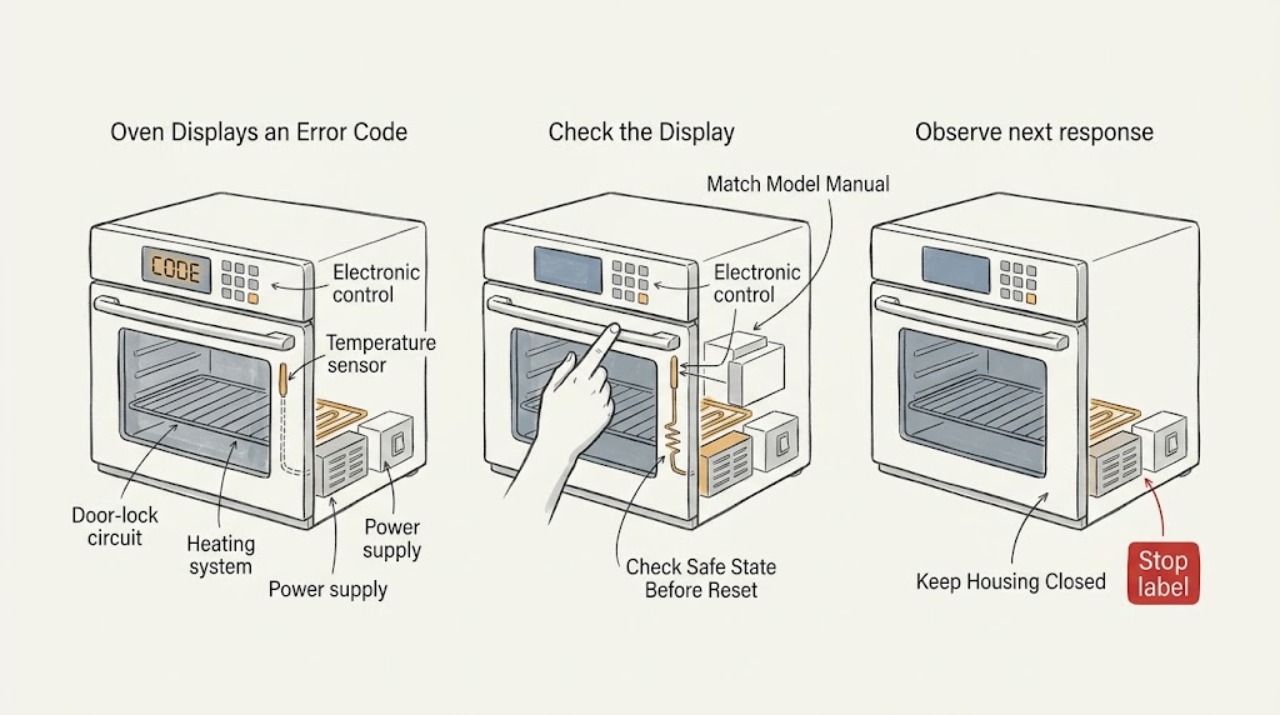
Work through in order
Diagnostic checks
Use only checks that match the exact appliance or system and its official guide.
-
Check 1
From a safe position, photograph the full display and record every character exactly as shown, the model number, the selected cooking mode, and whether the oven is hot, cooling, locked, heating, or silent.
Expected result: Classify the display as a code beginning with a letter or number, a short state message such as LOC or OFF, a power-loss or flashing-clock message, a normal preheat message, or an unreadable/flickering display; also record any odor, smoke, heat, arcing, or unusual noise.
Next step: Keep the photo and model information with the appliance record, then open the exact owner manual or manufacturer's support page before pressing buttons or ordering parts.
Stop if: Stop using the oven immediately for gas odor, smoke, burning smell, arcing, exposed or damaged wiring, unexpected heating, flame trouble, or a damaged door or glass; do not troubleshoot those signs by repeated resets.
Why this matters
Why: A complete code and appliance state can be matched to the correct model documentation. A state message may describe a lock, mode, cool-down, or preheat condition rather than a failed part; an incomplete or changing display can point toward a control or power issue but cannot identify it by sight alone.
-
Check 2
Use the recorded model number and exact display text to consult the appliance's owner manual or the manufacturer's code guide; compare punctuation, letter case, and whether the message is listed as a fault, information code, control state, or service-required condition.
Expected result: Record whether the model-specific documentation gives a user action, a normal-state explanation, a permitted reset, or a service instruction, and whether it says the displayed code is not covered by the generic guide.
Next step: Follow only the listed ordinary-user step for that exact model; if the manual calls for service or the code is unlisted, preserve the photo and arrange qualified appliance diagnosis.
Stop if: Do not infer a replacement keypad, sensor, lock, control, igniter, or heating element from a similar-looking code on another model.
Why this matters
Why: A model-specific match supports the manufacturer's stated interpretation; a generic match, an unlisted code, or a mismatch between the display and manual leaves the cause unresolved. GE explicitly says its common-code summary does not cover every past and present model, and Samsung directs users to the specific manual for unlisted codes.
-
Check 3
If the manual permits a reset and there is no hazard, cancel the cooking or cleaning cycle using the normal control and let the oven reach the documented safe state; do not force the door, latch, divider, or control panel.
Expected result: Observe whether the display clears normally, changes to a documented cool-down or lock state, remains frozen, or returns to the same code; note whether the door unlocks only through the manual's procedure.
Next step: Continue only with the exact manual procedure when the message clears and the oven behaves normally; otherwise turn the oven off and request service with the recorded code and state.
Stop if: Never pull, pry, or defeat a locked door or safety interlock, and do not continue a self-clean or heating cycle when the oven is overheating or cannot be controlled.
Why this matters
Why: A normal transition supports a temporary state such as preheating, power loss, control lock, or self-clean cool-down. A stuck lock, frozen display, repeated code, or oven that keeps heating indicates an unresolved control, sensor, lock, or safety problem and is not a successful repair.
-
Check 4
Only when the exact manual or manufacturer guide permits it and the oven is in a safe state, switch off the oven's circuit at the household breaker or unplug it where the installation provides a user-accessible plug, wait the documented interval, then restore power once.
Expected result: After power returns, observe whether the display is normal, the same code reappears immediately, the clock or settings need restoring, or the oven starts heating or locking without a command.
Next step: If the code returns or operation is abnormal, leave the oven off at the control and breaker as the manual directs, and provide the technician the code photo, timing, power-event history, and reset result.
Stop if: Do not open the control area, remove panels, touch wiring, repeatedly cycle the breaker, or reset an oven showing odor, smoke, arcing, overheating, or other hazard signs.
Why this matters
Why: A cleared code can indicate a transient control or power event, but it does not prove the underlying condition is fixed. A recurring code or unexpected operation indicates the control, sensor, lock, wiring, or supply still needs diagnosis; Whirlpool says to monitor after restoring power and notes that some controls do not reset and require service.
-
Check 5
If the display is clear and the manual allows normal use, run only a brief ordinary heating or function check while staying nearby; do not repeat a cleaning cycle or leave the oven unattended to see whether a fault returns.
Expected result: Record whether the oven responds to controls, heats only when commanded, reaches the expected operating state, unlocks normally after cooling, and keeps the display clear without unusual odor, smoke, noise, or breaker operation.
Next step: Stop the test and arrange qualified appliance service for any abnormal result; include the exact code, operating mode, timing, and what changed after the reset.
Stop if: Stop immediately for gas odor, smoke, burning smell, arcing, damaged glass, flame irregularity, uncontrolled heat, or a breaker that trips again.
Why this matters
Why: Normal behavior without a returning code makes a transient state possible but does not establish that an intermittent fault is gone. Failure to heat, uncontrolled heating, repeated lock behavior, a returning code, or a tripped circuit moves the case to service rather than more user testing.
Use your observations
Decision map
Find the observation that best matches what you see, then follow the next safe action.
-
PATH 01Safety boundary
What you see
The exact manual identifies the display as preheating, control lock, Sabbath or demo mode, power-loss, or a cool-down message, and the oven transitions normally when the manual's controls are used.
Do this next
Complete the documented state change and observe one normal operation. If the message persists outside that state or the oven behaves abnormally, stop and request service.
Why this path and its safety boundary
Why it matters: The display may be reporting an operating state rather than a failed component; the meaning and exit procedure remain model-specific.
Safety stop: Do not force a locked door, cancel a required cool-down by force, or bypass a control lock or safety interlock.
-
PATH 02Safety boundary
What you see
The code clears after the exact manual's permitted cancel or power-reset procedure, and the oven responds only to commands without odor, smoke, overheating, or a returning message.
Do this next
Record the event and use the oven only as the manual allows while watching for recurrence; arrange service if the code returns or the behavior changes.
Why this path and its safety boundary
Why it matters: A transient power or control state is plausible, but clearing the display does not prove a sensor, control, lock, or wiring fault has been eliminated.
Safety stop: Do not repeat resets to keep an abnormal oven running.
-
PATH 03Safety boundary
What you see
The display code returns after a permitted reset, is not listed for the exact model, or the generic guide and model manual disagree.
Do this next
Leave the oven off as directed by the manufacturer and arrange qualified appliance diagnosis with the exact code, model, timing, operating mode, and reset result.
Why this path and its safety boundary
Why it matters: The cause remains unresolved and may involve the electronic control, keypad, sensor, door-lock circuit, power supply, wiring, or another model-specific system; the code alone cannot select a part.
Safety stop: Do not remove panels, test energized wiring, bypass a lock, or order a component solely from a generic code chart.
-
PATH 04Safety boundary
What you see
The code appears with gas odor, smoke, burning smell, arcing, damaged wiring or glass, flame trouble, unexpected heating, an oven that will not stop, or a breaker that trips again.
Do this next
Stop using the oven, keep clear of the appliance, and follow the appropriate emergency, gas-safety, electrical-safety, or qualified-appliance-service procedure for the situation.
Why this path and its safety boundary
Why it matters: This is a safety boundary, not a routine display-code troubleshooting path. Continued use could worsen an electrical, gas, heat, or fire hazard.
Safety stop: Do not touch switches or wiring in a suspected gas or electrical hazard, relight or test gas with a flame, open panels, or keep resetting the appliance.
Helpful context
Understand the symptom
Read the display as a model-specific message
Write down every character, including a leading letter, a dash, a space, or a message such as LOC, OFF, or Pr E. A display can show a fault, a control-lock or mode state, a power-loss message, a door-lock condition, or normal preheating. GE notes that its list is only a summary of common codes, while Samsung warns that code design and meaning vary by model. The model number and the exact display are therefore more useful than guessing from a two-character code.
A reset can clear a transient state but does not prove a repair
Whirlpool describes canceling a power-failure message and, for some error codes, disconnecting power for one minute before monitoring the display. Frigidaire describes a short reset for some codes and says to use the use-and-care guide. Treat this as a single, model-permitted diagnostic step after the oven is safe and cool enough to handle: if the code returns or the oven behaves abnormally, the reset has supplied information but has not identified a part or made the appliance safe to keep using.
Some messages describe a state rather than a failed component
Examples in the opened manufacturer guides include Samsung's Pr E preheating message, its S-01 safety shutoff, divider and door-lock messages, and Whirlpool's power-failure, control-lock, Sabbath-mode, and self-clean cool-down messages. These examples are not a code key for another brand. Compare the exact message with the correct manual and observe whether the oven completes its normal state change without forcing a latch, canceling a required cool-down, or repeatedly restarting the appliance.
Safety boundary
Stop conditions
- Stop immediately for gas odor, hissing, smoke, burning smell, arcing, exposed or damaged wiring, damaged glass, flame irregularity, unexpected heating, an oven that will not stop, or a breaker that trips again.
- Do not force a locked oven door, defeat a door or control interlock, open the control panel, remove panels, touch wiring, or test energized terminals.
- Do not repeatedly reset the oven, run another self-clean cycle to test it, or order a sensor, control, keypad, lock, igniter, burner, or heating part from the code alone.
- If the code is unlisted, returns after the model-approved reset, or the oven remains unresponsive or abnormal, leave it out of service and arrange qualified appliance diagnosis.
Only after diagnosis
Potential parts
- oven temperature sensor
Consider this category only if the exact model documentation and technician diagnosis point to a sensor circuit; a code or uneven heating symptom alone is not enough.
Confirm the exact oven model, sensor connection, and manufacturer fit information before ordering; do not substitute a generic sensor based on a similar code. - oven electronic control or keypad assembly
Consider this category only when the exact model guide or qualified diagnosis identifies a control, communication, or keypad fault after safe power and state checks.
Control and keypad assemblies are model- and revision-specific; verify the exact model and approved replacement information before any repair. - oven door-lock assembly
Consider this category only when a recurring model-specific door-lock fault is confirmed and the oven is cool and safely out of service.
Confirm the exact model and lock configuration with the manufacturer or technician; never bypass or force the lock to test operation.
When checks do not resolve it
Need a professional?
Arrange qualified appliance service when the code returns, cannot be matched to the exact model, the display remains frozen, the oven will not heat or stop heating, the door will not unlock through the documented procedure, or any safety symptom appears. Provide the model number, exact code photo, operating mode, temperature or cycle state, recent power event, and reset result.
Safety scope: This article supports recording the display, consulting the exact manual, using ordinary controls, and performing one model-permitted reset in a safe state. It does not authorize panel removal, live electrical testing, gas work, interlock bypass, forced door release, or component replacement.
Common questions
FAQ
Why is my oven showing an error code?
The display may be reporting a model-specific fault, a power or control event, a locked or cleaning state, or normal preheating. Record the exact characters and match them to the correct model manual before assuming a failed part.
Can I clear an oven error code by turning off the power?
Some manufacturer guides permit one short power reset for certain codes, followed by monitoring for recurrence. Use that step only when the exact model guidance permits it and the oven has no safety symptom; a returning code still needs diagnosis.
What if the code is not listed in the manual or generic guide?
Do not map it to a similar code from another brand or model. Save a photo, confirm the model number, look for the exact manual, and arrange qualified service if the message remains or the oven is abnormal.
Should I replace the oven sensor or control board when a code appears?
Not from the code alone. Manufacturer charts may associate groups of codes with a keypad, sensor, control, lock circuit, or another system, but the exact model and technician diagnosis determine the failed component and compatible part.
When should I stop using the oven?
Stop for gas odor, smoke, burning smell, arcing, damaged wiring or glass, flame trouble, unexpected or uncontrolled heating, a door that cannot be safely controlled, a returning code, or a breaker that trips again. Arrange the appropriate qualified or emergency help for the symptom.
Read the exact guide
Official sources
- Error Codes for Cooking AppliancesWhirlpool Product Help · Whirlpool manufacturer guidance; the displayed format and resolution depend on the appliance model.
- Oven Error Codes and Alarms GuideFrigidaire · Frigidaire manufacturer guidance; examples and controls vary by oven model and product family.
- Range & Wall Oven - Oven Error, Fault or Function CodesGE Appliances · GE manufacturer guidance; code meanings and controls vary by model and the page lists only common examples.
- Check out the information codes on my ovenSamsung Electronics UK · Samsung UK manufacturer guidance; information-code design and controls differ by model and region.
Community feedback
Share a repair observation
Share a plain-text repair observation. Accepted observations are published automatically; this page may take a moment to update.