
On this page
Start here
Quick answer
An oven message that looks like an error code may instead be a control-lock or door-lock status, but a code cannot be decoded safely without the exact model and display text. Photograph the full message, lock icon, and any flashing indicators, and note whether the oven is hot, in self-clean, delayed start, demo mode, or recovering from a power outage. If the display clearly shows a lock message and the oven is off, use only the model manual's unlock command; common Whirlpool examples require holding a specified key for a few seconds, but controls vary. If an error remains after a model-approved, single power reset, the code returns, the breaker trips, the door will not release after the oven has cooled, or the display is blank or malfunctioning, stop troubleshooting and arrange qualified appliance service. Do not force the door, bypass a door lock, open the control panel, reset a breaker repeatedly, or guess at a part from an unfamiliar code.
Before you begin
Safety first
- This article supports reading the complete display, checking a documented control lock or operating mode, and one model-approved reset when the oven is safe and cool. Do not force locks, access live wiring, replace controls from a code alone, or continue with a safety symptom.
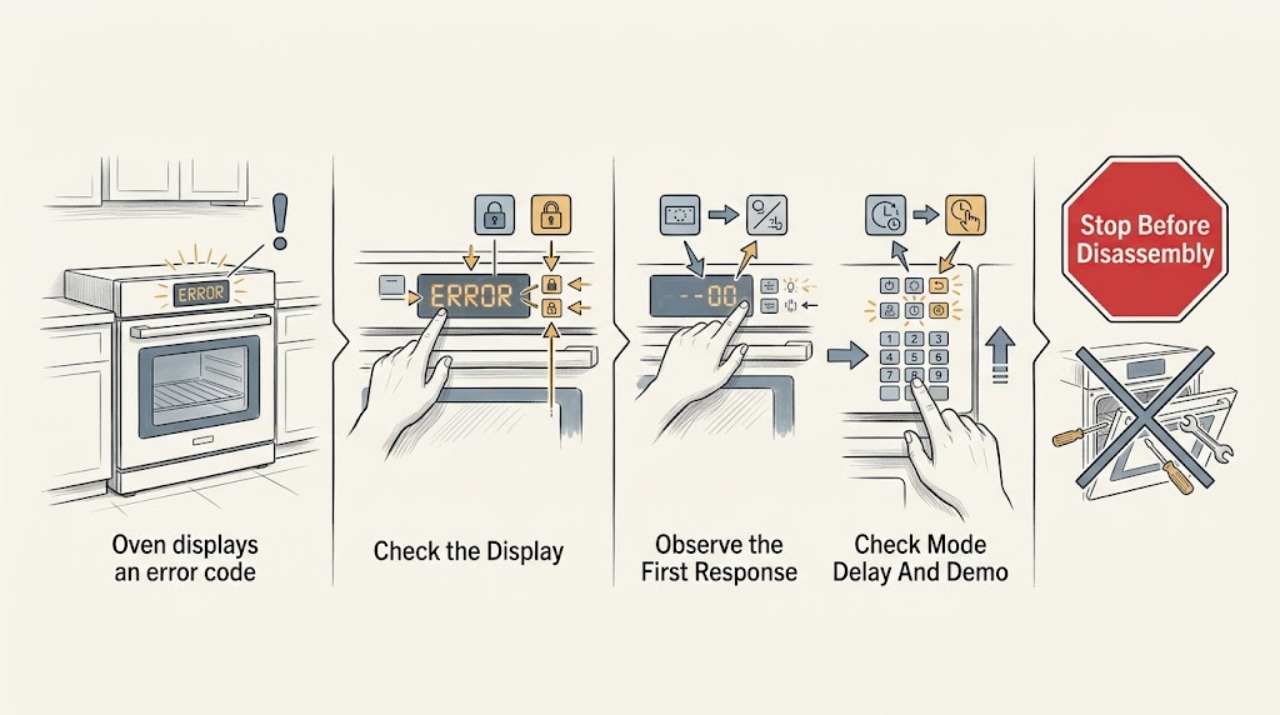
Work through in order
Diagnostic checks
Use only checks that match the exact appliance or system and its official guide.
-
Check 1
Photograph the complete display and record every letter, number, punctuation mark, lock icon, flashing indicator, and audible pattern. Note whether the oven is a range or wall oven, electric or gas, hot or cool, running a cooking or self-clean cycle, and whether a power outage or installation work occurred immediately before the message.
Expected result: Classify the message as a clear lock or LOC status, an alphanumeric error code, a blank or partial display, a delayed-start or demo indication, or an unreadable/intermittent display.
Next step: Use the exact model number and display text to find the owner's instructions; do not substitute a code interpretation from another oven family.
Stop if: Stop for smoke, burning odor, sparking, an energized cabinet, a tripping breaker, a door that is hot and locked, or any need to open the control panel.
Why this matters
Why: A clear lock status points first to the control-lock or protected-door procedure. An alphanumeric code needs the exact model manual and may indicate power, control, sensor, heating, or door-lock trouble. A blank or intermittent display shifts attention toward power or control hardware rather than a keypad lock.
-
Check 2
If the oven is off and the display identifies Control Lock, LOC, or a lock icon, use only the unlock command printed on the control or in the exact owner's manual. Keep the door closed if it is hot or in a protected cleaning cycle; do not try to pull it open.
Expected result: Record whether the lock indicator disappears and keys respond, the display remains locked, the controls respond but the door stays locked, or the oven is too hot or active to attempt an unlock.
Next step: Return to normal operation only after the lock clears and the oven is cool and stable. Arrange service for a lock that will not clear or a door that remains physically locked outside the documented cycle.
Stop if: Do not bypass a door switch, pry the door, insert a tool into the latch, or keep pressing random keys on a hot or active oven.
Why this matters
Why: A lock that clears with the documented command supports an intentional control-lock state. A locked door during or after a high-temperature cycle may be a temperature-protection state. A lock that remains after the manual procedure, or a door that stays locked while the oven is cool, suggests a latch, sensor, control, or wiring issue.
-
Check 3
Check the display and control settings for Delayed Start, Demo mode, Sabbath or other model-specific modes, and a control lock. Confirm that the oven and timer are off before changing a lock setting, and cancel a delayed program only as the owner's instructions describe.
Expected result: Record whether a delayed start is active, demo mode is shown, the control is locked, the oven is in a protected cleaning state, or no operating-mode setting explains the message.
Next step: Restore the intended mode using the exact model manual and verify one normal operation. Request service when the mode cannot be canceled, the lock returns, or the code remains.
Stop if: Do not alter service settings, enter diagnostic mode, disable a safety mode, or start a high-temperature cycle to clear an unknown message.
Why this matters
Why: A delayed start or demo mode can make an otherwise powered oven appear not to work. A control lock can reject every command. If no mode explains the code, treat it as an unresolved fault rather than repeatedly changing settings.
-
Check 4
If the code appeared immediately after a power outage, surge, installation, or a breaker event, confirm only that the dedicated oven circuit is on and that no other appliance has a related electrical symptom. Do not remove the terminal cover or inspect live wiring.
Expected result: Record whether the code appeared only after the power event, whether the display is otherwise normal, whether the breaker holds, and whether an F9/F9 E0-type code persists after the model-approved reset procedure.
Next step: Use one model-approved power reset only if the oven is safe, off, and cool; monitor as instructed. If the code returns or the breaker trips, leave power off and arrange qualified appliance or electrical service.
Stop if: Do not reset a repeatedly tripping breaker, use the main breaker to experiment, open the electrical compartment, or continue operation with a suspected miswired supply.
Why this matters
Why: A transient control response after an outage may clear after the manual's controlled reset. A persistent code after the reset may indicate a control or electrical-supply problem; Whirlpool specifically warns that a continuing F9 or F9 E0 can involve a miswired outlet and requires qualified electrical verification.
-
Check 5
Only when the oven is off, cool enough to leave safely, and the owner's manual permits it, turn off the dedicated oven circuit for the manual-specified interval, restore it, and observe the display for the specified monitoring period before selecting a function.
Expected result: Record whether the display returns normally, the lock or code clears but the oven will not heat, the same code returns during monitoring, or the display becomes blank or erratic.
Next step: Verify one normal low-risk operation only if the manual permits and no hazard is present. Save the code photo and service information if the message returns.
Stop if: Do not cycle power repeatedly, reset a breaker after it trips, bypass the lock, or run bake or clean to test an unresolved error.
Why this matters
Why: A clear message with normal operation supports a transient control state, but it does not prove a recurring fault is repaired. A returning code, failed heating, blank display, or erratic controls indicates service rather than another reset.
-
Check 6
After the exact lock/mode check and one permitted reset, determine whether the oven operates normally without the code. Keep the model number, display photo, settings, power-event history, and any heating or door behavior ready for service.
Expected result: Classify the result as normal operation with no return, a code that returns, a door that remains locked, controls that do not respond, a blank or partial display, or an error combined with smoke, odor, heat, water, or breaker operation.
Next step: Stop operation and arrange qualified appliance service; use a qualified electrician when the power supply, wiring, or breaker is implicated. Give the technician the exact code rather than guessing a replacement part.
Stop if: Do not continue operating with smoke, burning odor, sparking, a hot locked door, a tripping breaker, a cracked door window, or any exposed electrical component.
Why this matters
Why: A single cleared message may have been a transient lock or power state. Recurrence or a persistent lock points toward a control, latch, sensor, wiring, or supply fault. A safety symptom overrides all code interpretation and requires immediate shutdown.
Use your observations
Decision map
Find the observation that best matches what you see, then follow the next safe action.
-
PATH 01Safety boundary
What you see
The display clearly shows LOC, Control Lock, or a lock icon; the oven is off and cool; the keys are consistently unresponsive; and there is no other error, odor, leak, or power symptom.
Do this next
Use the exact model's documented unlock command and verify the lock indicator disappears. Return to service if the lock does not clear or returns immediately.
Why this path and its safety boundary
Why it matters: An intentional control-lock state is more likely than a failed control board. A lock can disable keys and, on some models, secure the door to prevent unintended use.
Safety stop: Do not pry the door, bypass a latch or switch, or use random key combinations on a hot or active oven.
-
PATH 02Safety boundary
What you see
The door is locked after self-clean or another high-temperature cycle, the oven is still hot, or the display indicates a protected cycle rather than a standalone control lock.
Do this next
Cancel only as the manual permits, allow the oven to cool and complete its normal unlock sequence, then request service if the door remains locked when cool or an error returns.
Why this path and its safety boundary
Why it matters: A temperature-protection door lock is more likely. The door should not be forced while heat remains, even if the display also shows a lock-related message.
Safety stop: Do not pull the handle, insert tools, pour water into the oven, or disconnect power as a way to force the latch open.
-
PATH 03Safety boundary
What you see
An alphanumeric code appeared after an outage or supply event, the oven is cool, the breaker holds, and one model-approved reset clears the code without a repeat during monitoring.
Do this next
Verify one normal operation and keep the code photo. If the code returns, the display behaves erratically, or another appliance has power symptoms, leave the oven off and arrange appliance or electrical service.
Why this path and its safety boundary
Why it matters: A transient control response is plausible, but the cleared message is not proof that the underlying electrical condition is permanently resolved.
Safety stop: Do not repeat resets or continue operation after a breaker trip or suspected supply fault.
-
PATH 04Safety boundary
What you see
The same code returns after the documented reset, the oven will not heat or accept commands, the display is blank or partial, or a lock remains after the oven is cool and the manual unlock fails.
Do this next
Stop using the oven and arrange qualified appliance service; use a qualified electrician when the code or breaker suggests a supply or wiring problem. Provide the exact code and reset result.
Why this path and its safety boundary
Why it matters: A control, display, latch, sensor, wiring, heating, or supply fault is more likely than a simple lock setting. The code must be interpreted against the exact model's service documentation.
Safety stop: Do not open the control panel, test terminals, replace a board, or bypass a door lock or safety device.
-
PATH 05Safety boundary
What you see
The error or lock message is accompanied by smoke, burning odor, sparks, a hot damaged door, water leakage, repeated breaker operation, unusual heating, or a smell of gas.
Do this next
Stop operation, keep clear of the appliance, and disconnect power or shut off gas only if the appliance instructions and immediate safety conditions make that possible. Arrange qualified emergency appliance or electrical/gas service.
Why this path and its safety boundary
Why it matters: This is an urgent appliance-safety or electrical/gas condition, not a keypad-lock problem. Continued operation could cause fire, shock, gas exposure, or further damage.
Safety stop: Do not reset the code, relight or test the oven, operate self-clean, touch wiring, or force the door while the hazard remains.
Helpful context
Understand the symptom
A lock message is not the same as an unknown fault code
Control Lock is a deliberate status that disables keys to prevent unintended operation, and some ovens also lock the door during a high-temperature clean or another protected cycle. Whirlpool's range guidance uses LOC when the control is locked, while its wall-oven guidance says the lock feature can shut down pads and lock the door. An F-code or another unfamiliar combination is not automatically a lock message. Read the complete display, including letters, numbers, dashes, and icons, before trying a reset or replacement.
Check operating state before touching power
A recent outage or abnormal supply event can produce a control code, and an oven may also be in demo mode or delayed start rather than failed. Whirlpool describes a model-specific one-minute power reset for some lock or power-outage messages and says to monitor the display afterward. That is a controlled diagnostic step, not permission to cycle power repeatedly or to reset a breaker that is tripping. If the oven is hot, actively cleaning, smoking, or electrically abnormal, use the manual's shutdown procedure and seek service.
Door lock and control lock have different boundaries
A control lock may be cleared with a keypad command when the oven is off, but a physically locked door can remain secured until the oven cools or the protected cycle completes. Do not pull the door, insert tools, or defeat a latch or switch. If the display remains locked after the documented procedure, the door stays locked when cool, or an error returns, the latch, temperature sensing, wiring, or electronic control needs model-specific diagnosis.
Safety boundary
Stop conditions
- Do not force a locked oven door, defeat a latch or door switch, insert tools into the latch, or open the control panel to identify an error code.
- Do not reset a repeatedly tripping breaker, use the main breaker to experiment, inspect live terminals, or continue with a suspected miswired supply.
- Do not run self-clean, bake, or broil to reproduce an unresolved code, especially when the oven is hot, smoking, or not heating correctly.
- Stop for smoke, burning odor, sparks, smell of gas, water near electrical parts, a damaged hot door, or exposed wiring; follow immediate safety procedures and arrange qualified service.
- Use one model-approved unlock or power-reset procedure only; if the code or lock returns, stop self-troubleshooting and preserve the exact display information for service.
Only after diagnosis
Potential parts
- oven electronic control or user-interface assembly
Consider this category only if qualified diagnosis confirms a persistent code, blank or erratic display, or unresponsive controls after the exact model's lock, mode, and power checks.
Confirm the exact model, control revision, display arrangement, power requirements, and manufacturer's fit information; do not replace a board from an error code alone. - oven door-lock or latch assembly
Consider this category only if the oven is cool and service confirms that a damaged or misreported latch or lock motor is preventing the documented unlock sequence or causing a related code.
Confirm the exact model, lock position, temperature rating, wiring connector, and manufacturer's procedure; do not bypass or force the latch. - oven temperature sensor or safety component
Consider this category only if qualified diagnosis links the persistent code or protected-door behavior to a failed sensor or safety component rather than a control-lock setting or power event.
Confirm the exact model, sensor or safety specification, connector, and manufacturer's service instructions; do not substitute a component based on a code label alone.
When checks do not resolve it
Need a professional?
Arrange qualified appliance service when an error code remains after the exact model's unlock or single reset procedure, the same code returns, the display is blank or intermittent, controls do not respond, the oven will not heat, the door remains locked after it is cool, or a latch, sensor, control, or wiring issue is suspected. Use a qualified electrician when a persistent code follows an outage, the breaker trips, or a miswired supply is possible. Provide the model, complete code, lock icon, operating state, power history, reset result, and any smoke, odor, heat, leak, or door symptoms.
Safety scope: This article supports reading the complete display, checking a documented control lock or operating mode, and one model-approved reset when the oven is safe and cool. Do not force locks, access live wiring, replace controls from a code alone, or continue with a safety symptom.
Common questions
FAQ
Does LOC always mean my oven has a fault?
No. LOC or a lock icon can indicate an intentional Control Lock that disables keys and may secure the door. Check the exact model's unlock procedure first. A different alphanumeric code, a returning message, or a lock that remains when the oven is cool needs service diagnosis.
How do I unlock an oven displaying a lock message?
Confirm the oven is off and cool, then use only the key and hold time shown in the owner's manual or on the control. Whirlpool examples vary by model, so do not copy a key sequence from another oven. Never force the door or bypass the latch.
Can a power outage cause an oven error code?
Yes, some controls can display a code after an abnormal power event. If the oven is safe, off, and cool, follow the exact model's single power-reset procedure and monitor it. If the code returns, a breaker trips, or supply wiring is suspected, leave power off and arrange qualified service.
Why is my oven locked after self-clean?
A high-temperature cleaning cycle can use a protected door-lock state until the oven cools. Follow the model manual and allow its unlock sequence to complete. Do not pull the door, insert tools, or disconnect power to force it open; service is needed if it remains locked when cool.
Should I replace the control board for an oven error code?
Not from the code alone. First identify the exact message, lock or mode state, power history, and reset result. A persistent code may involve a display, latch, sensor, control, heating circuit, or supply. Qualified service should confirm the fault and model-compatible part before replacement.
Read the exact guide
Official sources
- No or Partial Display - Wall OvenWhirlpool · Official Whirlpool wall-oven display guidance; controls and key sequences vary by model.
- Locked, Lock or Loc - Wall OvenWhirlpool · Official Whirlpool wall-oven guidance; exact unlock command and door behavior vary by model.
- Locked, Lock or Loc - RangeWhirlpool · Official Whirlpool range guidance; key names and timing vary by model.
- Oven Not Working - ElectricWhirlpool · Official Whirlpool electric-range guidance; code meanings and reset procedures differ by model.
- Not Working After Power Outage - ElectricWhirlpool · Official Whirlpool electric-oven guidance; the code is not a universal meaning for every brand or model.
Community feedback
Share a repair observation
Share a plain-text repair observation. Accepted observations are published automatically; this page may take a moment to update.