
On this page
Start here
Quick answer
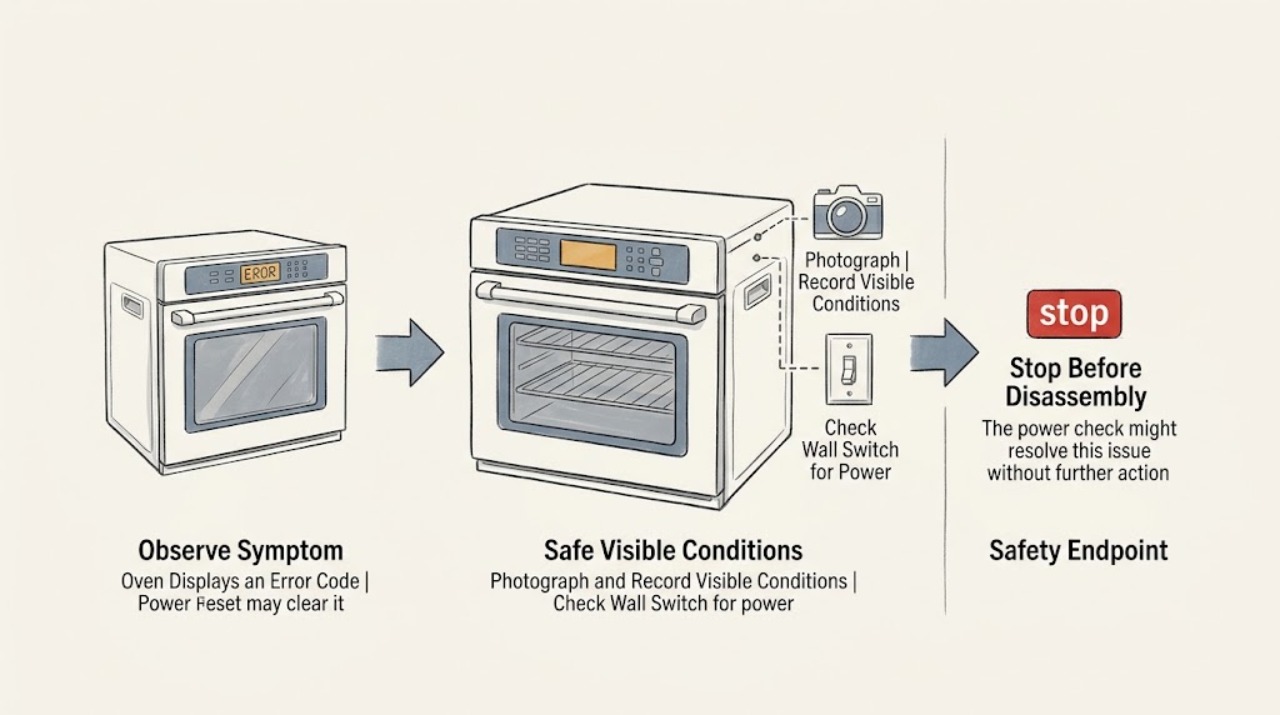
A power reset can clear a temporary oven control fault, but it does not prove the underlying problem is fixed. Before switching power off, photograph the complete code, note whether the oven was heating, self-cleaning, or recovering from an outage, and find the exact model manual. Use the manual's reset procedure or, when its instructions allow, switch off the oven circuit at the breaker or fuse for the specified time, then restore power and watch whether the code returns. If the code returns, the oven will not operate, a breaker trips, the display is abnormal, or the door is locked after the oven has cooled, leave the appliance off and arrange service. Never remove an access panel or diagnose a control, sensor, lock, or wiring fault by replacing parts based only on a generic code list.
Work through in order
Diagnostic checks
Use only checks that match the exact appliance or system and its official guide.
-
Check 1
Photograph the full display and write down every letter, number, symbol, beep, and message before pressing Cancel, Clear, or switching power off. Note the selected function, whether the oven was heating or self-cleaning, whether the code followed an outage, and whether the keys respond.
Expected result: The code is stable and readable; the display is incomplete or garbled; the keys do not respond; or the code appears only during one mode.
Next step: Keep the photo and timing record. Do not guess a component from the code or keep pressing keys to make the message change; move to the model and safe-reset check.
Why this matters
Why: A stable code can be looked up in the exact model documentation. A garbled display or unresponsive keypad keeps the user-interface, control, communication, or power path in play. A code limited to one mode may be a mode-specific condition rather than a universal control failure.
-
Check 2
Find the oven's model and serial information from its label, owner documentation, or the manufacturer's product record without removing panels. Search the model-specific error-code or troubleshooting section and check whether the displayed text could instead be Control Lock, Sabbath Mode, Celsius, calibration, or a power-failure message.
Expected result: The model and complete code match a manual entry; the message is a mode or power-status indication; only a partial model is available; or no reliable match is found.
Next step: Follow only the exact model's instructions for a mode message or reset. If the code cannot be matched confidently, do not improvise a reset sequence beyond the appliance's documented controls; record the information for service.
Why this matters
Why: A matched manual entry supplies the correct meaning and reset limits. A mode or power-status message may have a user-level procedure. A partial or missing model prevents a reliable interpretation because code formats and controls vary by appliance.
-
Check 3
If the oven is not hot, no smoke or other unsafe condition is present, and the manual permits a power reset, switch off the oven's dedicated breaker or fuse for the time specified by the manufacturer. Do not remove a cover, touch wiring, or use an unknown disconnect; restore power only after the wait period.
Expected result: The display restarts normally; the same code returns immediately; the display stays blank; or the breaker will not remain on.
Next step: Use the documented reset once, then proceed to the monitoring step. If power will not restore normally or the code returns, leave the oven off and arrange appliance service; do not repeat the reset or open the electrical compartment.
Why this matters
Why: A normal restart makes a temporary control or power event possible but does not establish repair. Immediate recurrence, a blank display, or a breaker problem indicates an unresolved control, supply, or component fault.
-
Check 4
After power is restored, confirm that the display is complete, the keypad responds, the clock or required setup is restored, and the oven remains idle without the code returning. Do not run self-clean or a long high-temperature cycle as a stress test.
Expected result: The code stays cleared and controls respond; the code returns during a specific function; the display becomes abnormal again; or the oven cannot be operated.
Next step: If the code remains cleared, use the oven normally but keep the record in case it returns. If it recurs or operation is incomplete, stop using the oven and provide the service technician the code, timing, model, and reset result.
Why this matters
Why: A stable display and responsive controls support a temporary event, but only continued normal operation can show whether the symptom remains absent. A return during one function narrows the service clue to that function's control or sensor path; an abnormal or dead display needs service.
-
Check 5
Make a visible-only check for a control-lock message, a door that is not fully closed, an oven that is still hot after self-clean, or an accessible plug or breaker condition when the appliance design permits it. Do not force a locked door, defeat a lock, move the appliance, or remove a panel.
Expected result: The message matches a documented lock or mode; the door remains locked after cooling; the door or control is visibly damaged; or no visible condition explains the error.
Next step: Use the manual's unlock or mode procedure only when the oven is cool and the control responds. Otherwise keep power off and request service; never defeat a door lock or continue heating with an unresolved code.
Why this matters
Why: A documented mode or normal hot-door lock may have a user procedure, while a lock that remains engaged after cooling or damaged controls can involve the latch, sensor, wiring, or control. No visible cause means the code must be interpreted through service documentation and testing.
-
Check 6
Prepare a service handoff with the model and serial information, exact code, photograph, date and timing, selected function, recent power interruption, reset duration, whether the code returned, display and keypad behavior, breaker behavior, and any visible door or control condition.
Expected result: The record is complete; the code is intermittent; or the appliance cannot be identified without disassembly.
Next step: Give the record to a qualified appliance technician or the oven manufacturer. Keep the oven out of service for a recurring code, a nonresponsive control, a breaker issue, or any condition that makes safe operation uncertain.
Why this matters
Why: Intermittent codes are easier to diagnose when their preceding function and power history are recorded. A missing model or intermittent display makes generic part selection especially unreliable.
Use your observations
Decision map
Find the observation that best matches what you see, then follow the next safe action.
-
PATH 01Next step
What you see
The code clears after one documented power reset, the display and keypad work, and it does not return during normal idle and a cautious ordinary operation.
Do this next
Treat the reset as a possible temporary power or control event, not a confirmed repair. Keep the code photo and model record; arrange service if the message returns or operation becomes abnormal.
-
PATH 02Next step
What you see
The same code returns immediately or during the same cooking mode after power is restored.
Do this next
Stop using the oven and request model-qualified service. The recurrence makes an unresolved sensor, keypad, control, wiring, lock, or power problem more likely than a one-time display glitch; do not keep resetting it.
-
PATH 03Next step
What you see
The display is blank or garbled, keys do not respond, or the breaker will not stay on after the reset.
Do this next
Leave the oven de-energized and arrange appliance or electrical service as appropriate. Do not open panels or assume the display, board, or supply component without testing.
-
PATH 04Next step
What you see
The displayed message is a documented lock, mode, temperature-unit, calibration, or power-failure indication rather than an unresolved fault code.
Do this next
Use the exact model manual's user procedure and verify that controls and operation return normally. If the message cannot be cleared as documented, move to service rather than trying unrelated reset sequences.
-
PATH 05Next step
What you see
The code is not listed for the model, the model cannot be identified, or the oven shows a damaged door, control, or other unsafe condition.
Do this next
Do not operate or order a generic part. Keep the oven off and provide the photograph, model clues, timing, and power-reset result to a qualified technician or manufacturer support channel.
Helpful context
Understand the symptom
The same letters and numbers can mean different things on different ovens. A code may describe a control, keypad, temperature sensor, door-lock circuit, power event, or a mode such as control lock. Treat the displayed code as a clue tied to the model, not as a universal part diagnosis.
A reset is useful only when the oven is safe to power down and the manufacturer permits it. Keep hands and tools out of the wiring compartment. An oven that works briefly and then shows the same code still has an unresolved fault, even if the display was temporarily cleared.
After power returns, verify the display and controls first; do not start a high-temperature bake or self-clean cycle merely to test a questionable appliance. Record the code's timing and the exact operation that preceded it for the service technician.
Safety boundary
Stop conditions
- Do not reset power when the oven is hot, smoking, sparking, visibly damaged, or otherwise unsafe; keep clear and use the appropriate emergency or electrical safety procedure.
- Do not remove access panels, touch wiring, defeat a door lock, test a control board, or replace a sensor or control based only on a generic error-code list.
- After one documented reset, stop and request service if the code returns, the display remains blank or garbled, the keys do not respond, or the breaker trips again.
- Do not run self-clean or a long high-temperature cycle to test an oven with an unresolved code, abnormal control behavior, damaged door, or uncertain power condition.
Only after diagnosis
Potential parts
- electronic oven control
Consider only when model-specific diagnosis links the returning code or failed reset to the electronic control rather than the keypad, sensor, wiring, or power supply.
Control boards are model- and revision-specific; confirm the complete model and service documentation before any selection. - oven user interface or keypad
Consider only when the display or keys fail and testing isolates the user interface or keypad as the cause.
Connector layout, control style, and software pairing vary by model; a similar display does not establish fit. - oven temperature sensor
Consider only when the exact model's code and service testing identify the temperature-sensing circuit as the fault.
Sensor resistance, connector, mounting, and approved replacement depend on the oven model and control system. - oven door-lock assembly
Consider only when a persistent lock indication or door-lock code remains after the oven is cool and diagnosis confirms the latch or lock circuit.
Lock style, wiring, mounting, and self-clean configuration must be matched to the exact model; do not defeat the lock.
When checks do not resolve it
Need a professional?
Arrange qualified appliance service when an error code returns after one model-approved reset, the code cannot be matched to the exact manual, the display or keypad is abnormal, the oven will not operate, the breaker trips again, the door-lock condition persists after cooling, or any control, sensor, wiring, or internal component needs testing.
Common questions
FAQ
Can a power reset really clear an oven error code?
Yes, some manufacturers state that a temporary power or control event may clear after power is removed and restored. That result is only a reset, not proof of repair. Monitor the oven and stop using it if the code returns.
How long should I turn the oven breaker off?
Use the exact model manual first. Manufacturer instructions differ, and some official guidance specifies about one minute while another may specify a different interval. Do not guess if the oven is hot or unsafe, and do not repeat resets when the code returns.
Should I write down the code before resetting the oven?
Yes. Photograph the complete display and note the function, recent power event, and whether keys respond. The same-looking code can have different meanings across models, so the record and model number are more useful than a generic code search.
What if the error code comes back after the reset?
Stop using the oven and request qualified service. A returning code can indicate a control, keypad, sensor, lock, wiring, or power problem that a reset did not correct. Do not keep cycling the breaker or replace a part from the code alone.
Can I open the oven panel to identify the failed part?
No. Keep troubleshooting to the display, model documentation, visible condition, and a safe documented reset. Internal control, wiring, sensor, lock, and power checks require a qualified technician.
Read the exact guide
Official sources
- Range & Wall Oven - Oven Error, Fault or Function CodesGE Appliances · Supports the general principle that codes map to different control, sensor, lock, and mode conditions and that a reset may clear but does not always resolve a fault.
- Error Codes for Cooking AppliancesWhirlpool Product Help · Supports the general distinction between a code that may clear after a reset and a code that returns and needs model-specific service; exact meanings remain model-dependent.
- No or Partial Display - Wall OvenWhirlpool Product Help · Supports the safe-reset and recurrence branch for an oven display or control issue; it does not supply universal timing for every oven.
- Samsung range or wall oven panel is blank, blinking, or incorrectSamsung Support · Supports the cross-manufacturer reset pattern for a display that is incomplete or incorrect; Samsung timing must not be applied to another model without its manual.
- Erratic Oven DisplaySub-Zero, Wolf, and Cove · Supports the general safety boundary for a display that remains erratic after a short power cycle; Wolf-specific causes are not applied to other brands.
Community feedback
Share a repair observation
Share a plain-text repair observation. Accepted observations are published automatically; this page may take a moment to update.