
On this page
Start here
Quick answer
Do not guess what an oven code means or keep cycling power to make it disappear. Photograph and transcribe the complete display, record the oven's exact model and what was happening when the code appeared, then use the documentation for that model or arrange appliance service. Stop using the oven immediately for smoke, a burning smell, sparks, flames, abnormal heat, or a code accompanied by unsafe door or heating behavior; do not open the control panel or perform electrical tests.
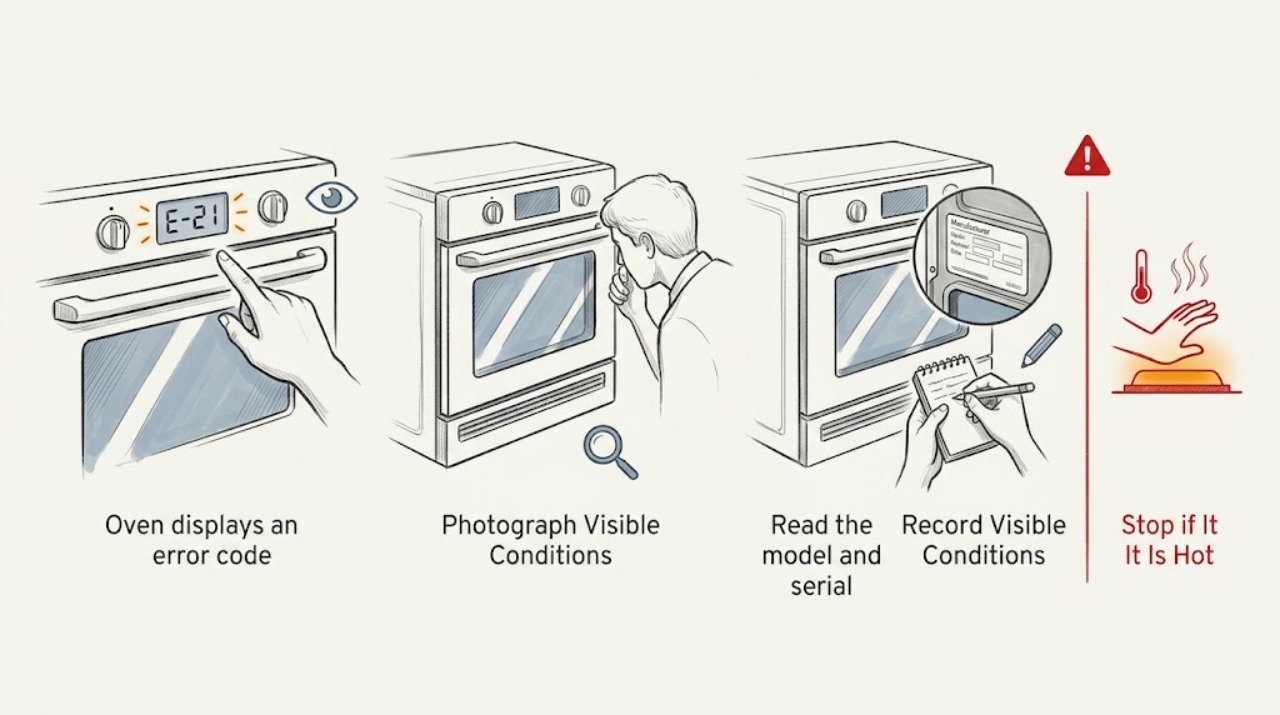
Work through in order
Diagnostic checks
Use only checks that match the exact appliance or system and its official guide.
-
Check 1
From a safe position, photograph the entire display and transcribe every visible character, including F or E prefixes, leading zeros, spaces, punctuation, alternating screens, and whether the code is steady or flashing.
Expected result: The display may show a complete code, a partial code, a status word, or several screens in sequence; a photo preserves details that are easy to misread.
Next step: Keep the photo with the service request and compare the exact text only with documentation for this oven model; do not substitute a similar-looking code from another appliance.
Stop if: Stop observing and stop using the oven if smoke, a burning smell, sparks, flame, or abnormal heat is present.
Why this matters
Why: A complete, model-specific code is useful evidence. A partial or guessed code is not enough to assign a component or repair.
-
Check 2
Read the model and serial identification from an owner-accessible label or the appliance documentation without removing covers, trim, or panels.
Expected result: The model identifier may be on an accessible door-frame, storage-area, or other manufacturer-designated label; the visible identifier should match the manual or support page being consulted.
Next step: Use the exact model identifier to locate the owner manual or official support material, and give the identifier to the technician along with the code photo.
Stop if: Stop if finding the label would require moving a hot appliance, removing a panel, reaching near wiring, or touching a damaged cord.
Why this matters
Why: The model determines which code table and safety instructions apply. An unverified model makes a generic code explanation unreliable.
-
Check 3
Write down the operating context without starting another cycle: bake, broil, convection, self-clean, idle, or power-up; whether the oven had recently lost power; and whether the door was closed normally.
Expected result: The code may appear during startup, preheating, cooking, cleaning, after a power interruption, or while the door or latch behaves differently; note any beeping, failure to heat, or unexpected fan activity.
Next step: Add the sequence and approximate time to the service notes, including any recent cleaning, installation, or electrical event, without repeating the event to reproduce it.
Stop if: Do not continue a heating or cleaning cycle to collect more evidence, and stop immediately for heat, smoke, odor, sparks, flame, or an abnormal door.
Why this matters
Why: Timing narrows the handoff context but does not prove which part failed. A code after an outage is still model-specific and should not be treated as a universal reset condition.
-
Check 4
Check only from outside whether the oven is currently safe and inactive: no smoke or burning odor, no sparks or flame, no uncontrolled heating, and no visibly unsafe door or latch behavior.
Expected result: If all of those hazards are absent, the oven can remain switched off while the code and model information are gathered. If any hazard is present, the appliance is not a candidate for more user testing.
Next step: For a safe-looking but unexplained display, arrange model-specific guidance or appliance service. For a hazard, stop use, leave the area if needed, and use the appropriate emergency response.
Stop if: For smoke, flame, sparks, burning odor, abnormal heat, or a damaged cord, stop using the oven immediately; do not touch internal parts or repeatedly restore power.
Why this matters
Why: A quiet display does not make an oven safe when other symptoms are present. Fire or electrical warning signs take priority over identifying the code.
-
Check 5
Prepare a service handoff containing the exact code photo, model and serial identifiers, operating mode, recent power or cleaning context, and what the display and oven did before being left off.
Expected result: A technician can see whether the code is persistent, returned after a power event, or accompanied by a door, heating, or display symptom without relying on a remembered description.
Next step: Use the model's official manual/support path or a qualified appliance technician, and follow only that model's documented instructions. Keep the oven out of service until the cause and safe operating state are established.
Stop if: Do not open the console, probe wiring, measure live voltage, bypass a latch, or repeatedly clear and recreate the code.
Why this matters
Why: This information supports a model-appropriate diagnosis; it does not justify ordering a control board, sensor, or lock before the fault is confirmed.
Use your observations
Decision map
Find the observation that best matches what you see, then follow the next safe action.
-
PATH 01Safety boundary
What you see
Smoke, a burning smell, sparks, flame, abnormal heat, or an unsafe door/latch is present.
Do this next
Stop using the oven. If a fire is inside, follow fire-safety guidance and do not open the door unnecessarily; if flames escape, leave the home and contact emergency services. Arrange professional inspection after the immediate hazard is controlled.
Why this path and its safety boundary
Safety stop: Do not touch the appliance, open panels, or restore power to test it.
-
PATH 02Safety boundary
What you see
The code is clear and the oven is otherwise inactive, but the brand or exact model is not known.
Do this next
Do not assign a meaning from a generic code list. Capture the label and display, then obtain the correct owner documentation or a service assessment.
Why this path and its safety boundary
Safety stop: Stop if identifying the model requires disassembly or contact with wiring.
-
PATH 03Safety boundary
What you see
The code appeared after a power interruption but the exact model instructions are unavailable.
Do this next
Record the outage or power event and leave the oven off while seeking model-specific guidance; do not perform repeated reset cycles or treat the code as cleared just because the display changes.
Why this path and its safety boundary
Safety stop: Stop all testing if the code returns, the appliance heats unexpectedly, or any odor, smoke, spark, or door problem appears.
-
PATH 04Safety boundary
What you see
The display is partial, alternating, or too faint to read confidently, or the code returns after the appliance remains off.
Do this next
Use photos and the model/serial information for a qualified appliance service call. Describe the sequence instead of guessing missing characters.
Why this path and its safety boundary
Safety stop: Do not remove the console or use live electrical instruments to reveal the code.
Helpful context
Understand the symptom
An oven error display is a message from a particular control system, not a universal diagnosis. The same letters or numbers can mean different things across brands and models. A useful handoff preserves the exact code and the circumstances around it, so a technician or the correct owner documentation can distinguish a power event from a control, sensor, or door-lock issue without speculative parts swapping.
Keep the oven out of service while the code is unexplained if the appliance is hot, behaving unexpectedly, or showing any fire-related symptom. Safe observation from outside the appliance is enough for this page; internal access and live electrical diagnosis belong to a qualified professional.
Only after diagnosis
Potential parts
- oven control board
Consider this category only if model-specific diagnosis links the persistent code or display/control symptom to the control assembly.
Confirm the complete oven model and the manufacturer's fit information before ordering; a similar code does not establish compatibility. - oven temperature sensor
Consider this category only when the model documentation or a qualified diagnosis identifies a temperature-sensing fault rather than a display-only message.
Match the exact model and documented sensor specification; do not infer fit from the error text alone. - oven door lock
Consider this category only when the code and visible door/latch symptoms are confirmed by model-specific instructions or professional diagnosis, especially around a cleaning-lock condition.
Verify the appliance model and the correct lock assembly before any replacement; never bypass the latch.
When checks do not resolve it
Need a professional?
Call a qualified appliance technician when the code persists, returns, cannot be read confidently, or is paired with failed heating, door/latch behavior, repeated beeps, or an unexplained power event. Escalate the situation immediately for smoke, flame, sparks, burning odor, or abnormal heat.
Common questions
FAQ
Can I use a generic oven error-code list?
Use generic lists only as background. Codes and meanings vary by manufacturer and model, so rely on the exact owner documentation or a qualified technician after recording the full display.
Should I keep resetting the oven until the code clears?
No. Do not guess at reset sequences or repeat power cycles. Record what happened, follow only the exact model's documented safe guidance, and arrange service if the code persists or returns.
What information should I give the appliance technician?
Give the complete code photo and transcription, model and serial identifiers, mode and timing, recent power or cleaning context, and any heating, door, fan, beeping, odor, smoke, or spark observations.
When is an oven error code an immediate safety issue?
Treat smoke, burning odor, sparks, flame, abnormal heat, a damaged cord, or unsafe door behavior as a stop-use condition. Do not open panels or continue testing; follow appropriate fire or emergency guidance and arrange professional inspection.
Read the exact guide
Official sources
- Cooking Fire Safety PictographsU.S. Fire Administration · Supports the immediate stop-use and evacuation boundary for an oven fire; it does not identify a displayed code.
- Appliance and Electrical Fire SafetyU.S. Fire Administration · Supports stopping use for damaged cords and avoiding unsafe appliance electrical practices; it is not oven fault-code diagnosis.
- Error Codes for Cooking AppliancesWhirlpool Product Help · Useful as a manufacturer example that code formats and power-event guidance are model-specific; not a universal code table for every oven.
- Oven Not WorkingWhirlpool Product Help · Supports using the model number and manufacturer support material rather than a generic diagnosis.
Community feedback
Share a repair observation
Share a plain-text repair observation. Accepted observations are published automatically; this page may take a moment to update.