
On this page
Start here
Quick answer
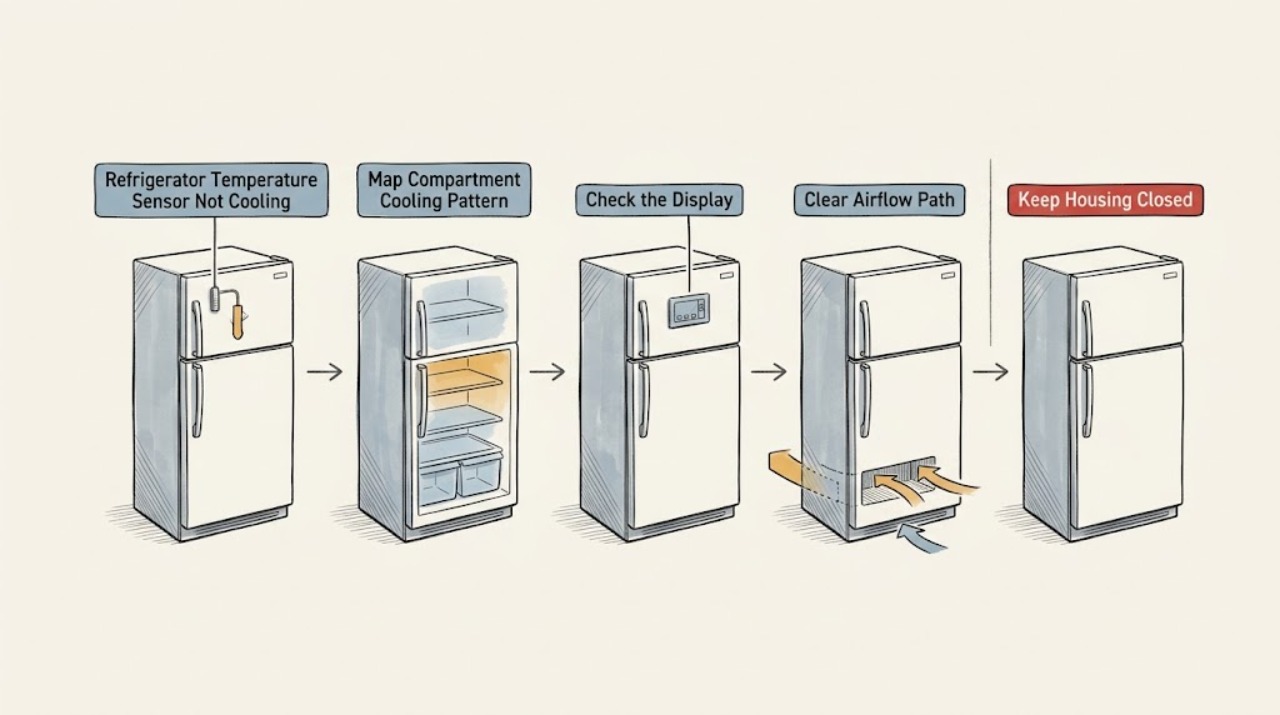
A refrigerator temperature sensor, often called a thermistor in service information, reports compartment conditions to the control system; a sensor fault can therefore produce incorrect cooling, but a warm refrigerator does not prove the sensor is bad. First record whether the refrigerator, freezer, or both compartments are affected, check the control setting and any displayed sensor or cooling error, and look for blocked vents, an unsealed door, heavy frost, or a recent power interruption. Use only the model manual for any accessible sensor location or reset procedure. Do not remove liners or panels, test resistance on a live appliance, pierce insulation, or order a sensor by appearance. If a sensor error remains after the manual’s permitted reset, the display is abnormal, cooling does not return, or the appliance has heavy frost, a hot compressor, smoke, an electrical odor, a leak near wiring, or repeated breaker trips, protect the food and arrange qualified appliance service. The technician must distinguish a sensor or harness fault from airflow, fan, defrost, control, compressor, and sealed-system problems.
Work through in order
Diagnostic checks
Use only checks that match the exact appliance or system and its official guide.
-
Check 1
Record whether the refrigerator compartment, freezer compartment, or both are warm; compare actual food or compartment temperature with an appliance thermometer placed away from doors, walls, and vents, and note whether the unit is running, silent, or running continuously.
Expected result: Both compartments are warm, only the refrigerator is warm, only the freezer is warm, the displayed temperature disagrees with the thermometer, or the compressor appears to run continuously or not at all.
Next step: Write down the pattern and protect perishable food. Continue with external settings and code checks only; arrange service if cooling is absent, temperatures continue rising, or the compressor behavior is abnormal.
Stop if: Do not insert a probe into a vent, remove an interior cover, touch the compressor or fan, or rely on a display alone to decide that food is safe.
Why this matters
Why: Both compartments warm can keep a control, sensor input, power, compressor, fan, or sealed-system issue in focus. A refrigerator-only problem makes internal airflow, damper, evaporator fan, or a local sensor input more likely. A display-versus-thermometer mismatch supports a sensing or display investigation but does not identify the sensor, while continuous or absent operation keeps other system faults possible.
-
Check 2
Check the control panel for Cooling Off, Demo, service, or temperature-sensor indications and confirm the settings using the exact model manual; photograph any code or blinking display before attempting a manual-approved reset.
Expected result: A sensor or service code is present, Cooling Off or Demo mode is shown, the display is normal, or the code returns after the permitted reset.
Next step: Follow only the manual’s stated reset or mode-correction procedure and record the result. If the sensor or service code remains or returns, stop and arrange qualified appliance service instead of searching for a generic sensor replacement.
Stop if: Do not enter an undocumented diagnostic mode, short terminals, bypass a sensor, alter wiring, or repeatedly power-cycle an appliance that smells hot or electrical.
Why this matters
Why: A model-specific sensor code is stronger evidence of a sensing, wiring, or control issue than a warm compartment alone. Cooling Off or Demo mode can disable cooling while lights and controls still operate. A normal display does not rule out a sensor, airflow, fan, or sealed-system problem, and a returning code requires professional diagnosis.
-
Check 3
Without removing panels, check that interior vents are not covered by food, doors close fully, gaskets are clean and intact, and the refrigerator has the model-required clearance and is not next to an excessive heat source.
Expected result: A vent is blocked, a door or gasket leaks, the refrigerator is tightly enclosed or beside a heat source, or these external conditions appear normal.
Next step: Move food away from vents, clean a gasket with a mild damp cloth, or restore only a safe clearance that does not require moving a heavy appliance alone. If cooling remains poor, continue to service rather than changing the sensor.
Stop if: Do not dismantle door liners, force the refrigerator away from a wall, adjust a concealed damper, or use a damaged gasket as evidence that the sensor is defective.
Why this matters
Why: Blocked internal airflow, a poor door seal, or restricted external ventilation can create warm compartments and make a sensor appear inaccurate because it is measuring an abnormal condition. Normal external airflow and sealing leave sensor, fan, defrost, control, compressor, and sealed-system paths unresolved.
-
Check 4
Only if the model manual identifies an externally accessible temperature sensor, inspect its visible surface for food, frost, displacement, or obvious damage with the appliance off; do not remove the sensor, liner, connector, or insulation.
Expected result: The accessible sensor area is covered or iced, the sensor appears displaced or damaged, the manual provides no accessible sensor check, or the area looks normal.
Next step: Follow only the manual’s permitted surface-cleaning or defrost instruction. If the fault persists or access requires disassembly, leave the appliance intact and schedule service.
Stop if: Do not scrape ice from a sensor, use a heat gun, pull a harness, pierce foam, remove a liner, or measure resistance unless a qualified technician is performing the model-specific procedure.
Why this matters
Why: A visible obstruction or frost may interfere with the sensor’s exposure to compartment air, but clearing it is appropriate only when the manual permits it and the sensor is genuinely accessible. A concealed, damaged, or normal-looking sensor still requires model-specific electrical and control diagnosis.
-
Check 5
From outside the cabinet, note whether frost or ice covers a compartment’s rear panel, whether airflow from an accessible vent is weak, whether the compressor or fan cycles, and whether the sensor symptom appeared after a power outage, cleaning, or door-seal problem.
Expected result: Heavy frost is present, airflow is weak, the unit runs continuously, the unit is silent, or the cooling problem began after a specific event.
Next step: Do not remove interior covers or force a defrost. Record the pattern, keep doors closed, and arrange appliance service when frost persists, cooling is absent, or the appliance cannot maintain safe food conditions.
Stop if: Do not chip ice, melt frost with an open flame or heat tool, reach through a fan grille, or bypass a defrost or temperature control.
Why this matters
Why: Heavy frost and weak airflow can point to defrost, evaporator fan, or air-distribution problems that can distort temperature readings. Continuous or absent operation can involve controls, compressor, fan, or power. A recent event may explain a mode or setting change, but it does not prove a sensor failure.
-
Check 6
Prepare the model and serial label, displayed code, selected settings, thermometer readings, affected compartment, sensor-access result, frost and airflow observations, compressor or fan behavior, door-seal condition, and the result of any manual-approved reset.
Expected result: The code persists, temperatures disagree with the display, cooling remains poor after external checks, or another warning symptom is present.
Next step: Arrange qualified appliance service and provide the record. Keep food in safe cold storage and leave the refrigerator off if it has an electrical, smoke, leak, or other immediate hazard.
Stop if: Do not open the sealed system, probe live circuits, replace a sensor or control, bypass a safety, or continue using an appliance with smoke, burning odor, exposed wiring, or repeated breaker trips.
Why this matters
Why: A complete record lets a technician distinguish a temperature sensor or harness fault from a control, fan, defrost, airflow, compressor, or sealed-system problem. Persistent symptoms are a reason to diagnose the whole cooling sequence, not to order a sensor from a generic picture.
Use your observations
Decision map
Find the observation that best matches what you see, then follow the next safe action.
-
PATH 01Next step
What you see
A model-specific refrigerator sensor or service code remains or returns after the manual’s permitted reset.
Do this next
Stop troubleshooting and arrange professional appliance inspection. Provide the exact model, code, and reset result; do not remove panels or replace a sensor by appearance.
Why this path and its safety boundary
Why it matters: A sensor, sensor harness, control input, or related component fault is more likely than a simple temperature setting, but the code does not identify which part is defective.
-
PATH 02Next step
What you see
Both refrigerator and freezer compartments are warm, no sensor code is displayed, and the controls and power appear normal.
Do this next
Protect food and arrange service after the external checks. Do not claim the sensor is bad solely from the warm compartments.
Why this path and its safety boundary
Why it matters: A sensor fault remains possible, but a whole-system power, control, condenser, fan, compressor, or sealed-system issue is at least as important as the sensor.
-
PATH 03Next step
What you see
The freezer is cooling but the refrigerator compartment is warm, especially when vents are blocked or airflow is weak.
Do this next
Clear only accessible vents and check door closure. If airflow remains weak or the compartment stays warm, arrange service without removing the liner or sensor.
Why this path and its safety boundary
Why it matters: Internal airflow, damper, evaporator fan, frost, door sealing, or a compartment-specific sensor input is more likely than a whole-system condenser fault.
-
PATH 04Next step
What you see
The control display appears to show a normal temperature, but a correctly placed appliance thermometer and the food condition show a persistent mismatch.
Do this next
Record readings after the model’s stabilization period and arrange service for a persistent mismatch; do not adjust or replace the sensor without model-specific diagnosis.
Why this path and its safety boundary
Why it matters: A sensor, display, control, airflow, or calibration issue is more likely, but an external thermometer cannot distinguish among those causes.
-
PATH 05Next step
What you see
The suspected sensor problem occurs with heavy frost, smoke, a burning or electrical odor, exposed wiring, a leak near electrical parts, or repeated breaker trips.
Do this next
Stop using the refrigerator and seek qualified appliance or electrical help; leave the area and contact emergency help for smoke or fire risk. Do not attempt a sensor repair.
Why this path and its safety boundary
Why it matters: A defrost, fan, electrical, control, or other safety problem is more likely than a simple sensor reading issue.
Helpful context
Understand the symptom
A warm compartment is not enough to condemn the sensor
The temperature sensor is one input to the refrigerator’s control system. A sensor that is open, shorted, displaced, iced over, or reporting implausible information can change when cooling components run, but the same warm symptom can come from a blocked vent, poor door seal, cooling-off mode, condenser airflow, fan, defrost, compressor, or sealed-system issue. Treat the sensor as a diagnostic possibility until the model’s display or a technician’s tests support it.
Use the model manual for sensor access and codes
Sensor position and error-code meanings vary by refrigerator design. Some sensors are behind interior covers or foamed into a liner, and many models do not provide a homeowner sensor test. Photograph the model label and display, find the matching manual or support page, and stop if the instructions require a panel, liner, harness, or service procedure to be removed.
Keep food safety and electrical safety separate from diagnosis
Keep doors closed while documenting the fault and move perishable food to safe cold storage if the refrigerator is warming. Disconnect power only for a manual-approved external check or reset, and never work around wet areas, damaged cords, exposed wiring, refrigerant tubing, or a running fan. A reset that clears a display does not prove that a sensor or cooling system is healthy.
Safety boundary
Stop conditions
- Stop troubleshooting if a sensor code remains or returns, access requires removing a liner or panel, or the refrigerator cannot be disconnected safely. Protect perishable food and arrange qualified appliance service for persistent no cooling, a warm freezer and refrigerator, a display-versus-thermometer mismatch, heavy frost, abnormal fan or compressor behavior, a leak near wiring, smoke, a burning or electrical odor, exposed wiring, a damaged cord, or repeated breaker trips. Leave immediately and seek emergency help for smoke or fire. Do not probe live circuits, pull a sensor harness, pierce insulation, scrape frost from a sensor, use a heat tool, open the sealed system, bypass a control, or install a sensor from appearance alone.
Only after diagnosis
Potential parts
- refrigerator temperature sensor or thermistor
Consider this only if a qualified technician confirms a sensor or thermistor fault after ruling out airflow, frost, harness, control, fan, and sealed-system causes.
Confirm the complete refrigerator model and manufacturer service information; sensor appearance alone does not establish compatibility. - temperature-sensor harness or connector
Consider this only if professional testing finds an open, loose, damaged, or corroded sensor connection rather than a failed sensor itself.
Verify the model-specific harness routing and connector before selecting or installing a component. - refrigerator electronic control board
Consider this only after a qualified technician confirms that the sensor signal and wiring are sound but the control does not process or act on the reading correctly.
Control boards are model-specific; do not infer fit or fault from a display symptom alone.
When checks do not resolve it
Need a professional?
Call a qualified appliance technician when the suspected temperature sensor error persists after the exact manual-approved reset, when cooling remains poor after external settings, airflow, and door checks, or when the sensor is concealed, damaged, or tied to frost, fan, compressor, or control symptoms. A short-lived setting or power issue can be monitored only when the appliance is otherwise safe and cooling is confirmed by the food and a correctly placed thermometer.
Have this ready
- Provide the complete model and serial information, code and display photos, compartment readings, sensor-access result, door and vent checks, frost and airflow observations, operating pattern, and any manual-approved reset result.
Common questions
FAQ
Can a bad refrigerator temperature sensor cause the refrigerator not to cool?
It can, because the sensor supplies temperature information to the control system, but a warm refrigerator does not prove the sensor is bad. Airflow, door sealing, frost, fans, controls, the compressor, and the sealed system can create the same symptom.
How do I know if a refrigerator temperature sensor is faulty?
A persistent model-specific sensor code or a display-versus-thermometer mismatch can support a sensor investigation, but neither identifies the failed component by itself. Use the model manual for permitted checks and have a technician test the sensor, harness, and control together.
Can I clean or replace the temperature sensor myself?
Only perform a surface check or cleaning if the exact owner’s manual identifies the sensor as accessible and permits it. Do not remove liners, pull connectors, pierce insulation, test live circuits, or replace a sensor by appearance; concealed sensor and wiring work should be handled by a qualified technician.
Why is the freezer cold but the refrigerator compartment warm?
That pattern commonly keeps internal airflow, a blocked vent, damper, evaporator fan, frost, door seal, or compartment-specific sensor input in focus. Check only accessible vents and door closure; arrange service if the refrigerator section stays warm.
Should I reset my refrigerator if a sensor error appears?
Follow a reset only when the exact model manual or manufacturer support page instructs it. Record the code first, and if it remains or returns after the permitted reset, stop and arrange professional inspection rather than repeatedly power-cycling or bypassing the sensor.
When should I call for refrigerator sensor service?
Call when a sensor code persists, temperatures disagree with the display, cooling remains poor after external checks, access requires removing a liner, or the symptom includes heavy frost, abnormal fan or compressor behavior, smoke, an electrical odor, a leak near wiring, or repeated breaker trips. Protect food while arranging service.
Read the exact guide
Official sources
- Not CoolingWhirlpool Product Help · Manufacturer guidance on cooling settings, condenser cleaning, airflow vents, recent installation, door use, and service escalation.
- Error codes on analog display modelsLG · Manufacturer support page identifying refrigerator sensor errors and directing professional inspection, while also distinguishing defrost and fan errors.
- Tips for Properly Setting the ControlsWhirlpool Product Help · Manufacturer guidance on model-specific controls, stabilization after adjustment, and appliance thermometer placement.
- Cooling issues with Samsung refrigerator or freezerSamsung · Manufacturer support guidance on error displays, power cycling, stabilization, door seals, airflow, cooling-off mode, frost, and service escalation.
- Parts of a Refrigerator: A Visual GuideWhirlpool · Manufacturer explanation of refrigerator cooling components and why complex component replacement varies by brand and model.
- Refrigerator - Not Cooling EnoughGE Appliances · Manufacturer guidance on controls, doors, airflow, condenser condition, installation environment, and scheduling service when basic checks do not resolve poor cooling.
Community feedback
Share a repair observation
Share a plain-text repair observation. Accepted observations are published automatically; this page may take a moment to update.