
On this page
Start here
Quick answer
If a Samsung cooktop touch panel will not respond, first turn the cooktop off and let the surface cool. A wet or greasy panel, wet hands, an enabled Child Lock or Control Lock, or a touch sequence that is not available for the current mode can make a working panel appear dead. Wipe the cool panel with the model-approved method, dry your hands, use a bare finger, and check the lock indicator and owner manual. If the model permits a reset, disconnect power or switch off the dedicated breaker from a dry, safe point for the manual's interval and restore it once. If the panel remains unresponsive, activates by itself, shows a recurring fault, or a burner cannot be turned off, keep the cooktop off and arrange qualified Samsung service. Do not open the cooktop or test its wiring.
Before you begin
Safety first
- This article covers cool-surface cleaning, lock and contact checks, model identification, and one documented power reset from a safe accessible point. It does not authorize opening the cooktop or electrical panel, testing live parts, bypassing controls, handling hot or damaged glass, or replacing components.
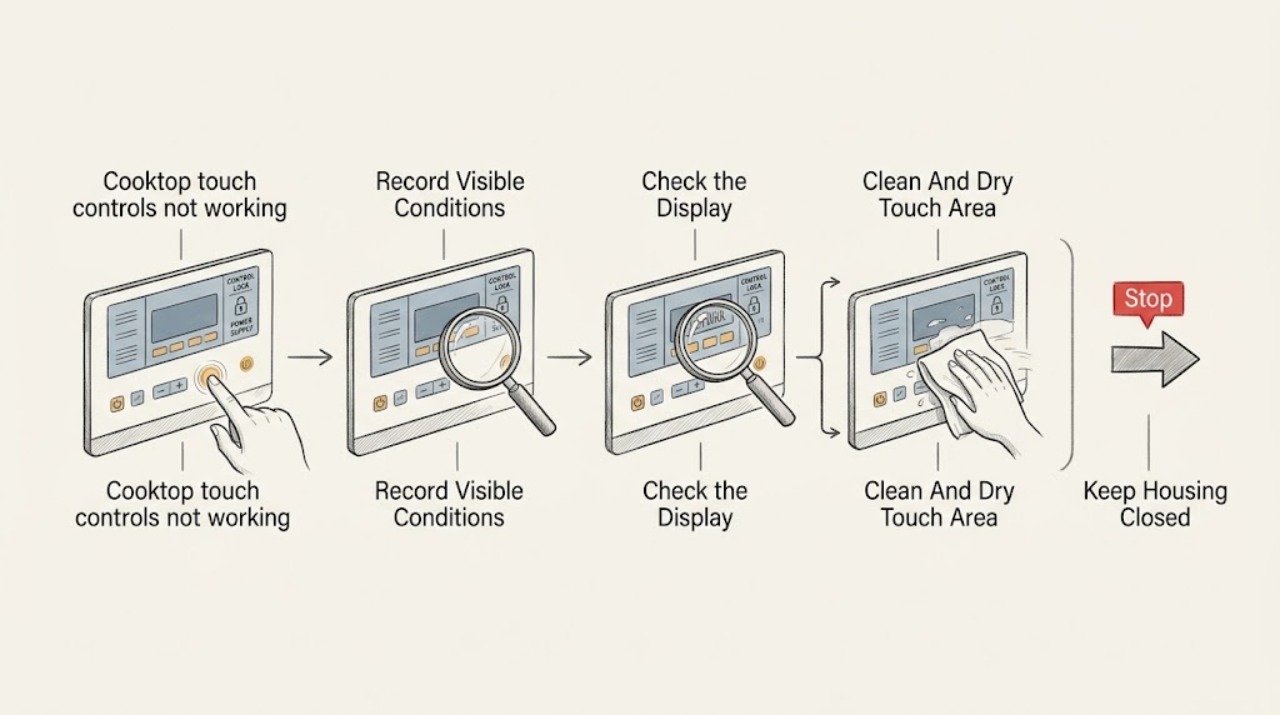
Work through in order
Diagnostic checks
Use only checks that match the exact appliance or system and its official guide.
-
Check 1
Turn all cooktop controls off and record whether the panel is completely dark, shows a lock symbol, beeps without changing, accepts Power but not heat settings, activates on its own, or affects only one touch area; record the exact model from a safe visible label or manual.
Expected result: The panel is dark, a lock icon is lit, only some keys respond, the panel responds after repeated pressure, it activates without touch, or the model and cooktop type are known.
Next step: Use the model manual for the matching control behavior. Do not infer a part from the symptom or keep pressing a panel that activates unexpectedly.
Stop if: Stop for uncontrolled heating, smoke, sparks, burning odor, cracked glass, repeated breaker trips, or a burner that will not turn off.
Why this matters
Why: A dark panel points toward power or control supply; a lock icon or partial response points toward settings or touch-surface conditions; self-activation or intermittent response raises concern for moisture, the user interface, or control electronics.
-
Check 2
With all zones off and the surface cool, check the display for Child Lock, Control Lock, a lock icon, or a mode that restricts input; use only the model's documented unlock gesture and confirm whether the panel then accepts a normal command.
Expected result: A lock indicator is present, the panel chimes but will not change, the manual says the current mode limits controls, or no lock or restricted mode is shown.
Next step: Disable the lock only as the manual directs, then test one normal control. If the lock cannot be cleared or returns without being selected, arrange service rather than trying unlisted key combinations.
Stop if: Do not use force, sharp objects, improvised button sequences, or a hot pan to test a locked or unresponsive panel.
Why this matters
Why: A lock or restricted mode can intentionally ignore most touch input. If no lock is shown and the panel still ignores a bare, dry touch, moisture, power, touch-board, or control trouble becomes more likely.
-
Check 3
After turning the cooktop off and waiting for the glass to cool, wipe the touch-control area with a soft cloth and the model-approved cleaner or water method; dry the panel and your hands completely before touching it again.
Expected result: The panel was wet, greasy, dirty, covered by a spill or utensil, or already clean and dry; response returns or remains absent after drying.
Next step: Try one bare-finger command after the panel is fully dry. If response does not return, continue only with the model-specific power check and reset boundary.
Stop if: Do not spray cleaner directly into controls, flood the panel, use abrasive tools, scrape the glass, or clean while the surface is hot.
Why this matters
Why: Samsung says moisture, grease, or debris can reduce capacitive touch response. A clean, dry panel that remains dead makes a lock, power, user-interface, or control fault more likely than a surface-cleaning issue.
-
Check 4
Use a dry bare finger with light direct contact on the model's Power or control area; for an induction model, keep cookware off the control strip and check that the command is available in the current state rather than pressing harder or using a glove.
Expected result: A bare finger works, a glove or wet hand was used, only one area fails, the panel responds with a light touch but not pressure, or no area responds.
Next step: Use only the manual's normal touch sequence. Stop if the panel activates itself, needs force, or gives an unexpected heat command; record the affected area for service.
Stop if: Do not press harder, use a tool, lean on the cooktop, touch hot glass, or continue if a burner turns on or will not turn off unexpectedly.
Why this matters
Why: A working bare-finger response supports contact or mode conditions. One failed area suggests localized touch-surface damage; no response anywhere after a clean dry surface and correct contact points toward power, lock, user-interface, or control service.
-
Check 5
If the cooktop is cool, dry, intact, and the model manual permits a reset, turn the cooktop off and disconnect its power or switch off its dedicated breaker from a dry, safely accessible point for the manual's stated interval, then restore power once.
Expected result: The panel returns to normal, remains dark, shows a lock or fault after startup, or the breaker trips again.
Next step: Record the power state and display after the single reset. If the panel is still unresponsive or the breaker trips, leave the cooktop off and arrange qualified service.
Stop if: Do not open the breaker panel, reset a tripping breaker repeatedly, remove covers, or reset while smoke, sparks, water, heat, or damaged wiring is present.
Why this matters
Why: A normal restart can indicate a temporary control state. A dead panel, recurring lock or fault, or a breaker that trips again points toward power, touch-control, main-control, or wiring service rather than another reset.
-
Check 6
After a successful restart and only with a cool, intact surface, use one model-documented low-risk control command and observe whether the panel responds normally, only one zone fails, the display changes without touch, or a burner heats or stays on unexpectedly.
Expected result: All controls respond, one touch area fails, the panel activates without contact, the cooktop displays a fault, or heat cannot be controlled.
Next step: Stop the test at the first abnormal response and keep the cooktop off. Give the technician the model, display, affected area, lock status, reset result, and heat behavior.
Stop if: Do not continue cooking, test exposed wiring, bypass a lock or safety, or keep resetting a cooktop that behaves unexpectedly.
Why this matters
Why: Normal response supports a temporary state. A localized failure suggests the touch surface or its input channel; self-activation, a recurring fault, or uncontrolled heat suggests a touch board, control, sensor, power, or wiring issue that needs service.
Use your observations
Decision map
Find the observation that best matches what you see, then follow the next safe action.
-
PATH 01Safety boundary
What you see
The panel responds after the surface and hands are dry, a lock is disabled, or a bare finger is used at the documented touch area.
Do this next
Keep the panel clean and dry and use the model's normal touch sequence. Arrange service if response becomes intermittent or the panel activates without touch.
Why this path and its safety boundary
Why it matters: The control hardware may be working and the initial issue is more consistent with moisture, debris, lock state, glove use, or an unavailable command.
Safety stop: Do not cook if the panel cannot reliably control heat or if a zone will not turn off.
-
PATH 02Safety boundary
What you see
The panel is dark or unresponsive everywhere, and one model-permitted power reset restores normal response without a recurring fault.
Do this next
Monitor one normal operation and record the reset. If the symptom returns, arrange qualified Samsung service rather than repeating the reset.
Why this path and its safety boundary
Why it matters: A temporary control or power state is possible, but the reset does not prove the supply or control electronics are healthy.
Safety stop: Do not reset a breaker that trips, open the electrical panel, or operate with smoke, odor, sparks, or uncontrolled heat.
-
PATH 03Safety boundary
What you see
The surface is clean and dry, the lock is off, bare-finger contact is correct, but one touch area remains dead or the panel requires force.
Do this next
Keep the affected control and cooktop off and arrange model-specific service. Do not remove the glass or control panel to inspect the input board.
Why this path and its safety boundary
Why it matters: A localized touch-surface, user-interface, connector, or control fault is more likely than a lock or cookware issue.
Safety stop: Do not press harder, use a tool, bridge touch contacts, or test live components.
-
PATH 04Safety boundary
What you see
The panel activates by itself, a burner will not turn off, a fault returns after reset, the breaker trips, or smoke, sparks, burning odor, cracked glass, or water is present.
Do this next
Keep clear and leave the cooktop off. From a dry, safely accessible point disconnect power only if that can be done without touching damaged equipment, then arrange urgent qualified service.
Why this path and its safety boundary
Why it matters: This is a safety and service boundary. A touch board, power supply, main control, heating control, sensor, wiring, or surface fault may be involved.
Safety stop: Do not touch damaged glass or energized equipment, keep resetting power, or attempt to force a burner off through the panel.
Helpful context
Understand the symptom
Start with the panel conditions, not the glass beneath it
Capacitive touch controls detect a finger through a surface that must be clean and dry. A spill, grease film, damp hand, glove, or an enabled lock can prevent normal input. Turn the cooktop off and cool before wiping it, and do not spray cleaner directly into the controls. If a control activates without being touched or does not respond after the surface and lock checks, treat that as a control fault rather than pressing harder.
A lock can look like a failed panel
Samsung cooktops can use Child Lock or another control lock, and the exact unlock gesture differs by model. A lit lock symbol, a chime without a setting change, or only the Power control responding points toward a lock state. Use the exact manual instead of trying random button combinations, especially while the surface is hot.
Reset once, then escalate recurring failure
Power cycling can clear a temporary control state, but it does not establish that a touch board, power supply, or main control is healthy. Use only a documented reset from a safely accessible breaker or disconnect, restore power once, and record the result. A panel that remains dead or behaves on its own needs professional diagnosis.
Safety boundary
Stop conditions
- Stop using the cooktop for a burner that will not turn off, self-activating controls, smoke, sparks, burning odor, uncontrolled heat, repeated breaker trips, cracked glass, or water near electrical parts.
- Do not open the cooktop, touch-control panel, wiring cover, or breaker-panel cover; do not test live circuits or bypass Child Lock, Control Lock, or a safety control.
- Do not press harder, use sharp tools, spray cleaner into the panel, flood the controls, or touch hot glass to test response.
- Do not repeat power resets, keep cooking through a recurring fault, or operate when the panel response is intermittent or unpredictable.
- Do not order a touch panel, user interface, control board, power module, sensor, or glass assembly until the exact model and qualified diagnosis confirm the failed component and fit.
Only after diagnosis
Potential parts
- capacitive touch panel or user-interface assembly
Consider this category only when the surface is clean and dry, the lock is off, correct touch contact is verified, and qualified diagnosis identifies a localized or complete touch-interface failure.
Confirm the exact Samsung model, panel layout, control revision, connector arrangement, and manufacturer fit information before ordering. - main control or power module
Consider this category only when the panel remains dark or unresponsive after safe external checks and qualified diagnosis identifies a power or main-control fault.
Confirm the exact Samsung model, electrical design, control revision, connector layout, and technician diagnosis before ordering. - touch sensor, heating control, or related wiring
Consider this category only when a recurring localized response or uncontrolled-heat symptom is traced by a qualified technician to a sensor, heating control, or harness rather than the user interface.
Confirm the exact Samsung model, zone design, wiring path, electrical rating, and repair diagnosis; do not choose a component from a similar-looking cooktop.
When checks do not resolve it
Need a professional?
Arrange qualified Samsung appliance service when the touch controls remain unresponsive after the panel is clean and dry, the lock is disabled, correct bare-finger contact is used, and one model-permitted reset has been tried; when one touch area fails, the panel activates without touch, a fault returns, or heat cannot be controlled. Seek urgent service for smoke, sparks, burning odor, cracked glass, repeated breaker trips, water near electrical parts, or a burner that will not turn off.
Safety scope: This article covers cool-surface cleaning, lock and contact checks, model identification, and one documented power reset from a safe accessible point. It does not authorize opening the cooktop or electrical panel, testing live parts, bypassing controls, handling hot or damaged glass, or replacing components.
Common questions
FAQ
Why are my Samsung cooktop touch controls not working?
Samsung identifies a wet or dirty panel, wet hands, incorrect touch contact, Child Lock, and model settings as common causes. If the panel remains unresponsive after a cool clean-and-dry check, lock check, bare-finger contact, and one documented reset, service is needed.
How do I unlock Samsung cooktop touch controls?
The unlock gesture varies by model. Look for a Child Lock or Control Lock indicator and follow the exact owner manual; do not guess button combinations. If the lock will not clear or returns on its own, leave the cooktop off and arrange service.
Can moisture make Samsung cooktop touch controls stop responding?
Yes. Samsung says moisture, grease, or debris can reduce capacitive touch response. Turn the cooktop off, wait for the surface to cool, wipe it with the approved method, dry the panel and your hands, and retry once. Do not spray cleaner directly into the controls.
Should I reset the breaker when Samsung cooktop controls do not work?
If the cooktop is cool, intact, dry, and the model manual permits it, one power reset may clear a temporary control state. Use a dry, safely accessible disconnect and the manual's interval. If the breaker trips or the panel stays dead, do not repeat resets; arrange service.
When should I stop using a Samsung cooktop with unresponsive controls?
Stop for self-activating controls, a burner that will not turn off, smoke, sparks, burning odor, uncontrolled heat, repeated breaker trips, cracked glass, water near electrical parts, or a recurring fault. Keep it off and arrange qualified appliance service.
Read the exact guide
Official sources
- Samsung Cooktop FAQsSamsung Electronics America · Official Samsung USA FAQ used for power, Control Lock, clean-and-dry, reset, and escalation branches; model-specific manuals control variations.
- Clean and care for your Samsung electric cooktopSamsung Electronics America · Official Samsung care guidance used for cool-surface cleaning and spill boundaries; it does not authorize cleaning a hot or damaged control area.
- Electric cooktop panel isn't responsiveSamsung Electronics America · Official Samsung support article used for the touch-panel, lock, moisture, bare-finger, and service branches; model-specific controls and lock gestures remain authoritative.
- Cooktops & Hoods | Samsung Support USSamsung Electronics America · Official Samsung support hub used for model identification and repair handoff; it does not replace the exact manual or technician diagnosis.
- Home Appliance Terms and ConditionsSamsung Electronics America · Official Samsung safety information used for the no-live-testing, dry-isolation, and service boundary; the exact cooktop manual controls model-specific procedures.
- Connect and use SmartThings with your Samsung cooktopSamsung Electronics America · Official Samsung cooktop support article used to show that touch-control reset sequences differ by model and may require Child Lock to be off; it is not a universal reset procedure.
Community feedback
Share a repair observation
Share a plain-text repair observation. Accepted observations are published automatically; this page may take a moment to update.