
On this page
Start here
Quick answer
Excessive frost in a Samsung freezer is usually a moisture and air-seal problem: warm, humid air enters through a door left open, hot food, a blocked closure, or a damaged seal, then freezes. Start by checking that the door or freezer drawer closes fully, that food is not blocking it, that the rubber seal is clean and undamaged, and that interior vents have about the clearance Samsung specifies. Remove only light frost with a damp cloth; Samsung says heavier frost may require defrosting and warns not to use a hair dryer or other heat source to speed it up. Use only the exact model manual for a manual-defrost procedure, protect food and the floor, and disconnect power only when it is safe to do so. If the frost returns after the air leak or loading cause is corrected, the freezer stays warm, an error code appears, or access requires removing panels, stop and request Samsung service. Do not chip ice with sharp tools, puncture the liner, or improvise a heater or sealed-system repair.
Before you begin
Safety first
- Keep the freezer out of service for electrical or water hazards, smoke, burning smell, unstable power, persistent errors, or unsafe warming. Do not use heat or sharp tools, remove evaporator or sealed-system panels, or force a hidden component.
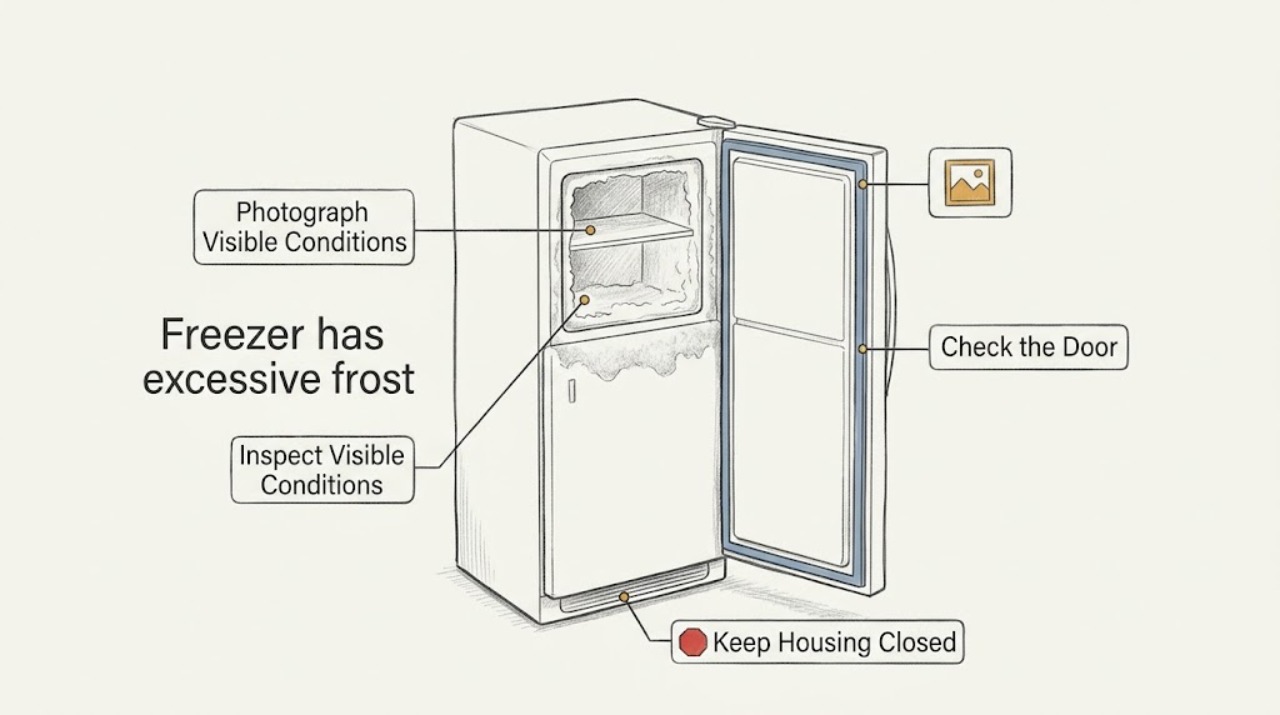
Work through in order
Diagnostic checks
Use only checks that match the exact appliance or system and its official guide.
-
Check 1
Photograph the frost before moving it and note its location, thickness, whether the door or drawer is blocked, whether food is soft or warming, and whether water is collecting below. Keep clear of any damaged cord, wet outlet, smoke, burning smell, or other electrical hazard.
Expected result: Frost is at the door edge, around a vent or rear wall, widespread, blocking closure, or accompanied by warming food, water, smoke, burning smell, or electrical damage.
Next step: Keep the door closed to protect food and obtain qualified or emergency help for smoke, burning smell, damaged wiring, water near electrics, or unsafe flooding. Otherwise continue with the external closure checks.
Why this matters
Why: A door-edge pattern makes an air-seal problem more likely; vent or rear-wall frost makes airflow or widespread ice more likely. Warming food or an electrical or water hazard changes the priority from routine frost removal to cooling or safety service.
-
Check 2
Check that the freezer door or drawer closes fully. Look for a package, shelf, drawer, ice buildup, misaligned bin, or frost ridge holding it open; inspect the rubber gasket for dirt, a gap, warping, or a tear. If the model has an ice chute or bucket seal, check that it sits flush and closes.
Expected result: The closure is clear and even, an item blocks it, frost prevents closure, the gasket is dirty but intact, the gasket is damaged, or an ice chute or bucket does not seal.
Next step: Remove only a simple food or bin obstruction. Clean a reachable gasket with the model-approved care method and dry it; do not reshape, heat, glue, or replace a damaged seal without exact model information. Arrange service for a continuing gap.
Why this matters
Why: Any gap lets warm moist air enter and can recreate frost. A dirty gasket may be cleaned, but a torn or warped seal, persistent door misalignment, or an ice-chute or bucket gap needs model-specific service or adjustment.
-
Check 3
Inspect loading and air passages. Keep food away from the rear vents by the clearance Samsung specifies for the model, avoid pressing packages against the back wall or door, and note whether frost itself covers a vent. Let hot food cool before loading and limit unnecessary door-open time.
Expected result: A package blocks a vent, food presses on the closure, a vent is iced over, hot items or long door openings preceded the frost, or loading and vents look clear.
Next step: Reposition items and close the door normally. Do not pry ice out of a vent or remove an internal cover; if the vent is heavily iced, use only the exact model defrost guidance and stop for recurrence.
Why this matters
Why: Blocked circulation and added moisture can explain localized or recurring frost. If the vents and loading are clear but frost is widespread, a door-seal or internal defrost issue becomes more plausible.
-
Check 4
Check the displayed temperature, cooling mode, error indicators, interior lights, and power from a dry, safe position. If the display is blinking or an error code appears, record it before any reset; do not repeatedly reset a tripping circuit or use an extension cord.
Expected result: Temperature is above the setting, the display blinks, an error appears, the freezer has normal power, the display is blank, or power is intermittent.
Next step: Follow only the normal model controls and safe household power checks. Stop for a persistent error, unstable power, repeated breaker trips, or food spoilage and request qualified appliance or electrical service.
Why this matters
Why: A warm or blinking freezer may have a cooling or power problem in addition to frost. Samsung notes that an error may mean service is needed and that a refrigerator can take time to reach a changed setting; a blank or unstable supply should be addressed before frost diagnosis.
-
Check 5
Use the frost amount to select the model-approved removal method: wipe light frost with a damp cloth and dry it, use only a plastic scraper if the manual permits it for heavier patches, or perform the exact manual defrost procedure for heavy frost. Remove or protect perishable food, place towels for meltwater, and disconnect power only when the plug and floor are dry and safe.
Expected result: Light frost clears and stays away, heavy frost cannot be cleared by hand, a fan noise disappears after ice melts, or frost returns after defrosting.
Next step: Never use a hair dryer, heat gun, open flame, knife, or other heat source or sharp tool. Stop if manual defrost is unavailable or requires panel removal, and request Samsung service for recurrence or persistent fan and cooling symptoms.
Why this matters
Why: A lasting dry compartment after correcting the air path supports a temporary moisture or loading cause. Heavy or recurring frost, or a fan noise that returns, indicates the underlying cause remains and is not fixed by surface removal alone.
Use your observations
Decision map
Find the observation that best matches what you see, then follow the next safe action.
-
PATH 01Next step
What you see
Frost is concentrated along the door or drawer edge, the gasket has a gap or damage, or food or a bin prevents full closure.
Do this next
Remove the external obstruction and clean a reachable gasket. Request service for a torn, warped, misaligned, or persistently non-sealing door, drawer, chute, or bucket; do not heat or reshape the seal.
Why this path and its safety boundary
Why it matters: Warm moist air entering through the closure is more likely than an isolated internal defrost failure.
-
PATH 02Next step
What you see
Packages block rear vents, frost surrounds a vent, hot items or long door openings preceded the buildup, and the door seals normally.
Do this next
Reposition food to preserve the model-specified vent clearance, let hot items cool before storing, and monitor. Do not pick ice from a vent with a sharp tool; arrange service if frost remains heavy or returns.
Why this path and its safety boundary
Why it matters: Moisture and airflow conditions are plausible contributors, and an external loading change may prevent more frost.
-
PATH 03Next step
What you see
Frost is widespread, blocks the door, reduces airflow, leaves the freezer warm, or is accompanied by a fan noise that returns after defrost.
Do this next
Follow only the exact model's safe defrost method. Request service when the procedure is unavailable, access requires a cover, cooling stays poor, or the noise or frost returns.
Why this path and its safety boundary
Why it matters: The frost is affecting cooling or may be covering an internal fan; a defrost, airflow, fan, sensor, or seal fault may remain.
-
PATH 04Next step
What you see
The display shows a persistent error, the temperature remains high, power is unstable, food is spoiling, or a breaker or GFCI trips again.
Do this next
Make only the normal safe power checks once, keep the freezer closed, and obtain qualified appliance or electrical service. Do not repeatedly reset power, bypass an error, or alter wiring.
Why this path and its safety boundary
Why it matters: An electrical, control, or cooling fault may be driving the frost or preventing recovery; scraping frost will not correct it.
-
PATH 05Next step
What you see
The door, gasket, loading, vents, power, and temperature are normal, but frost returns after the documented model defrost or cannot be reached without removing a panel.
Do this next
Stop DIY access, preserve photographs and timing, and request Samsung service. Do not remove evaporator covers, puncture the liner, or replace a component based on frost alone.
Why this path and its safety boundary
Why it matters: A hidden defrost, fan, sensor, or airflow problem is more likely and requires model-specific diagnosis.
Helpful context
Understand the symptom
Why a Samsung freezer gets heavily frosted
Samsung explains that warm moist air entering a cold compartment becomes frost. The common paths are a door or drawer that does not fully close, food or a shelf obstructing the seal, a dirty or damaged gasket, hot items placed inside, long or frequent door openings, or a vent blocked by food or ice. Once frost forms on a vent, it can restrict airflow even after the original loading obstruction is moved.
The pattern helps separate the causes
Frost along an interior door edge points toward a sealing gap; frost around a rear vent points toward blocked airflow or a moisture path; widespread frost that makes the drawer or door hard to close can be both a result and a cause of further buildup. Frost with a fan noise that stops when the door opens may indicate ice around a fan and should not be treated as a completed repair after a temporary defrost.
Defrost only within Samsung's safety limits
Samsung says light frost can be wiped away and heavier patches may need a plastic scraper or defrosting. Its support guidance warns not to use a hair dryer or other heat source, because that can damage the refrigerator. Keep the manual's procedure and your exact model available; do not remove an evaporator cover or use a sharp tool to reach hidden ice.
When frost is also a cooling fault
Excessive frost can reduce airflow, prevent the door from closing, and leave food too warm. Samsung's cooling guidance also calls for checking power, settings, vents, and the condition of food. If the freezer stays warm, displays an error, or frost returns after the closure and loading causes are corrected, service is the next safe step.
Safety boundary
Stop conditions
- Stop immediately for smoke, burning smell, damaged wiring, water near electrical equipment, unsafe flooding, repeated breaker or GFCI trips, a persistent error, or food warming rapidly. Keep clear and obtain qualified or emergency help.
- Do not use a hair dryer, heat gun, open flame, or other heat source to speed defrosting. Do not chip frost with a knife or sharp tool, puncture the liner, bend an evaporator, or force ice from a hidden vent.
- Disconnect power before a model-approved manual defrost only when the plug, outlet, floor, and surrounding equipment are dry and safe. Do not handle wet electrical equipment or perform live electrical tests.
- Stop when frost returns after the documented procedure, the door or gasket cannot seal, cooling remains poor, a fan noise returns, or access requires panel removal. Arrange qualified Samsung appliance service.
Only after diagnosis
Potential parts
- freezer door or drawer gasket
Consider this category only when inspection confirms a torn, warped, dirty beyond cleaning, or non-sealing gasket matches the frost at the closure.
Samsung seals vary by refrigerator and freezer configuration. Confirm the exact model and service diagnosis before selecting a gasket. - defrost heater, sensor, or control component
Consider this category only after qualified diagnosis confirms recurring ice is caused by a defrost-system or sensor fault rather than a door, loading, or vent issue.
Defrost components and connectors are model-specific and may be behind covers. Do not test or replace them as a generic frost repair. - evaporator fan or fan shroud
Consider this category only if qualified diagnosis links a returning fan noise, poor airflow, or persistent warming to a fan or shroud fault after the ice cause is addressed.
Fan assemblies and shrouds differ by model and may require internal access. Confirm exact model and diagnosis first. - ice chute or ice bucket seal
Consider this category only for models with the relevant ice system when a gap or non-sealing chute or bucket is confirmed as the moisture path.
Ice-system components vary by Samsung model and door layout. Confirm the exact model and seal diagnosis before selecting a part.
When checks do not resolve it
Need a professional?
Arrange Samsung or qualified appliance service when frost is widespread or recurring, a gasket, door, drawer, chute, or ice bucket remains non-sealing, the freezer stays warm, an error persists, a fan noise returns after defrost, or the cause is behind a cover. Treat smoke, burning smell, water near electrical equipment, repeated breaker trips, and unsafe flooding as urgent safety conditions.
Safety scope: Keep the freezer out of service for electrical or water hazards, smoke, burning smell, unstable power, persistent errors, or unsafe warming. Do not use heat or sharp tools, remove evaporator or sealed-system panels, or force a hidden component.
Common questions
FAQ
What causes excessive frost in a Samsung freezer?
Samsung says warm moist air freezes into frost. Common checks are a door or drawer that does not close, food blocking the seal, a dirty or damaged gasket, hot items, long door openings, and blocked rear vents. Frost around a vent can then restrict airflow further.
Can I use a hair dryer to defrost my Samsung freezer?
No. Samsung specifically warns not to use a hair dryer or other heat source to speed defrosting because it can damage the refrigerator. Follow the exact model manual, protect food and the floor, and stop if defrosting requires panel removal.
Why does frost return after I defrost the Samsung freezer?
The air leak or airflow cause may still be present, or a hidden defrost, fan, sensor, or cooling fault may remain. Recheck full door closure, the gasket, vents, and loading; if frost returns after the model-approved procedure, request service.
Can excessive frost make a Samsung freezer stop cooling?
Yes. Samsung says excessive frost can decrease airflow or prevent the door from closing, which can affect cooling. If the freezer remains warm, shows an error, or food is spoiling after the basic checks, arrange service rather than repeatedly resetting it.
When should I call Samsung for freezer frost?
Call when frost is widespread or returns, the gasket or door cannot seal, a fan noise returns after defrost, the freezer stays warm, an error persists, or access requires removing a cover. Treat smoke, burning smell, water near electrical equipment, repeated trips, and unsafe flooding as urgent.
Read the exact guide
Official sources
- Samsung SupportSamsung · Official Samsung support entry point; use the exact appliance model to retrieve the applicable manual and service path.
- Cooling issues with Samsung refrigerator or freezerSamsung · Official Samsung cooling guidance; model controls, temperature behavior, and error handling vary by appliance.
- Frost forms in the Samsung freezer, refrigerator, or ice bucketSamsung · Official Samsung support guidance for frost in freezer or refrigerator compartments; exact defrost details and features vary by model.
- Samsung refrigerator or freezer doors will not closeSamsung · Official Samsung closure guidance for multiple refrigerator and freezer door styles; user-manual procedures are model-specific.
- Understanding the different noises coming from your Samsung refrigeratorSamsung · Official Samsung noise guidance; manual defrost and service steps vary by model.
Community feedback
Share a repair observation
Share a plain-text repair observation. Accepted observations are published automatically; this page may take a moment to update.