
On this page
Start here
Quick answer
A Samsung washer that appears stuck is usually waiting for a stage to complete, not necessarily frozen electronics. Note the displayed stage, remaining time, icons, water level, and whether the tub is filling, washing, draining, or trying to spin. A washer cannot move to spin until it drains, and Samsung says a locked door can be normal while water is detected or the cycle is still unsafe to open. Check the model-specific door or Child Lock state, accessible water and drain conditions, and—on front-load models only—the pump filter after hot water has cooled. A balanced load and correct level can address a spin pause. If the washer will not drain, the door remains locked after the model's safe drain procedure, the display or controls are unresponsive, there is a burning smell, water is leaking, or the cycle repeatedly stops at the same stage, stop testing and arrange Samsung or qualified appliance service.
Before you begin
Safety first
- This page covers dry-position observation and model-permitted user checks only. Do not open the cabinet, bypass a lock, remove undocumented components, handle hot water, or work on live electrical, pump, motor, or control parts.
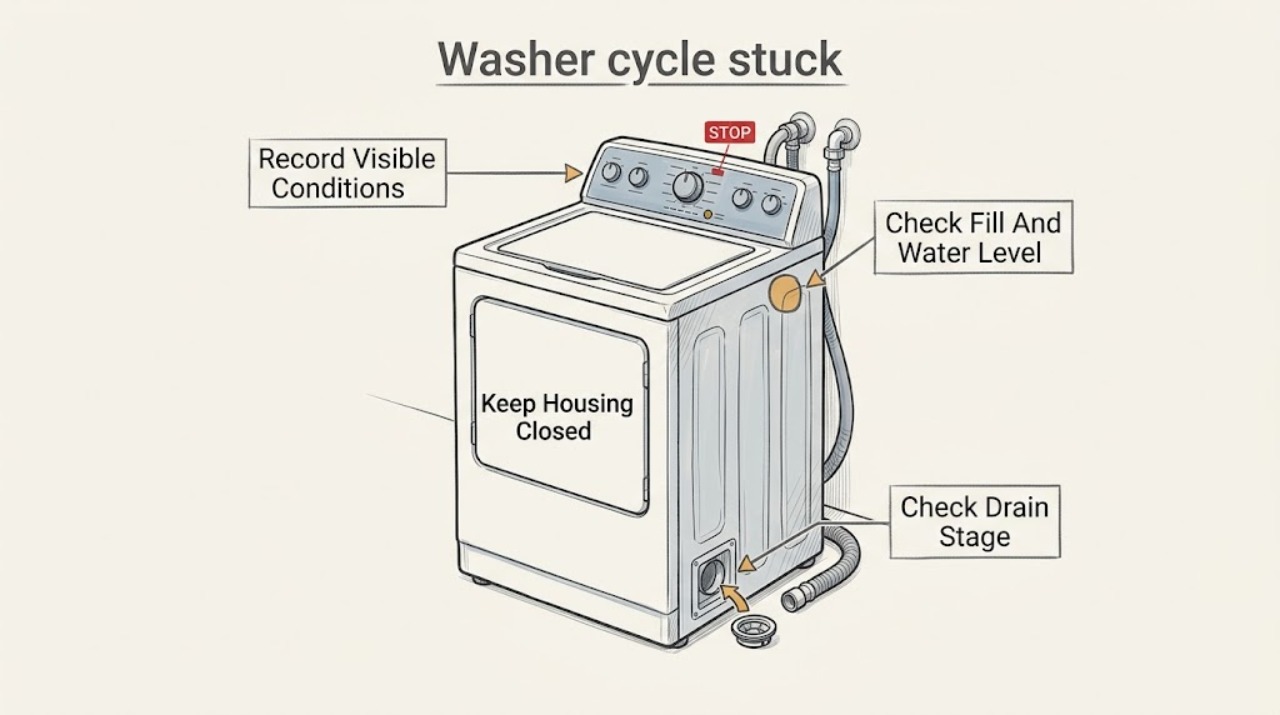
Work through in order
Diagnostic checks
Use only checks that match the exact appliance or system and its official guide.
-
Check 1
Pause or turn the washer off using its normal control if the panel responds and the floor and controls are dry. Record the displayed stage or code, remaining time, water level, door or lid state, tub movement, and whether the machine is filling, washing, draining, or attempting to spin.
Expected result: The display responds and the washer resumes after a normal pause, or the same stage remains displayed with no water, movement, or control response.
Next step: Use the matching stage branch below and record the full display before requesting service. Do not start repeated cycles merely to reproduce the stop.
Stop if: Stop if the washer is leaking, the floor or controls are wet, there is smoke or a burning smell, the cord or outlet is damaged, or the tub is moving violently.
Why this matters
Why: A changing stage or normal pause can be sensing or balancing behavior. A repeatable stop at one stage, an unresponsive panel, or a code that returns points to a specific fill, drain, lock, balance, or control path rather than a generic timer issue.
-
Check 2
If the cycle is stuck at fill or sensing, verify from a dry position that the household water supplies are open, both inlet hoses are connected as the model requires, and the visible hoses are not kinked. Do not disconnect a hose or open the cabinet.
Expected result: Water enters normally, no water enters, the washer fills and drains at the same time, or the water level rises unusually high.
Next step: If safe and dry, close the water supplies when the washer is not in use and provide the observations to service; use the exact Samsung model guidance for any inlet or hose repair.
Stop if: Stop for overflow, a cracked hose or valve, water near power, or a door or lid that cannot secure; do not reach through water or loosen pressurized connections.
Why this matters
Why: No fill can point to a supply, hose, screen, inlet valve, door or lid, or control issue. Filling and draining together can indicate drain-hose installation or siphoning. An unusually high level or overflow is not a condition for continued testing.
-
Check 3
If water remains and the washer is stuck before spin or during drain, inspect only the accessible drain-hose route and household drain for a kink, damage, a loose entry, or visible backup. On a front-load model with a documented pump filter, drain or filter-check only after the water is cool and using the model procedure; keep a container and towels ready and do not force the filter.
Expected result: Water leaves through the drain, the household drain backs up, the drain hose is kinked or improperly placed, the front-load filter is blocked, or no water moves and the pump is silent or abnormal.
Next step: Correct only a clearly visible, model-permitted hose-position issue from dry access; otherwise leave the washer off and request service. Do not run a spin cycle with water still present.
Stop if: Do not open a hot-water drain, reach into standing water, remove a filter that the model does not have, remove the drain-hose holder screw, or dismantle the pump.
Why this matters
Why: Samsung says spin is delayed when the washer cannot drain and identifies drain-hose installation and a clogged front-load pump filter as possible causes. A blocked household drain or failed pump requires a different service path.
-
Check 4
Check the door-lock or lid-lock icon and Child Lock indicator against the exact Samsung model manual. Confirm the door or lid is fully closed without forcing it, and wait for a normal pause or drain sequence to finish; do not pull on a locked door.
Expected result: The lock icon clears after the tub drains, Child Lock is active, the door or lid is visibly obstructed or misaligned, or the lock remains engaged with no water and the cycle does not continue.
Next step: Use only the model-documented Child Lock or cancel procedure. If the door or lid remains locked, request service rather than forcing the latch or opening the cabinet.
Stop if: Do not defeat the lock, insert tools around the door, force the lid, or reach into a moving or water-filled drum.
Why this matters
Why: Samsung says the door can stay locked while a cycle is in progress or water is detected, and Child Lock behavior varies by model. A lock that remains engaged after the safe conditions are met may indicate a lock, sensor, or control fault.
-
Check 5
If the washer has drained but pauses or stops during spin, wait until the tub is fully stopped, then check through the open door or lid whether a single bulky item, tightly tangled load, or very small load is gathered to one side. Redistribute only when the lock is released and the drum is stationary; do not reach into a moving machine.
Expected result: The load is visibly off-balance, the washer rocks or is not level, the tub starts and stops while redistributing, or the load is balanced but spin still never begins.
Next step: Use the model's load and leveling instructions without moving a wet or stacked appliance. If a balanced, stable load still stops at spin, stop testing and arrange service.
Stop if: Do not hold the tub, place hands near the drive, adjust hidden components, or run repeated high-speed tests when the washer shakes violently.
Why this matters
Why: Samsung says an unbalanced load can stop or slow spin and extend the cycle. If the load is balanced and the washer is stable but does not spin, a drain, motor, drive, sensor, or control fault becomes more likely.
-
Check 6
Only after the washer is empty or safely stopped, the water level is safe, the door or lid is released, and no leak or electrical hazard is present, use the exact Samsung model's documented power reset or calibration procedure once; do not invent a button combination.
Expected result: The washer completes the documented reset or calibration and advances normally, or the same stage, lock, code, or stop returns immediately.
Next step: If the issue returns, keep the washer out of service and provide the model, display, stage, water status, and reset result to Samsung or qualified service.
Stop if: Do not repeatedly reset, enter undocumented service modes, bypass a lock, or reset while water is leaking or the appliance is wet.
Why this matters
Why: A one-time documented reset can clear a temporary control state, but a recurring stop after drain, fill, lock, balance, and supply checks indicates an unresolved mechanical, sensor, motor, or control problem.
Use your observations
Decision map
Find the observation that best matches what you see, then follow the next safe action.
-
PATH 01Safety boundary
What you see
The washer remains at fill or sensing with little or no water entering, or it fills and drains at the same time.
Do this next
Check only the visible supply and hose conditions allowed by the model, close water supplies when safe, and request service if the valve, wiring, or fill behavior is abnormal.
Why this path and its safety boundary
Why it matters: A supply, inlet-hose, valve, door or lid, or drain-hose installation issue is more likely than a spin problem.
Safety stop: Do not continue if the washer overfills, leaks, or has water near power.
-
PATH 02Safety boundary
What you see
Water level and door or lid state are normal, but the washer remains in wash, rinse, or sensing with no meaningful tub movement or repeated stopping.
Do this next
Do not add or remove items while the lock is engaged. After the drum stops and the model allows access, document the load and use one model-documented reset; request service if the same stage returns.
Why this path and its safety boundary
Why it matters: Load sensing, an unsuitable or tangled load, excess water or suds, motor or drive, sensor, or control issue is more likely; a timer that pauses alone does not identify the failed part.
Safety stop: Stop for violent movement, grinding, burning odor, a leak, or an unresponsive control panel.
-
PATH 03Safety boundary
What you see
Water remains in the tub or the washer stalls before spin, while the drain hose or household drain shows backup, kink, damage, or no flow.
Do this next
Use only the model-permitted cool-water pump-filter procedure on a front-load model, or request service for a blocked household drain, damaged hose, missing holder, or failed pump.
Why this path and its safety boundary
Why it matters: The drain path or pump is the leading branch; Samsung specifically notes that a washer cannot proceed to spin when it cannot drain.
Safety stop: Do not run spin, open a hot drain, remove an unapproved filter, or dismantle the pump.
-
PATH 04Safety boundary
What you see
The tub is empty of standing water, the door or lid is released normally, and the washer stops or repeatedly rebalances at spin.
Do this next
Redistribute a stationary load only as the model permits and verify stable placement without pulling the appliance. If a balanced load still does not spin, arrange service.
Why this path and its safety boundary
Why it matters: An uneven load, unstable floor, leveling issue, or spin-related sensor or drive fault is more likely than an inlet problem.
Safety stop: Do not continue high-speed tests when the washer rocks violently or a component is noisy, hot, or damaged.
-
PATH 05Safety boundary
What you see
The door or lid remains locked after the tub is safely drained, Child Lock status is understood, and the model's cancel or unlock procedure does not release it.
Do this next
Keep the washer out of service and request Samsung or qualified appliance service with the displayed icon or code, water status, and model information.
Why this path and its safety boundary
Why it matters: A lock, water-level sensor, control, or door/lid alignment fault is more likely; forcing the latch can cause injury or a leak.
Safety stop: Do not defeat, pry, or disassemble the lock or reach into the drum.
Helpful context
Understand the symptom
Identify the stage before trying a reset
A cycle can look stuck during filling, sensing, washing, rinsing, draining, or spin balancing. Remaining time may pause while the machine adds or removes water, senses load balance, or waits for a door or lid lock. The useful first record is the stage and physical symptom, not a guess that the main board has failed. Do not open a locked door or lid just because the timer is not changing.
Drain status controls the next safe decision
Samsung says the washer tries to drain before it spins. Water left in the tub therefore makes a drain path, pump filter, hose, or household drain more likely than a spin-motor fault. A front-load pump filter is not present on every model; use it only if the exact model has one and the water is cool enough to handle. If the machine is full of hot water, wait for safe cooling and follow the model manual.
Door and Child Lock behavior is model-specific
A front-load door may remain locked to prevent water from coming out, and Samsung notes that Child Lock and the buttons that function during it vary by model. Check the icon and owner's manual rather than pulling the door or forcing a latch. If the lock stays engaged after water has safely drained and the model procedure has been followed, the lock or control needs service.
Safety boundary
Stop conditions
- Do not open a Samsung washer door or lid while its lock icon is lit, the tub is moving, or water is detected inside.
- Do not touch the washer, cord, outlet, or surrounding water when the appliance or electrical area is wet.
- Do not drain or open a pump filter when the water may be hot; use the exact model procedure and allow safe cooling.
- Do not remove the drain-hose holder screw, dismantle the pump, bypass a lock, enter undocumented service modes, or open the cabinet.
- Stop for overflow, continuous filling, a leak, violent shaking, smoke, burning odor, sparking, damaged wiring, or a cycle that repeatedly stops at the same stage.
Only after diagnosis
Potential parts
- Samsung model-specific drain hose
Consider this category only if the exact model's visible drain path has a confirmed damaged, kinked, or improperly secured hose and the installation guidance supports replacement.
Confirm the exact Samsung model, hose routing, drain connection, and holder requirements; do not remove the rear holder screw or pull the appliance forward while wet. - front-load washer pump filter
Consider this category only for a front-load model that actually has a documented removable pump filter and a confirmed damaged or missing filter after cool-water inspection.
Confirm the model and filter design; do not treat a top-load washer as having a removable filter or open the filter with hot water inside. - Samsung washer door or lid lock assembly
Consider this category only when the tub is safely drained, Child Lock and obstructions are ruled out, and qualified diagnosis confirms a failed lock or latch.
Confirm the exact model, front-load or top-load configuration, lock design, and safe installation procedure; never bypass the lock. - washer drain pump or inlet valve
Consider this service category only after stage-specific checks indicate an internal drain or fill fault and qualified diagnosis identifies the failed component.
Confirm exact model, electrical and hose connections, and technician fitment; these are not wet-area or live-circuit DIY parts.
When checks do not resolve it
Need a professional?
Request qualified Samsung or appliance service when the washer cannot drain, the door or lid remains locked after safe model-specific draining, the same stage or code returns after one documented reset, the balanced tub will not spin, the panel is unresponsive, or an internal hose, pump, motor, sensor, or control may be involved. Treat overflow, a wet electrical area, smoke, burning odor, sparking, violent movement, or a damaged cord or outlet as an immediate stop-use boundary.
Safety scope: This page covers dry-position observation and model-permitted user checks only. Do not open the cabinet, bypass a lock, remove undocumented components, handle hot water, or work on live electrical, pump, motor, or control parts.
Common questions
FAQ
Why does a Samsung washer stop before spin?
Samsung says the washer tries to drain before it spins. Water remaining in the tub, a blocked or poorly installed drain hose, a front-load pump-filter issue, a household-drain backup, or a failed pump can hold the cycle at drain. If the tub is empty, an unbalanced load, level issue, motor, sensor, or control fault becomes more likely.
Why is the Samsung washer door still locked when the cycle seems stuck?
The door can remain locked while a cycle is active or water is detected, and Child Lock behavior varies by model. Do not force it. Check the model icon and manual, allow safe draining, and request service if the lock remains after the model procedure and no water is present.
Can I reset a Samsung washer that is stuck?
Use only the exact model's documented reset or calibration procedure, and only after the washer is safely stopped, not leaking, and not holding hazardous hot water. Try it once; a recurring stop at the same stage or code means the underlying fill, drain, lock, balance, motor, sensor, or control issue still needs diagnosis.
Read the exact guide
Official sources
- Samsung washing machine information and error codesSamsung Support · Samsung error-code and icon reference used for model variation, Child Lock, door-lock, and the need to use the exact model guidance.
- Samsung washing machine will not drainSamsung Support · Samsung no-drain support page used for cool-water caution, drain-hose observations, front-load filter scope, and service escalation.
- Samsung washing machine spins poorlySamsung Support · Samsung support page used for the non-drain spin branch, load redistribution, stable leveling, and model-specific calibration or service boundary.
- Samsung washing machine does not spin at allSamsung Support · Samsung support page used for the distinction that front-load pump filters are model-specific and that inability to drain can prevent spin.
- TroubleshootingSamsung · Samsung official manual reference used only to reinforce that button combinations and procedures must follow the exact user manual; the assigned washer may use different controls.
- Water fill issues with Samsung washing machinesSamsung Support · Samsung fill-support page used for distinguishing a fill-stage stall from drain, spin, and lock stages; exact model instructions control hose and inlet access.
- Samsung washing machine will not start or fill with waterSamsung Support · Samsung support page used for model-dependent door lock and Child Lock behavior and for the safe boundary around water remaining in a front-load washer.
Community feedback
Share a repair observation
Share a plain-text repair observation. Accepted observations are published automatically; this page may take a moment to update.