
On this page
Start here
Quick answer
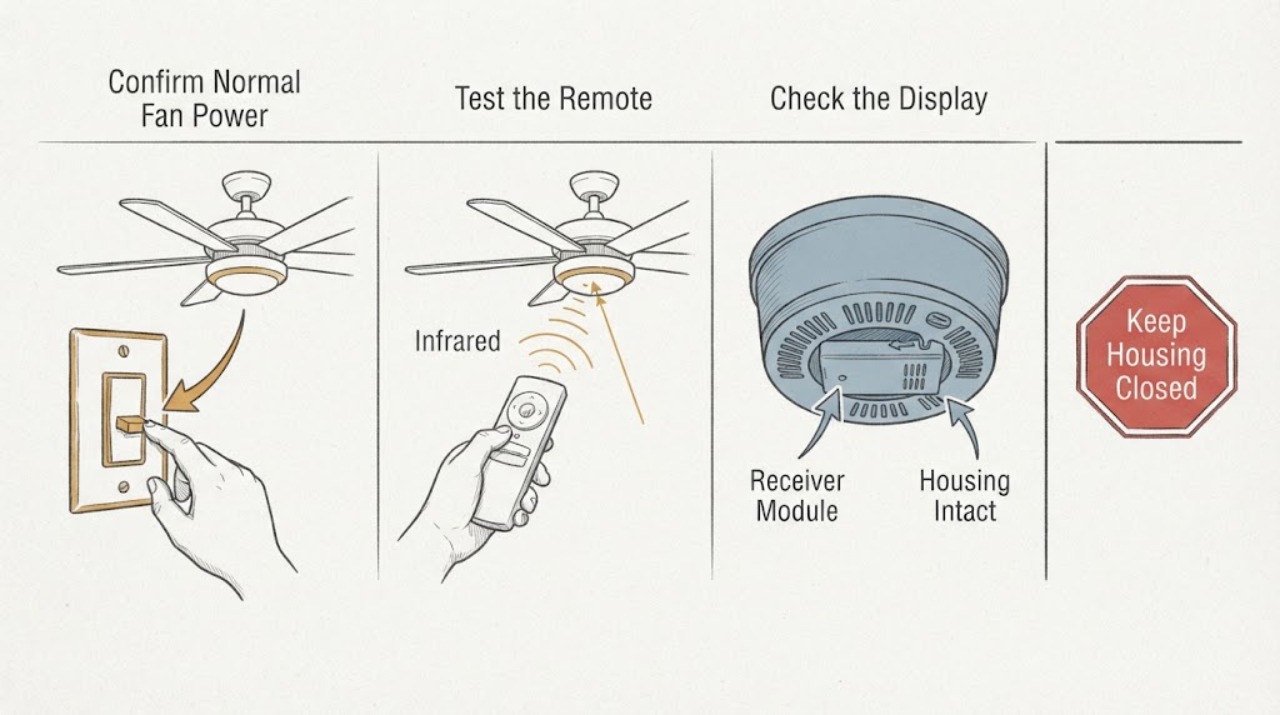
When a Casablanca ceiling-fan remote stops working, first separate a dead transmitter or lost pairing from a receiver module that is not powered or cannot operate the fan. From the floor, confirm the fan's normal wall switch or pull-chain control is on, test the remote battery and button response, and record whether the light and fan react separately. Use the exact Casablanca model instructions for pairing; Casablanca systems differ by generation, and Hunter's support material says some older INTEL-TOUCH models have no user reset procedure. Do not remove the canopy, handle line-voltage wiring, change receiver dip switches without the matching instructions, or buy a receiver by appearance. If a model-specific pairing attempt fails, the fan has no response from its normal control, the receiver is inside the canopy, or there is buzzing, heat, odor, flicker, or damaged wiring, leave the fan off and have a qualified electrician or ceiling-fan technician inspect the receiver, supply, controls, and fan. A receiver replacement is conditional on proving the exact receiver and fan-control compatibility after the safe external checks.
Work through in order
Diagnostic checks
Use only checks that match the exact appliance or system and its official guide.
-
Check 1
From the floor, confirm the normal wall switch supplying the Casablanca fan is on and use only the fan's ordinary pull-chain or wall-control function if the model has one. Observe the fan and light separately; do not climb, remove the canopy, or touch wiring. Note whether the fan runs, the light responds, neither responds, or the wall control behaves abnormally.
Expected result: The fan or light works from its normal control; neither responds; only one function responds; or the wall switch feels loose, warm, or does not stay on.
Next step: Keep the normal control in its safe operating state and continue only with the battery and model-identification checks if the fan is otherwise normal. If neither function responds or the switch is hot, loose, buzzing, or damaged, stop using the fan and arrange qualified electrical service.
Stop if: Do not stand on furniture, open the canopy, pull on wires, or keep operating a fan with heat, odor, arcing, flicker, or damaged controls.
Why this matters
Why: A working normal control with a dead remote shifts attention toward the battery, transmitter, pairing, or receiver command path. No response from normal control suggests a supply, wall-switch, receiver, motor, light, or wiring issue and cannot be diagnosed as a remote problem alone. One working function can indicate a channel, load, or receiver-side issue rather than total receiver failure.
-
Check 2
Read the remote or control model marking and compare its battery type and orientation with the matching Casablanca instructions. Remove and reinstall or replace the battery only from the normal user-accessible compartment, then press a fan and light command while aiming at the fan. Note a dim, intermittent, stuck, or completely unresponsive button without opening the transmitter.
Expected result: The battery is wrong, depleted, corroded, or reversed; the remote indicator responds but the fan does not; the buttons remain dead; or the battery and buttons appear normal.
Next step: Install only the battery specified for the identified control and retry the model-approved command once. If the remote remains dead, obtain a compatible transmitter diagnosis; if it responds but the fan does not, continue with model identification and pairing rather than buying a receiver immediately.
Stop if: Do not short the battery contacts, open the remote electronics, substitute a battery type, or use a damaged or leaking battery.
Why this matters
Why: Casablanca and Hunter support identify more than one battery family across control systems, so a battery that fits is not enough to prove it is correct. A live remote indicator with no fan response shifts attention toward power, pairing, compatibility, or receiver behavior. Dead or intermittent buttons keep the transmitter or battery as the more likely starting point.
-
Check 3
Record the Casablanca fan model from its accessible label, paperwork, or normal product documentation, along with the handheld or wall-control model and any visible receiver identification. Determine whether the fan is a pull-chain model, a model supplied with an integrated control system, or an older INTEL-TOUCH system. Do not remove the canopy to find a receiver label.
Expected result: The fan and control models are clear; the fan has pull chains and a separate receiver; the fan arrived with an integrated control system; or the model cannot be identified without disassembly.
Next step: Use the exact model documentation to choose the pairing or reset path. If the fan is an older or integrated-control model, or the model is inaccessible, stop at external checks and have qualified service identify the control system.
Stop if: Do not change dip switches, pair a different control family, or open the canopy because a generic receiver appears to match.
Why this matters
Why: Casablanca support says five-digit pull-chain models beginning with 5 can use specified Casablanca controls and a separate receiver, while fans supplied with a control system are not compatible with another control system. Older INTEL-TOUCH models have no published reset procedure in the support article. Unidentified models cannot be safely matched by a generic remote or receiver.
-
Check 4
If the identified model's Casablanca instructions provide a pairing or reset procedure, follow that procedure exactly from the normal wall switch or user control. Pair only the intended fan, keep other remote-controlled fans isolated as the instructions require, and observe whether the fan or light acknowledges the command. If the instructions require canopy access, line-voltage work, or an unavailable dip-switch setting, stop and arrange service instead.
Expected result: The fan acknowledges pairing; the remote still does nothing; another fan responds; the procedure times out; or the model has no reset procedure.
Next step: Use the result to identify the fan and control path for service. Do not repeat an unsuccessful pairing loop indefinitely; have a technician inspect the receiver and control system when the model procedure fails or is unavailable.
Stop if: Do not change receiver settings without the exact instructions, open the canopy, touch line-voltage conductors, or use a reset procedure from a different Casablanca generation.
Why this matters
Why: A successful acknowledgment makes lost pairing or control selection more likely and makes a failed receiver less likely. Another fan responding suggests a pairing or addressing error. A timeout or no-response result after the correct model procedure leaves power, receiver, transmitter, compatibility, or wiring unresolved; it does not prove a receiver replacement is needed.
-
Check 5
Record the final symptom pattern: fan and light both ignore the remote, only the light ignores it, only the fan ignores it, the fan works intermittently, or the fan works from another control but not the remote. Also note buzzing, heat, flicker, odor, visible damage, or a recent power or installation change. Do not remove the canopy or attempt to test the receiver's input or output voltage.
Expected result: Both channels fail; one channel fails; operation is intermittent; another control works; or an electrical warning sign is present.
Next step: Give the technician the model numbers, battery result, pairing result, channel pattern, and photographs. Leave the fan off for heat, odor, flicker, buzzing, damaged wiring, or a nonresponsive wall switch; otherwise arrange qualified ceiling-fan or electrical service before replacing the receiver.
Stop if: Do not probe the receiver, bypass its protection, replace it with an unlisted module, or restore power repeatedly when the fan or canopy shows damage.
Why this matters
Why: Both channels failing after a verified battery and model-approved pairing attempt makes receiver power, compatibility, or receiver failure more plausible, but an upstream supply or control issue remains possible. One channel failing points toward that load, command path, or receiver output. Intermittence or electrical warning signs require professional inspection rather than more pairing attempts.
Use your observations
Decision map
Find the observation that best matches what you see, then follow the next safe action.
-
PATH 01Next step
What you see
The fan or light works from its normal wall or pull-chain control, but the handheld remote remains dead after the exact battery check.
Do this next
Use the exact control model to obtain a compatible transmitter diagnosis or replacement. Do not replace the receiver until a known-good, model-compatible control and pairing path have been checked.
Why this path and its safety boundary
Why it matters: A battery, transmitter button, or remote electronics problem is more likely than a completely unpowered receiver.
-
PATH 02Next step
What you see
The remote indicator or buttons respond, the fan has normal user-level power, but neither fan nor light responds after the model-approved pairing attempt.
Do this next
Stop repeating pairing and have a qualified technician inspect receiver compatibility, supply, connections, and outputs. Leave canopy access and line-voltage checks to the technician.
Why this path and its safety boundary
Why it matters: Lost pairing, incompatible control, receiver power, receiver failure, or canopy wiring is more likely; the remote alone is not proven bad.
-
PATH 03Next step
What you see
The remote controls the light but not the fan, or controls the fan but not the light.
Do this next
Record which function responds and provide it with the model number to qualified service. Do not infer a receiver replacement from one failed channel or open the canopy to swap wiring.
Why this path and its safety boundary
Why it matters: A single receiver output, load, motor/light component, command mode, or compatible-control limitation is more likely than a total receiver power failure.
-
PATH 04Next step
What you see
The fan is an older INTEL-TOUCH system, an integrated-control model, or a model whose pairing/reset procedure is unavailable or does not match the remote.
Do this next
Stop at model identification and arrange qualified Casablanca or ceiling-fan service with the model number. Do not change dip switches or install a universal receiver without documented compatibility.
Why this path and its safety boundary
Why it matters: A generic reset or receiver is unsafe to assume. Casablanca support says an INTEL-TOUCH reset procedure is not available, and integrated systems may not accept another control system.
-
PATH 05Next step
What you see
Neither the fan nor the light responds from a normal control, or the fan shows buzzing, heat, odor, flicker, damage, or a loose wall switch.
Do this next
Keep the fan off and obtain qualified electrical or ceiling-fan service; use local emergency guidance for smoke, active arcing, or shock. Do not open the canopy or keep cycling power.
Why this path and its safety boundary
Why it matters: A supply, wall-control, receiver power, wiring, or fan fault is more likely than a handheld remote-only problem, and the condition may be electrically hazardous.
Helpful context
Understand the symptom
The remote and receiver are two different failure points
A handheld remote sends a command; the receiver module in or near the fan canopy interprets that command and controls fan speed and, on applicable systems, the light. A wall switch that is off, a depleted or wrong battery, lost pairing, an incompatible control, a failed receiver, or a power or wiring problem can all look like 'the remote does nothing.' Whether the light works, the fan works, or neither works is a useful split, but it cannot prove that the receiver is bad without model-specific testing.
Casablanca control generations are not interchangeable by appearance
Casablanca documentation covers several control families. Some pull-chain fans use a separate compatible receiver and transmitter, some systems pair within a short window after power is restored, and Hunter's Casablanca support page says INTEL-TOUCH models do not have a reset procedure. Identify the fan and control model before changing dip switches, pairing a remote, or selecting a receiver. A remote that fits in a hand or a receiver that fits in a canopy is not proof of compatibility.
Only after diagnosis
Potential parts
- model-specific Casablanca receiver module
Consider this only after the battery, normal power, model-specific pairing, control compatibility, and channel pattern point to a failed receiver or receiver output.
Receiver generation, wiring, control protocol, fan type, light load, and canopy fit are model-specific. A module that physically fits or says universal is not proof of compatibility; qualified service should select and install it. - compatible Casablanca handheld transmitter or wall control
Consider this only when the existing remote remains unresponsive after the correct battery check or the exact model documentation identifies a failed transmitter.
Casablanca control generations are not interchangeable by appearance. Confirm the fan model, control family, receiver, pairing method, and battery type before selecting a replacement. - receiver harness, connector, or canopy electrical component
Consider this only if qualified inspection finds a damaged connector, harness, mounting, or canopy component after the receiver and supply are safely checked.
Canopy wiring and connectors carry electrical hazards and vary by fan and control generation. Do not repair or substitute them from a visual match; a qualified technician should verify the installation.
When checks do not resolve it
Need a professional?
Arrange qualified ceiling-fan or electrical service when a Casablanca remote still fails after the correct battery and model-specific pairing check, when the fan has no response from its normal control, when the control system is INTEL-TOUCH or otherwise unidentified, or when receiver access, wiring, compatibility, or replacement is required. Give the technician the fan and control model numbers, battery result, pairing result, and whether the light and fan fail together. Stop using the fan for buzzing, heat, burning odor, flicker, smoke, shock, damaged wiring, or a loose or hot wall switch, and use local emergency guidance for active arcing or fire. Do not open the canopy, touch line-voltage conductors, change dip switches without exact documentation, bypass the receiver, or install a generic module as a test.
Common questions
FAQ
Why is my Casablanca ceiling fan remote not working when the fan has power?
A working wall switch or pull chain proves only that some fan power or control path is available. The remote may have a wrong or depleted battery, lost pairing, an incompatible control family, a failed transmitter, or a receiver-module problem. Check the exact battery and model-specific pairing path before considering a receiver replacement.
What battery does a Casablanca ceiling fan remote use?
It depends on the control system. Hunter's Casablanca support says current Hunter remotes use CR2032 while other Hunter and Casablanca systems use AAA or 9V batteries. Read the control model and its documentation; do not choose a battery solely because it fits.
How do I pair a Casablanca remote to the receiver?
Pairing is model-specific. Some Casablanca instructions use a short window after power is restored and a specified button combination, while older systems use different procedures. Identify the fan and control model first and follow only that manual. If pairing requires canopy access or the model has no reset procedure, use qualified service.
Can I replace a Casablanca receiver with any universal receiver?
No. Casablanca control systems differ, and support says fans supplied with a control system are not compatible with another control system. A receiver must match the fan, transmitter or wall control, wiring, load, and pairing method. Have a qualified technician verify compatibility before replacement.
When should I call a professional for a Casablanca receiver problem?
Call when the remote still fails after the correct battery and model-approved pairing attempt, the fan has no response from its normal control, the receiver is inside the canopy, the model is an older or integrated-control system, or there is buzzing, heat, odor, flicker, damage, or wiring work. Do not open the canopy or touch line-voltage wiring to test the receiver.
Read the exact guide
Official sources
- What kind of battery is used in the our control systems?Hunter Fan Support Site and Help Center · Hunter and Casablanca remote-control battery families
- INSTALLATIONCasablanca Fan Company · Casablanca receiver pairing timing and user-control operation for the documented control installation
- How do I reset my Casablanca W-52 Adapt Touch Remote?Hunter Fan Support Site and Help Center · Casablanca W-52 Adapt-Touch remote and receiver pairing/reset sequence
- Which controls can I use with Casablanca pull chain fan?Hunter Fan Support Site and Help Center · Casablanca pull-chain fan control and receiver compatibility by model family
- Universal Receiver - 4 Speed - 99199Hunter Fan · Casablanca universal receiver role, canopy installation, control pairing context, and stated fan-family compatibility
- Can I reset INTEL-TOUCH (T) model Casablanca fans?Hunter Fan Support Site and Help Center · Casablanca INTEL-TOUCH reset availability and model-specific service boundary
Community feedback
Share a repair observation
Share a plain-text repair observation. Accepted observations are published automatically; this page may take a moment to update.