
On this page
Start here
Quick answer
Start with the controls that are safe to reach: make sure the wall switch supplies power, then install a fresh battery in the Casablanca remote in the orientation shown in the exact manual. Test whether the fan or light responds to a pull chain or other local control if your model has one. If local control works but the remote does not, the remote may be unpaired, incompatible with the receiver, or failed; Casablanca pairing is model-specific, so use the manual for the exact model rather than a generic reset sequence. If neither the remote nor local control operates the fan or light, the problem may be the wall switch, breaker, receiver power, or fan wiring. Stop for a tripped breaker that returns, burning smell, buzzing, heat, visible damage, or any wiring or canopy access, and arrange qualified electrical service.
Before you begin
Safety first
- This article covers safe observation from the floor, a handheld battery replacement, accessible control comparison, and model identification. It does not authorize wall-plate or canopy removal, receiver access, electrical measurement, exposed-wire handling, address or DIP changes by guesswork, receiver bypass, or energized work.
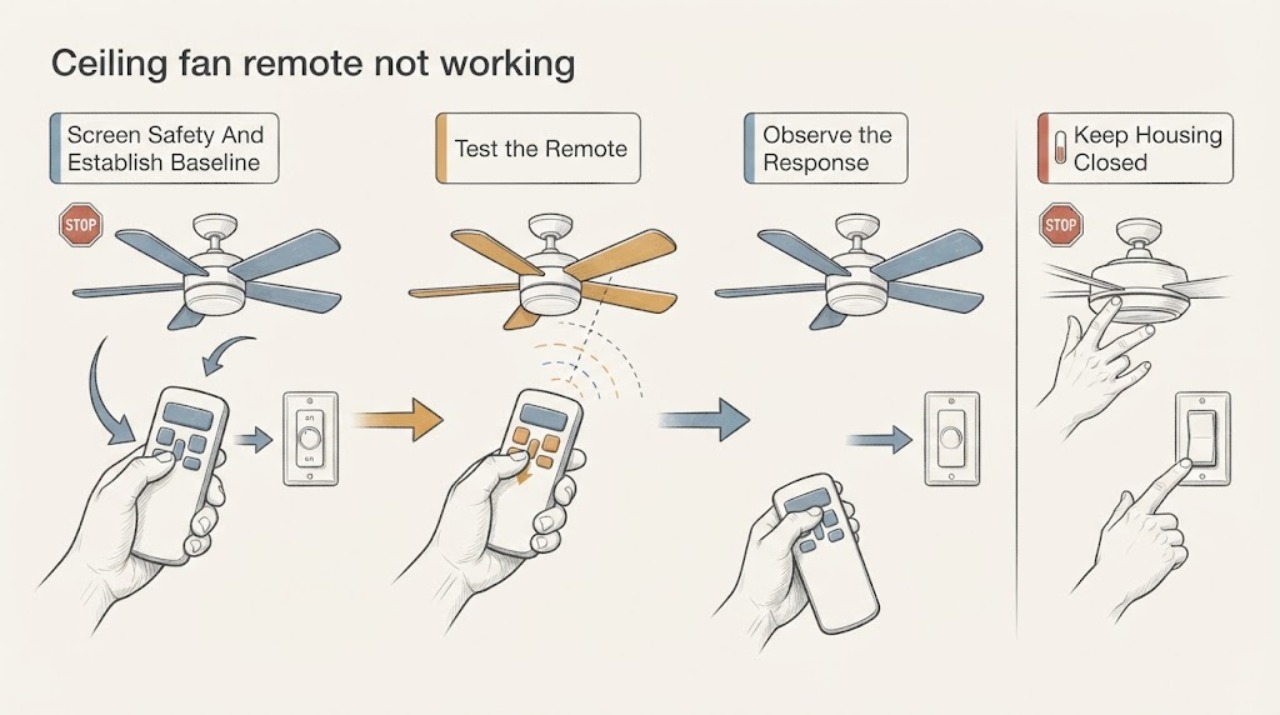
Work through in order
Diagnostic checks
Use only checks that match the exact appliance or system and its official guide.
-
Check 1
From the floor, check for burning smell, smoke, buzzing, visible damage, unusual heat, a loose wall plate, or a breaker that trips again. If none is present, turn the existing fan wall switch on and press one normal speed or light button on the remote once while watching the fan and light, if fitted.
Expected result: Record whether the remote shows any indicator (if its model has one), whether the fan light or motor responds, whether the wall switch feels normal, and whether an electrical warning or repeated breaker trip occurs.
Next step: For any warning, leave the fan off and arrange qualified electrical service. Without a warning, continue to the battery and local-control checks without removing covers or creating repeated power cycles.
Stop if: Do not keep resetting a tripping breaker, operate a hot or damaged control, remove a wall plate, open the canopy, or touch a wire.
Why this matters
Why: A warning sign or recurring breaker trip is an electrical fault boundary, not a remote-pairing problem. A normal wall switch with no fan response establishes that power or the fan control path may be involved; a responding fan gives a safe baseline for isolating the remote.
-
Check 2
Open only the handheld remote's battery compartment. Check the battery type and polarity against the Casablanca manual or markings, replace a depleted battery with the specified fresh type, and inspect for corrosion, moisture, a stuck button, or a damaged compartment.
Expected result: Record the old and new battery condition, correct polarity, any corrosion or moisture, whether a button feels stuck, and whether the remote indicator or fan responds after the battery change.
Next step: Test the remote from the normal distance with one command at a time. If it remains unresponsive, identify the fan and remote model before trying any pairing procedure; do not buy a generic replacement based only on appearance.
Stop if: Do not pry open the remote electronics, bridge the battery contacts, use a leaking battery, or spray cleaner into the remote.
Why this matters
Why: Incorrect orientation, a depleted cell, corrosion, or a damaged button can make the transmitter appear completely dead. If a fresh correctly installed battery changes nothing while the fan works locally, the remaining branches are transmitter failure, pairing, compatibility, or receiver response.
-
Check 3
If equipped, use the fan's accessible pull chain or wall control to test the motor and light separately, then return the wall control to the normal position and test one remote command. Do not climb, remove a shade, or reach into the fan housing.
Expected result: Classify the result as fan and light both respond locally, only the light responds, only the motor responds, neither responds, or the fan has no local control. Note whether the remote changes any function.
Next step: Use the result to select a branch below. If the fan is pull-chain operated with an accessory remote, leave the pull chain at the model's normal operating speed before judging the remote, as the manufacturer notes for accessory controls.
Stop if: Do not bypass a remote receiver, force a pull chain, use a ladder to reach the housing, or perform a wiring test as part of this comparison.
Why this matters
Why: Local operation with remote failure points toward the remote, pairing, compatibility, or receiver command path. Local failure of both motor and light points toward supplied power, wall control, receiver power, or fan wiring rather than only the handheld transmitter. A single failed function can indicate a function-specific control or load fault.
-
Check 4
Read the model label or documentation from a safe, already accessible location and note the remote part or model number. In the exact Casablanca owner manual, find the remote-pairing section and follow only its external button sequence; if it requires a power cycle, isolate the fan using the stated normal control and keep nearby Casablanca fans powered down as directed.
Expected result: Record the exact fan model, remote model, whether the manual describes pairing or address settings, the required power state, and the manual's success indication such as a fan or light response.
Next step: If the model-specific procedure succeeds, retest all intended functions. If it fails, if the model cannot be identified, or if the procedure requires canopy, receiver, or wiring access, stop and provide the model and observations to a qualified technician.
Stop if: Do not guess a reset sequence, change hidden receiver settings, remove the canopy, handle DIP switches, or work near wiring unless power has been isolated and the work is performed by a qualified person under the exact manual.
Why this matters
Why: A remote can have a good battery and still be unpaired or incompatible with the receiver. The Casablanca 5-series guidance says the owner manual contains the complete pairing information and warns about other powered controls; a procedure for one series must not be assumed for another.
-
Check 5
Once the battery, local-control comparison, and applicable model-specific pairing check are complete, stop testing and summarize the results instead of repeatedly cycling power or disassembling the fan.
Expected result: Record whether the remote is dead or merely ignored, whether the light and motor work locally, whether the wall switch and breaker remain stable, the model and remote numbers, and any successful or failed pairing indication.
Next step: Arrange qualified electrical service when the remote remains unusable after the exact battery and manual checks, when local controls also fail, or when any electrical warning is present. Give the technician the recorded sequence so parts are not guessed.
Stop if: Stop immediately for smoke, burning smell, heat, buzzing, visible damage, a recurring breaker trip, sparking, water near the control, or any request to expose energized wiring.
Why this matters
Why: These observations distinguish a transmitter or pairing issue from a receiver, wall-control, supply, or fan-wiring issue, but they do not prove which electrical component should be replaced. Receiver and wiring diagnosis requires safe power isolation and model-specific testing.
Use your observations
Decision map
Find the observation that best matches what you see, then follow the next safe action.
-
PATH 01Safety boundary
What you see
The fan or light responds to a wall control or pull chain, but the handheld remote has no indicator or command response after a correctly installed fresh battery.
Do this next
Confirm the exact remote and fan model numbers, then use the matching manual's pairing instructions. If pairing is unavailable or fails, have the remote/receiver compatibility checked before replacing either component.
Why this path and its safety boundary
Why it matters: Fan power and at least part of the fan control path are present; the likely branch is a failed transmitter, damaged battery compartment, or a remote that is not compatible or paired with this receiver.
Safety stop: Do not open the remote electronics, substitute a visually similar remote, or access the receiver without qualified electrical work and the correct manual.
-
PATH 02Safety boundary
What you see
The remote has a working battery or indicator and the fan has power, but the fan ignores every command; local operation works or the fan previously worked until a control change.
Do this next
Use the exact model manual to confirm pairing and the expected success response. If the procedure fails, have a technician identify and test the receiver and fan control system using the model information.
Why this path and its safety boundary
Why it matters: An unpaired transmitter, wrong address or series, receiver fault, or receiver power/control issue is more likely than a simple battery fault. A button that controls one function but not another can also indicate a function-specific load or control fault.
Safety stop: Do not change DIP or address settings by guesswork, bypass the receiver, or replace a receiver based only on connector appearance.
-
PATH 03Safety boundary
What you see
Neither the remote nor the accessible wall control or pull chain operates the motor or light, or both fan functions stopped together.
Do this next
Check the wall switch position and visually note whether the breaker is tripped, but do not keep resetting it. Arrange qualified electrical diagnosis if the breaker is stable but the fan remains dead or if it trips again.
Why this path and its safety boundary
Why it matters: The symptom is not isolated to the handheld transmitter. A wall-switch position, breaker, receiver supply, fan wiring, or internal control may be interrupting power; the remote cannot restore a fan that is not receiving its required supply.
Safety stop: Do not remove the wall plate or canopy, measure terminals, or reset a breaker repeatedly, especially with heat, smell, buzzing, or visible damage.
-
PATH 04Safety boundary
What you see
The remote or local control operates the fan motor but not the light, or operates the light but not the motor.
Do this next
Confirm the model manual's function controls and test the correct light or speed command once. If the function remains absent, stop and arrange service for the receiver, load, and wiring path.
Why this path and its safety boundary
Why it matters: Power reaches at least part of the fixture, so a completely dead remote battery is less likely. The failed function may have its own load, receiver output, control setting, or wiring issue; the symptom does not identify a safe replacement part.
Safety stop: Do not access lamp sockets, switch housing, receiver wiring, or internal controls while energized; stop for burning odor, heat, buzzing, or visible socket damage.
-
PATH 05Safety boundary
What you see
The issue began after a remote replacement, fan installation, battery-compartment damage, nearby fan installation, or an unknown control change, or the fan and remote models cannot be identified.
Do this next
Locate the model documentation and record the remote number. Use the exact manual or have a qualified technician verify compatibility and pairing; keep other nearby controlled fans off during pairing when instructed.
Why this path and its safety boundary
Why it matters: Control compatibility, lost pairing, a changed address, or an installation/control-system mismatch becomes more likely. Casablanca instructions vary by series, so a generic sequence can pair the wrong fan or fail without proving a receiver fault.
Safety stop: Do not order a generic transmitter, copy settings from another fan, or change receiver switches without model-specific documentation and safe power isolation.
-
PATH 06Safety boundary
What you see
There is smoke, a burning smell, abnormal heat, buzzing or sparking, visible damage, a recurring breaker trip, water near the control, or a loose or hot wall control.
Do this next
Leave the fan off and arrange qualified electrical service; if there is active smoke or fire, leave the area and contact emergency help from a safe location. Provide the model and the observed warning without opening the fixture.
Why this path and its safety boundary
Why it matters: The priority is an electrical or equipment safety fault. Remote pairing, battery replacement, and repeated testing could increase the hazard or obscure the cause.
Safety stop: Do not touch hot controls, reset the breaker, operate the fan, spray liquid, open the canopy, or handle exposed wiring.
Helpful context
Understand the symptom
Separate a dead remote from a fan with no power
A remote can be dead because its battery or transmitter has a problem, while the fan may still have power. The reverse can also happen: the remote may be working, but the wall switch, breaker, receiver supply, or fan control may not be. Test the fan's other accessible controls and the light, if fitted, before assuming the remote is the failed part. Do not remove the canopy or touch wiring to perform this comparison.
Casablanca pairing is model-specific
Casablanca control systems do not share one universal pairing sequence. Official Casablanca guidance directs owners to the model owner's manual, and some series use different control steps or address settings. Identify the fan model and remote number first; follow only the matching manual's external procedure, and keep other nearby Casablanca fans powered down during a pairing attempt when the manual calls for it.
Keep receiver and wiring work out of a remote reset
The receiver is commonly in the fan mounting area, where inspection can expose line-voltage wiring. Manufacturer guidance says to turn power off at the circuit breaker before wiring inspection and to use model-specific instructions. A wall-switch observation and a battery change are reasonable checks; receiver access, wiring tests, replacement, or an unexplained power fault should be handled by a qualified electrician.
Safety boundary
Stop conditions
- Stop and arrange qualified electrical service for smoke, burning smell, abnormal heat, buzzing, sparking, visible damage, water near the control, or a breaker that trips again.
- Do not remove the canopy, wall plate, receiver, or switch housing, measure terminals, handle exposed wiring, bypass the receiver, or change wiring as a remote reset.
- Do not guess a Casablanca pairing or address sequence; use the exact fan and remote manual, because control procedures vary by series.
- Do not repeatedly cycle a tripping breaker or keep operating a fan that has an electrical warning just to see whether the remote recovers.
- Stop after the safe battery, local-control, and model-identification checks if the remote remains unusable or the fan has no local response; provide the recorded observations to a qualified technician.
Only after diagnosis
Potential parts
- remote-control battery
Consider this only when the remote battery is depleted, installed incorrectly, corroded, or damaged and the exact Casablanca manual confirms the required type.
Match the battery chemistry, size, polarity, and remote model; do not substitute a leaking or visibly damaged cell. - Casablanca-compatible remote transmitter
Consider this only after a fresh specified battery and the model-specific pairing procedure fail, and diagnosis confirms the handheld transmitter is defective or unavailable.
Confirm the exact fan series, remote model, receiver system, functions, and pairing method before any replacement. - ceiling fan remote receiver or control module
Consider this only when the fan has stable power, the transmitter is confirmed compatible and paired or functional, and qualified testing shows the receiver does not accept commands.
Match the exact fan model, receiver/control version, wiring configuration, load ratings, and manufacturer service information; receiver access is electrical work. - ceiling fan wall control
Consider this only when qualified diagnosis identifies the wall control or its compatibility as the cause of missing fan power or failed control commands.
Confirm the fan control system, electrical ratings, neutral and grounding requirements, and exact model compatibility before installation.
When checks do not resolve it
Need a professional?
Arrange qualified electrical service when a fresh correctly oriented battery and the exact model-specific pairing procedure do not restore the remote, when the fan or light also fails from local controls, when the model or receiver compatibility is unknown, or when receiver, wall-switch, canopy, or wiring access would be required. Treat smoke, burning smell, sparking, abnormal heat, water near controls, visible damage, or a recurring breaker trip as an urgent electrical safety issue.
Safety scope: This article covers safe observation from the floor, a handheld battery replacement, accessible control comparison, and model identification. It does not authorize wall-plate or canopy removal, receiver access, electrical measurement, exposed-wire handling, address or DIP changes by guesswork, receiver bypass, or energized work.
Common questions
FAQ
Why is my Casablanca fan remote not working after I replace the battery?
A fresh correctly oriented battery rules out only the simplest transmitter-power problem. If the fan works from a wall control or pull chain, the remote may need the model-specific pairing procedure, may be incompatible, or may have a failed transmitter. Use the exact fan and remote manual before considering a replacement.
How do I pair a Casablanca ceiling fan remote?
Pairing depends on the Casablanca fan series and remote. Find the fan model and follow its owner manual; do not copy a sequence from another series. Official 5xxxx guidance also says to keep other nearby Casablanca control systems powered down during pairing and describes a fan or light response as the success indication when equipped.
What if both the remote and fan are not working?
Check the existing wall-switch position and visually note the breaker, then compare whether the light or any local control responds. If both motor and light remain dead, the issue may be supplied power, the wall control, receiver power, or fan wiring rather than the handheld remote. Do not repeatedly reset a tripping breaker or open the fan; arrange qualified electrical service.
Can I inspect or replace the Casablanca receiver myself?
The receiver is in the fan mounting area and inspection can expose electrical wiring. Manufacturer guidance calls for power to be off at the circuit breaker before wiring inspection. If receiver access, electrical testing, or replacement is needed, use a qualified professional with the exact model and control information.
When is a nonworking fan remote an electrical emergency?
Stop using the fan and arrange urgent electrical help for smoke, burning smell, sparking, abnormal heat, buzzing, visible damage, water near the control, or a breaker that trips again. Do not keep testing the remote or open the fixture to investigate.
Read the exact guide
Official sources
- Troubleshooting remote controls and wall switchesHunter Fan Support · Support index used to establish that remote and wall-control procedures are separated into model-specific articles.
- How do I pair my remote to a 5xxxx model Casablanca fan?Hunter Fan Support · Only for Casablanca 5xxxx models; it is evidence that pairing is model-specific, not a universal procedure for every Casablanca fan.
- Casablanca ceiling fan manual M8520-01: TroubleshootingCasablanca Fan Company · Casablanca M8520-01 owner-manual troubleshooting page; exact remote buttons and timing must not be generalized to another fan model.
- How to Install a Ceiling Fan Remote - Step by StepHunter Fan Support · Hunter remote installation guidance; older controls and Casablanca models can require different batteries, so the exact manual remains controlling.
- My fan stopped working. What do I do?Hunter Fan Support · Hunter support guidance for ceiling-fan power checks; Casablanca wiring and control details remain model-specific.
- How to Fix a Ceiling Fan That Won't Turn On, Wobbles, or Makes NoiseHunter Fan · Hunter's general ceiling-fan guidance, applied here for the shared control concepts; the Casablanca model manual controls the exact procedure.
- Casablanca Fans Consumer SupportHunter Fan Support · Official support page for Casablanca fans maintained by the Hunter Fan Team.
Community feedback
Share a repair observation
Share a plain-text repair observation. Accepted observations are published automatically; this page may take a moment to update.