
On this page
Start here
Quick answer
When a Casablanca ceiling-fan wall switch or remote stops working, first determine whether the fan, light, or both are unresponsive. Check the wall switch and known fan breaker, install a fresh remote battery in the correct orientation, and use the exact Casablanca manual for pairing or reset steps. A remote can lose pairing with its receiver, and a wall control can be powered while the receiver, wiring harness, or fan control is not responding. If the fan responds to a local switch but not the handheld remote, focus on battery, pairing, range, or the remote; if neither control works, focus on power, receiver, wiring, or the fan. With power off, check only that the blades move freely and that there is no visible damage. Do not open the canopy, change dip switches, handle wiring, or substitute a receiver until the exact model and control system are confirmed. Stop using the fan for a loose mount, exposed wiring, sparking, heat, smoke, repeated breaker trips, or any inability to isolate power safely.
Before you begin
Safety first
- This article supports external control and battery checks, one model-approved pairing attempt, and a power-off blade-freedom observation only. Licensed service handles wall-box, canopy, receiver, harness, capacitor, motor, stored-charge, and overhead mounting work.
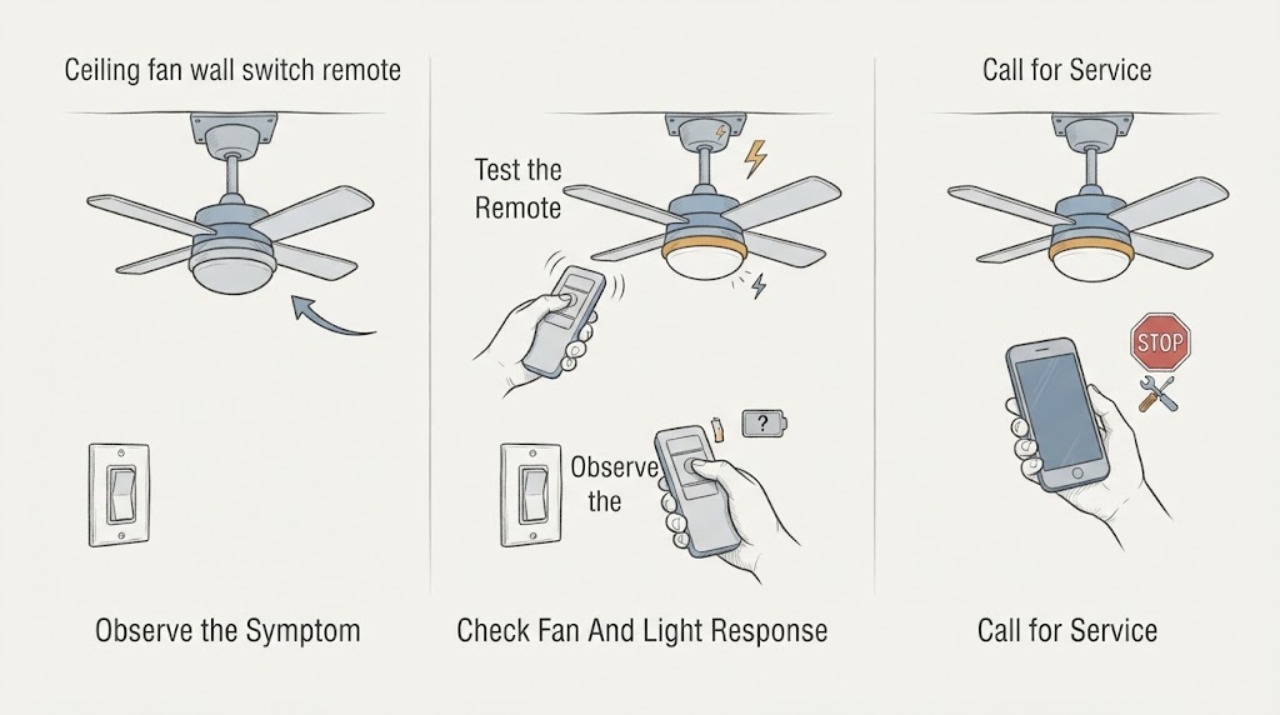
Work through in order
Diagnostic checks
Use only checks that match the exact appliance or system and its official guide.
-
Check 1
From a safe position, press the approved Casablanca fan and light controls once and observe the fixture without reaching toward the blades or housing.
Expected result: Record whether the fan, light, both, or neither responds; whether the light works but the fan does not; and whether a response occurs only at close range or after repeated presses.
Next step: Use the response pattern to choose the battery/pairing, power, or receiver branch; stop repeated commands if the fan hums, starts unexpectedly, or behaves erratically.
Stop if: Stop for sparking, smoke, burning odor, unexpected blade movement, a loose mount, or exposed wiring.
Why this matters
Why: A light and fan that both fail point toward power, wall switch, remote, receiver, or wiring. A working light with no fan response keeps the fan control, receiver, capacitor, harness, and motor in contention. Close-range-only response favors a weak battery or wireless path.
-
Check 2
Replace the handheld remote battery with the type listed in the exact Casablanca manual, observing polarity and securing the battery door before testing.
Expected result: Record a normal indicator or fan response, no response, intermittent response, response only close to the fan, or a battery compartment with corrosion or damage.
Next step: If the new battery does not restore reliable operation, follow only the model-specific pairing step; do not open the receiver or alter control coding yet.
Stop if: Do not use a swollen, leaking, corroded, or damaged battery, short the contacts, or leave the door loose.
Why this matters
Why: A restored response supports a depleted or poorly seated battery. Intermittent or close-range response keeps battery contact, transmitter, interference, or receiver issues possible. Corrosion or damage requires control replacement or service rather than repeated battery changes.
-
Check 3
Check that the wall switch supplying the Casablanca fan is on and inspect the known fan circuit breaker from a dry, safe position; make one manual-approved reset only if there is no damage or hazard.
Expected result: Record a switch or breaker that was off, a breaker that trips again, no power indication, a wall switch that feels loose or hot, or normal power with no remote response.
Next step: Leave the circuit off and call a licensed electrician for a repeated trip, heat, looseness, absent power, or wiring uncertainty; otherwise continue with the model-specific control path.
Stop if: Do not reset repeatedly, remove a wall plate, test live terminals, or touch a wet or damaged switch.
Why this matters
Why: An off switch or breaker can make both remote and wall control appear dead. A repeated trip, hot/loose switch, or no power points toward an electrical fault. Normal power with no response shifts suspicion to pairing, receiver, control wiring, or the fan electronics.
-
Check 4
Identify the Casablanca model and control system, then follow its manual's pairing or reset sequence exactly, including any required power cycle and nearby-fan isolation; do not change settings from a different Casablanca system.
Expected result: Record a confirmed pairing indication, a control response after pairing, no response, an unexpected response from another fan, or a sequence that does not match the model manual.
Next step: Stop pairing attempts after the manual's prescribed sequence and arrange model-specific service for persistent failure or cross-control behavior.
Stop if: Do not alter dip switches or receiver settings without the exact manual, pair while standing under a loose fan, or continue if the fan behaves unpredictably.
Why this matters
Why: A response after pairing supports a lost transmitter-receiver relationship. An unexpected fan response suggests overlapping control codes or nearby-fan interference. A sequence that does not fit the model or fails repeatedly means the receiver, control, or power path remains unresolved.
-
Check 5
With the fan off and the circuit breaker off, confirm from a stable position that the blades rotate freely and that the direction switch is fully engaged rather than centered; do not climb or force the rotor.
Expected result: Record smooth blade movement, stiff or scraping movement, a direction switch in an intermediate position, wobble, or a blade that is loose or damaged.
Next step: Leave power off and arrange ceiling-fan service for resistance, wobble, damage, or an unsafe mount; correct only the manual-specified direction position when the fan is secure.
Stop if: Do not force the direction switch, spin a damaged fan, climb onto an unstable ladder, or operate a fan with a loose mount.
Why this matters
Why: Free blades and a fully engaged direction switch keep the remote/receiver/control path as leading suspects. Resistance, scraping, wobble, or damage points to a mechanical or mounting problem that a new remote cannot fix.
-
Check 6
If you are qualified and the breaker is locked off, inspect only visible canopy or switch-housing connectors against the Casablanca wiring diagram; otherwise leave the housing closed and arrange electrical service.
Expected result: Record firmly seated connectors and no damage, a loose plug, burned or corroded wiring, an unknown receiver, or wiring that cannot be safely identified.
Next step: Keep power off and provide the model, photos, control behavior, and wiring observations to a licensed electrician; do not restore power with covers open.
Stop if: Do not test live wiring, handle a receiver, tighten wire nuts without training, or touch a capacitor or other internal component.
Why this matters
Why: A loose connector or failed receiver can make a good remote appear dead. Burn marks, corrosion, incorrect wiring, or unknown parts create a shock/fire risk and cannot be safely resolved by pairing or battery changes.
Use your observations
Decision map
Find the observation that best matches what you see, then follow the next safe action.
-
PATH 01Safety boundary
What you see
The fan and light respond normally after installing the correct fresh remote battery.
Do this next
Secure the battery door, keep the model number with the remote, and monitor for recurrence; arrange service if the remote again works only at close range.
Why this path and its safety boundary
Why it matters: The original fault was likely battery seating or battery depletion rather than the wall switch or receiver.
Safety stop: Do not use a leaking or corroded battery or continue if the control becomes hot.
-
PATH 02Safety boundary
What you see
The battery is good, power is present, and the Casablanca-specific pairing sequence restores fan and light control.
Do this next
Document the correct pairing procedure and keep other nearby remote fans isolated during future pairing; call service if pairing is lost repeatedly.
Why this path and its safety boundary
Why it matters: A lost transmitter-receiver pairing was more likely than a failed wall switch or capacitor.
Safety stop: Do not change dip switches or pair an unknown control to the fan.
-
PATH 03Safety boundary
What you see
The wall switch or breaker was off and the fan returns after one safe restoration, with no trip, heat, or damage.
Do this next
Monitor normal operation and arrange electrical diagnosis if the supply interruption returns or the control feels warm or loose.
Why this path and its safety boundary
Why it matters: An interrupted supply explains the dead remote, but it does not explain a breaker that trips, a hot switch, or recurring loss of power.
Safety stop: Do not keep resetting a breaker or use a damaged wall switch.
-
PATH 04Safety boundary
What you see
The remote battery and pairing are not the issue, and neither the fan nor light responds while the breaker appears on.
Do this next
Leave electrical access closed and have a licensed electrician verify the circuit, switch, receiver, and harness with the exact Casablanca model.
Why this path and its safety boundary
Why it matters: A wall switch, receiver, wiring connection, or loss of power inside the circuit is more likely than a fan-only capacitor fault.
Safety stop: Do not remove the wall plate or canopy, test live terminals, or substitute a receiver without diagnosis.
-
PATH 05Safety boundary
What you see
The light responds but the fan does not, the blades move freely, and the remote or wall control sends a command.
Do this next
Do not buy a remote as the first repair; provide the one-function response and model data to qualified service for fan-circuit diagnosis.
Why this path and its safety boundary
Why it matters: The fixture has some power, but the fan's receiver output, wiring harness, speed control, capacitor, or motor path remains possible.
Safety stop: Do not leave a humming motor energized or open the switch housing to bypass the receiver.
-
PATH 06Safety boundary
What you see
The blades resist movement, scrape, wobble, or the mount, canopy, downrod, or blade is loose or damaged.
Do this next
Keep the circuit off and obtain qualified ceiling-fan service before using the fan again.
Why this path and its safety boundary
Why it matters: A mechanical or overhead mounting issue is more likely than a remote communication fault and may create a falling-object or motor-overload hazard.
Safety stop: Do not climb, force blades, tighten overhead hardware from an unstable position, or operate a damaged fan.
-
PATH 07Safety boundary
What you see
Power-off inspection finds a loose connector, burned or corroded wire, unknown receiver, or repeated breaker trip.
Do this next
Leave power off and call a licensed electrician with the exact model and photos; do not restore power until the defect is assessed.
Why this path and its safety boundary
Why it matters: The control or power path may be damaged; repeated pairing or battery changes cannot correct an electrical fault.
Safety stop: Do not handle damaged conductors, test energized wiring, or tape over a burned connector.
Helpful context
Understand the symptom
Separate a dead remote from a dead fan
A remote that does nothing can have a depleted battery, lost pairing, interference, or a failed transmitter. If the light and fan both work from another approved control, the receiver is receiving power and the remote path is the leading check. If neither the wall switch nor remote produces a response, a breaker, switch, receiver, wiring, or fan-control problem is more likely. A light that works while the blades do not turn means only part of the fan circuit is responding; it does not prove that the remote is at fault.
Pair only the control system identified for the fan
Casablanca control systems vary by model and age. Some use a handheld transmitter and receiver with a prescribed pairing sequence; others use a wall control or a different receiver. Use the exact manual and model number before changing dip switches, cycling power, or replacing a control. During a pairing attempt, other nearby remote-controlled fans can interfere, so follow the manual's isolation instructions.
Keep electrical and overhead work out of the quick checks
Battery replacement, external button checks, and a known-safe breaker check are ordinary observations. Canopy, switch-housing, receiver, and wall-box wiring are electrical work; the breaker must be off and the wiring must be identified before any inspection. A loose ceiling mount or exposed conductor is also a physical hazard. When the control path is not restored by the manual-approved steps, a licensed electrician should diagnose it rather than guessing at a receiver or wall switch.
Safety boundary
Stop conditions
- Turn the fan off and disconnect power at the breaker before any canopy, receiver, switch-housing, or wiring access; a wall switch alone is not sufficient for electrical work.
- Do not alter dip switches, substitute a receiver or wall control, bridge a capacitor, or change wiring without the exact model instructions and qualified electrical work.
- Do not operate a fan with a loose mount, cracked blade, exposed wire, scorch mark, hot housing, smoke, sparking, or a repeated breaker trip.
- Do not force the direction switch or rotor, pair a remote while a fan is unstable, or continue cycling power when the fan behaves unpredictably.
- For gas-free electrical hazards such as smoke, heat, sparking, or exposed conductors, keep clear, leave power off if safe, and obtain licensed electrical service.
Only after diagnosis
Potential parts
- Casablanca remote battery
Consider this category only when the remote has no or intermittent response and the exact manual identifies a depleted, incorrectly installed, or corroded battery as the cause.
Match the exact control's battery type and polarity; do not use damaged or leaking cells or short the contacts. - Casablanca handheld remote or fan wall control
Consider this category only when correct power, battery, pairing, and receiver checks show the transmitter or wall control itself is not sending commands.
Confirm the exact Casablanca model and control system; a remote for another series may not pair or provide compatible functions. - Casablanca remote receiver or wiring harness
Consider this category only when qualified diagnosis confirms the receiver or harness is not passing valid control or motor signals after power and pairing are verified.
Match the exact model, connector arrangement, control protocol, and manual; electrical isolation and overhead access are required. - Casablanca capacitor or motor assembly
Consider this category only when the control responds and qualified testing identifies a no-start, one-speed, or motor fault rather than a remote or receiver problem.
Confirm exact motor and control specifications, capacitor voltage/capacitance, lead arrangement, and approved replacement procedure; do not substitute by appearance.
When checks do not resolve it
Need a professional?
Arrange qualified electrical or ceiling-fan service when the correct battery, power, model-specific pairing, direction, and blade-freedom checks do not restore the Casablanca remote or wall switch, when the fan and light respond differently, when pairing fails repeatedly, or when the receiver, harness, capacitor, motor, or wall-box wiring is suspected. Seek urgent service for a loose mount, exposed wiring, smoke, burning odor, sparking, hot housing, repeated breaker trip, or a fan that cannot be isolated safely.
Safety scope: This article supports external control and battery checks, one model-approved pairing attempt, and a power-off blade-freedom observation only. Licensed service handles wall-box, canopy, receiver, harness, capacitor, motor, stored-charge, and overhead mounting work.
Common questions
FAQ
Why is my Casablanca ceiling-fan remote not working?
The remote may need a fresh battery or model-specific re-pairing, but the wall switch, breaker, receiver, wiring harness, control, or fan can also be responsible. Determine whether the light and fan respond, then follow the exact Casablanca control procedure before replacing a part.
What should I check first when the Casablanca remote stops working?
Check the fan and light response, the wall switch and known breaker, and the remote battery orientation. If power is present, use only the exact model's pairing instructions. Do not open the canopy as a first step.
Can a Casablanca remote lose pairing?
Yes. Casablanca control systems can use model-specific transmitter and receiver pairing. Follow the exact manual or support article for the identified system; do not apply a W-52 or another model's sequence to an unknown fan.
The light works but the Casablanca fan does not respond. Is the remote bad?
Not necessarily. Some power reaches the fixture, but the fan's receiver output, wiring harness, speed control, capacitor, or motor may still be faulty. Check the control response and blade freedom safely, then arrange qualified diagnosis rather than buying a remote first.
Can I change the Casablanca remote dip switches?
Only when the exact model manual or support procedure calls for it and power is safely controlled. Dip-switch settings are not universal; changing them by guesswork can create pairing or cross-control problems.
When should I call an electrician for a Casablanca fan remote problem?
Call when battery and model-specific pairing do not restore control, when the breaker trips, a wall switch is hot or loose, wiring or the receiver is suspected, or the fan and light respond differently. Seek urgent service for smoke, sparking, exposed wires, a loose mount, or a fan that cannot be isolated safely.
Read the exact guide
Official sources
- M8509-01 Casablanca Ceiling Fan Installation and Operation ManualCasablanca Fan Company · Official Casablanca Fan Company manual hosted in the Hunter support asset system; exact model instructions control a particular fan.
- My fan stopped working. What do I do?Hunter Fan Support Site and Help Center · Official Hunter guidance used for general ceiling-fan control and safety distinctions; non-Hunter owners should confirm steps with the Casablanca manual.
- How do I reset my Casablanca W-52 Adapt Touch Remote?Hunter Fan Support Site and Help Center · Official support article for the Casablanca W-52 Adapt Touch system used on specified older pull-chain fans; it must not be applied to an unknown Casablanca control system.
- Remote ControlCasablanca Fan Company · Official fan remote manual hosted by Hunter; exact Casablanca model and control system take precedence over this related manual.
Community feedback
Share a repair observation
Share a plain-text repair observation. Accepted observations are published automatically; this page may take a moment to update.