
On this page
Start here
Quick answer
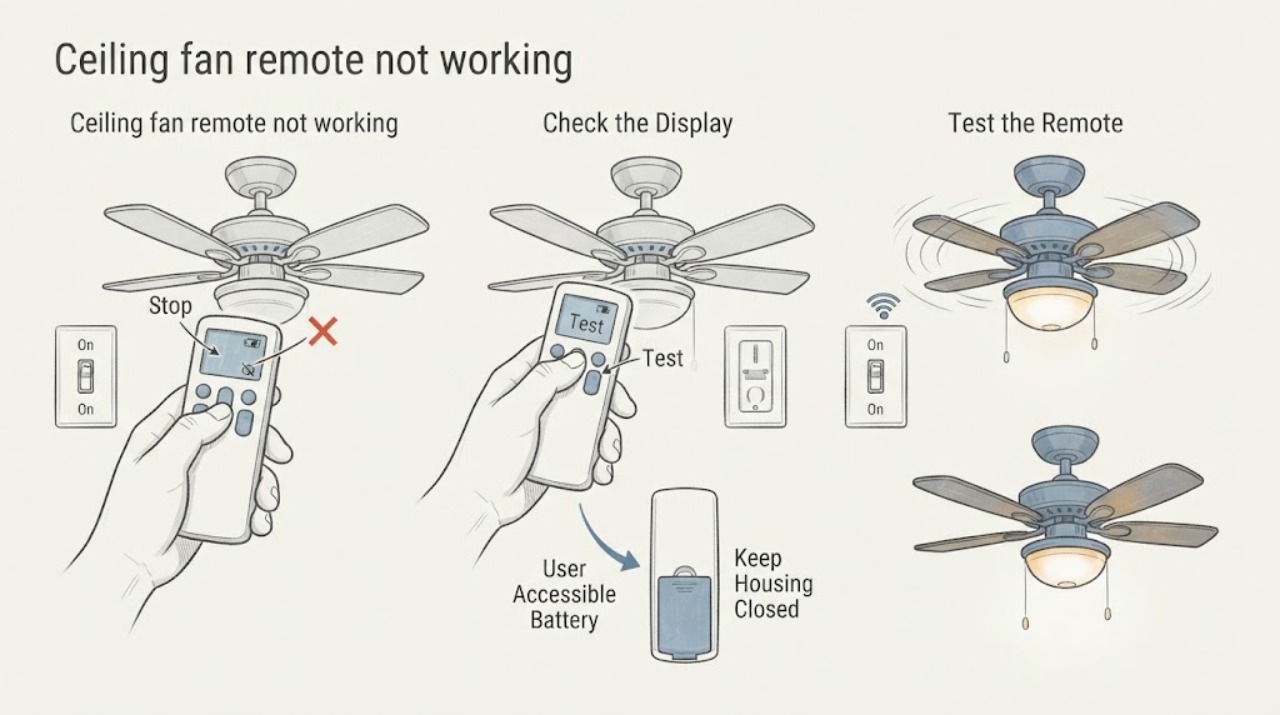
Keep the diagnosis at floor level. First observe whether the ordinary wall switch is on and whether the fan or light responds without the handheld remote. Then press one normal remote button once and look for an indicator or fan/light response; inspect only the remote's ordinary user-accessible battery compartment and use the exact battery type specified for that model. If the wall switch powers the fan or light but the remote stays unresponsive after that battery check, use the model manual or manufacturer support for pairing and compatibility guidance. Do not climb, open the canopy or receiver, touch wiring or a capacitor, live-test, bypass a control, or repeatedly cycle power. Stop immediately for heat, odor, smoke, sparking, abnormal noise, or unexpected movement and call an electrician.
Work through in order
Diagnostic checks
Use only checks that match the exact appliance or system and its official guide.
-
Check 1
From the floor, confirm the ordinary wall switch or wall control is in its normal on position, then observe the fan and its light during one normal control attempt; do not remove the wall plate or operate a dimmer outside its normal use.
Expected result: Record whether the light works, the fan runs, both respond, or neither responds, and whether anything looks or sounds abnormal.
Next step: Continue to the remote indicator and battery observations only when there is no hazard and the fixture has ordinary power behavior; otherwise stop and request electrical service.
Stop if: Stop for heat, burning odor, smoke, sparking, an unexpectedly moving fan, visible damage, or abnormal electrical noise; leave the control untouched and call an electrician.
Why this matters
Why: If either fixture function works while the handheld remote does not, the remote path is the leading branch. If neither function responds, the problem may be upstream power, wall control, or fan electronics and is not a battery-only repair.
-
Check 2
Standing clear of the blades, point the handheld remote at the fan and press one normal fan or light button once; do not keep pressing buttons or cycle the wall switch repeatedly.
Expected result: Note whether the remote's indicator light or normal beep appears and whether the fan, light, neither, or only one function responds.
Next step: If the response is absent but the wall control still powers a function, inspect only the ordinary battery compartment and check the model manual for any pairing guidance that does not require unsafe access.
Stop if: Stop if the fan starts unexpectedly, the remote or wall control becomes hot, or any odor, smoke, sparking, or abnormal sound appears; call an electrician.
Why this matters
Why: No indicator suggests a remote power or handset issue. An indicator with no fixture response makes pairing, model compatibility, or the receiver a possibility; those require model-specific support or a professional, not receiver access.
-
Check 3
With the remote in hand, inspect only its ordinary user-accessible battery compartment; compare the battery orientation and type with the remote or model manual, and replace it only with the specified type if it is depleted or visibly leaking.
Expected result: Record whether the battery is missing, reversed, depleted, loose, or affected by visible leakage or corrosion, and whether the remote indicator returns after the single battery check.
Next step: Retest one normal button from the floor. If the remote remains unresponsive, provide the model and the observations to manufacturer support or an electrician and ask about a compatible remote or wall control.
Stop if: Stop handling a leaking or damaged battery, keep it away from skin and children, and follow local battery-disposal guidance; call a professional if the remote is damaged or any electrical hazard is present.
Why this matters
Why: A restored indicator supports a battery or handset-power cause. A correctly installed specified battery with no indicator makes the remote itself or a model-specific control fault more likely; it does not justify opening the fan or receiver.
-
Check 4
From a safe standing position, compare the fan and light separately during their one normal command, listening for the usual response without touching the fan, canopy, housing, or wiring.
Expected result: Record whether the fan runs but the light does not, the light works but the fan does not, both respond intermittently, or there is a hum, click, buzz, grinding sound, or no sound at all.
Next step: Give the exact pattern, model information, remote indicator result, and battery result to manufacturer support or an electrician; do not access a capacitor, receiver, canopy, or switch wiring.
Stop if: Stop immediately for heat, odor, smoke, sparking, unexpected movement, or a worsening sound and arrange electrical service.
Why this matters
Why: A split response can indicate a control, light, or receiver path rather than a simple battery issue. New humming, buzzing, grinding, heat, or odor is a stop signal, not evidence to keep testing.
Use your observations
Decision map
Find the observation that best matches what you see, then follow the next safe action.
-
PATH 01Next step
What you see
The wall control still allows the fan or light to work, but the remote has no indicator after the specified battery check.
Do this next
Treat this as a handset or battery-path issue; use the model manual or manufacturer support for a compatible remote, and do not access the ceiling receiver.
-
PATH 02Next step
What you see
The remote indicator responds, but neither the fan nor the light responds while the wall control still powers the fixture.
Do this next
Pairing, compatibility, or the receiver may be involved. Provide the model and the observed pattern to support or an electrician; use only model-specific, safe guidance and do not open the canopy.
-
PATH 03Next step
What you see
Neither the wall control nor the remote produces a normal fan or light response.
Do this next
Stop the battery-only troubleshooting path and request an electrician to assess power and controls. Do not remove covers, live-test, bypass controls, or repeatedly reset the circuit.
-
PATH 04Next step
What you see
There is heat, a burning odor, smoke, sparking, visible damage, abnormal noise, or unexpected fan movement.
Do this next
Stop using the fan and controls, keep clear of the fixture, and contact an electrician; use emergency help if there is active smoke or fire.
Helpful context
Understand the symptom
What the pattern tells you
A remote can fail independently of the fan's power path, so the most useful first distinction is whether the wall control still leaves the fan or light available. A remote with no visible indicator after a normal battery check points toward the handheld control or its battery; an indicator with no response from the fan or light can point toward pairing, compatibility, or the receiver. Those are model-specific decisions, not a reason to open the ceiling assembly.
Stay within the safe boundary
All checks below are visual or ordinary user controls from the floor. Do not use a ladder, reach the canopy, remove a receiver, open a switch box, touch conductors, access a capacitor, or perform live electrical testing. A single normal control observation is enough; repeated energizing or resets can hide a developing fault.
What to have ready for service
If support or an electrician is needed, record the fan brand and model from a label or the manual, whether the wall switch changes anything, whether the remote indicator lights, whether the fan and light fail together, and any heat, odor, smoke, sparking, or unusual sound. Do not remove a cover to find the model or receiver.
Only after diagnosis
Potential parts
- ceiling fan remote
Consider this only if the wall control still powers a fan or light, the specified battery is correctly installed, and the remote has no usable indicator or response.
Match the exact fan model and control system in the manual or manufacturer support information; a visually similar remote is not proof of compatibility. - fan remote receiver
Consider this only after model-specific support or an electrician confirms a receiver fault when the remote indicator works but the fan and light do not respond.
Receiver access and electrical connections are professional work here; confirm the exact model and approved part before any replacement. - fan wall control
Consider this only when the wall control itself shows a distinct failure and a qualified diagnosis separates it from the remote, receiver, or supply.
Confirm the fan control system and model-specific compatibility; do not substitute a dimmer or remove the wall control for this check.
When checks do not resolve it
Need a professional?
Have this ready
- Provide the fan brand and model from a label or manual, wall-control result, fan-versus-light response, remote-indicator result, battery type and condition, and the exact sound or hazard observed.
Common questions
FAQ
Why does the fan work from the wall control but not the remote?
That pattern makes the handheld battery, handset, pairing, compatibility, or receiver path more likely than a total loss of fixture power. Check only the remote's ordinary battery compartment, then use model-specific support rather than opening the ceiling assembly.
What if the remote light comes on but the fan does not respond?
The remote is producing an indication but communication or the fan's control path may still be at fault. Record whether the light and fan fail together, confirm the model, and ask support or an electrician about pairing, compatibility, or receiver diagnosis.
Should I open the canopy to inspect the receiver?
No. Receiver, wiring, and capacitor access are outside this safe user-level check. A qualified electrician can isolate power and diagnose those parts when the simple observations do not identify a battery or handset issue.
Read the exact guide
Official sources
- How to Fix a Ceiling Fan That Won't Turn On, Wobbles, or Makes NoiseHunter Fan · The remote section identifies batteries, pairing, receiver, and fan power as possible causes and directs users to model-specific guidance; the safety section calls for professional help around electrical hazards.
- My fan stopped working. What do I do?Hunter Fan Support · Manufacturer support page confirms checking the ordinary power switch and using the model manual or support when basic troubleshooting does not restore operation.
Community feedback
Share a repair observation
Share a plain-text repair observation. Accepted observations are published automatically; this page may take a moment to update.