
On this page
Start here
Quick answer
For a Hampton Bay ceiling fan whose wall switch and remote do not operate the fan, first confirm that the wall switch is supplying power and is an ordinary on/off switch rather than a dimmer or variable-speed control. Then replace or correctly seat the remote battery, test from the normal operating range, and check that the transmitter and receiver use the same code only according to the exact model instructions. A remote cannot control a fan if its receiver is not powered, and a wall control or receiver from a different Hampton Bay system may not be compatible. If the fan remains unresponsive after these external checks, if the wall switch is warm, loose, buzzing, damaged, or sparking, or if the receiver or ceiling wiring needs access, leave power off and arrange qualified electrical or ceiling-fan service. Do not open the switch box or canopy while energized, bypass the receiver, splice wires, or use a dimmer as a substitute.
Before you begin
Safety first
- This article supports checking an external breaker and wall switch from a safe position, inspecting a remote battery and housing, testing normal commands, identifying the control system from available documentation, and performing one exact-model pairing attempt only when receiver access is not hazardous. A qualified professional must handle wall-box and canopy wiring, receiver installation or replacement, live testing, switch replacement, and motor or light-control repair.
Work through in order
Diagnostic checks
Use only checks that match the exact appliance or system and its official guide.
-
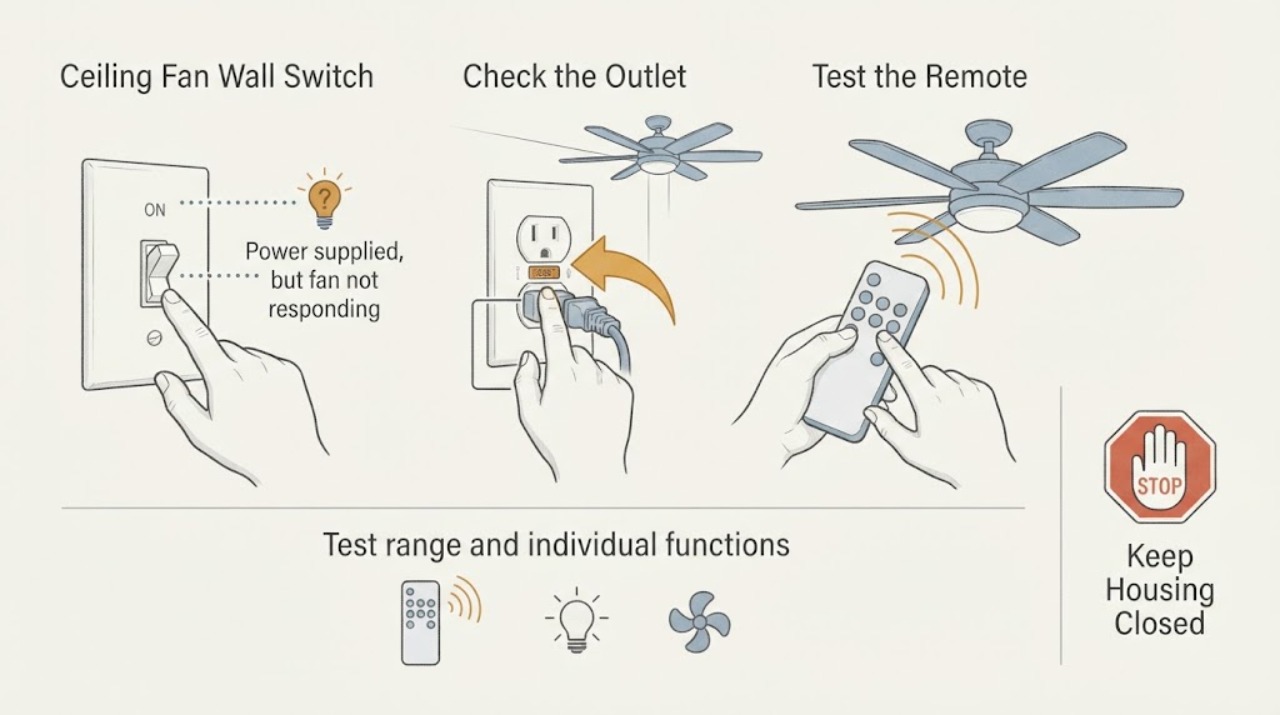
Confirm the wall switch and fan power state
From a dry, safe position, check that the wall switch controlling the fan is on and that the fan's labeled breaker has not tripped. Observe whether the fan light, indicator, or any response changes when the wall switch is toggled once. Do not remove the switch plate or open the fan canopy.
Expected result: The switch is off; the breaker is tripped; the wall control is a dimmer or variable-speed control; the light responds but the motor does not; or nothing responds.
Next step: Use only the compatible wall-switch type identified by the fan manual. If the breaker trips again or power is uncertain, leave the fan off and arrange qualified electrical service.
Stop if: Do not repeatedly reset the breaker, install a dimmer as a test, touch a warm or damaged switch, or open the wall box.
Why this matters
Why: A remote cannot control a receiver with no power. A dimmer or variable-speed wall control may be incompatible with a remote receiver, while a light-only response can indicate a motor, receiver, or control-path problem rather than a dead transmitter.
-
Check the remote battery and external condition
Inspect the hand-held remote for a low-battery indication, corrosion, liquid damage, cracked housing, or stuck buttons. Replace the battery only with the type specified for the exact remote, observing its polarity, and keep the remote dry. Press one normal function button from the usual room position.
Expected result: The remote indicator lights; it remains dark; the battery compartment is corroded or wet; the fan responds only after a new battery; or the fan remains unresponsive.
Next step: Keep a damaged or leaking remote out of use. If the remote appears to transmit but the fan does not respond, continue with the receiver and compatibility checks without opening the ceiling assembly.
Stop if: Do not bridge battery contacts, use a leaking battery, immerse the remote, or open the transmitter electronics.
Why this matters
Why: A dark indicator or restored response after a correct battery replacement makes the battery or contact path more likely. Corrosion or liquid damage can disable the transmitter. A lit transmitter with no fan response shifts attention to wall power, receiver compatibility, code matching, or the fan itself.
-
Test range and individual functions
With the wall switch on and no electrical hazard present, stand within the normal operating range described in the fan manual and press one function at a time: fan off/on, one speed, and light if fitted. Note whether any command works, whether the light and motor behave differently, and whether nearby fans respond instead.
Expected result: No function works; only the light works; only the fan works; response occurs only nearby; or another fan responds.
Next step: Record the working and failed functions. If no function responds at normal range after the battery check, verify pairing and receiver compatibility rather than repeatedly pressing buttons.
Stop if: Do not climb to the fan, remove the canopy, or keep operating a fan that starts unexpectedly or has a damaged light or motor.
Why this matters
Why: Partial response can isolate the fault to a motor, light, receiver channel, or control command. Short-range response suggests battery, obstruction, or transmitter weakness. Another fan responding suggests a code collision or mismatched system.
-
Verify transmitter and receiver compatibility
Find the fan model and the remote or receiver model from the manual, labels, or documentation already available without disassembly. Check whether the fan was designed for a remote-only system, a wall control and receiver kit, or a simple on/off wall switch. Do not assume a universal remote or a same-brand wall control is compatible.
Expected result: The receiver is missing from the expected system; the fan and replacement remote are different systems; the wall control is a dimmer or variable control; or the model and receiver relationship cannot be confirmed.
Next step: Use the exact fan and control manual to identify a compatible system. If access to the receiver or wiring is required, turn power off at the appropriate external disconnect and arrange qualified service unless the model instructions clearly authorize a safe, user-level check.
Stop if: Do not splice a new receiver, bypass an existing receiver, or open the canopy or wall box to guess at compatibility.
Why this matters
Why: A remote requires a compatible, powered receiver. A wall control intended for another receiver can leave the fan unresponsive even when its battery and power are good. An unknown receiver relationship is an identification gap, not proof that the fan motor failed.
-
Check code matching or pairing only from the exact instructions
If the exact Hampton Bay manual documents user-accessible pairing, turn fan power off as instructed and compare the transmitter code with the receiver code without touching house wiring. Restore power and complete only the documented pairing sequence, then test one command. Do not change receiver settings if they are inside an energized canopy or inaccessible enclosure.
Expected result: The transmitter and receiver codes match; the pairing sequence produces a response; no response occurs; the receiver cannot be accessed safely; or the fan responds to another remote.
Next step: Stop after one model-approved pairing attempt. If the system remains unresponsive or receiver access requires wiring work, leave power off and arrange qualified ceiling-fan or electrical service.
Stop if: Do not work inside the canopy while energized, change wiring colors or connections, use an unverified code sequence, or repeatedly reprogram the system.
Why this matters
Why: A mismatch or lost pairing can prevent commands from reaching the fan. No response with confirmed pairing keeps wall power, receiver failure, wiring, or fan-control failure in consideration. Another remote response suggests code conflict or transmitter identification trouble.
-
Document the failure for service
Record the complete fan model, wall-control type, remote and receiver model if known, breaker and wall-switch behavior, battery result, operating-range result, which functions respond, code or pairing result, and any unusual sound, heat, odor, or visible damage. Keep the fan off if it starts unexpectedly or the switch or canopy is damaged.
Expected result: The evidence points to a wall-switch supply issue, remote battery or transmitter issue, code mismatch, receiver incompatibility or failure, motor or light control fault, or house wiring concern.
Next step: Arrange qualified electrical service for the switch, breaker, wall box, canopy wiring, receiver wiring, or unexpected energizing. Arrange qualified fan service for a compatible-system, motor, light, or receiver diagnosis.
Stop if: Do not order a remote or receiver solely from appearance, return a fan to use after an intermittent response, or continue testing after a hazard appears.
Why this matters
Why: A structured record lets a technician separate the low-voltage control path from branch power and avoids replacing a remote when the wall control or receiver is the actual problem.
Use your observations
Decision map
Find the observation that best matches what you see, then follow the next safe action.
-
PATH 01Next step
What you see
The wall switch is off, a breaker trips, a dimmer or variable-speed control is installed, or the fan has no response from either control.
Do this next
Use only the wall-control type specified by the fan system. Leave the circuit off for repeated trips or damaged controls and arrange qualified electrical service.
Why this path and its safety boundary
Why it matters: The receiver may not have compatible or stable power, so remote pairing and battery checks cannot solve the immediate problem.
-
PATH 02Next step
What you see
The remote indicator is dark, the battery is corroded or weak, or the fan responds after the exact replacement battery is installed.
Do this next
Keep a damaged remote out of use and use a model-confirmed replacement if needed. If the transmitter lights but the fan remains dead, continue to receiver and code diagnosis.
Why this path and its safety boundary
Why it matters: The transmitter battery or contact path is more likely than the receiver or wall switch.
-
PATH 03Next step
What you see
The fan has power and the remote battery is good, but no command works, another fan responds, or the replacement remote and receiver belong to different systems.
Do this next
Use the exact model pairing instructions for one attempt. If the receiver is inaccessible or the fan remains unresponsive, arrange qualified service rather than changing wiring or installing a guessed receiver.
Why this path and its safety boundary
Why it matters: A code mismatch, lost pairing, receiver compatibility problem, or wrong control system is more likely than a simple dead battery.
-
PATH 04Next step
What you see
The light responds but the motor does not, the motor responds but the light does not, or response occurs only at very short range.
Do this next
Record the specific working and failed functions and arrange fan service if the correct battery and pairing do not restore full operation. Do not bypass the nonworking channel.
Why this path and its safety boundary
Why it matters: A receiver channel, motor or light path, command, battery, or transmitter-range problem is more likely than a total loss of fan power.
-
PATH 05Safety boundary
What you see
The wall switch or canopy is warm, loose, discolored, buzzing, wet, sparking, smoking, or the fan starts without a command.
Do this next
Stop using the fan, leave power off if it can be done without touching the hazard, and arrange qualified electrical service. Leave the area and seek emergency help for smoke, active arcing, or fire.
Why this path and its safety boundary
Why it matters: The symptom is an electrical or control safety hazard, not a routine pairing problem.
Safety stop: Do not touch damaged parts, open the wall box or canopy, or attempt a receiver bypass.
Helpful context
Understand the symptom
The wall switch supplies power; the remote sends commands
A wall switch that is off, a dimmer that is incompatible, or a tripped supply can make a working remote appear dead. Once the fan has power, the transmitter still needs a good battery and a receiver that recognizes its code. Hampton Bay systems vary, so the exact fan and remote manual controls the pairing method and compatibility.
Do not treat every Hampton Bay remote as interchangeable
A wall switch, hand-held remote, and receiver are a control system. The same brand name does not prove that two systems communicate, and some fans are designed for a simple on/off wall switch while all speed and light functions come from the remote. Confirm the fan model and receiver type before considering any replacement part.
Electrical symptoms change the safe next step
Stop if the switch or canopy is warm, loose, discolored, buzzing, sparking, wet, or associated with a burning odor. A remote problem is not a reason to open a ceiling box or bypass a receiver. Leave the fan off and use qualified electrical service when wiring, the receiver, or the switch enclosure needs inspection.
Safety boundary
Stop conditions
- Stop immediately for a warm, loose, wet, discolored, buzzing, smoking, or sparking wall switch or canopy, a burning odor, exposed wiring, or a fan that starts unexpectedly; leave power off and seek qualified help.
- Do not open the wall switch box or fan canopy while energized, test live conductors, splice wires, bypass the receiver, or install a dimmer or variable-speed control as a workaround.
- Do not assume that Hampton Bay remotes, wall controls, and receivers are interchangeable; confirm the exact fan and control system before ordering parts.
- Perform no more than one model-approved battery replacement and pairing attempt, and stop if receiver access or wiring inspection is required.
- Arrange qualified electrical service for branch power, breakers, wall controls, house wiring, receiver wiring, or hazards; arrange qualified fan service for compatible-system, receiver, motor, or light-control diagnosis.
Only after diagnosis
Potential parts
- Hampton Bay remote transmitter
Consider this category only when the fan has compatible power and receiver, the original transmitter has a failed battery or visible damage, and qualified or model-specific diagnosis supports transmitter replacement.
Confirm the complete fan, receiver, and remote model relationship; same-brand appearance does not prove compatibility. - Hampton Bay remote receiver
Consider this category only after wall power, control type, battery, and pairing checks are correct and qualified diagnosis identifies an incompatible or failed receiver.
Confirm the exact fan system, motor type, control functions, and approved receiver; receiver installation requires power isolation and may require qualified service. - ceiling-fan wall control
Consider this category only when the installed wall switch is incompatible or failed and the fan's exact manual identifies an approved wall control.
Confirm whether the fan requires a simple on/off switch, a paired wall control, or remote-only operation; electrical installation requires qualified service. - remote control battery
Consider this category only when the exact transmitter specifies a replaceable battery and the indicator or range behavior supports a depleted battery.
Confirm the remote model, battery type, polarity, and condition; do not use a leaking or damaged battery.
When checks do not resolve it
Need a professional?
Arrange qualified electrical service when the breaker trips, the wall switch is a dimmer or variable control, the switch or wiring is loose or damaged, receiver access requires opening a box or canopy, or the fan starts unexpectedly. Arrange qualified Hampton Bay or ceiling-fan service when the remote battery and model-approved pairing are correct but the fan remains unresponsive, only one function works, the receiver is incompatible or suspected failed, or the motor or light path needs diagnosis. Stop immediately for smoke, sparking, burning odor, heat, water, or exposed wiring.
Safety scope: This article supports checking an external breaker and wall switch from a safe position, inspecting a remote battery and housing, testing normal commands, identifying the control system from available documentation, and performing one exact-model pairing attempt only when receiver access is not hazardous. A qualified professional must handle wall-box and canopy wiring, receiver installation or replacement, live testing, switch replacement, and motor or light-control repair.
Common questions
FAQ
Why are my Hampton Bay wall switch and remote both not working?
The receiver may not have power, the wall switch may be an incompatible dimmer or variable control, the remote battery may be weak, or the transmitter and receiver may not be paired or compatible. Check external power, switch type, battery, range, and exact system documentation before opening any wiring enclosure.
Can a dimmer wall switch stop a Hampton Bay remote from working?
Yes. Hampton Bay documentation warns that remote receiver systems may require a simple on/off wall switch and may not be compatible with variable controls or dimmers. Use the exact fan manual to identify the approved wall control; do not install a dimmer as a test.
What should I check on a Hampton Bay remote first?
Check the battery and its condition, the remote indicator if present, and response from the normal operating range. If the battery is correct and the remote transmits but the fan does not respond, check wall power and receiver pairing or compatibility rather than repeatedly pressing buttons.
How do I pair a Hampton Bay remote with its receiver?
Pairing is model-specific. Use only the exact fan and remote instructions, isolate power before any receiver access, and perform no more than one documented pairing attempt. If the receiver is inside an inaccessible canopy or the fan remains unresponsive, arrange qualified service.
Can I use any Hampton Bay remote with my ceiling fan?
No. A remote must communicate with a compatible receiver and motor-control system. Hampton Bay's troubleshooting guidance warns that system type matters, including differences for DC-motor fans. Confirm the complete fan and receiver model before considering a replacement.
When should I call an electrician for a Hampton Bay remote problem?
Call when the breaker trips, the wall switch is warm, loose, buzzing, damaged, or incompatible, receiver or wall-box wiring needs access, the fan starts unexpectedly, or the remote and wall switch remain ineffective after the exact battery and pairing checks. Stop immediately for smoke, sparking, burning odor, water, or exposed wiring.
Read the exact guide
Official sources
- Victoria by Hampton BayHampton Bay · Official Hampton Bay fan use-and-care manual for the documented Victoria system; used for control-system distinctions and pairing concepts, not as universal instructions for every Hampton Bay fan.
- USE AND CARE GUIDE UNIVERSAL REMOTE CONTROLHampton Bay · Official Hampton Bay universal remote use-and-care guide hosted with the product documentation; only apply its instructions when the remote and receiver match the user's system.
- Hampton Bay Ceiling Fan Troubleshooting Guide - The Home DepotHampton Bay / The Home Depot · Official Hampton Bay brand troubleshooting guidance published through The Home Depot; use the exact fan and control manual for model-specific pairing and wiring procedures.
Community feedback
Share a repair observation
Share a plain-text repair observation. Accepted observations are published automatically; this page may take a moment to update.