
On this page
Start here
Quick answer
A breaker that trips during gaming may be reacting to the combined demand of a gaming PC or console, graphics hardware, display, speakers, chargers, lights, and other equipment on the same branch. It can also indicate a failing power supply, damaged cord or power strip, a ground fault, a hot receptacle, or fixed-wiring trouble. Record whether the trip happens at game launch, when graphics load rises, or after the setup runs for a while. Turn the gaming equipment off and disconnect it only when there is no smoke, heat, water, sparking, or other immediate hazard. Do not keep resetting the breaker, move a suspect device to another outlet, bypass protection, or open the panel. Leave the circuit unused and have a qualified electrician assess the branch; have an appliance or computer technician assess equipment that repeatedly triggers the trip.
Before you begin
Safety first
- This article covers stopping use, safe shutdown and disconnection only when no immediate hazard is present, external observation, and documenting the gaming load. Receptacle, breaker, GFCI, AFCI, panel, wiring, grounding, and electrical measurement work require a qualified electrician.
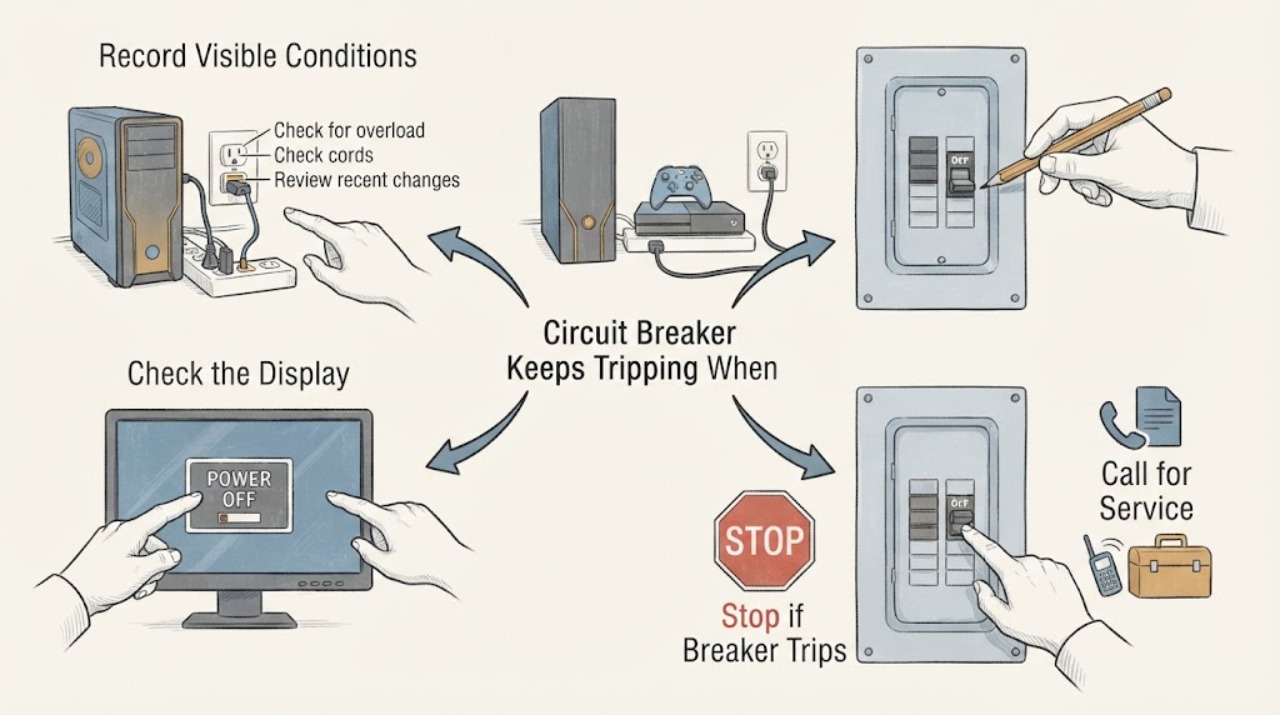
Work through in order
Diagnostic checks
Use only checks that match the exact appliance or system and its official guide.
-
Check 1
From a dry, safe position, record the game, gaming device, display, accessories, and other equipment that were operating when the breaker tripped. Note whether it happened at plug-in, power-on, game launch, a graphics-heavy scene, a charging event, or after the setup had run for a while; do not deliberately recreate the trip.
Expected result: The trip is immediate when one device starts, follows a high-graphics or charging event, occurs after sustained play, or happens when no gaming equipment is connected.
Next step: Keep the timing record and use the matching branch. Leave the circuit unused when the cause is unclear rather than launching the game again to obtain a clearer pattern.
Stop if: Stop immediately for smoke, active sparking, burning odor, shock, severe heat, water, or a panel, outlet, plug, cord, or strip that appears damaged.
Why this matters
Why: Immediate operation keeps a device, cord, plug, power strip, receptacle, short, or ground-fault path in focus. A delayed trip can involve sustained combined demand or heat. A trip with no gaming load shifts concern toward the receptacle, protective device, or fixed branch wiring.
-
Check 2
With the setup switched off normally, list every item on the same room or branch that was operating: desktop or console, display, speakers, chargers, lighting, network gear, heater, fan, air conditioner, or other equipment. Use rating labels and ordinary user documentation only; do not open equipment or make electrical measurements.
Expected result: Several loads shared the branch, a heater or motor-driven device was also running, the setup used a power strip or extension cord, or the gaming device was the only substantial load.
Next step: Keep suspect equipment disconnected and give the complete load list and ratings to the electrician. Do not remove another load and then keep gaming as a workaround until the circuit is cleared.
Stop if: Do not add a larger protective device, daisy-chain strips, use an extension cord as a permanent fix, or continue a load that has caused a trip.
Why this matters
Why: Combined demand can overload a branch even when each gaming item appears normal. A single device that trips the circuit still may have a failed power supply, cord, plug, or internal fault; the list cannot prove which part is at fault.
-
Check 3
If there is no active heat, smoke, water, arcing, or visible damage, turn off the console or computer and display using their normal controls, then disconnect each item by holding the plug body. Do not pull a cord or handle a damaged connection.
Expected result: A plug, cord, adapter, power strip, or device is hot, cracked, melted, wet, discolored, loose, or odor-producing, or the equipment and connections appear cool and intact after shutdown.
Next step: Keep the affected equipment, cord, adapter, and strip disconnected and identify them for the electrician or computer technician. Do not move a suspect item to another outlet for a comparison.
Stop if: Do not handle a smoking, wet, fused, actively arcing, melted, or severely hot connection; keep clear and obtain qualified or emergency help.
Why this matters
Why: A damaged or hot connection can be the trip source and must not be reused. A cool appearance after shutdown does not clear the equipment or circuit, but it gives the technician a safer record of what was connected.
-
Check 4
With all gaming equipment disconnected, inspect the receptacle face, wallplate, power-strip exterior, plug bodies, cords, and nearby wall from a safe position without touching a hot surface or removing any cover.
Expected result: There is discoloration, melting, cracking, a loose-looking receptacle, a loose plug fit, moisture, soot, burning odor, or no visible abnormality.
Next step: Leave the outlet, strip, and circuit unused and arrange qualified electrical service for any abnormal sign. Provide safe-distance photos and do not touch the outlet to check temperature.
Stop if: Stop for heat, smoke, odor, wetness, crackling, sparks, shock, or any need to remove the wallplate or reach into the receptacle.
Why this matters
Why: Visible or odor evidence supports a receptacle, strip, plug, cord, moisture, or wiring hazard even if the breaker currently holds. No visible damage cannot rule out a loose connection or hidden fault.
-
Check 5
From outside a dry, undamaged panel, record whether the breaker is visibly open and whether the gaming room or nearby wet area has a GFCI or AFCI indicator. Do not open the panel or operate a reset when the outlet, equipment, or panel shows a hazard sign.
Expected result: The branch breaker is open, a GFCI or AFCI indicator shows interruption, the protective device will not stay set, or no protective indicator is visible.
Next step: Leave the circuit unused and report the device type, indicator, and timing to a qualified electrician. Do not operate the setup merely because a handle or indicator changes position.
Stop if: Do not open the panel, remove a cover, bypass protection, or operate a reset in a wet, hot, sparking, or visibly damaged area.
Why this matters
Why: A breaker can open for overload, short, ground fault, equipment failure, or wiring trouble; GFCI and AFCI devices can interrupt leakage or arc-fault conditions. An indicator does not identify the failed part and cannot clear heat or water damage.
-
Check 6
Prepare a service report with the outlet and breaker location, gaming devices and ratings, shared loads, power-strip or adapter history, exact trip timing, visible symptoms, moisture history, and recent electrical or computer work. Photograph only from a safe distance.
Expected result: The trip follows one device, a combined gaming session, a power strip or cord, a protective-device event, or occurs with the setup disconnected.
Next step: Call a qualified electrician for the branch, receptacle, and protective-device assessment. Also contact an appliance or computer technician when one gaming device, adapter, or cord is the repeat trigger. Keep everything unused until cleared.
Stop if: Do not remove covers, touch conductors, perform live electrical measurements, reset repeatedly, or reconnect equipment to obtain more evidence.
Why this matters
Why: This evidence helps separate equipment from receptacle, branch-circuit, and protective-device causes without asking the homeowner to energize a questionable setup. A disconnected-load trip is a fixed-circuit or protective-device warning until diagnosed.
Use your observations
Decision map
Find the observation that best matches what you see, then follow the next safe action.
-
PATH 01Safety boundary
What you see
The breaker trips when the PC or console starts, a game launches, or a particular graphics-heavy title begins, while the setup has no visible hazard.
Do this next
Keep the gaming device disconnected and arrange qualified electrical and equipment diagnosis. Provide the exact device, accessories, and trip timing.
Why this path and its safety boundary
Why it matters: A startup or load change may expose a failing power supply, adapter, cord, receptacle, or branch-circuit problem; the game title itself is not a diagnosis.
Safety stop: Do not launch the game again, use another outlet, or keep resetting the breaker to compare titles.
-
PATH 02Safety boundary
What you see
The breaker holds during startup but trips after prolonged play, graphics load, charging, or heat buildup.
Do this next
Stop using the setup, record the elapsed play pattern without repeating it, and request electrician and equipment assessment.
Why this path and its safety boundary
Why it matters: Sustained combined demand, heat, a failing power supply, a deteriorating cord or connection, or a branch overload may be involved.
Safety stop: Stop at once for a hot plug, cord, strip, outlet, device, smoke, odor, buzzing, sparks, or unusual fan or power-supply behavior.
-
PATH 03Safety boundary
What you see
The gaming setup shares a branch with a heater, air conditioner, fan, lighting, charger, or another high-demand or motor-driven load.
Do this next
Keep the circuit unused and give the electrician the complete load list. Do not solve the symptom with a strip, extension cord, larger breaker, or an improvised circuit change.
Why this path and its safety boundary
Why it matters: The total branch demand may be too high even though the gaming hardware is functioning normally.
Safety stop: Do not continue gaming while another load is cycled to find a combination that holds.
-
PATH 04Safety boundary
What you see
The power strip, adapter, plug, cord, receptacle, or wallplate is loose, hot, discolored, cracked, wet, melted, smoking, or smells burnt.
Do this next
Keep clear, leave the equipment and outlet unused, and obtain qualified electrical service; use local emergency guidance for smoke, fire, or active arcing.
Why this path and its safety boundary
Why it matters: This is an electrical shock or fire hazard regardless of whether the gaming device still powers on.
Safety stop: Do not touch the damage, unplug an actively arcing connection, apply water, or reconnect the setup.
-
PATH 05Safety boundary
What you see
The breaker trips or will not remain set after the gaming equipment and accessories are disconnected.
Do this next
Leave the circuit off and arrange prompt qualified electrical diagnosis. Tell the electrician that the trip occurs with the gaming load removed.
Why this path and its safety boundary
Why it matters: The receptacle, protective device, upstream connection, or fixed branch wiring may be at fault; the gaming setup is not the only possible cause.
Safety stop: Do not open the panel or receptacle, probe the outlet, or install a different protective device.
-
PATH 06Safety boundary
What you see
A GFCI or AFCI indicates an interruption or operates along with the breaker during the gaming session.
Do this next
Keep the circuit unused and have a qualified electrician identify the cause and verify the protective arrangement before gaming resumes.
Why this path and its safety boundary
Why it matters: Leakage, an arc fault, overload, damaged equipment, or wiring trouble may be present; the protective device is responding to a condition rather than identifying its own failure.
Safety stop: Do not bypass, hold, rewire, or repeatedly reset the GFCI, AFCI, or breaker.
Helpful context
Understand the symptom
Gaming changes the load over time
A gaming setup is rarely just one device. A desktop may share the branch with a graphics card, monitor, speakers, chargers, room lighting, a router, and another heat-producing or motor-driven load. Graphics-heavy play can change the demand after the system has already started, so note the exact point at which the breaker operates instead of blaming the game or repeatedly trying the same launch.
A power strip does not create more circuit capacity
A power strip or extension cord adds connection points, not branch capacity. A hot, damaged, loose, or overloaded strip, plug, cord, or receptacle can be part of the fault. Keep suspect equipment disconnected and do not use another outlet as a comparison when a trip, heat, odor, or visible damage has occurred.
The breaker is a safety device, not the part to defeat
ESFI explains that breakers protect circuit wiring from overheating and fire, while AFCI and GFCI devices respond to arc-fault or leakage conditions. CPSC describes recurring trips and outlet or appliance faults as reasons for qualified electrical help. Keep the protective arrangement intact and leave panel, receptacle, grounding, and fixed-wiring work to a qualified electrician.
Safety boundary
Stop conditions
- Stop immediately for smoke, active arcing, sparks, burning odor, shock, wet electrical equipment, melting, severe heat, or a hot or damaged panel; keep clear and follow local emergency guidance.
- Do not repeatedly reset the breaker or GFCI, install a higher-rated breaker or fuse, bypass protective devices, or return power to a circuit that has overheated.
- Do not remove the receptacle or wallplate, open the electrical panel, probe outlet slots, touch conductors, or perform live electrical measurements.
- Do not reconnect suspect gaming equipment, power strips, adapters, plugs, cords, or chargers to another outlet as a test, and do not use an extension cord as a workaround.
- If the breaker trips with the gaming setup disconnected, leave the circuit off until a qualified electrician evaluates the receptacle, protective device, branch connections, and fixed wiring.
Only after diagnosis
Potential parts
- branch receptacle
Consider this category only when qualified diagnosis confirms that the receptacle is worn, heat-damaged, loose, or failed and the branch circuit and protective arrangement are suitable.
Confirm device rating, grounding, box, conductor, location, load, and local electrical requirements with the electrician; do not choose a replacement from appearance alone. - GFCI or AFCI protective device
Consider this category only after qualified diagnosis identifies failed or damaged protection or a required device arrangement; a gaming-related trip alone does not justify replacement.
Confirm circuit configuration, device type and rating, wiring, location, and applicable requirements; protection must not be bypassed. - computer or console power supply
Consider this category only when a qualified equipment technician confirms that the same PC or console repeatedly causes the trip and its power supply is implicated after circuit safety is established.
Confirm the exact device revision, output requirements, connector arrangement, cooling, and manufacturer fit information; do not substitute a generic supply based only on the symptom.
When checks do not resolve it
Need a professional?
Arrange prompt qualified electrical service when the breaker trips more than once during gaming, trips with the gaming load disconnected, operates with a GFCI or AFCI, or the outlet, plug, cord, strip, wallplate, or panel shows heat, discoloration, wetness, looseness, odor, smoke, sparks, or shock. Arrange computer or equipment service when one PC, console, display, adapter, or cord repeatedly triggers the trip. Active smoke, fire, or arcing requires local emergency guidance; do not attempt outlet or panel repair.
Safety scope: This article covers stopping use, safe shutdown and disconnection only when no immediate hazard is present, external observation, and documenting the gaming load. Receptacle, breaker, GFCI, AFCI, panel, wiring, grounding, and electrical measurement work require a qualified electrician.
Common questions
FAQ
Why does my breaker trip only when I am gaming?
Gaming can raise demand from the PC or console and display, and other room loads may share the same branch. A device, power supply, cord, strip, receptacle, or wiring fault can show up at startup or after heat builds. Record the timing, disconnect suspect equipment only when safe, and arrange qualified diagnosis instead of repeating the event.
Can a gaming PC overload a circuit by itself?
It can contribute to the branch load, especially with a display, chargers, lighting, or another heater or motor-driven item, but the nameplate alone does not establish circuit capacity or a fault. An electrician should assess the branch if protection operates repeatedly.
Should I use a different outlet when gaming trips the breaker?
Do not move suspect equipment to another outlet as a test. A damaged device, cord, or plug can create a hazard elsewhere, and a qualified electrician or equipment technician can evaluate it from the recorded timing and load history.
What if the breaker trips after I unplug the gaming setup?
Leave the circuit off. A trip with the gaming load removed keeps the receptacle, protective device, upstream connection, or fixed branch wiring in focus and needs a qualified electrician; do not open the panel or receptacle.
Is a power strip a safe fix for a gaming setup that trips?
No. A power strip adds connection points but does not increase branch capacity. Do not keep gaming through a strip or extension cord after a trip, heat, odor, sparking, or damage; leave the setup disconnected and obtain qualified advice.
Read the exact guide
Official sources
- Understanding Your Home Electrical SystemElectrical Safety Foundation International · General residential electrical-safety guidance; local code and qualified electrician instructions control a particular installation.
- CPSC Guide to Home Wiring HazardsU.S. Consumer Product Safety Commission · CPSC household wiring-hazard guide; it provides general safety information and does not replace an inspection of a particular circuit or gaming setup.
Community feedback
Share a repair observation
Share a plain-text repair observation. Accepted observations are published automatically; this page may take a moment to update.