
On this page
Start here
Quick answer
A breaker that trips when a newly added light switch is turned off is not normal switch behavior. Treat the new switch, light fitting, permanent wiring, or a shared circuit fault as unproven and leave the affected circuit out of service; do not keep resetting the breaker or open the switch box or panel. From a safe distance, record whether the device is a circuit breaker or a safety switch, exactly when it trips, what else loses power, and whether there is heat, smoke, odor, moisture, buzzing, or visible damage. Have a licensed electrician inspect the new installation before using that switch again.
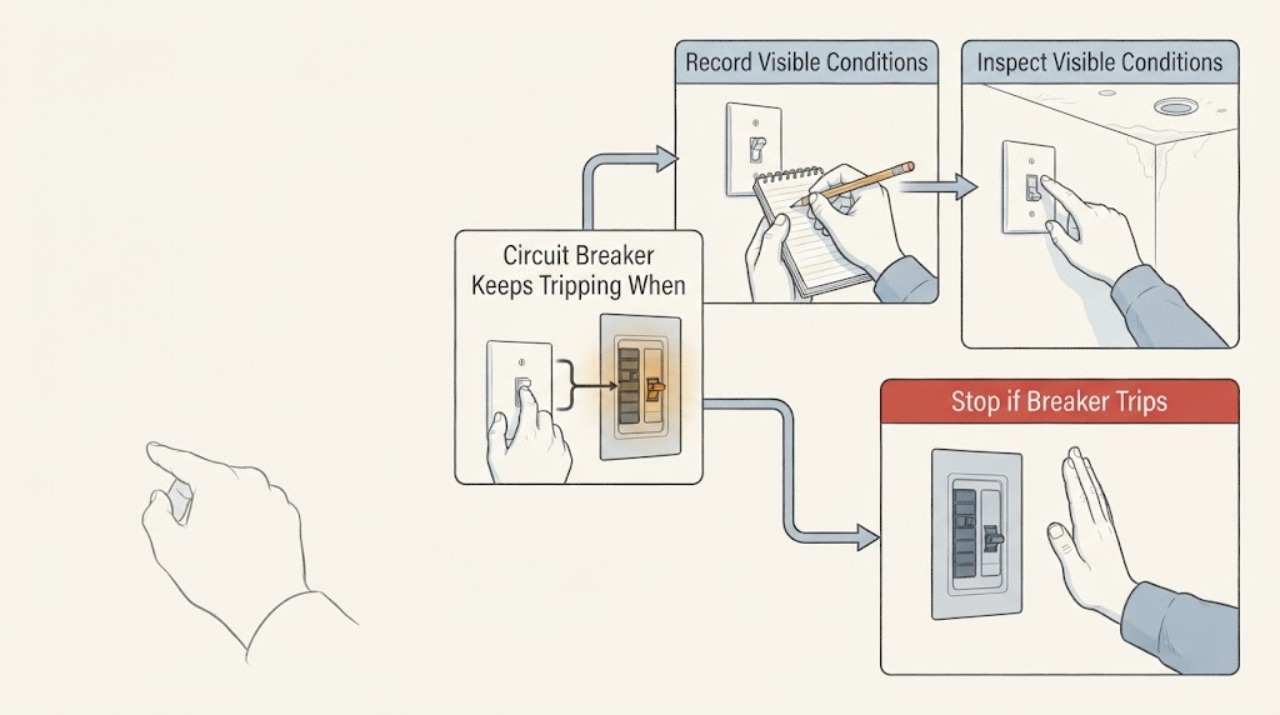
Work through in order
Diagnostic checks
Use only checks that match the exact appliance or system and its official guide.
-
Check 1
Leave the affected breaker or safety switch in its tripped or off state and stop using the newly added light switch; write down whether the trip was immediate, delayed, or occurred only as the switch moved to off.
Expected result: The trip is tied to the new switch event, occurs after the light has been on, or also occurs with no deliberate use of that switch.
Next step: Do not reproduce the trip. Keep the circuit unused and continue only with safe external observations before arranging electrical service.
Stop if: Stop all observation for smoke, a burning odor, crackling, visible arcing, heat, water, or a melted or discolored switch plate.
Why this matters
Why: A repeatable relationship to the new installation makes the switch, controlled light, or associated wiring a priority for an electrician; a trip with no use may indicate a persistent circuit or equipment fault.
-
Check 2
From outside the electrical equipment, look at the switch plate, light fitting, nearby wall, and accessible ceiling area without removing screws, covers, lamps, or the panel.
Expected result: The plate or fitting is hot, loose, cracked, wet, discolored, buzzing, or smells burnt, versus cool, dry, intact, and quiet.
Next step: If any warning sign is present, keep people away and arrange prompt electrician assessment. If no warning sign is present, leave the circuit unused rather than opening the switch box.
Stop if: Do not touch the switch, fitting, panel, or nearby metalwork if it is hot, wet, damaged, or making an electrical sound.
Why this matters
Why: Heat, moisture, odor, noise, or damage increases the urgency of a wiring or equipment fault; an intact exterior does not make the concealed wiring safe.
-
Check 3
Without operating the new switch again, note which other lights, receptacles, or fixed equipment lost power when the breaker tripped and whether the affected locations are in a damp area, outdoors, or near recent construction.
Expected result: Only the new light circuit is affected, several rooms share the outage, or the circuit includes a bathroom, exterior, wet location, or other recently changed fitting.
Next step: Record the breaker label, affected locations, new equipment type, and installation date. Do not move the new wiring or use another circuit as a substitute until the cause is assessed.
Stop if: Stop if any affected outlet or fitting is wet, warm, damaged, or showing smoke, sparks, or a burning smell.
Why this matters
Why: The outage pattern helps the electrician identify the branch and any shared loads; damp locations and recent work raise the need for a careful inspection rather than a user-performed wiring test.
-
Check 4
Read the label or paperwork for the newly installed control and light from a safe, dry location, noting whether it is a dimmer, smart control, timer, three-way control, or a fixture with a driver, and whether the instructions call for a particular load or arrangement.
Expected result: The new device type or controlled light differs from a simple switch-and-lamp arrangement, or the installation documents are missing or show an uncertain connection arrangement.
Next step: Give the electrician the device model, light type, wiring arrangement described in the documentation, and the trip timing. Do not remove the device or attempt a connection change.
Stop if: Stop if the device label is scorched, wet, loose, or unreadable, or if accessing it would require opening an electrical enclosure.
Why this matters
Why: Device type and load arrangement can change the applicable wiring and compatibility requirements, but the correct diagnosis depends on the exact product and circuit and cannot be inferred from the breaker trip alone.
-
Check 5
From a safe distance, check the electrical panel exterior and breaker handle position without removing the panel cover; record whether the device has a test button, an intermediate trip position, or a visible fault indicator.
Expected result: The device is a plain circuit breaker, a safety switch with a test button, or it is hot, damaged, repeatedly returning to a trip position, or accompanied by a wider power problem.
Next step: Do not remove the panel cover, test the circuit, change the rating, or repeatedly operate the handle. Provide the panel observations to a licensed electrician.
Stop if: Stop near the panel for heat, smoke, crackling, odor, visible damage, water, or any need to remove a cover.
Why this matters
Why: A test button may identify a safety switch rather than a plain breaker, and the distinction helps the electrician interpret the event; heat, damage, or repeated tripping indicates that the protective device should remain out of service.
-
Check 6
Prepare a service handoff with the installation date, exact switch event, breaker or safety-switch label, affected rooms, device and lamp type, weather or moisture conditions, and any external warning signs; leave the new switch unused until inspected.
Expected result: The electrician receives a repeatable timing and circuit map, or the event cannot be reproduced safely because the circuit remains off.
Next step: Arrange inspection and ask that the new switch, light fitting, circuit protection, and affected branch be checked before restoration. Do not substitute a larger protective device or bypass the trip.
Stop if: Stop and seek urgent help for smoke, fire, electrical shock, visible arcing, or a hot or wet panel or switch.
Why this matters
Why: A clear event record lets the electrician isolate the new work and shared circuit without asking the homeowner to repeat a hazardous trip; inability to reproduce the event does not clear the installation.
Use your observations
Decision map
Find the observation that best matches what you see, then follow the next safe action.
-
PATH 01Next step
What you see
The breaker trips in direct connection with the newly added switch, even though the light is being turned off.
Do this next
Leave that circuit unused and have a qualified electrician inspect the new switch, light, connections, and branch wiring. Do not operate the switch again to confirm the pattern.
-
PATH 02Next step
What you see
The switch plate, light fitting, or panel is hot, wet, scorched, buzzing, smoking, or smells burnt.
Do this next
Keep away from the area, do not touch or open the equipment, and obtain urgent electrical help. Treat smoke or fire as an emergency.
-
PATH 03Next step
What you see
Several rooms or fixed loads lose power, or the circuit trips without using the new switch.
Do this next
Treat the event as a possible branch overload, persistent equipment fault, or wiring fault. Leave the protective device in its safe off state and arrange licensed electrical diagnosis.
-
PATH 04Next step
What you see
The new device is a dimmer, smart control, timer, three-way control, or a wet-location installation and its exact arrangement is uncertain.
Do this next
Provide the device information to the electrician and do not change connections or substitute another control until compatibility and wiring are assessed.
-
PATH 05Next step
What you see
The circuit has stayed stable only because the new switch is not being used.
Do this next
Do not treat that as a repair. Keep the switch out of service and schedule inspection before normal operation resumes.
Helpful context
Understand the symptom
The timing matters: a fault that appears after a new light switch was installed and occurs when that switch is operated points toward the new switch, light, connection, cable route, or circuit interaction. The breaker is doing its protective job by opening the circuit when it detects an unsafe condition; it is not evidence that the breaker should be replaced with a larger rating.
Keep the diagnosis observational. The safe homeowner checks are to leave the affected circuit unused, identify the exact trigger from the event already observed, and look for external warning signs without removing a cover. A new dimmer, smart control, three-way arrangement, light fitting, or damp location can require model- and wiring-specific assessment that cannot be confirmed from the breaker handle alone.
Do not treat a trip as nuisance behavior simply because the light is off afterward. Repeated tripping can reflect overload, faulty equipment, or faulty wiring. Do not bypass protection, increase the breaker rating, use an extension lead as a workaround, or keep operating the new switch while waiting for service.
Safety boundary
Stop conditions
- Stop immediately for smoke, flames, visible arcing, crackling, a burning odor, a hot switch or panel, or any electric shock.
- Stop if water or dampness reaches the switch, light, receptacle, panel, or wiring, or if the circuit is in a wet or recently damaged area.
- Do not continue any check that requires operating the new switch again, removing a faceplate or panel cover, touching wiring, measuring live voltage, or changing circuit protection.
Only after diagnosis
Potential parts
- light switch or control
Consider a replacement only after an electrician identifies the control as faulty and confirms the required switch type, load, location, and circuit arrangement.
Do not select or install a replacement from the symptom alone; confirm the exact device and wiring requirements with the electrician and the manufacturer's instructions. - light fitting or driver
Consider this only if professional diagnosis identifies the newly added fitting or its driver as the fault source.
Confirm the fitting, control method, location rating, and circuit requirements before any replacement.
When checks do not resolve it
Need a professional?
Call a licensed electrician before using the newly added switch again when its operation is associated with a breaker or safety-switch trip., Seek urgent electrical help for heat, smoke, burning odor, buzzing or crackling, visible arcing, water, damaged equipment, shock, or repeated trips., Never install a higher-rated breaker, bypass the protective device, open the panel, or alter switch wiring as a workaround.
Common questions
FAQ
Why would a breaker trip when a light switch is turned off?
The timing can indicate a fault involving the new switch, the light fitting or driver, a connection, or the shared branch circuit. It is not normal behavior to keep testing; leave the circuit unused and have a qualified electrician inspect it.
Should I reset the breaker and try the new switch again?
No. Repeated resets and repeated operation can leave a fault energized and do not diagnose the cause. Leave the protective device in its safe off or tripped state and arrange electrical service.
Can I replace the breaker with a larger one?
No. A higher-rated protective device can allow unsafe current for the existing wiring. Circuit protection and the new installation must be assessed by a qualified electrician.
What information should I give the electrician?
Give the installation date, exact switch movement associated with the trip, breaker or safety-switch label, affected rooms, device and light type, and any heat, odor, moisture, buzzing, smoke, or visible damage. Do not reproduce the trip to obtain more information.
Read the exact guide
Official sources
- Switch on to electrical safetyElectrical Safety Office, Queensland Government · Government electrical safety guidance on nuisance tripping, faulty wiring, and licensed electrician boundaries
- CPSC Guide to Home Wiring HazardsU.S. Consumer Product Safety Commission · U.S. consumer guidance on circuit breakers, home wiring hazards, and switch-related trips
Community feedback
Share a repair observation
Share a plain-text repair observation. Accepted observations are published automatically; this page may take a moment to update.