
On this page
Start here
Quick answer
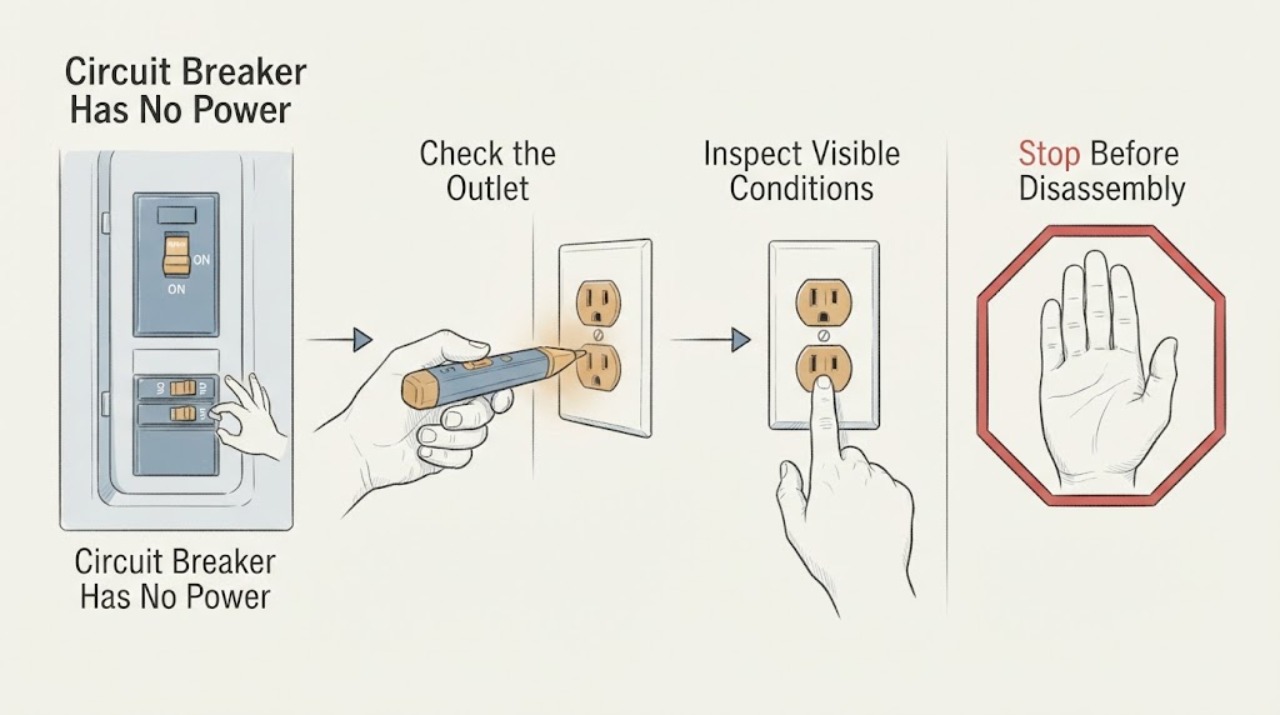
No power at one outlet may be caused by a tripped breaker, an upstream GFCI outlet, a local outlet fault, a disconnected branch, or a failed device. From a dry position, check whether nearby outlets also lost power, inspect the breaker handle without opening the panel, and look for a GFCI with TEST and RESET buttons. A single safe reset of the relevant enclosed control may be reasonable only when there is no water, heat, damage, smell, sound, or spark; if it will not reset, trips again, or the outlet is hot or damaged, leave it off and call a qualified electrician.
Work through in order
Diagnostic checks
Use only checks that match the exact appliance or system and its official guide.
-
Check 1
Unplug the device that was being used only if the plug, outlet, floor, and your hands are dry and undamaged. Use a small known-good lamp or other simple device at the dead outlet only when the faceplate is intact and there is no heat, smell, noise, or moisture. Check one nearby outlet and one light without removing any covers.
Expected result: Only one outlet is dead; several outlets on the same wall or room are dead; or the test device is also faulty.
Next step: Record the affected outlets and the last device used. If the test device works elsewhere but not here, continue to the breaker and GFCI checks without opening the outlet.
Why this matters
Why: One dead outlet points toward a local receptacle, an upstream protective device, or a connection in the branch. Several dead points suggest a branch breaker, GFCI, or supply issue. A second failed device is not useful evidence of an outlet fault.
-
Check 2
Look at the breaker panel from outside the enclosure. Identify the breaker serving the affected area from its label or prior circuit map and check whether its handle is fully on, fully off, or in a middle position. Do not remove the cover, touch other parts, or change the breaker rating.
Expected result: The relevant breaker is visibly tripped or centered; it appears on while the outlet is dead; or more than one breaker or a main device is affected.
Next step: If the area is dry, there is no warning sign, and the cause appears to be an obvious disconnected load, operate the enclosed breaker handle once according to its labeling. If it trips again or will not stay on, leave it off and arrange electrical service.
Why this matters
Why: A tripped branch device can explain a group of dead outlets. An apparently on breaker with no power can indicate an upstream GFCI, a loose or failed device, a branch fault, or a breaker that cannot hold. A main or multiple-device outage needs broader service diagnosis.
-
Check 3
Look for accessible GFCI outlets with TEST and RESET buttons in the same room and nearby wet-use areas, such as a bathroom, kitchen, garage, laundry area, or outdoors. With dry hands and no visible damage or moisture, press RESET once. Do not force a button, remove the receptacle, or keep resetting it if it will not hold.
Expected result: The GFCI reset restores the outlet; the reset will not stay in; the test/reset controls do not respond normally; or no GFCI is visible.
Next step: If power returns and no hazard is present, reconnect only the original dry, undamaged load after checking its cord. If the GFCI will not reset or trips again, leave the protected circuit off and call an electrician; do not replace the outlet yourself.
Why this matters
Why: A GFCI can protect its own outlet and other outlets farther along the same branch, so an upstream trip can make a normal-looking outlet dead. A failed or non-resetting GFCI can indicate a ground fault, damaged device, downstream problem, or wiring issue.
-
Check 4
With the affected circuit off and the area dry, make a list of devices that were connected, especially heaters, tools, outdoor equipment, kitchen equipment, or anything that recently became wet or damaged. Do not move a hardwired appliance, open a device, or test the suspect item on another outlet.
Expected result: The outage began when one device was used; several high-demand devices were active; or no device or event matches the outage.
Next step: Keep a suspect device unplugged and out of use. Do not solve an overload by moving the device around or fitting a higher-rated protective device; give the load list and timing to the electrician.
Why this matters
Why: One device can have a cord or internal fault, while several high-demand loads can overload a branch. No clear load leaves a receptacle, branch wiring, protective device, or upstream connection as an unresolved possibility.
-
Check 5
Inspect only the outside of the outlet, plug, cord, and nearby wall area for a hot faceplate, browning, melting, loose cover, crackle, burning odor, visible spark, moisture, or a shock or tingling sensation. Do not touch a hot, wet, loose, or damaged part and do not enter standing water to reach a control.
Expected result: There is no warning sign and the outlet remains dead, or any heat, damage, sound, odor, spark, moisture, or shock is present.
Next step: For any warning sign, stop using the outlet and leave the circuit off if it can be done safely from a dry position. Arrange prompt electrical service; for smoke or fire, leave the area and contact emergency services.
Why this matters
Why: A dead outlet with no visible warning still needs circuit-level diagnosis if breaker and GFCI checks do not restore power. Any warning sign can indicate arcing, overheating, ground fault, damaged insulation, or unsafe wiring.
Use your observations
Decision map
Find the observation that best matches what you see, then follow the next safe action.
-
PATH 01Next step
What you see
Only one outlet is dead while nearby outlets and lights work.
Do this next
Check accessible GFCI RESET controls once from a dry position. If power does not return, leave the outlet unused and call an electrician rather than removing its cover.
Why this path and its safety boundary
Why it matters: An upstream GFCI, local receptacle fault, or branch connection is possible.
-
PATH 02Next step
What you see
Several outlets or lights in one area are dead and the branch breaker is tripped.
Do this next
Remove only accessible dry portable loads and operate the enclosed breaker once if no hazard is present. If it trips again or will not hold, leave it off for qualified diagnosis.
Why this path and its safety boundary
Why it matters: An overload, connected-product fault, or branch-circuit fault may have opened the protective device.
-
PATH 03Next step
What you see
An upstream GFCI RESET restores power to the outlet.
Do this next
Use only a dry, undamaged device and stop if the GFCI trips again. A repeat trip needs an electrician to identify the downstream cause.
Why this path and its safety boundary
Why it matters: The outlet is downstream of a ground-fault protective device, and the original trip may have been caused by moisture, leakage, or a connected product.
-
PATH 04Next step
What you see
The GFCI will not reset, the test control does not work as expected, or the outlet remains dead after reset.
Do this next
Do not bypass or replace the GFCI as a casual fix. Leave the circuit unused and arrange qualified electrical service.
Why this path and its safety boundary
Why it matters: The protective device, its supply, downstream wiring, or a connected fault needs professional diagnosis.
-
PATH 05Next step
What you see
The outlet lost power when one device was connected or when multiple high-demand devices were used.
Do this next
Keep the suspect device unplugged and avoid the combination. Do not test it on another outlet or fit a higher-rated breaker; provide the load history to an electrician or qualified repair person.
Why this path and its safety boundary
Why it matters: The device or combined load may have exceeded safe circuit limits.
-
PATH 06Next step
What you see
The outlet or plug is hot, discolored, melted, wet, buzzing, sparking, odorous, or has shocked someone.
Do this next
Stop using the outlet and keep clear. Arrange urgent electrical help; leave and contact emergency services for smoke or fire, and do not approach wet electrical equipment.
Why this path and its safety boundary
Why it matters: This is an electrical hazard, not a routine no-power reset.
Helpful context
Understand the symptom
Start by deciding whether the outage is local
Test the symptom from a dry, safe position. If only one outlet is dead, an upstream protective outlet or a local receptacle connection is possible. If several outlets, lights, or rooms are dead, the branch breaker, a GFCI device, or a larger supply problem is more likely. The outlet itself is not proof that the breaker has failed, and a breaker handle that looks on can still be tripped or unable to hold.
Safety boundary
Do not remove the outlet cover or panel cover, insert a probe into the slots, test live voltage, touch loose wires, install a larger breaker, or bypass GFCI or AFCI protection. Stop immediately for warmth, discoloration, melting, buzzing, crackling, burning odor, visible spark, shock, or moisture. Keep people away and arrange qualified electrical service.
Safety boundary
Stop conditions
- Do not remove the outlet or panel cover, insert tools or probes into slots, test live voltage, touch loose wires, change breaker ratings, or bypass GFCI or AFCI protection.
- Stop for heat, melting, discoloration, buzzing, crackling, burning odor, visible spark, shock or tingling, or moisture near the outlet or electrical controls.
- Do not reset a breaker or GFCI repeatedly. If it trips again or will not hold, leave it off until a qualified electrician has inspected the circuit and connected equipment.
- Do not enter standing water to reach a breaker or use an electrical device in a wet area.
When checks do not resolve it
Need a professional?
Call a qualified electrician when one outlet remains dead after safe breaker and GFCI checks, a breaker or GFCI will not hold, more than one circuit is affected, the outlet is hot or damaged, a fixed appliance is involved, or there is no clear cause. Use emergency services for smoke or fire and keep away from wet electrical equipment.
Common questions
FAQ
Why does one outlet have no power when the breaker looks on?
The outlet may be downstream of a tripped GFCI, or the receptacle, branch connection, or breaker may have failed. Check only accessible protective controls from a dry position; do not remove the outlet or panel cover.
Can a GFCI outlet turn off other outlets?
Yes. A GFCI receptacle can protect its own outlet and other outlets farther along the same branch. A trip upstream can therefore leave a standard-looking outlet without power.
When should I stop resetting the breaker?
Stop after a repeat trip, an immediate trip, or any heat, odor, buzzing, spark, moisture, damage, shock, or tingling. Leave the circuit off and have a qualified electrician identify the cause.
Read the exact guide
Official sources
- CPSC Guide to Home Wiring HazardsU.S. Consumer Product Safety Commission · General residential electrical safety guidance.
- GFCI Fact SheetU.S. Consumer Product Safety Commission · Residential GFCI receptacles and GFCI breakers; exact installation depends on the circuit and local requirements.
- How to Use GFCIsElectrical Safety Foundation International · General residential GFCI safety guidance; follow the device and installation instructions for the specific circuit.
Community feedback
Share a repair observation
Share a plain-text repair observation. Accepted observations are published automatically; this page may take a moment to update.