
On this page
Start here
Quick answer
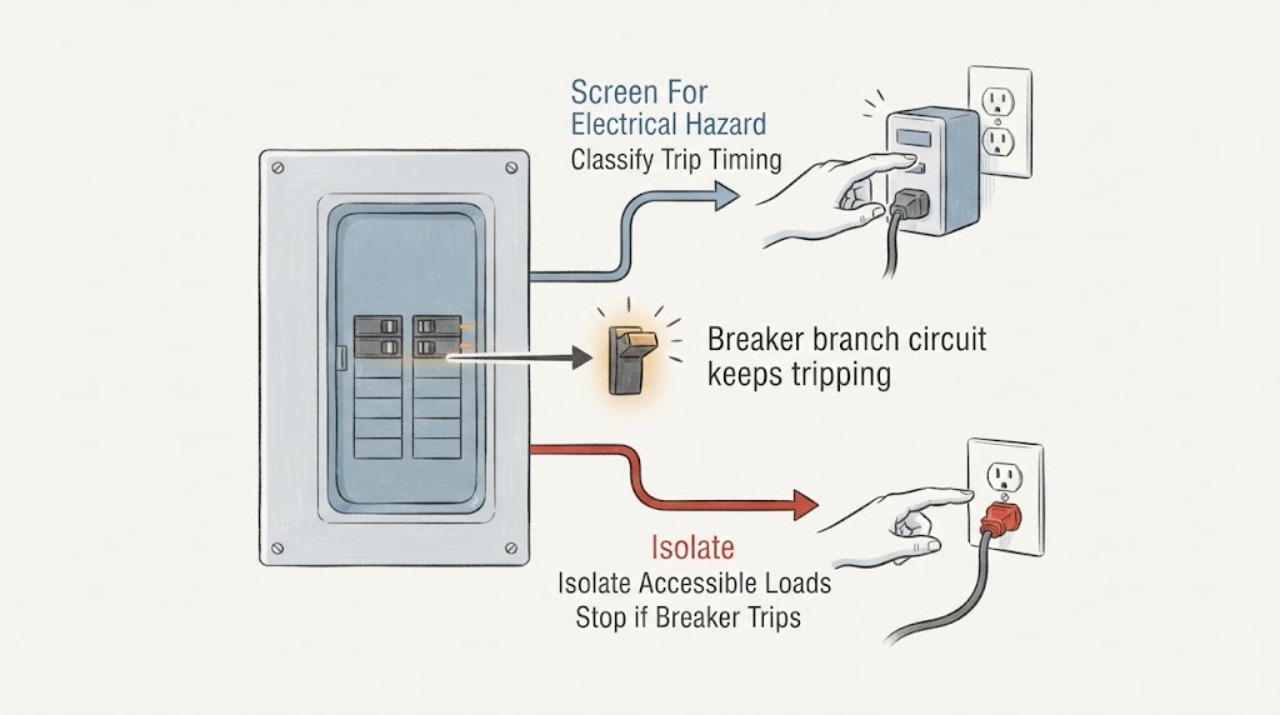
An Eaton breaker that keeps tripping is interrupting a branch circuit because it has detected, or may be responding to, an overload, short circuit, arc fault, ground fault, or another fault condition; repeated resetting is not a repair. First note whether it trips immediately, only when a particular appliance or light is used, or after several minutes of combined load. With no smell, heat, smoke, moisture, sparking, or visible damage, unplug or switch off accessible loads on that circuit and make one normal reset only if the Eaton instructions for that device allow it. If the breaker trips again, trips immediately, shows an AFCI/GFCI diagnostic indication, or the cause is not obvious, leave the circuit off and arrange a licensed electrician. Never install a larger breaker, open the panel, alter wiring, bypass AFCI/GFCI protection, or test energized parts as a homeowner troubleshooting step.
Before you begin
Safety first
- This article permits only dry, external observation and one normal load-isolation/reset attempt when no hazard is present and the exact device instructions allow it. A licensed electrician must perform panel access, wiring isolation, energized testing, breaker replacement, fault testing, and protection verification.
Work through in order
Diagnostic checks
Use only checks that match the exact appliance or system and its official guide.
-
Check 1
From a dry, stable position, look at the accessible breaker handle, nearby wall plates, receptacles, cords, and the affected room without removing a cover; note any smoke, burning odor, heat, discoloration, buzzing, sparks, shock, water, or damaged insulation.
Expected result: Record whether the circuit is merely without power or whether there is a hot or discolored plate, smell, sound, visible arc, damaged cord, moisture, or another warning sign.
Next step: For any warning sign, keep people away, avoid operating the affected device, and arrange urgent licensed electrical evaluation; follow local emergency guidance for smoke or fire.
Stop if: Do not touch hot or wet electrical parts, operate a sparking or smoking circuit, use water near the circuit, or open the panel to investigate.
Why this matters
Why: A safety warning can indicate overheating, arcing, leakage, damaged wiring, or a fault that must remain de-energized. A normal-looking exterior does not prove that the wiring or breaker is safe to open or test.
-
Check 2
Record whether the Eaton breaker trips immediately on restoration, after several minutes, only when one appliance or light is used, when several loads run together, or at an apparently random time; do not repeatedly restore it to reproduce the symptom.
Expected result: Write down the room or outlets affected, the operating load, approximate time to trip, whether the handle is in the middle or OFF position, and whether the breaker is standard, AFCI, GFCI, or AF/GF from its visible marking.
Next step: Use the timing and visible breaker type to choose the next safe branch, and provide the record to an electrician if the pattern is not resolved by one documented load isolation.
Stop if: Stop if the trip is immediate, the breaker will not remain on, or the circuit shows heat, odor, noise, moisture, smoke, or visible damage.
Why this matters
Why: Immediate tripping suggests a fault remains present. A load-specific trip focuses the next safe isolation on that load; a delayed trip can fit overload or heating; random trips or a device with a diagnostic indicator need broader wiring, protection, and equipment assessment.
-
Check 3
Only when the circuit has no hazard, unplug or switch off accessible appliances and portable loads served by the affected branch, including recently added or high-demand equipment; do not unplug a hot, wet, smoking, or damaged device.
Expected result: Note whether the trip is associated with one device, a group of simultaneous loads, or no identifiable load, and whether the device has a damaged cord, moisture, unusual noise, or a fault indication.
Next step: Leave a suspect load disconnected and arrange appliance or electrical service as appropriate. Do not move a large load to another circuit with an extension cord as a workaround.
Stop if: Do not use or reconnect a device with heat, odor, sparks, moisture, damaged insulation, or a tripped protection device that returns when that device is connected.
Why this matters
Why: A trip tied to one load makes that appliance, cord, or connected accessory a likely contributor. A trip with several ordinary loads suggests total branch demand or a circuit-level fault; a trip with loads removed points away from a simple overload and toward wiring, protection, or the breaker.
-
Check 4
If no hazard is present and the affected load has been isolated, make one normal manual reset of the accessible Eaton handle according to the exact device instructions; do not hold the handle on or keep resetting it against a fault.
Expected result: Record whether the handle stays on with loads isolated, trips immediately, or stays on until a particular load is reconnected; note any visible Eaton diagnostic light or trip indication.
Next step: Leave the suspect load disconnected and reconnect nothing until the device and branch are assessed if the breaker trips again. If it remains on, restore loads only cautiously and stop at the first repeat trip.
Stop if: Do not reset again after a repeat trip, do not bypass an AFCI/GFCI function, and do not continue if the breaker handle feels abnormal or will not remain engaged.
Why this matters
Why: A stable breaker with loads disconnected supports a connected-load or overload branch but does not certify the appliance or wiring. Immediate tripping indicates a fault according to Eaton; a recurring trip or diagnostic indication needs qualified diagnosis rather than more resets.
-
Check 5
From outside the panel, photograph the Eaton label and any diagnostic LED or trip indicator after the event, and record the visible blink pattern without pressing hidden test controls or removing the dead front.
Expected result: Record no indicator, a repeating indicator, an AFCI or arc-related label, a GFCI or ground-fault label, a dual-function AF/GF label, or a message in the exact Eaton documentation for the model.
Next step: Give the breaker catalog or model marking, indicator pattern, trip timing, affected loads, and reset result to a licensed electrician; use only the exact Eaton manual's user-facing interpretation.
Stop if: Do not remove the panel dead front, disconnect branch conductors, press test controls to force a fault, probe terminals, or alter the breaker or neutral connections.
Why this matters
Why: Eaton's AF/GF instructions use diagnostic trip patterns to distinguish protection events, while a standard breaker may provide no such code. The indication narrows professional diagnosis but cannot tell a homeowner to change wiring or select a replacement device.
-
Check 6
After the safe external checks, keep the circuit or suspect load out of service and compile the branch label, Eaton breaker type and model, trip timing, connected loads, indicator pattern, and any recent installation, renovation, moisture, or appliance change.
Expected result: The problem is isolated to one load, persists with loads disconnected, occurs across multiple rooms or receptacles, or cannot be associated with a load or event.
Next step: Arrange licensed electrical diagnosis and keep the affected breaker off until the electrician determines that the branch and protective device are safe. Provide the complete observation record rather than requesting a higher-rated breaker.
Stop if: Do not open the panel, replace the breaker, tighten terminals, move conductors, install a larger protective device, or repeatedly energize a persistent fault.
Why this matters
Why: One-load recurrence supports appliance or cord service; persistence with loads disconnected raises a circuit, wiring, protection, or breaker fault; multiple affected areas or a recent alteration raises a circuit mapping, installation, or shared-neutral question that requires professional inspection.
Use your observations
Decision map
Find the observation that best matches what you see, then follow the next safe action.
-
PATH 01Safety boundary
What you see
The Eaton breaker trips immediately when restored, including after accessible loads are switched off or unplugged.
Do this next
Leave the breaker off and arrange licensed electrical diagnosis. Provide the exact Eaton type, any diagnostic indicator, and whether the trip remains with loads isolated.
Why this path and its safety boundary
Why it matters: Eaton states that immediate tripping indicates a fault. A short circuit, arc or ground fault, connected wiring problem, or breaker issue remains possible; a higher-rated breaker would remove protection rather than solve the fault.
Safety stop: Do not reset repeatedly, disconnect branch wires, open the panel, or substitute a breaker.
-
PATH 02Safety boundary
What you see
The branch stays on with accessible loads disconnected but trips when one appliance, cord, light, or outdoor device is used or reconnected.
Do this next
Leave that device disconnected and arrange qualified appliance or electrical evaluation; do not move it through an extension cord to bypass the branch protection.
Why this path and its safety boundary
Why it matters: The connected load, cord, moisture exposure, or the load's interaction with AFCI/GFCI protection is more likely than a simple total-load overload, but the load is not proven safe or defective by the timing alone.
Safety stop: Do not reconnect a device with heat, odor, sparks, water, damaged insulation, or a repeat trip.
-
PATH 03Safety boundary
What you see
The breaker trips only after several minutes or when multiple appliances or high-demand loads operate together, and no electrical warning sign is present.
Do this next
Keep simultaneous loads separated only by normal intended use and arrange an electrician to evaluate branch loading, circuit design, and any needed dedicated circuit.
Why this path and its safety boundary
Why it matters: A branch overload or heat-related condition is plausible. The circuit's safe capacity and the loads' nameplate requirements must be evaluated; the breaker rating must not be increased by guesswork.
Safety stop: Stop using the branch if plates become warm or discolored, lights dim, the breaker smells hot, or the trip repeats after reducing loads.
-
PATH 04Safety boundary
What you see
An Eaton AFCI, GFCI, or dual-function AF/GF breaker shows a diagnostic indicator, or the protected branch trips with no obvious load pattern.
Do this next
Photograph the visible model and indicator pattern, leave the affected circuit off if the trip recurs, and arrange electrical service.
Why this path and its safety boundary
Why it matters: Arc, ground-fault, overcurrent, wiring, moisture, device, and protection-device causes remain possible. Eaton's exact model documentation and a licensed electrician are needed to interpret the indication and test the branch safely.
Safety stop: Do not defeat the protection, alter neutral or load conductors, remove the dead front, or use a different breaker type as a workaround.
-
PATH 05Safety boundary
What you see
The circuit has hot or discolored plates, buzzing or sizzling, sparks, damaged insulation, moisture, shock, recent wiring work, or trips across several outlets or rooms.
Do this next
Keep people away, avoid the affected circuit, follow local emergency guidance for smoke or fire, and arrange urgent licensed electrical inspection.
Why this path and its safety boundary
Why it matters: The pattern is an electrical safety or installation concern, not a routine breaker reset. ESFI recommends licensed inspection for these warning signs, and CPSC warns that incorrectly rated protection can expose branch wiring to fire risk.
Safety stop: Do not touch, cover, dry, tighten, splice, or energize the affected wiring or panel yourself.
Helpful context
Understand the symptom
The timing of the trip is useful evidence
A trip immediately when the handle is restored points toward a fault that is still present, while a trip only after several minutes or after multiple devices run can fit an overload or heat-related condition. A trip that follows one appliance, light, receptacle, or outdoor load narrows the suspect load, but it does not prove that the appliance or the breaker is the failed part. Eaton's breaker family includes standard, AFCI, GFCI, and dual-function devices, so the breaker type and any indicator pattern matter.
Identify the protection type before interpreting an indication
Read the visible label and handle markings from outside the panel and note whether the Eaton device is standard, AFCI, GFCI, or a dual-function AF/GF breaker. An AFCI can respond to an arc-fault condition, a GFCI to leakage to ground, and a combination device can report more than one kind of fault. The exact Eaton model instructions control the meaning of a diagnostic light; do not infer a repair from a generic blink pattern or substitute a different breaker type.
A branch circuit may have a load, wiring, or protection problem
The same symptom can come from too many simultaneous loads, a damaged cord or appliance, a short or arc in a receptacle or fixture, moisture or leakage to ground, a loose or damaged connection, incorrect protection, or a breaker that needs professional testing. CPSC explains that branch-circuit protective devices must match the circuit's safe current level; increasing the breaker rating can leave the wiring exposed to overload. ESFI recommends licensed electrical inspection for frequent trips and signs such as heat, discoloration, buzzing, sparks, or damaged insulation.
Safety boundary
Stop conditions
- Do not open the panel, remove the dead front, disconnect branch conductors, tighten terminals, probe live parts, or replace an Eaton breaker as a homeowner troubleshooting step.
- Do not install a larger ampere breaker, bypass AFCI/GFCI protection, alter neutral or grounding conductors, or use an extension cord to conceal a recurring overload.
- Stop immediately for smoke, fire, burning odor, sparks, buzzing or sizzling, hot or discolored plates, exposed or damaged insulation, water, shock, or a breaker that trips again.
- Do not keep resetting a breaker that trips immediately, will not stay engaged, shows a recurring diagnostic indication, or trips with loads disconnected.
- Leave the affected branch off and arrange licensed electrical service when the cause is not obvious after one safe load-isolation attempt or when recent wiring, moisture, appliance, or panel work is involved.
Only after diagnosis
Potential parts
- Eaton branch-circuit breaker
Consider this category only if a licensed electrician confirms that the breaker itself is defective or the exact protective device must be replaced after the branch fault is addressed.
Confirm the exact Eaton family, catalog number, pole arrangement, interrupting rating, loadcenter compatibility, and required protection type; never choose a higher rating from the trip symptom. - Eaton AFCI, GFCI, or dual-function protective breaker
Consider this category only when the exact Eaton device and a qualified diagnosis show an end-of-life or failed protective device after wiring, neutral, ground, moisture, and load causes are evaluated.
Confirm the exact catalog number, panel compatibility, circuit conductors, neutral arrangement, and required arc- or ground-fault protection before installation by a qualified person. - appliance cord or connected-load component
Consider this category only if appliance service confirms that one connected device or its cord is damaged and is the repeat-trip cause.
Match the exact appliance, cord type, ratings, strain relief, and manufacturer's instructions; do not replace a cord or device to bypass branch protection.
When checks do not resolve it
Need a professional?
Arrange licensed electrical service when an Eaton breaker trips immediately, repeats after one safe load-isolation attempt, trips with no load connected, shows an AFCI/GFCI or AF/GF indication, or affects multiple outlets or rooms. Arrange appliance service for a single suspect load, and treat smoke, fire, burning odor, sparks, buzzing, heat, discoloration, moisture, shock, damaged insulation, or repeated protective trips as urgent safety conditions. Never increase the breaker rating or alter wiring to keep the circuit energized.
Safety scope: This article permits only dry, external observation and one normal load-isolation/reset attempt when no hazard is present and the exact device instructions allow it. A licensed electrician must perform panel access, wiring isolation, energized testing, breaker replacement, fault testing, and protection verification.
Common questions
FAQ
Why does an Eaton breaker keep tripping?
The breaker may be responding to an overload, short circuit, arc fault, ground fault, damaged load, moisture, wiring issue, or a protective-device problem. Trip timing, the connected load, breaker type, and any diagnostic indication help narrow the cause, but repeated resetting does not repair it.
What does it mean if an Eaton breaker trips immediately after reset?
Eaton states that immediate tripping indicates a fault. Leave the breaker off and arrange qualified electrical diagnosis rather than disconnecting conductors, opening the panel, or installing a larger breaker.
Can I reset the Eaton breaker one more time?
Only when there is no heat, smell, smoke, moisture, sparking, visible damage, or other hazard, accessible loads have been switched off or unplugged, and the exact device guidance permits one normal reset. If it trips again, leave it off and call a licensed electrician.
Should I replace a tripping breaker with a higher amp rating?
No. CPSC warns that protective devices with ratings above the branch circuit's capacity can allow dangerous overloading. An electrician must verify the conductors, load, panel compatibility, and protection type before selecting any replacement.
What should I do if the Eaton AFCI or GFCI light shows a trip pattern?
Record the visible breaker model and diagnostic pattern from outside the panel and use the exact Eaton instructions for interpretation. A recurring AFCI, GFCI, or dual-function trip needs licensed diagnosis of the load, wiring, moisture, neutral or ground arrangement, and protective device.
When is a repeatedly tripping branch circuit urgent?
Treat smoke, fire, burning odor, sparks, buzzing or sizzling, hot or discolored plates, exposed insulation, water, shock, or repeated protective trips as urgent. Keep clear and follow local emergency guidance for smoke or fire, then arrange licensed electrical service.
Read the exact guide
Official sources
- Home Wiring Safety TipsElectrical Safety Foundation International · Supports urgent stop conditions for frequent trips, heat, discoloration, buzzing, sparks, shocks, damaged insulation, and overrated protective devices.
- CPSC Guide to Home Wiring HazardsU.S. Consumer Product Safety Commission · Supports load isolation, correct protective ratings, warning signs, and qualified evaluation for repeated trips or a load-specific fault.
- BR (1-inch), CL (1-inch), CH (3/4-inch), and QB (bolt-on) pigtail and plug-on-neutral, AFCI, GFCI (5 mA), equipment protection (30 mA) and dual function AF/GF instructionsEaton · Supports immediate-trip meaning, Eaton AF/GF diagnostic indications, and the boundary against homeowner conductor disconnection or repeated resetting.
- Residential Circuit Breakers | BR Circuit Breakers | EatonEaton · Supports identifying the visible Eaton protection type and preserving the exact breaker and loadcenter compatibility question for an electrician.
- Circuit breakers fundamentalsEaton · Supports explaining why an Eaton branch breaker trips and separating overload, short circuit, and specialty fault categories.
Community feedback
Share a repair observation
Share a plain-text repair observation. Accepted observations are published automatically; this page may take a moment to update.