
On this page
Start here
Quick answer
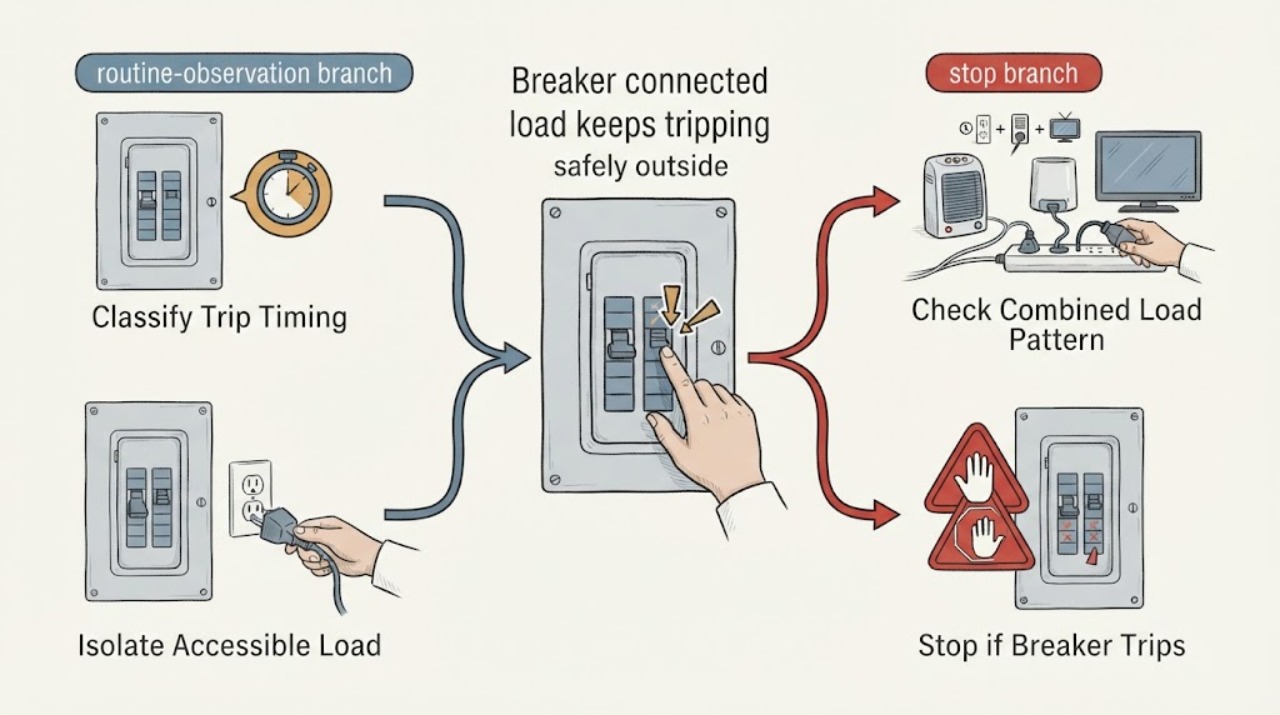
An Eaton breaker that trips with a connected load is reacting to an electrical condition, not simply refusing to stay on. First note whether it trips immediately or only after the load runs, then stop using the suspected appliance or circuit and look for a repeatable pattern at accessible plugs, switches, and controls. A delayed trip is more consistent with sustained overload or heating; an immediate trip points toward a short, ground fault, arc-fault condition, or a breaker/load problem. Do not keep resetting it, remove the panel cover, loosen conductors, or bypass the breaker. If the trip occurs with the load disconnected, if a hardwired load is involved, or if there is heat, odor, buzzing, visible damage, water, or smoke, leave the circuit off and have a qualified electrician diagnose it.
Work through in order
Diagnostic checks
Use only checks that match the exact appliance or system and its official guide.
-
Check 1
With the area dry and no visible damage, record whether the Eaton breaker trips as soon as the connected load is turned on, after the load has run for a while, or only when another load starts; if the breaker is already off, do not repeatedly reset it just to reproduce the symptom.
Expected result: Note the exact sequence, what equipment was operating, whether the handle moves to a tripped or middle position, and whether there was any odor, buzzing, warmth, smoke, or visible damage.
Next step: Leave the circuit off for any immediate trip or any heat, odor, noise, water, smoke, or damage; otherwise continue only with the accessible load-isolation check and do not open the panel.
Stop if: Stop immediately for smoke, arcing, burning odor, a hot or discolored breaker or receptacle, water, exposed metal, or a painful shock; keep clear and arrange qualified electrical service.
Why this matters
Why: An immediate trip makes a short, ground fault, arc-fault response, severe equipment fault, or breaker problem more likely. A delayed trip makes sustained overload or heat more likely. A trip only when a second load starts points toward combined demand or starting behavior, but timing alone cannot prove which component is defective.
-
Check 2
Turn off the suspected appliance or equipment at its normal control and unplug it only if the plug and receptacle are cool, dry, intact, and readily accessible; do not disconnect or pull apart a hardwired load.
Expected result: After the suspected item is left disconnected, note whether the breaker remains stable with other ordinary loads left off, or whether it still trips without that item operating.
Next step: Leave the item disconnected and label it for service if the symptom follows that item. If the breaker trips with the suspected item disconnected, leave it off and call an electrician rather than reconnecting loads to search for the fault.
Stop if: Do not touch a damaged, wet, loose, hot, or scorched plug or receptacle, and do not remove outlet covers or appliance panels.
Why this matters
Why: A stable circuit with one accessible appliance disconnected makes that appliance, its cord, plug, or its branch connection more suspicious. A continued trip with the appliance disconnected shifts concern toward another connected load, hardwired equipment, branch wiring, or the breaker.
-
Check 3
Make a written list of every device normally supplied by the circuit, including extension-connected equipment and equipment that starts automatically; compare the trip with one large load alone versus multiple loads operating together, without repeatedly cycling the breaker.
Expected result: Record whether one device alone trips the breaker, whether two or more devices together cause the trip, or whether the trip occurs even when accessible plug-in devices are off.
Next step: Keep the combination that causes the trip out of service. Do not solve an overload by fitting a higher-rated breaker or moving wires; ask an electrician to verify the circuit design and connected load.
Stop if: Stop if a motor or heating appliance repeatedly trips, if a receptacle or cord heats, or if the circuit serves a wet location and ground-fault protection may be involved.
Why this matters
Why: Only a combination pattern makes a sustained overload or starting-demand interaction more plausible. One-device behavior makes that device or its cord more suspicious. A trip with plug-in devices off means hidden or hardwired loads, wiring, or the breaker still need professional diagnosis.
-
Check 4
With power left off to the affected circuit, visually inspect only accessible appliance cords, plugs, receptacles, and the equipment exterior for cuts, crushed insulation, discoloration, moisture, loose covers, or signs of overheating; do not handle a damaged item.
Expected result: Separate a clean, dry, intact exterior from visible scorching, melted plastic, cracked insulation, moisture, a loose receptacle, or damage that appears near the equipment or cord.
Next step: Photograph the condition from a safe distance and arrange repair or electrical service; do not tape, splice, dry, or open the equipment as a workaround.
Stop if: Do not touch or move a wet, scorched, buzzing, sparking, or physically damaged electrical component.
Why this matters
Why: Visible damage or moisture supports a load-side fault or unsafe connection and requires the affected item/circuit to remain out of use. A clean exterior does not rule out an internal appliance fault, a hardwired fault, or a problem inside the branch wiring.
-
Check 5
Without removing the breaker or panel cover, photograph the installed Eaton label and check the exact model instructions for a trip flag or diagnostic LED; observe only the indication that is visible during a normal, safe event.
Expected result: Record whether the breaker has no diagnostic indicator, a model-specific trip flag, or a documented LED pattern, and preserve the sequence rather than guessing what a color or blink means.
Next step: Give the model marking and documented indication to the electrician or follow only the exact Eaton manual's user-safe guidance; do not press test controls or re-energize a circuit that is showing a fault just to obtain a code.
Stop if: Stop if obtaining the indication would require opening the panel, touching conductors, holding a test control while energized, or repeated resetting.
Why this matters
Why: On supported Eaton BR electronic breakers, a documented code can distinguish categories such as arc, short delay, overvoltage, ground fault, or self-test failure. A standard breaker may provide no such code, and a remembered code can be stale or model-specific, so it is not a substitute for circuit diagnosis.
-
Check 6
Prepare a service note with the breaker markings, connected equipment, trip timing, load-isolation result, visible-condition observations, and any supported diagnostic indication; leave the circuit off when the cause is not clearly a single unplugged appliance.
Expected result: The note should show either a repeatable appliance-specific pattern with the appliance isolated, or a persistent/uncertain trip that remains when accessible loads are off.
Next step: Request qualified electrical service for any persistent, immediate, hardwired, or unexplained trip, and request appliance service for a single identified load; provide the note instead of performing live tests yourself.
Stop if: There is no safe user troubleshooting path through an opened panel, disconnected branch conductor, bypassed protective device, or live voltage/current test.
Why this matters
Why: A repeatable appliance-specific pattern supports appliance repair while the item remains disconnected. A persistent or uncertain pattern requires an electrician to assess the branch circuit and protective device; it is not evidence that the breaker should be replaced or upsized by the homeowner.
Use your observations
Decision map
Find the observation that best matches what you see, then follow the next safe action.
-
PATH 01Next step
What you see
The breaker stays on when an accessible appliance is unplugged, but trips again when that same appliance is used.
Do this next
Leave that appliance disconnected and arrange appliance or electrical service; do not keep reconnecting it to test the pattern.
-
PATH 02Next step
What you see
One load can run, but the breaker trips when several loads run together or when another load starts.
Do this next
Keep the combination off and have an electrician evaluate the connected load and circuit; never install a larger breaker as a remedy.
-
PATH 03Next step
What you see
The breaker trips immediately when the connected load is energized, or will not remain reset.
Do this next
Leave the breaker off, keep people away from damaged equipment, and arrange qualified electrical service. Do not repeatedly reset it or open the panel.
-
PATH 04Next step
What you see
The breaker still trips after accessible plug-in loads are off or disconnected.
Do this next
Keep the circuit off and call an electrician to inspect the circuit and breaker with appropriate isolation and test procedures.
-
PATH 05Next step
What you see
There is heat, scorching, melted plastic, buzzing, arcing, water, burning odor, smoke, or exposed/damaged wiring near the load or circuit.
Do this next
Do not touch or move the affected component; leave the area safe, keep the circuit off if it can be done without approaching the hazard, and obtain urgent qualified help. Call emergency services if there is active fire or immediate danger.
Helpful context
Understand the symptom
Why the timing matters
Eaton describes the trip unit as opening the mechanism for a prolonged overload or short-circuit fault. That makes timing a useful first separator: a trip after the connected equipment has operated for a while suggests sustained load or heat, while an immediate trip when the load is energized is more concerning for a fault. Arc-fault and ground-fault versions can also respond to conditions that a basic thermal-magnetic breaker does not detect. The timing does not identify the failed part by itself, so treat it as a direction for safe observation rather than a reason to replace the breaker blindly.
Keep the diagnosis at the user-accessible side
You can record what was running and inspect accessible cords, plugs, receptacles, appliance controls, and the breaker handle without opening the panel. Do not pull a hardwired appliance out to disconnect it, remove a dead-front or breaker, touch a wet or damaged connection, or use a larger breaker to make the symptom disappear. Those steps can expose energized parts or defeat the protection the circuit is meant to provide.
What a professional needs to know
Record the Eaton breaker family and visible markings without removing it, the connected equipment, whether the trip is immediate or delayed, whether unplugging an accessible load changes the result, and any LED indication or trip flag. This narrows the visit without asking you to test live wiring. The electrician can then check the circuit, load, connections, and breaker with appropriate instruments and determine whether the cause is the appliance, branch wiring, or protective device.
Safety boundary
Stop conditions
- Stop and leave the circuit off for smoke, active arcing, burning odor, hot or discolored electrical parts, water near electrical equipment, exposed conductors, or any shock sensation.
- Do not open the loadcenter, remove the dead-front or breaker, loosen or disconnect branch wires, perform live voltage/current tests, bypass the breaker, or install a larger breaker.
- Do not repeatedly reset an Eaton breaker that trips immediately or continues to trip; arrange qualified electrical service.
Only after diagnosis
Potential parts
- Eaton circuit breaker
Only consider a breaker after a qualified diagnosis finds a failed or incompatible protective device, especially when the circuit and connected load check out and the breaker will not operate correctly.
Match the exact Eaton family, model, pole arrangement, rating, loadcenter listing, and applicable code requirements; do not substitute or change rating based only on repeated trips. - appliance power cord or plug assembly
Only consider this if inspection and professional testing identify damage at the appliance cord or plug rather than a receptacle, branch circuit, or internal appliance fault.
Confirm the appliance model and manufacturer-approved replacement before ordering or installing. - appliance electrical component
Only consider an internal component after the appliance is isolated and a qualified appliance technician identifies that component as the cause of the trip.
Use the appliance model and manufacturer fit information; a breaker trip alone does not identify a particular component.
When checks do not resolve it
Need a professional?
Call a qualified electrician for an immediate or unexplained trip, a trip that remains after accessible plug-in loads are off, any hardwired load, any visible electrical damage, or any need to inspect the panel, wiring, breaker fit, load calculation, or protective-device operation. Call appliance service when one accessible appliance reliably triggers the trip and remains disconnected. If there is active smoke, fire, or immediate shock danger, leave the area and contact emergency services.
Common questions
FAQ
Why does the Eaton breaker trip only when the connected appliance starts?
The start event may expose a fault, a starting-demand interaction, or a load that is already near the circuit's limit. Leave the appliance disconnected if it reliably triggers the trip and have the appliance or circuit diagnosed; do not keep cycling the breaker to test it.
What does an immediate Eaton breaker trip mean?
Eaton's Type BR guidance treats immediate tripping on reset as evidence of a fault. A short circuit, ground fault, arc-fault response, severe load fault, or protective-device problem may be involved, so leave the breaker off and arrange qualified electrical service.
Can I replace the Eaton breaker with a higher-rated breaker?
No. A higher rating is not a safe troubleshooting fix and can leave the conductors inadequately protected. The exact breaker, circuit, load, and code requirements must be evaluated by a qualified electrician.
Why does my Eaton breaker have an LED or trip flag?
Some Eaton breaker families provide a trip flag or model-specific diagnostic LED. If yours has one, record the exact model and use its own instructions; a code can guide diagnosis but does not authorize opening the panel or repeatedly re-energizing a faulted circuit.
What if the breaker trips even when the appliance is unplugged?
Another connected or hardwired load, branch wiring, or the protective device may still be involved. Leave the circuit off and call an electrician rather than disconnecting wires or removing the breaker yourself.
Read the exact guide
Official sources
- Circuit breaker fundamentalsEaton · Eaton explanation of breaker protection, overcurrent categories, and trip-unit function
- Type BR Quick Connect Neutral loadcenters and electronic breakersEaton · Eaton Type BR electronic breaker trip guidance and diagnostic code descriptions
- Circuit breaker LED blink codesEaton · Eaton BR two-pole ground-fault breaker diagnostic feature overview
- Residential Circuit Breakers | CH Circuit Breakers | EatonEaton · Eaton residential CH breaker overload, short-circuit, GFCI, and AFCI protection overview
Community feedback
Share a repair observation
Share a plain-text repair observation. Accepted observations are published automatically; this page may take a moment to update.