
On this page
Start here
Quick answer
A breaker trips to disconnect a circuit when current or a detected fault exceeds what the circuit can safely carry. Repeated trips can come from too many loads, a faulty appliance, a short circuit, a ground or arc fault, a wiring or connection problem, or a breaker problem. Do not repeatedly reset an Eaton breaker, install a larger breaker, bypass protection, or open the panel. If there is no heat, odor, smoke, sparking, water, or visible damage, turn off or unplug ordinary accessible loads and follow the panel's instructions for one reset only; if it trips again or will not reset, leave it off and arrange qualified electrical diagnosis.
Before you begin
Safety first
- The homeowner scope is limited to observing the exterior, reading accessible labels, switching off or unplugging ordinary accessible loads only when there is no hazard, and recording the trip pattern. Do not touch hot, wet, damaged, or sparking equipment, remove covers, probe voltage, tighten terminals, reseat or swap breakers, install a larger breaker, bypass protection, or re-energize a smoking or overheating circuit.
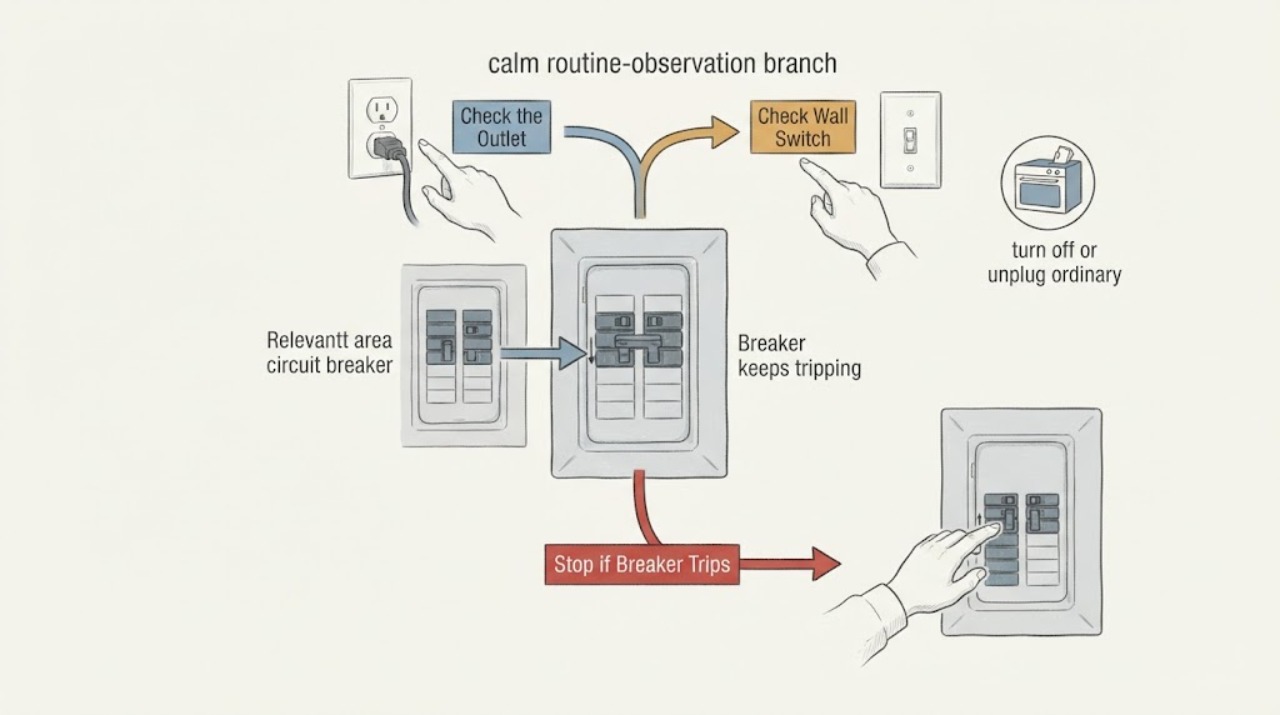
Work through in order
Diagnostic checks
Use only checks that match the exact appliance or system and its official guide.
-
Check 1
From a dry, stable position, identify the Eaton breaker and read its accessible circuit label without touching the panel interior. Note whether the handle is fully off, in a middle or tripped position, or will not remain on, and list the rooms, outlets, or lights that lost power.
Expected result: The breaker is tripped, will not stay on, or the affected circuit cannot be identified; or the circuit and breaker are clearly identified.
Next step: Leave it off if there is any warning sign or if the cause is unclear. If there is no hazard, continue with external load observations and follow the exact panel instructions for no more than one cautious reset.
Stop if: Do not force the handle, hold it on, remove a cover, or approach a panel that is hot, wet, smoking, sparking, or giving off a burning odor.
Why this matters
Why: A tripped or failed-to-reset breaker indicates that an unresolved protective condition may remain. Knowing the circuit lets you correlate loads, but it does not establish whether the problem is an overload, fault, wiring defect, or breaker failure.
-
Check 2
Look from a safe position for warning signs around the panel, accessible receptacles, switches, plugs, and cords: heat, discoloration, melted plastic, soot, moisture, burning odor, unusual buzzing or sizzling, flickering, or visible arcs or sparks. Do not touch a suspected hot or damaged item.
Expected result: One or more warning signs are present; or there is no visible, sensory, or lighting abnormality.
Next step: For a warning sign, stop using the affected circuit and arrange urgent qualified help; leave and contact emergency services for active smoke or fire. If no warning sign is present, correlate the trip with accessible loads without invasive testing.
Stop if: Do not wipe moisture, unplug a hot or sparking device, open the panel, or continue if smoke, active arcing, or rapidly worsening odor is present.
Why this matters
Why: Overheating, odors, unusual sounds, flicker, and arcs or sparks can indicate a fire or shock hazard and are not cleared by resetting. A normal exterior does not rule out a hidden fault.
-
Check 3
If there is no immediate hazard, turn off or unplug ordinary accessible appliances on the affected circuit one at a time. Start with the appliance, heater, motor, or power strip that was operating when the trip occurred; do not move a plug that is hot, wet, loose, damaged, or discolored.
Expected result: The breaker stays on after one load is removed, trips when one particular load is connected, or trips with all ordinary loads disconnected.
Next step: Leave the triggering device disconnected and arrange appliance or electrical diagnosis. If it trips with loads off, leave the breaker off and arrange qualified electrical service instead of trying another reset.
Stop if: Do not reconnect a device that is hot, wet, melted, damaged, sparking, or gives a shock, and do not keep cycling loads to reproduce the trip.
Why this matters
Why: A repeatable device-specific trip points to that appliance, cord, receptacle, or its circuit. A trip with several loads together may reflect excessive demand. A trip with loads off is more concerning for wiring, a fault-protection device, or the breaker itself.
-
Check 4
Record the timing of each trip: immediately when the breaker is reset, when a switch or appliance starts, after several minutes of operation, or only when multiple loads overlap. Note recent appliance additions, temporary wiring, moisture, outdoor use, and any work near the circuit.
Expected result: The trip is immediate, startup-related, delayed under load, tied to moisture or a particular location, or random with no repeatable load.
Next step: Keep the relevant load or circuit off and give the timing history to a qualified electrician. Do not use a timing pattern to select a replacement breaker or change its rating.
Stop if: Stop if water is present, a cord or receptacle is damaged, lights flicker, the panel heats, or the trip is accompanied by odor, buzzing, smoke, or sparks.
Why this matters
Why: Immediate or location-specific trips can indicate a short, ground or arc fault; delayed trips can reflect sustained excess demand or heating; random trips require inspection rather than a guessed diagnosis. Moisture and damaged cords can create electrical hazards.
-
Check 5
If safe, photograph the panel label and circuit directory from outside and gather the Eaton breaker type, visible rating, home age if known, recent electrical work, and prior trip history. Do not remove the service-panel cover to obtain a model or inspect terminals.
Expected result: The circuit and breaker information are legible; only partial information is available; or the label is missing or damaged.
Next step: Provide the record, load pattern, warning signs, and trip sequence to the electrician. Keep the affected circuit off when practical until it is assessed.
Stop if: Do not remove covers, expose terminals, test voltage, reseat the breaker, swap devices, or install a larger breaker yourself.
Why this matters
Why: Accurate identification helps an electrician verify the correct protective device and investigate the correct branch. A physical match or a readable ampere marking alone does not prove that a replacement is approved for the panel or wiring.
Use your observations
Decision map
Find the observation that best matches what you see, then follow the next safe action.
-
PATH 01Safety boundary
What you see
The breaker tripped once after several ordinary loads were used together, there is no heat, odor, damage, water, smoke, or flicker, and it stays on after one safe reset with loads reduced.
Do this next
Keep high-demand loads from overlapping, monitor the circuit from a safe position, and arrange an inspection if trips recur or the load cannot be managed safely.
Why this path and its safety boundary
Safety stop: Do not repeatedly reset, add a larger breaker, or treat a recurrence as normal.
-
PATH 02Safety boundary
What you see
The breaker trips whenever one appliance, switch, or receptacle is used, even after other accessible loads are removed.
Do this next
Leave that device or circuit disconnected and arrange qualified appliance or electrical diagnosis; provide the exact device and trip timing.
Why this path and its safety boundary
Safety stop: Do not keep testing the device, use an extension cord as a workaround, or install a higher-rated breaker.
-
PATH 03Safety boundary
What you see
The breaker trips immediately on reset or trips again with ordinary loads disconnected.
Do this next
Leave it off and arrange qualified electrical diagnosis for short, ground or arc fault, wiring, breaker, and connected equipment conditions.
Why this path and its safety boundary
Safety stop: Do not force or repeatedly reset the handle, open the panel, test live wiring, or replace the breaker based only on the symptom.
-
PATH 04Safety boundary
What you see
Trips are delayed and occur when a circuit carries several loads or a high-demand appliance for a period of time, with no visible damage.
Do this next
Reduce overlapping loads and arrange an electrician to verify circuit loading, conductor condition, connections, and protective-device rating.
Why this path and its safety boundary
Safety stop: Do not use a larger breaker or permanent extension-cord arrangement to defeat the trip.
-
PATH 05Safety boundary
What you see
A trip is paired with heat, burning odor, buzzing or sizzling, discoloration, flicker, melted plastic, smoke, sparks, moisture, or a shock.
Do this next
Move away, stop using the circuit, and obtain urgent professional help; for active smoke or fire, leave and contact emergency services.
Why this path and its safety boundary
Safety stop: Do not touch the equipment, remove covers, spray water, reset the breaker, or re-energize the circuit.
-
PATH 06Safety boundary
What you see
The breaker will not reset, appears damaged, has an unclear position, or trips randomly without a known load or pattern.
Do this next
Leave it off and arrange qualified electrical inspection; provide the breaker label, trip history, and any changes to the home electrical system.
Why this path and its safety boundary
Safety stop: Do not hold the breaker on, reseat it, substitute another device, or infer that the breaker alone is defective.
Helpful context
Understand the symptom
Treat a repeated trip as a symptom, not an inconvenience
The Eaton breaker is designed to open the circuit when a protective condition is detected. A single trip after several loads start together may be an overload, while an immediate or repeated trip with one device can indicate a short, ground or arc fault, appliance defect, or wiring problem. The timing and load pattern help a professional diagnose the circuit, but they do not make a homeowner reset routine safe.
Use only safe, external checks
Read the circuit label and observe which lights, outlets, or appliances lost power. Turn off or unplug only ordinary accessible loads when there is no heat, water, smoke, sparking, or damage. Do not remove the dead front, test live terminals, tighten connections, or substitute a higher-rated breaker; a normal-looking handle does not clear a hidden fault.
A device-specific trip changes the next step
If the circuit trips whenever a particular appliance, switch, or receptacle is used, leave that load out of service and have the appliance or circuit inspected. CPSC specifically warns against putting in a higher-ampere breaker when a particular receptacle or switch causes a trip. If the breaker trips with all ordinary loads off, the fault is more likely to require panel or wiring diagnosis.
Only after diagnosis
Potential parts
- Eaton-compatible circuit breaker
Consider this category only after a qualified electrician confirms that the breaker is defective and identifies the exact Eaton load center, breaker family, poles, rating, and protective function.
A breaker that fits physically may not be approved for the panel or circuit. Match the panel labeling and electrical requirements; never substitute a higher-rated or different protective device. - branch-circuit receptacle or switch
Consider this category only when a qualified electrician identifies a downstream receptacle or switch as the source of the trip, heat, arcing, or damaged connection.
Selection depends on circuit rating, conductor condition, box, location, and protective-device requirements; a repeated trip alone does not identify the device. - branch-circuit wiring or connection repair
Consider this category only after inspection finds damaged insulation, a loose or failed connection, moisture-related damage, or another wiring fault.
The repair depends on the existing wiring method, circuit protection, access, and applicable electrical rules; it is not a homeowner terminal-tightening task.
When checks do not resolve it
Need a professional?
Escalate urgently for smoke, active arcing, burning odor, melted plastic, severe heat, water near electrical equipment, visible damage, or a circuit that cannot be safely left off. Arrange prompt diagnosis for repeated, immediate, random, or device-specific trips.
Safety scope: The homeowner scope is limited to observing the exterior, reading accessible labels, switching off or unplugging ordinary accessible loads only when there is no hazard, and recording the trip pattern. Do not touch hot, wet, damaged, or sparking equipment, remove covers, probe voltage, tighten terminals, reseat or swap breakers, install a larger breaker, bypass protection, or re-energize a smoking or overheating circuit.
Have this ready
- Provide the Eaton breaker and panel labels if safely visible, affected circuit and rooms, trip timing, devices and loads operating, whether a single load triggers it, reset history, recent electrical work or moisture, and any heat, odor, buzzing, flicker, discoloration, smoke, sparks, or shock.
Common questions
FAQ
Why does my Eaton breaker keep tripping?
Common possibilities include too many loads on the branch, a faulty appliance, a short, ground or arc fault, a damaged connection or wire, or a breaker problem. The trip timing and load pattern are useful clues, but repeated trips require diagnosis rather than a guessed replacement.
Can I keep resetting a breaker that trips?
No. If there are no warning signs, remove ordinary accessible loads and follow the panel instructions for one cautious reset only. If it trips again or will not reset, leave it off and arrange qualified electrical service.
What if the breaker trips when one appliance is turned on?
Leave that appliance disconnected and arrange appliance or electrical diagnosis. Do not keep cycling it, use a higher-rated breaker, or continue if the plug, cord, or receptacle is hot, loose, wet, damaged, discolored, sparking, or gives a shock.
What does an immediate trip mean?
An immediate trip can be consistent with a short, ground or arc fault, a connected-device problem, or a protective-device issue, but timing alone cannot prove the cause. Leave the breaker off and have the circuit inspected instead of resetting it repeatedly.
Can I install a larger Eaton breaker to stop nuisance trips?
No. A higher-rated breaker can leave wiring unprotected from overload. CPSC advises qualified electrical help when a particular receptacle or switch trips a breaker; the correct device and circuit condition must be verified together.
Read the exact guide
Official sources
- CPSC Guide to Home Wiring HazardsU.S. Consumer Product Safety Commission · CPSC consumer safety guide for residential electrical systems; exact Eaton breaker and load-center behavior must be verified by its labeling and a qualified electrician.
Community feedback
Share a repair observation
Share a plain-text repair observation. Accepted observations are published automatically; this page may take a moment to update.