
On this page
Start here
Quick answer
An Eaton breaker or its load wiring should not be treated as a harmless noise source when it buzzes, especially if the sound changes with a load, the breaker trips, the enclosure is warm or discolored, lights flicker, or there is a burning smell. From outside the closed panel, identify the exact breaker and the load it supplies, turn off or unplug only accessible loads if that can be done without approaching the panel, and note whether the sound stops. Do not remove the panel cover, touch conductors, retighten a load terminal, repeatedly reset the breaker, or substitute a higher-rated breaker. Leave the affected circuit off when safe and arrange a qualified electrician to de-energize, verify, and inspect the Eaton breaker, load wiring, and connections.
Before you begin
Safety first
- This article permits outside-the-panel observation and safe control of accessible cord-connected loads only. It does not authorize panel-cover removal, live testing, terminal work, breaker removal or replacement, load rewiring, protective-device bypass, or repeated reset attempts.
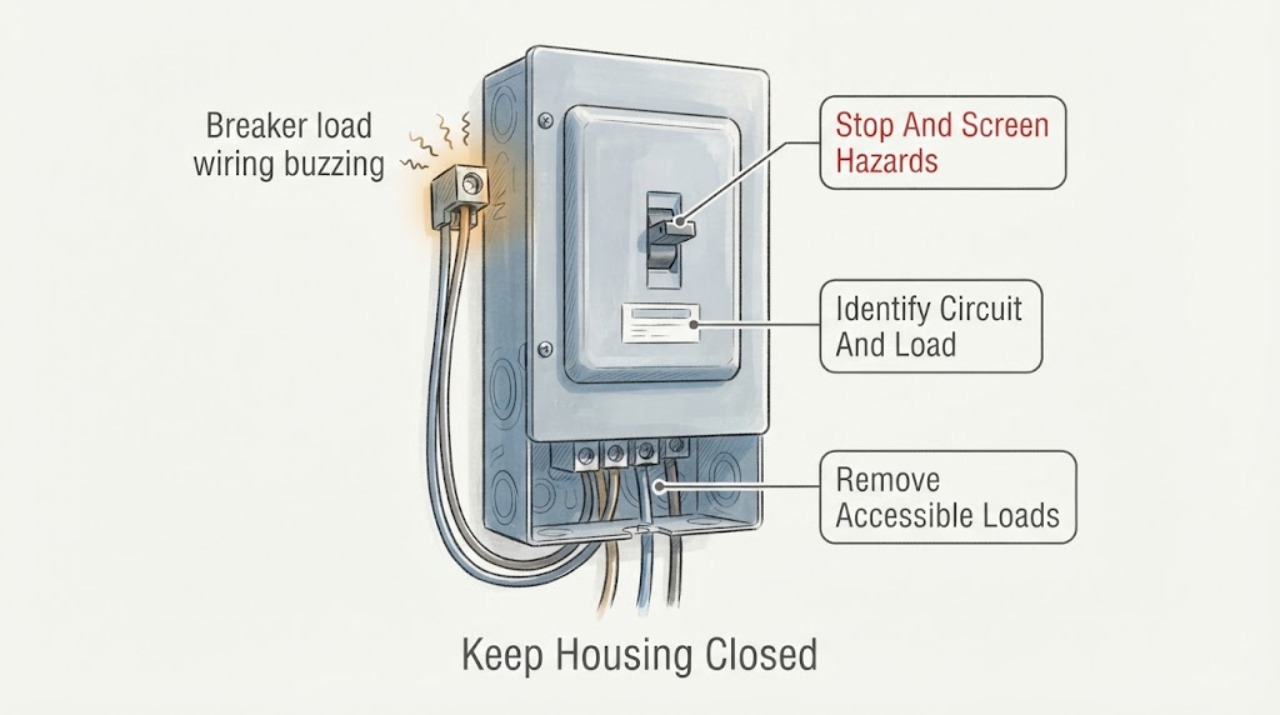
Work through in order
Diagnostic checks
Use only checks that match the exact appliance or system and its official guide.
-
Check 1
From a stable position outside the closed panel, listen for the buzz and look for smoke, sparks, a burning or rubbery odor, visible discoloration, a warm door or trim, flickering lights, or a breaker that is tripped; do not touch the panel or remove its cover.
Expected result: The buzz is present without other warning signs, or there is heat, odor, smoke, sparking, discoloration, flicker, or a trip.
Next step: For any heat, odor, smoke, sparks, visible damage, or repeated trip, stop using the affected circuit, keep clear, and contact a qualified electrician or emergency service as appropriate. Otherwise continue only with outside-the-panel observation.
Stop if: Do not open the panel, touch the enclosure to judge temperature, or continue testing a circuit showing smoke, sparks, hot or discolored parts, or a burning smell.
Why this matters
Why: Buzzing alone still needs inspection, but accompanying heat, odor, sparking, discoloration, flicker, or a trip makes an electrical fault or overheating condition more urgent.
-
Check 2
Read the circuit directory and the Eaton breaker handle marking from outside the panel, then list the accessible lights, receptacles, appliances, or hardwired equipment supplied by that circuit; do not open boxes or disconnect a hardwired load.
Expected result: The circuit identity is clear, the directory is inaccurate or incomplete, the buzz is localized to one load, or the supplied loads are unknown.
Next step: Photograph or write down the handle position and load list from a safe position. If the circuit cannot be identified without opening the panel, stop and give that uncertainty to the electrician.
Stop if: Do not remove the panel cover, pull the Eaton breaker, move conductors, or open a hardwired device to trace the circuit.
Why this matters
Why: A clear circuit and a single associated load make a load-specific cause easier to isolate. An inaccurate directory or unknown load increases the chance of switching off the wrong circuit and needs electrician verification.
-
Check 3
With the panel untouched, turn off or unplug only accessible cord-connected loads on the identified circuit, one at a time if practical, and keep any high-load or damaged appliance out of use; do not use an extension cord or move a hardwired load.
Expected result: The buzz stops when one accessible load is turned off, continues with all accessible loads off, changes with a particular load, or cannot be safely isolated.
Next step: Leave the load that changes the sound disconnected and arrange qualified diagnosis. If the sound continues with accessible loads off or the load cannot be isolated, leave the circuit off when safe and request prompt electrician service.
Stop if: Do not unplug a hot, damaged, wet, sparking, or hardwired device; keep away from any equipment with an odor, heat, smoke, or exposed conductor.
Why this matters
Why: A sound that follows one load makes that equipment or its connection a suspect. A sound that continues with loads off makes the breaker, load wiring, panel connection, or another hardwired load more likely; this observation does not prove which part has failed.
-
Check 4
Without repeatedly moving the handle, record whether the Eaton breaker is ON, OFF, in a tripped middle position, or showing a model-specific indicator or trip pattern, and note whether the buzz begins only when the load is energized.
Expected result: The breaker is tripped or repeatedly trips, the indicator reports a fault, the breaker remains ON while buzzing, or the handle and indicator are unclear.
Next step: Do not reset a tripped or buzzing breaker more than the product instructions allow. Record the indication and leave the circuit off when safe; a qualified electrician should diagnose the load and wiring before restoration.
Stop if: Do not force the handle, repeatedly reset it, install a larger breaker, or treat a momentary return of power as a repair.
Why this matters
Why: A trip or fault indication can point to overload, short circuit, ground fault, miswiring, or a load problem. A breaker that remains ON while buzzing still requires inspection; an unclear handle state should not be guessed at.
-
Check 5
From outside the panel, document recent wiring, breaker, appliance, renovation, or load changes and look for moisture, construction dust, stored items pressing against the enclosure, or a load that was newly connected; do not clean inside or disturb wiring.
Expected result: The buzz began after new work or a new load, the area is wet or contaminated, the enclosure is obstructed, or there is no recent change.
Next step: Keep the affected circuit out of use and tell the electrician exactly what changed and when. For moisture, keep clear and address the water source without touching electrical equipment.
Stop if: Do not spray cleaner, insert tools, vacuum inside the panel, remove covers, or energize a wet or contaminated enclosure.
Why this matters
Why: A timing link to new work or a new load raises the possibility of miswiring, an incompatible device, a loose connection, or an overloading condition. Moisture or contamination changes the shock and fire risk; no recent change does not rule out aging or failure.
-
Check 6
Prepare a safe handoff record with the Eaton breaker family and markings, circuit label, buzz location and timing, loads affected, trip or indicator behavior, odor or heat observations, recent work, and photos taken only from outside the closed panel.
Expected result: The record distinguishes a load-following buzz, a panel-local buzz, a trip-related buzz, an environment-related concern, or an unresolved location.
Next step: Give the record to a qualified electrician and keep the affected circuit off when safe. The electrician should follow the exact Eaton documentation and applicable electrical requirements for de-energizing, verification, wiring, terminal work, and replacement.
Stop if: Do not perform a live test, measure current or voltage, retorque a terminal, remove the breaker, or replace the breaker as a user check.
Why this matters
Why: This pattern helps the electrician prioritize load isolation, breaker and terminal inspection, wiring verification, and panel or equipment assessment without asking a homeowner to expose energized parts.
Use your observations
Decision map
Find the observation that best matches what you see, then follow the next safe action.
-
PATH 01Safety boundary
What you see
Buzzing is accompanied by heat, discoloration, burning or rubbery odor, smoke, sparks, flicker, or a repeated trip.
Do this next
Stop using the affected circuit, keep people away, and arrange prompt qualified electrician assessment. Use emergency service for active smoke, fire, or an immediate danger.
Why this path and its safety boundary
Why it matters: The warning pattern is consistent with a potentially overheating, arcing, overloaded, damaged, or faulty electrical circuit; the sound is not a normal operating indication.
Safety stop: Do not touch the panel, reset the breaker, or continue load tests while the warning signs remain.
-
PATH 02Safety boundary
What you see
The buzz changes or stops when one accessible cord-connected load is turned off, with no heat, odor, sparks, or other immediate warning sign.
Do this next
Leave that load disconnected and request qualified diagnosis of the load and Eaton circuit. Do not move it to another circuit, use an extension cord, or keep cycling it to reproduce the sound.
Why this path and its safety boundary
Why it matters: The connected load, its cord or plug, or the circuit's demand becomes more likely than a breaker-only fault, but the observation cannot rule out a load-side connection problem.
Safety stop: Do not reuse a load that is hot, damaged, wet, sparking, or producing an odor.
-
PATH 03Safety boundary
What you see
The buzz remains after accessible loads are off or unplugged, or it is clearly localized to the panel or breaker.
Do this next
Leave the circuit off when safe and arrange prompt electrician service for de-energized verification and inspection. Do not open the panel or retighten a suspected connection.
Why this path and its safety boundary
Why it matters: The Eaton breaker, load-side wiring or terminal, another hardwired load, or panel assembly becomes more likely; ordinary user observation cannot separate those possibilities.
Safety stop: Do not continue operating the circuit to compare sounds, and do not touch the breaker or panel enclosure to locate heat.
-
PATH 04Safety boundary
What you see
The buzz began after breaker, load, renovation, or wiring work, or the Eaton breaker trips or shows a fault indicator when the load is energized.
Do this next
Keep the circuit off and give the electrician the work timeline, breaker markings, indicator pattern, and affected loads. The electrician must verify the installation against the exact Eaton documentation before re-energizing.
Why this path and its safety boundary
Why it matters: Improper load wiring, an incompatible connection, overload, short circuit, ground fault, or a damaged device becomes more likely than harmless vibration.
Safety stop: Do not install a higher-rated breaker, bypass a protective device, or reset the circuit repeatedly to clear the indication.
Helpful context
Understand the symptom
What a buzzing Eaton breaker can mean
The sound may come from the breaker, a load-side connection, the connected equipment, or an adjacent device that transmits vibration through the enclosure. A sound that follows a particular appliance suggests a load or circuit interaction; a sound that remains with loads off points more toward the breaker, connection, or panel. Buzzing together with heat, discoloration, odor, flicker, sparks, or trips raises the urgency. The location and timing matter more than the brand name alone.
Keep the inspection outside the energized enclosure
CPSC describes its home-wiring guide as a way to identify warning signs before seeking professional assistance, not as a repair manual, and specifically says a qualified electrical professional should assess and repair defects. The user checks here are limited to identifying the circuit, controlling accessible loads, observing from a safe position, and recording symptoms. The panel cover stays in place.
Do not confuse a trip with a resolved fault
Eaton breakers protect branch-circuit wiring from overload and fault conditions, and Eaton documents product-specific trip indications and load-wiring checks for some electronic models. A handle that trips or an indicator that records a fault is useful evidence, not permission to keep resetting the circuit. A qualified electrician must determine whether the cause is a load, a connection, the breaker, or upstream wiring before power is restored.
Safety boundary
Stop conditions
- Do not remove the electrical panel cover, touch conductors, pull the Eaton breaker, or retighten load terminals as a homeowner troubleshooting step.
- Stop immediately for smoke, sparks, burning or rubbery odor, heat, discoloration, flickering lights, moisture, exposed conductors, or a repeated trip; keep the affected circuit out of use and seek qualified help.
- Do not repeatedly reset a buzzing or tripping breaker, install a higher-rated breaker, bypass an AFCI or GFCI function, or move a suspected load to another circuit to keep using it.
- Do not measure live voltage or current, perform a load test, alter wiring, or open a hardwired appliance to locate the sound.
- Do not energize a panel or load that is wet, contaminated, damaged, or has an unresolved buzzing condition.
Only after diagnosis
Potential parts
- Eaton circuit breaker
Consider this category only if a qualified electrician confirms the breaker itself is defective after checking the load, load wiring, panel connection, and protective-device behavior.
Confirm the exact Eaton family, panel, pole arrangement, rating, protection type, and manufacturer fit information; do not substitute a larger or different protective device. - load-side conductor or terminal hardware
Consider this category only when de-energized inspection finds damaged conductor preparation, a failed terminal, or heat damage and a qualified electrician identifies the required repair.
The electrician must confirm conductor type, size, terminal listing, enclosure, and the exact Eaton installation specification before selecting or installing hardware. - connected-load repair component
Consider this category only when the buzz follows one appliance or hardwired load and a qualified diagnosis identifies a failed load component rather than a breaker or branch-wiring fault.
Confirm the exact load model and manufacturer fit information; do not move, modify, or continue operating the load to test a suspected part.
When checks do not resolve it
Need a professional?
Arrange prompt qualified electrician service for any Eaton breaker or load wiring buzz that persists with accessible loads off, follows a hardwired load, begins after electrical work, accompanies a trip or fault indicator, or cannot be localized from outside the closed panel. Seek immediate emergency assistance for active smoke, fire, sparks, or an urgent danger. Keep the affected circuit off when safe and do not open the panel.
Safety scope: This article permits outside-the-panel observation and safe control of accessible cord-connected loads only. It does not authorize panel-cover removal, live testing, terminal work, breaker removal or replacement, load rewiring, protective-device bypass, or repeated reset attempts.
Common questions
FAQ
Is a buzzing Eaton breaker normal?
Treat a new or noticeable buzz as abnormal until a qualified electrician identifies the source. It may follow a connected load, load-side wiring, or the breaker, and heat, odor, discoloration, flicker, sparks, or trips make it more urgent.
Can I tighten the Eaton breaker load wire?
Not as a homeowner check. A panel can contain exposed energized parts even when one breaker is off. Keep the cover closed and have a qualified electrician de-energize, verify, inspect, and apply the exact Eaton terminal specification.
What if the buzzing stops when I unplug an appliance?
Leave that appliance disconnected and arrange diagnosis of both the appliance and its circuit. The result makes the load or its connection more likely, but it does not prove the breaker and load wiring are safe. Do not move the appliance to another circuit or use an extension cord to keep it running.
Should I reset a buzzing breaker?
Do not repeatedly reset it. Record whether it is on, off, tripped, or showing a model-specific indication, then leave the circuit off when safe and request qualified electrical service. A temporary return of power does not establish that the fault is gone.
What information should I give the electrician?
Provide the Eaton breaker markings and panel identity, circuit label, buzz location and timing, connected loads, what changed when accessible loads were turned off, any trip or indicator behavior, recent work, and any heat, odor, discoloration, flicker, moisture, or spark observations made without opening the panel.
Read the exact guide
Official sources
- Electrical Safety: ChecklistNational Fire Protection Association · Official NFPA checklist used for escalation when breakers trip, outlets or equipment are warm or discolored, odors occur, lights flicker, or sparks are present.
- Residential Circuit Breakers | BR Circuit Breakers | EatonEaton · Official Eaton product-family information used for general breaker and branch-load context; it does not identify the fault in an unspecified installed model.
- AbleEdge Smart Breaker FAQEaton · Official Eaton smart-breaker FAQ used for the wiring and fault-indication branches; its LED behavior is not generalized to every Eaton breaker.
- CPSC Guide to Home Wiring HazardsU.S. Consumer Product Safety Commission · Government safety guidance used for warning-sign triage and the boundary against homeowner panel repair.
- Circuit BreakersEaton Industries · Official Eaton installation leaflet used to support the device-specific installation and terminal-work boundary; the exact breaker documentation controls.
Community feedback
Share a repair observation
Share a plain-text repair observation. Accepted observations are published automatically; this page may take a moment to update.