
On this page
Start here
Quick answer
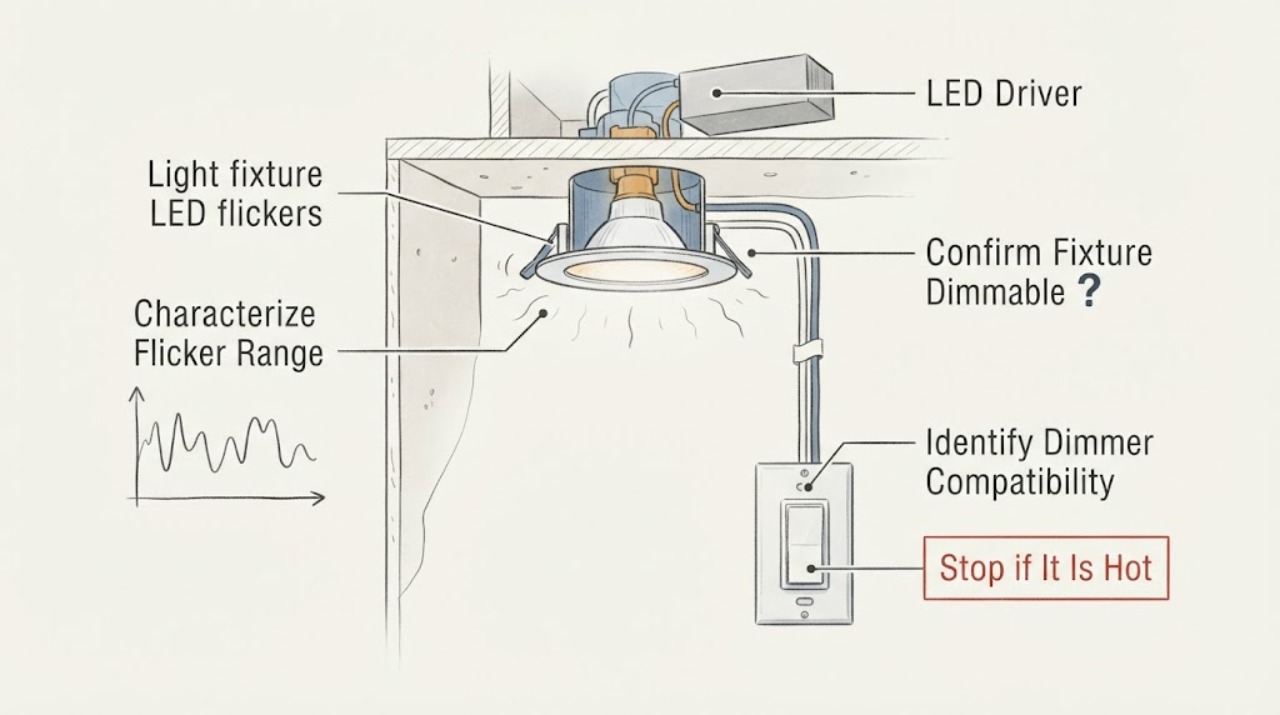
A Feit LED fixture that flickers on a dimmer most often has a compatibility or operating-range mismatch: the fixture may not be dimmable, the dimmer may not be rated for LED loads, the total load may be outside the dimmer's range, or the driver and dimmer may not work well together. Flicker that is strongest near the low end can sometimes be reduced by setting the dimmer's minimum level according to its instructions. First identify the exact Feit fixture and dimmer, check the fixture's dimmable marking and the dimmer's LED compatibility, and observe whether flicker occurs at every level or only near minimum brightness. Do not open the fixture, change wall wiring, bypass the dimmer, or work on energized conductors. If there are loose wires, heat, buzzing, burning odor, arcing, flicker at full brightness, a tripping breaker, or flicker that continues with a compatible setup, switch the circuit off from a safe location and arrange qualified electrical service.
Work through in order
Diagnostic checks
Use only checks that match the exact appliance or system and its official guide.
-
Check 1
From a safe position, move the dimmer through its normal range and note whether the LED flickers only near the lowest setting, at mid-levels, at full brightness, or whenever the light is on; do not remove the fixture or dimmer cover.
Expected result: Flicker is limited to the low end, occurs at all dim levels, begins after a control change, or is accompanied by buzzing or heat.
Next step: Record the pattern and continue with fixture and dimmer identification. Stop operating the light for heat, odor, arcing, or unpredictable behavior.
Why this matters
Why: Low-end-only flicker makes minimum-level or dimmer compatibility behavior more likely. Full-range flicker, a recent control change, buzzing, or heat keeps incompatibility, wiring, driver, or supply faults in question.
-
Check 2
Read the Feit fixture packaging, label, or model documentation for a dimmable designation without opening the fixture or relying on a generic LED assumption.
Expected result: The fixture is explicitly dimmable, explicitly non-dimmable, or its dimming status cannot be confirmed.
Next step: Stop using the dimmer with a non-dimmable or unconfirmed fixture until the exact documentation is checked. Continue only with model and dimmer identification, not wiring changes.
Why this matters
Why: A non-dimmable fixture is not a suitable dimmer load. A dimmable marking permits compatibility checking but does not guarantee compatibility with every dimmer; an unknown status cannot safely be assumed.
-
Check 3
Record the dimmer brand and model from accessible markings and compare it with Feit's current compatibility information for the exact fixture or LED product; do not remove the wall plate to expose wiring.
Expected result: The dimmer is listed as compatible, listed as incompatible, not listed, or its model cannot be identified.
Next step: Use a control confirmed for the exact Feit product or have a qualified electrician evaluate the control. Do not pair a smart dimmer with a smart LED fixture unless both manufacturers document that combination as compatible.
Why this matters
Why: A tested combination is a stronger starting point. An incompatible, unlisted, or unidentified dimmer leaves a compatibility mismatch as the leading explanation and does not justify guessing at a replacement.
-
Check 4
If the installed control is a Feit Smart Dimmer and the fixture is confirmed dimmable, use only the dimmer's documented minimum-brightness adjustment to raise the low end until the light is stable; do not change wiring or hold a control in an undocumented mode.
Expected result: Flicker stops above the adjusted minimum, remains at low brightness, or occurs even at higher and full levels.
Next step: Keep the minimum setting within the control's instructions. If flicker persists beyond the low end, stop adjustment attempts and arrange compatibility or electrical diagnosis.
Why this matters
Why: A stable higher minimum supports low-end dimming behavior or compatibility margin as the immediate cause. Flicker outside the low end makes a broader mismatch, driver, wiring, or supply issue more likely.
-
Check 5
With the light off and cool, look from outside the fixture for a loose accessible lamp, cracked diffuser, discoloration, buzzing, or signs of heat; do not open an integrated LED fixture or touch wiring.
Expected result: A lamp is loose, the fixture or dimmer buzzes or feels hot, discoloration is visible, or the external fixture looks normal.
Next step: Tighten only an accessible replaceable lamp when the circuit is off and the lamp is cool. For integrated fixtures, heat, buzzing, discoloration, or an unknown source, leave the circuit off and arrange service.
Why this matters
Why: A loose lamp can contribute to flicker, while heat, buzzing, or discoloration can indicate a driver, dimmer, or connection problem that is not solved by a brightness setting.
-
Check 6
Observe whether flicker occurs with the dimmer at full brightness, whether other lights on the circuit also flicker, or whether the breaker trips, wiring is loose, smoke appears, or a burning odor is present; do not touch the wall box or fixture wiring.
Expected result: Only this fixture flickers, multiple lights flicker, or an electrical warning sign is present.
Next step: Switch the circuit off from a safe location and arrange qualified electrical service for persistent full-range flicker, multiple affected lights, repeated trips, heat, odor, smoke, arcing, or any wiring concern.
Why this matters
Why: A single fixture points more toward its driver, dimmer compatibility, or local connection. Multiple fixtures or a breaker event can indicate a circuit or supply issue; smoke, odor, heat, arcing, or loose wiring is an immediate safety boundary.
Use your observations
Decision map
Find the observation that best matches what you see, then follow the next safe action.
-
PATH 01Next step
What you see
Do this next
If using a Feit Smart Dimmer, adjust the minimum brightness only according to its instructions. If the control is another model, verify its LED compatibility rather than changing wiring.
-
PATH 02Next step
What you see
Do this next
Stop dimming the fixture and have a qualified electrician select a documented compatible control or appropriate non-dimming arrangement for the exact Feit product.
-
PATH 03Next step
What you see
Do this next
Stop using the fixture, isolate power from a safe location, and arrange qualified electrical diagnosis. Do not open an integrated fixture.
-
PATH 04Next step
What you see
Do this next
Stop experimenting with dimmer settings and have a qualified electrician assess the circuit and supply. Do not open the wall box or attempt a live check.
-
PATH 05Next step
What you see
Do this next
Keep clear, turn off the circuit only from a safe location, and contact a qualified electrician; use emergency services for active smoke or fire.
Helpful context
Understand the symptom
The dimmer is part of the LED system
An LED fixture does not behave like an incandescent load. The dimmer and the fixture's electronic driver must be compatible, and the circuit's LED load must fall within the dimmer's supported range. A fixture that is not marked dimmable should not be treated as a dimmer-adjustment problem.
Flicker pattern is the useful clue
Flicker only near the lowest brightness often points toward minimum-level or compatibility behavior. Flicker across the full range, at full brightness, or after a wall-control change makes a broader mismatch, loose connection, driver fault, or irregular supply more likely. Compare brightness levels without opening the fixture.
Keep wiring work professional
Feit installation guidance requires power to be off at the breaker before wiring work and recommends a qualified electrician when wiring is uncertain. User checks should stop at markings, control identification, normal dimmer settings, and external observation; fixture-driver and wall-box access are service work.
Only after diagnosis
Potential parts
- LED-rated dimmer
Consider this only when the fixture is confirmed dimmable and the installed control is incompatible, unlisted, or unable to operate the LED load without flicker.
Confirm the exact Feit fixture, dimmer model, load range, wiring configuration, and local requirements; electrical installation belongs with a qualified person. - Feit LED fixture or driver
Consider a driver or fixture replacement only when a compatible dimmer and correct minimum setting are confirmed but flicker persists at normal and full brightness or a professional diagnoses the driver.
Integrated LED parts are model-specific; do not open or modify the fixture without the exact documentation and qualified service. - lamp or LED module
Consider a replaceable lamp or module only when the fixture design allows it and the lamp is loose, damaged, or confirmed incompatible after the dimmer check.
Match the fixture's documented lamp type and dimming requirements; a generic LED is not automatically compatible. - wall-box wiring connector
Consider a wiring repair only when a qualified electrician finds a loose or damaged connection after the fixture and dimmer compatibility path is cleared.
Do not open the wall box or handle energized conductors as a user-level check; local electrical rules and qualified service apply.
When checks do not resolve it
Need a professional?
Arrange qualified electrical service when the Feit fixture flickers at full brightness, the dimmer and fixture are not confirmed compatible, flicker affects multiple lights, the breaker trips, or the fixture, switch, or wiring is hot, buzzing, discolored, loose, arcing, or smoking. Switch off power from a safe location and do not open the fixture or wall box.
Common questions
FAQ
Why does my Feit LED fixture flicker with a dimmer?
The fixture may not be dimmable, the dimmer may not be LED-rated, the LED load may be outside the dimmer's supported range, or the fixture driver and dimmer may be incompatible. Flicker only near minimum brightness can be a low-end setting issue.
Can I use any dimmer with a Feit LED fixture?
No. Feit recommends verifying that the light is dimmable and checking tested compatibility for the specific dimmer and LED product. A dimmer made only for incandescent loads can flicker, buzz, or drop out with LEDs.
Why does the Feit LED flicker only at the lowest setting?
Low-end flicker can occur when the dimmer's minimum level is below the stable operating range of the LED driver. If it is a Feit Smart Dimmer and the fixture is confirmed dimmable, use the documented minimum-brightness adjustment; otherwise verify compatibility with the dimmer manufacturer.
Should I replace the Feit fixture or the dimmer first?
Do not guess. Identify the fixture and dimmer models, confirm the fixture is dimmable, and check the tested compatibility information. If the pair is compatible but flickers at full brightness or shows heat or damage, have the fixture and wiring professionally diagnosed.
When is LED flicker an electrical emergency?
Treat smoke, burning odor, arcing, exposed or loose wiring, a hot fixture or dimmer, visible damage, or repeated breaker trips as stop conditions. Turn off the circuit from a safe location and contact a qualified electrician; use emergency services for active smoke or fire.
Read the exact guide
Official sources
- The lights are flickering with my Smart DimmerFeit Electric Help Center · Feit Smart Dimmer guidance; other Feit fixtures and controls require their exact documentation.
- LED Dimmer Compatibility - Dimmable Bulbs & Switch GuideFeit Electric · Feit general LED and dimmer compatibility guidance; verify the exact fixture and dimmer models.
- What Dimmers are Compatible with Feit Electric Dimmable Lights?Feit Electric Help Center · Feit guidance for confirming dimmability and tested dimmer combinations; exact fixture documentation still controls.
- How to install and wire your Feit Electric smart dimmerFeit Electric Help Center · Feit Smart Dimmer installation guidance; it does not authorize user wiring changes on another fixture or control.
Community feedback
Share a repair observation
Share a plain-text repair observation. Accepted observations are published automatically; this page may take a moment to update.