
On this page
Start here
Quick answer
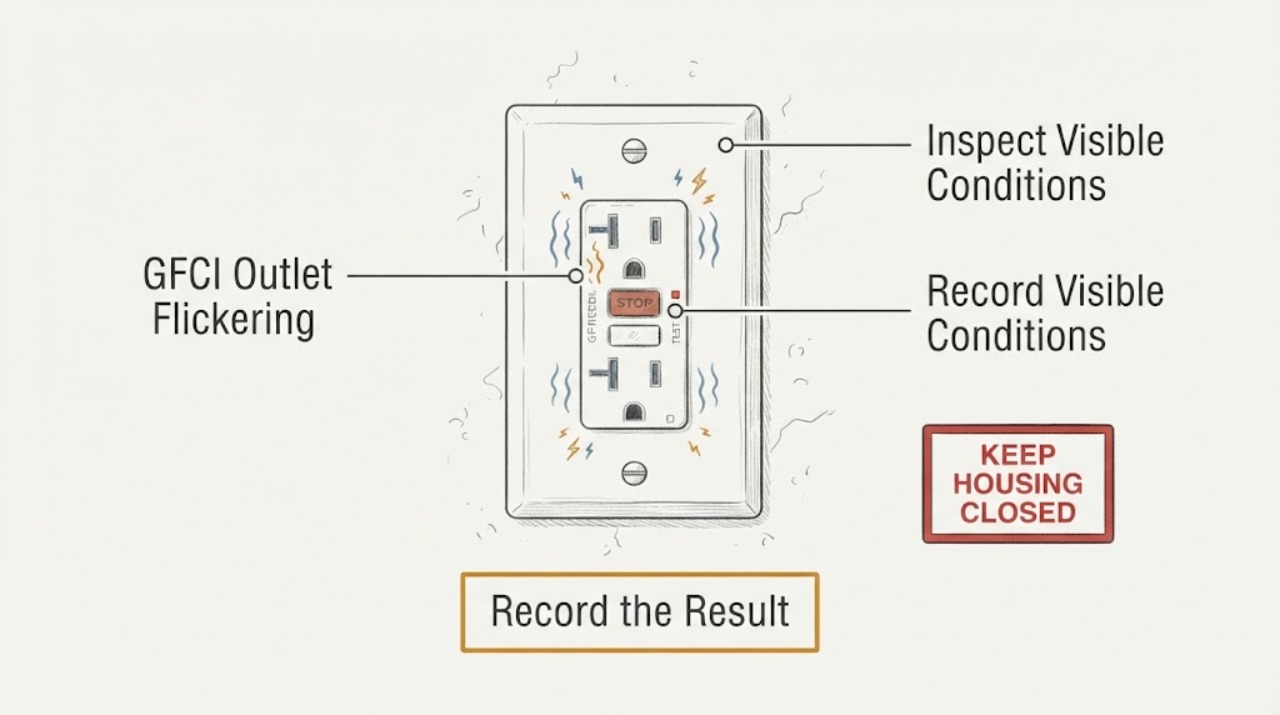
A GFCI outlet that flickers may be showing a model-specific status or self-test indication, losing power, responding to a fault, or experiencing a wiring or receptacle problem. First determine whether the GFCI's indicator, a plugged-in load, nearby lights, or all of them are flickering. From a dry, safe distance, look for warmth, discoloration, crackling or buzzing, odor, smoke, sparks, moisture, damaged cords, and other affected outlets. Do not touch the receptacle, press TEST or RESET, unplug a load, remove a cover, or take an electrical measurement. A blinking red or unstable indicator, a noisy or warm outlet, repeated loss of power, or any arcing, smoke, burning odor, shock, or water exposure is a stop condition. Keep clear and have a licensed electrician inspect the GFCI and its circuit.
Before you begin
Safety first
- Keep the outlet and affected circuit out of use for heat, odor, smoke, arcing, shock, water, repeated power loss, or uncertain protection. Device replacement, wiring inspection, panel work, and electrical measurements belong to a licensed electrician.
Work through in order
Diagnostic checks
Use only checks that match the exact appliance or system and its official guide.
-
Check 1
From a dry position and without touching the outlet, observe whether there is smoke, a burning or hot-insulation odor, visible spark or arc, crackling or buzzing, a warm or discolored cover, a shock or tingle, moisture, or a damaged cord nearby.
Expected result: Any warning sign is present, or the outlet is in a wet area and its condition is changing.
Next step: Do not touch the outlet, connected load, breaker, or wall cover. Keep people clear; if smoke or fire is present, leave and use the local emergency route from a safe location. Otherwise arrange urgent licensed electrician inspection.
Stop if: Stop immediately for smoke, fire, sparks, arc, burning odor, heat, shock, exposed wiring, water contact, or repeated protective-device operation.
Why this matters
Why: The flicker may indicate an electrical fault, overheating, arcing, shock hazard, or moisture-related ground fault rather than a harmless indicator pattern.
-
Check 2
Without touching the device or changing any control, watch from a safe distance and record whether the GFCI status light flickers, the plugged-in load loses and regains power, nearby room lights dim, or several signs change together.
Expected result: Only the status light changes, only the load changes, nearby lights also dim, or the status and load change together.
Next step: Record the pattern and frequency for the electrician. Do not press TEST or RESET, unplug the load, or try to prove the pattern by repeated cycling.
Stop if: Stop if the flicker becomes continuous, the outlet makes noise, feels warm, changes color unexpectedly, or loses power repeatedly.
Why this matters
Why: An indicator-only pattern may be a model-specific status or fault; load or room-light changes suggest power interruption or a broader circuit issue; combined changes require the GFCI and circuit to be treated as unresolved.
-
Check 3
Read the receptacle face and, from a dry distance, record the visible indicator color, whether it is steady or blinking, the RESET button position as already found, the device brand or model marking, and whether the pattern began after a power event or new load; do not touch the buttons.
Expected result: The indicator is steady green or white, red or amber, unlit, rapidly blinking, or changing only during a system event; the model marking is known or unavailable.
Next step: Use the exact model information to guide the electrician or compare it only with the manufacturer's instructions. If the pattern is unexplained, unstable, or paired with loss of protection, stop using the receptacle and arrange inspection.
Stop if: Stop for a red fault indication that remains, no indicator with lost power, a device that will not remain stable, or any need to press a button or remove the faceplate.
Why this matters
Why: GFCI indicator meanings are device-specific. On some devices a red indication can mean a fault, while smart-device blinking can represent setup or connectivity; an unlit indicator can reflect no circuit power or a device issue.
-
Check 4
Without operating switches, breakers, or the GFCI, note whether other already-powered outlets, lights, or equipment in the same room or nearby area are also dimming, flickering, or losing power; record which locations are affected and whether water is nearby.
Expected result: Only this receptacle is affected, several downstream outlets are affected, room lights are affected, or the issue spans more than one area.
Next step: Stop using the affected circuit and give the electrician the map of locations and timing. Do not move loads, operate the panel, or open any outlet to trace the circuit.
Stop if: Stop for an expanding affected area, power loss in essential equipment, buzzing at the panel, heat, odor, water, or a shock.
Why this matters
Why: A local symptom may involve the receptacle or its immediate load; several outlets or lights point to an upstream GFCI, branch-circuit, neutral, supply, or broader wiring issue that cannot be located safely from the face of the outlet.
-
Check 5
From a safe position, visually note the connected appliance or cord identity, visible damage, moisture, crushed insulation, discoloration, unusual movement, or whether the flicker starts when that load is already operating; do not unplug, reposition, or handle the load.
Expected result: One load appears damaged or wet, the flicker follows that load's operation, no visible load damage exists, or the outlet flickers with no load change.
Next step: Keep the load and receptacle out of use and tell the electrician exactly what was connected and when the flicker began. Do not substitute another load to repeat the fault.
Stop if: Stop for damaged insulation, wet equipment, heat, smoke, odor, sparking, or any need to unplug or move a connected device.
Why this matters
Why: A connected appliance or cord can contribute to a ground fault or overload, but visual inspection cannot clear it. A no-load flicker keeps the receptacle or branch circuit in scope.
-
Check 6
Prepare a service note with the outlet location, GFCI brand or model marking, indicator color and timing, whether the load or room lights flicker, affected nearby outlets, water exposure, visible damage, recent power event, and any sound or odor; leave the receptacle, wiring, buttons, and panel untouched.
Expected result: The flicker persists, its meaning is unclear, protection does not appear reliable, another outlet is affected, or any safe observation points to a circuit fault.
Next step: Stop using the outlet and arrange a licensed electrician to inspect the GFCI, connected circuit, upstream and downstream protection, and applicable wiring safely.
Stop if: Stop all user diagnosis if it would require touching the receptacle, pressing TEST or RESET, unplugging a load, opening a cover or panel, or making an electrical measurement.
Why this matters
Why: The remaining possibilities include a failed GFCI, a connected-load fault, a loose or damaged connection, an upstream protective device, moisture, or a branch-circuit problem.
Use your observations
Decision map
Find the observation that best matches what you see, then follow the next safe action.
-
PATH 01Next step
What you see
The GFCI or nearby wiring is warm, discolored, wet, smoky, sparking, arcing, noisy, or associated with odor or shock.
Do this next
Do not touch or operate the outlet or panel. Keep clear and use the local emergency route for smoke or fire; otherwise arrange urgent licensed electrician inspection.
Why this path and its safety boundary
Why it matters: This is an electrical fire, shock, arcing, overheating, or moisture hazard.
-
PATH 02Next step
What you see
Only the status light flickers and the outlet remains visually cool, quiet, dry, and otherwise stable.
Do this next
Record the model, color, and timing and consult the exact manufacturer instructions or an electrician without pressing buttons or opening the device.
Why this path and its safety boundary
Why it matters: The pattern may be a model-specific status, self-test, setup, connectivity, or fault indication; color alone cannot establish which one.
-
PATH 03Next step
What you see
A lamp or appliance loses and regains power along with the GFCI flicker.
Do this next
Stop using the affected outlet and keep the load in place for identification; do not unplug or substitute another load, and call an electrician.
Why this path and its safety boundary
Why it matters: The GFCI may be tripping or losing supply, or a connected load may be contributing to a ground fault or overload.
-
PATH 04Next step
What you see
Nearby outlets or room lights also flicker, dim, or lose power.
Do this next
Stop using affected loads and request prompt electrical inspection; do not operate breakers or open the panel to trace the circuit.
Why this path and its safety boundary
Why it matters: The issue may be upstream or broader than the single receptacle, including a branch-circuit or supply connection.
-
PATH 05Next step
What you see
The GFCI shows a persistent fault or no protection indication, will not remain stable, or its protection status is uncertain.
Do this next
Do not press TEST or RESET or attempt replacement; stop using the receptacle and have a licensed electrician inspect it and the circuit.
Why this path and its safety boundary
Why it matters: The device may have failed, lack supply, have a wiring issue, or be responding to an unresolved ground fault; the protection cannot be assumed.
-
PATH 06Next step
What you see
The indicator or receptacle flickers with no change in connected load and no visible environmental cause.
Do this next
Keep the outlet out of use and provide the timing and affected-area map to an electrician rather than testing with another appliance.
Why this path and its safety boundary
Why it matters: A device, connection, upstream protection, or circuit fault remains possible even without an obvious appliance trigger.
Helpful context
Understand the symptom
First separate the indicator from the power
People use flickering to describe several different observations: the tiny GFCI status light changes state, a lamp or appliance on the receptacle blinks, or room lights dim at the same time. Those patterns lead to different questions. A light pattern can be normal on one model and a fault on another, while an outlet that loses power can be responding to a trip, upstream device, or circuit problem. Identify what is changing without touching the device.
Why a GFCI warning deserves caution
A GFCI is a shock-protection device, not merely a convenient outlet. It may interrupt power after a ground fault, and a fault can come from a connected load, moisture, the receptacle, or circuit wiring. A blinking status light is not a universal code: color, timing, and meaning depend on the exact device. Use its model instructions only as information for an electrician when the outlet is unstable or damaged.
The non-contact boundary
This symptom is not a safe invitation to tighten a terminal, swap a receptacle, test voltage, or keep pressing buttons. The electrician needs to examine the device, upstream and downstream connections, protective behavior, and the circuit under the applicable local rules. Your useful contribution is a clear record of what flickers, when it happens, what else is affected, and what warning signs are visible from a safe position.
Safety boundary
Stop conditions
- Stop immediately for smoke, fire, visible spark or arc, burning odor, heat, discoloration, crackling or buzzing, exposed wiring, shock, or tingling.
- Stop for water, condensation, wet equipment, a damp wall or floor, or a GFCI in a wet area whose condition is changing.
- Do not touch the receptacle, press TEST or RESET, unplug or reposition a load, remove a faceplate or panel, touch wiring, or make an electrical measurement.
- Stop using the outlet when the indicator remains faulty, power repeatedly drops, other outlets or lights flicker, or protection status is uncertain.
- If smoke or fire is present, leave the area and contact the local emergency route from a safe location; do not return to investigate.
Only after diagnosis
Potential parts
- GFCI receptacle
- connected load or cord
- branch-circuit connection or upstream protection
When checks do not resolve it
Need a professional?
The GFCI indicator flickers without a clear model-specific normal explanation, remains red or faulted, or the protection status is uncertain., The receptacle or connected load loses and regains power, or nearby outlets or lights also flicker or dim., The outlet is warm, discolored, noisy, wet, smoky, sparking, arcing, or associated with a burning odor, shock, or tingling., A connected appliance or cord appears damaged or wet, or the symptom follows one load but cannot be safely isolated without unplugging it., Diagnosis would require pressing a button, unplugging a load, opening the receptacle or panel, touching wiring, or making an electrical measurement.
Safety scope: Keep the outlet and affected circuit out of use for heat, odor, smoke, arcing, shock, water, repeated power loss, or uncertain protection. Device replacement, wiring inspection, panel work, and electrical measurements belong to a licensed electrician.
Common questions
FAQ
Is a flickering GFCI light always a failed outlet?
No. Indicator colors and blinking patterns vary by model; some blinking states can be setup or connectivity information, while persistent red, unstable, or unexplained behavior can indicate a fault. Record the exact model and pattern without pressing buttons and ask an electrician when protection is uncertain.
What if the appliance plugged into the GFCI flickers too?
Treat the combined outlet and load behavior as unresolved power or ground-fault evidence. Stop using that outlet, do not unplug or substitute a load during the investigation, and provide the timing and load identity to a licensed electrician.
Can I press TEST or RESET to see whether the GFCI is okay?
For this flickering symptom, do not press either button as a troubleshooting experiment. A warm, noisy, discolored, wet, unstable, or fault-indicating device should remain untouched until an electrician assesses it; routine testing belongs to the exact manufacturer instructions when the device is safe and stable.
Why do nearby lights flicker when one GFCI flickers?
Shared or upstream circuit conditions can affect more than one outlet or light, but the visible pattern cannot locate a loose connection or supply problem safely. Stop using the affected circuit and have an electrician inspect it.
When is a flickering GFCI an emergency?
Smoke, sparks, arcing, burning odor, heat, shock, water exposure, crackling or buzzing, or a rapidly worsening condition requires immediate stop and safe-distance emergency handling. Do not touch the device or panel; leave for smoke or fire and use the local emergency route from a safe location.
Read the exact guide
Official sources
- GFCI Fact SheetU.S. Consumer Product Safety Commission · CPSC consumer safety fact sheet; local rules and exact device instructions control installation and testing.
- Home Wiring Safety TipsElectrical Safety Foundation International · ESFI home electrical-safety guidance for recognizing wiring hazards; local emergency procedures and code requirements vary.
- What to do when your GFCI outlet trips?Leviton · Leviton GFCI support guidance; exact indicator behavior and installation details vary by device and circuit.
- What the LED Light on Your GFCI Outlet is Telling You and When to Take ActionLeviton · Leviton indicator guidance; colors and blinking behavior are not universal across GFCI models.
- GFCI Outlets & ReceptaclesLeviton · Leviton product-family guidance; the assigned outlet brand and exact model are unspecified, so status meanings must not be generalized.
Community feedback
Share a repair observation
Share a plain-text repair observation. Accepted observations are published automatically; this page may take a moment to update.