
On this page
Start here
Quick answer
When a GFCI outlet has no power, the cause may be a tripped GFCI, an upstream GFCI protecting this outlet, an open circuit breaker, a failed receptacle, a connected-load fault, or a wiring problem. From a dry, safe position, observe the outlet's indicator and button position, nearby outlets and lights, the visible state of the labeled breaker, moisture or damage, and what was connected when power disappeared. Do not press TEST or RESET, repeatedly operate a breaker, unplug a load, remove a faceplate or panel, touch wiring, or make an electrical measurement. If the outlet is warm, discolored, wet, noisy, smoky, sparking, associated with a shock, or the breaker opens again, keep clear and arrange urgent licensed electrician service.
Before you begin
Safety first
- Keep the affected outlet and circuit out of use for heat, odor, smoke, arcing, shock, water, repeated power loss, or uncertain protection. Receptacle replacement, panel work, wiring inspection, and electrical measurements belong to a licensed electrician.
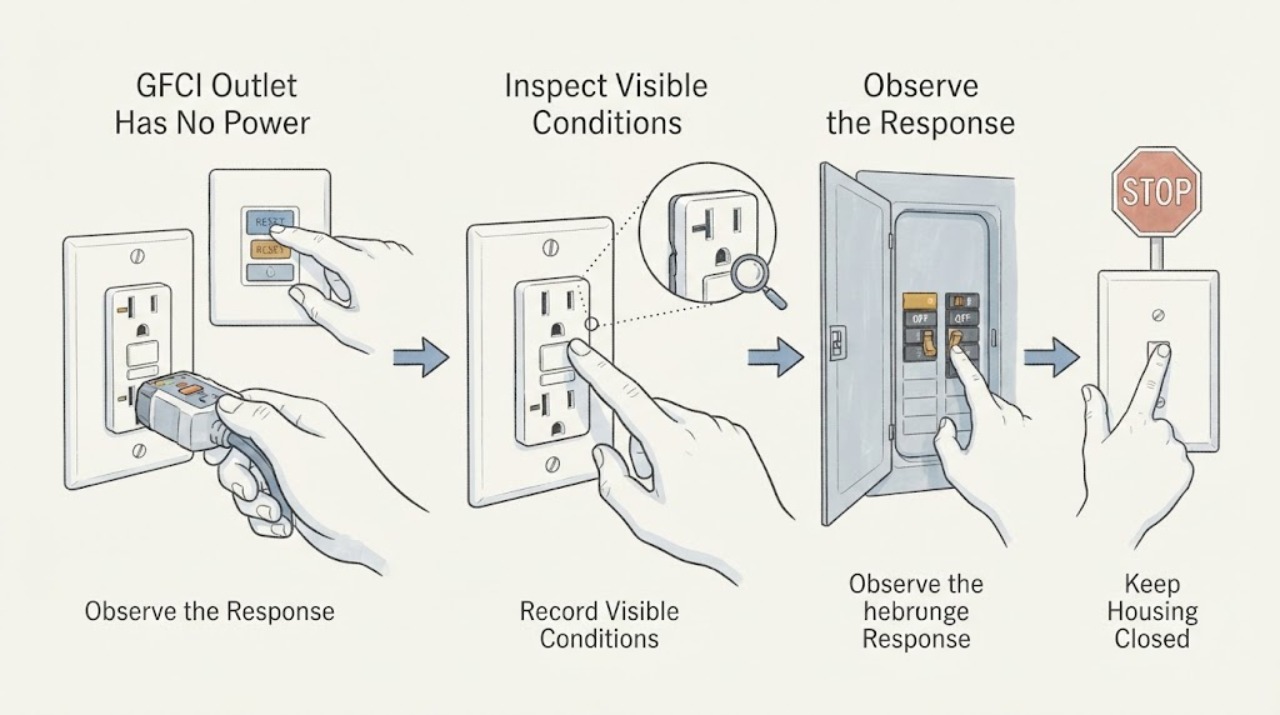
Work through in order
Diagnostic checks
Use only checks that match the exact appliance or system and its official guide.
-
Check 1
From a dry, safe position, look at the GFCI and surrounding wall without touching them; note smoke, burning or hot-insulation odor, heat, discoloration, crackling or buzzing, visible spark or arc, exposed wiring, moisture, or a shock or tingle.
Expected result: Any warning sign is present, or the outlet is wet or changing condition.
Next step: Do not touch the outlet, load, breaker, or cover. Keep people clear; if smoke or fire is present, leave and use the local emergency route from a safe location. Otherwise arrange urgent licensed electrician inspection.
Stop if: Stop immediately for smoke, fire, sparks, arc, burning odor, heat, shock, exposed wiring, water contact, or repeated protective-device operation.
Why this matters
Why: The loss of power may involve overheating, arcing, shock, moisture, or another electrical hazard rather than a routine trip.
-
Check 2
Without pressing either button or removing the faceplate, record whether the GFCI indicator is off, steady, or blinking, whether the RESET button appears in or out, the device brand or model marking, and whether a recent power event preceded the outage.
Expected result: The indicator is off, red or another fault color, blinking, normal-looking but the receptacle is dead, or the model marking is unavailable.
Next step: Give the exact visible state and model information to an electrician. Do not press TEST or RESET to force a change or interpret an unfamiliar light pattern across brands.
Stop if: Stop for a loose or damaged faceplate, heat, odor, noise, wetness, a persistent fault light, or any need to touch the buttons or terminals.
Why this matters
Why: An unlit device can lack circuit power or have failed; a red or blinking state can indicate a model-specific fault, while a normal-looking indicator does not prove the receptacle can supply power.
-
Check 3
Without operating switches, breakers, or outlets, observe whether already-powered nearby outlets, lights, or equipment also lost power; record the rooms and fixtures affected and whether the outage is limited to one receptacle.
Expected result: Only this GFCI is dead, several outlets downstream are dead, room lights are affected, or the outage spans more than one area.
Next step: Keep the affected points out of use and give the electrician the location map. Do not open a panel or another outlet to trace the circuit.
Stop if: Stop for an expanding outage, essential equipment losing power, panel buzzing, heat, odor, water, or any shock.
Why this matters
Why: A single dead device may involve the receptacle or local load; several dead points suggest an upstream GFCI, breaker, branch circuit, neutral, or supply issue.
-
Check 4
From outside the electrical panel and without touching it, read the label and note whether the associated breaker appears fully on, off, or in an intermediate position; do not reset it, remove the panel cover, or substitute a fuse.
Expected result: The breaker appears open or intermediate, appears on while the GFCI is dead, cannot be identified, or has opened more than once.
Next step: Record the visible position and call a licensed electrician. If it has opened repeatedly, leave the circuit off and do not attempt another reset.
Stop if: Stop for panel heat, buzzing, smoke, odor, water, visible damage, an unknown breaker, or any need to touch the panel.
Why this matters
Why: An open protective device can explain lost supply, but a repeat opening indicates an unresolved overload, ground fault, wiring, or equipment problem and should not be defeated.
-
Check 5
From a safe position, visually record what was connected to the GFCI or its downstream outlets, whether a cord or appliance appears damaged or wet, and whether the outage began during use, rain, cleaning, or another moisture event; do not unplug or move the load.
Expected result: A connected load is damaged or wet, the outage follows one appliance event, no visible load clue exists, or the device is in a wet location.
Next step: Keep the load and outlet out of use and tell the electrician the load identity and event timing. Do not unplug, substitute, or reconnect equipment to reproduce the fault.
Stop if: Stop for wet equipment, damaged insulation, heat, smoke, odor, sparks, or any need to handle a connected load.
Why this matters
Why: A connected load or moisture can contribute to a ground fault, while no visible clue keeps the receptacle and circuit in scope. Visual inspection cannot declare a load safe.
-
Check 6
Prepare a service note with the outlet location, GFCI model marking, indicator and button position as found, visible breaker position, affected outlets and lights, connected load, moisture or damage, recent power event, and any sound, heat, odor, or shock; leave the receptacle and panel untouched.
Expected result: The GFCI remains without power, its protection status is uncertain, another circuit point is affected, or the breaker has opened.
Next step: Stop using the affected circuit and arrange a licensed electrician to inspect the GFCI, upstream and downstream protection, connected load, and circuit wiring safely.
Stop if: Stop all user diagnosis if it would require pressing a button, unplugging a load, opening a cover or panel, touching wiring, or making an electrical measurement.
Why this matters
Why: The remaining possibilities include a tripped upstream device, failed GFCI, connected-load fault, moisture, loose connection, branch-circuit problem, or supply issue.
Use your observations
Decision map
Find the observation that best matches what you see, then follow the next safe action.
-
PATH 01Next step
What you see
The outlet or panel is warm, discolored, wet, smoky, noisy, sparking, arcing, or associated with a shock or odor.
Do this next
Do not touch or operate the device or panel. Keep clear and use the local emergency route for smoke or fire; otherwise arrange urgent licensed electrician inspection.
Why this path and its safety boundary
Why it matters: This is a possible electrical fire, shock, arcing, overheating, or moisture hazard.
-
PATH 02Next step
What you see
Only this GFCI is dead while nearby points remain powered and no visible hazard exists.
Do this next
Keep the outlet unused, record its visible state and load history, and have an electrician inspect it without pressing buttons or opening the box.
Why this path and its safety boundary
Why it matters: The receptacle, an upstream protective device, a connected load, or a local connection may be involved.
-
PATH 03Next step
What you see
Several downstream outlets, room lights, or areas are also without power.
Do this next
Keep affected loads out of use and request prompt licensed electrician inspection; do not open the panel or trace wiring.
Why this path and its safety boundary
Why it matters: An upstream GFCI, breaker, branch circuit, neutral, or supply problem is more likely than one receptacle alone.
-
PATH 04Next step
What you see
The labeled breaker appears open or has opened again after a previous attempt to restore power.
Do this next
Do not reset it again or replace a fuse; leave the circuit out of use and call a licensed electrician.
Why this path and its safety boundary
Why it matters: The protection may be responding to an overload, ground fault, wiring problem, or faulty equipment.
-
PATH 05Next step
What you see
The outage began during use of one appliance, after rain or cleaning, or with a wet or damaged cord visible.
Do this next
Keep the load and outlet unused, do not handle the cord, and tell the electrician the event and moisture history.
Why this path and its safety boundary
Why it matters: A connected load or moisture may have caused a ground fault, but the load and circuit cannot be cleared by visual inspection alone.
-
PATH 06Next step
What you see
The breaker appears on but the GFCI has no power, or the indicator and protection state cannot be interpreted for the model.
Do this next
Do not press TEST or RESET or try another plug; keep the outlet out of use and arrange electrician diagnosis.
Why this path and its safety boundary
Why it matters: The device may be failed, lack supply from upstream, or have a circuit or load fault.
Helpful context
Understand the symptom
No light does not identify the fault
A dark GFCI indicator can mean the circuit has no supply, the device is tripped, or the device has failed. Another GFCI or a breaker can protect the same downstream path, so a dead receptacle may not be the first device in the circuit. The exact meaning of an indicator and button position is model-specific. Record what is already visible and leave the device untouched until the circuit is assessed.
Start with scope and safety
Determine whether only this receptacle is dead or whether nearby outlets and lights are also affected. A local no-power symptom can involve the receptacle or a connected load; a wider outage can involve an upstream protective device or branch circuit. Water, heat, discoloration, noise, or a damaged cord changes this from a convenience problem into an electrical safety issue.
Why the circuit breaker stays untouched
A breaker that is visibly open is useful information, but a no-power GFCI with a recent trip may reflect a fault that will recur. Repeated resets can expose people and equipment to a continuing problem. A licensed electrician can inspect the GFCI, upstream protection, connected load, and wiring under local requirements without relying on guesswork.
Safety boundary
Stop conditions
- Stop immediately for smoke, fire, visible spark or arc, burning odor, heat, discoloration, crackling or buzzing, exposed wiring, shock, or tingling.
- Stop for water, condensation, wet equipment, a damp wall or floor, or any GFCI in a wet area whose condition is changing.
- Do not press TEST or RESET, repeatedly operate a breaker, replace a fuse, unplug or substitute a load, remove a faceplate or panel, touch wiring, or make an electrical measurement.
- Stop using the circuit when power repeatedly drops, several outlets are affected, the breaker opens again, or GFCI protection status is uncertain.
- If smoke or fire is present, leave the area and use the local emergency route from a safe location; do not return to investigate.
Only after diagnosis
Potential parts
- GFCI receptacle
- upstream GFCI or circuit breaker
- connected load or branch-circuit connection
When checks do not resolve it
Need a professional?
The GFCI has no power after a visible supply interruption, its indicator is faulted or unexplained, or protection status is uncertain., The labeled breaker is open, opens again, or several outlets or lights are also without power., The outlet is warm, discolored, noisy, wet, smoky, sparking, arcing, or associated with odor, shock, or tingling., A connected appliance or cord appears damaged or wet, or the outage began with one load and cannot be safely isolated., Diagnosis would require pressing a button, unplugging a load, opening an outlet or panel, touching wiring, or making an electrical measurement.
Safety scope: Keep the affected outlet and circuit out of use for heat, odor, smoke, arcing, shock, water, repeated power loss, or uncertain protection. Receptacle replacement, panel work, wiring inspection, and electrical measurements belong to a licensed electrician.
Common questions
FAQ
Why does a GFCI outlet have no power?
Possible causes include a tripped upstream GFCI or breaker, a failed receptacle, a connected-load fault, moisture, or a circuit problem. Record the visible state and affected area without pressing buttons or opening the panel, then call an electrician when power remains absent.
Can another GFCI control this dead outlet?
Yes, a receptacle-type GFCI can protect downstream outlets, so the first device you notice may not be the only protective device involved. Do not trace the circuit by opening outlets; give the electrician the map of dead locations.
Should I keep resetting the breaker or GFCI?
No. Repeated operation can leave an unresolved overload, ground fault, wiring, moisture, or equipment problem energized. For this no-power symptom, leave the device untouched and call a licensed electrician, especially if it has opened more than once.
What does a dark GFCI indicator mean?
It can mean no circuit power, a tripped condition, or a failed device, and exact status rules vary by model. Record the model marking and visible button position without pressing either button and have the circuit assessed if power is absent.
When is a dead GFCI an emergency?
Smoke, sparks, arcing, burning odor, heat, discoloration, crackling or buzzing, shock, water, or a worsening condition requires immediate stop and safe-distance emergency handling. Do not touch the outlet or panel; leave for smoke or fire and use the local emergency route.
Read the exact guide
Official sources
- What to do when your GFCI outlet trips?Leviton · Leviton GFCI support guidance; exact indicator behavior and circuit arrangement vary by device and installation.
- GFCI Outlets & ReceptaclesLeviton · Leviton product-family guidance; the assigned outlet brand and exact model are unspecified, so status meanings must not be generalized.
- What the LED Light on Your GFCI Outlet is Telling You and When to Take ActionLeviton · Leviton indicator guidance; colors and blinking behavior are not universal across GFCI models.
- GFCI Fact SheetU.S. Consumer Product Safety Commission · CPSC consumer safety fact sheet; local rules and exact device instructions control installation and operation.
- Home Wiring Safety TipsElectrical Safety Foundation International · ESFI home electrical-safety guidance for recognizing wiring hazards; local emergency procedures and code requirements vary.
Community feedback
Share a repair observation
Share a plain-text repair observation. Accepted observations are published automatically; this page may take a moment to update.