
On this page
Start here
Quick answer
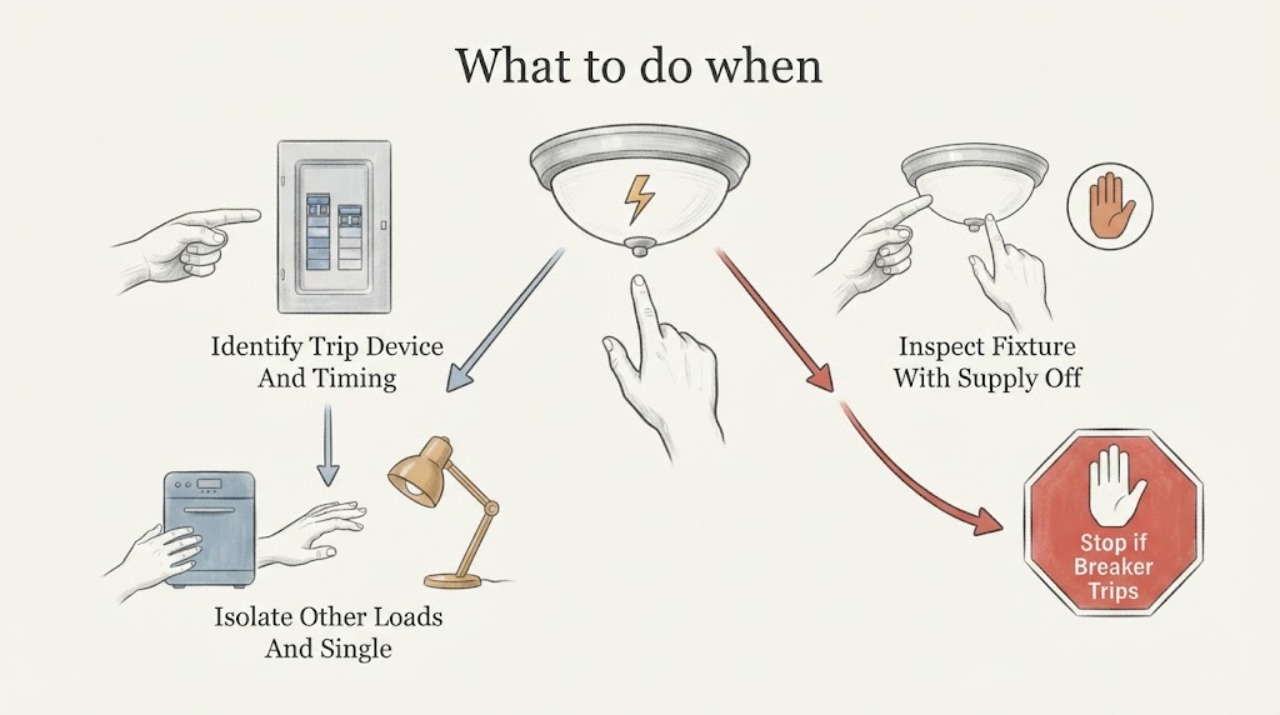
Do not keep resetting the breaker. Turn the light off, identify whether the breaker or a GFCI or AFCI device trips and whether it happens immediately, then make only a visual check and a safe lamp check with the supply off. Repeated trips, burning smell, heat, scorch marks, buzzing, moisture, exposed wiring, or a trip that returns with the fixture isolated means leave it off and call a qualified electrician.
Work through in order
Diagnostic checks
Use only checks that match the exact appliance or system and its official guide.
-
Check 1
With the light switch off, note which protective device moved or reset and when the trip occurs: immediately when the light is switched on, after it has run, or even while the light remains off.
Expected result: The same breaker or a GFCI or AFCI device trips only when this fixture is energized, or it trips with the fixture switch off or alongside other loads.
Next step: Record the device label and timing, then continue only with the supply-off visual checks. Do not repeatedly reset the device to reproduce the fault.
Stop if: Stop immediately for smoke, a burning smell, heat, buzzing or crackling, sparks, or visible damage.
Why this matters
Why: A fixture-specific trip makes the lamp, fixture, switch, or branch wiring suspect; a trip with the switch off or with other loads points to a wider circuit, leakage, or overload issue. The observation narrows the branch but does not prove which component failed.
-
Check 2
Leave the light switch off, turn off or unplug other accessible loads on the same labeled circuit, and reset the tripped breaker or protective device once according to its normal panel or device operation.
Expected result: The device stays set with the light off, or it trips again before the light is used.
Next step: If it trips again, leave it off and arrange an electrician's diagnosis. If it stays set, do not turn the suspect fixture on until the external inspection and any safe lamp check are complete.
Stop if: Do not hold the breaker on, reset it repeatedly, or change its rating.
Why this matters
Why: A device that will not stay set with the fixture off may be responding to a circuit fault, leakage, or another connected load; a stable reset does not clear the fixture as safe.
-
Check 3
Switch off the electrical supply to the fixture, then inspect only visible surfaces of the lamp, socket, switch area, cord if present, and surrounding ceiling or wall for damage.
Expected result: You see scorch marks, melted or cracked plastic, discoloration, corrosion, water, damaged insulation, a loose cover, or no visible abnormality.
Next step: For any damage, moisture, heat evidence, or odor, leave the circuit off and call a qualified electrician. If the fixture looks normal, continue only with a model-appropriate lamp check.
Stop if: Do not touch exposed conductors, open the fixture, tighten internal connections, or restore power for a closer look.
Why this matters
Why: Heat, arcing, moisture, or damaged insulation can make the protective device operate and can create shock or fire risk. No visible mark does not rule out a hidden wiring or component fault.
-
Check 4
If the fixture has a user-replaceable lamp and the supply is off, compare the installed lamp with the fixture or manufacturer marking for lamp type and maximum wattage; replace only a visibly failed lamp with the specified type.
Expected result: The lamp is wrong for the fixture, exceeds its marked maximum, is cracked or blackened, or the lamp and fitting appear undamaged and correctly matched.
Next step: After a correct lamp replacement, make at most one normal test. If the protective device trips again, switch the supply off and arrange service. For an integrated LED or inaccessible lamp, skip replacement and call an electrician.
Stop if: Do not exceed the fixture marking, use an unverified replacement, or replace a lamp where the holder is scorched, corroded, cracked, or hot-damaged.
Why this matters
Why: An incorrect, damaged, or overheated lamp can contribute to fixture stress; a correctly matched lamp does not eliminate a socket, driver, switch, or wiring fault.
-
Check 5
Consider the fixture's location and recent conditions, especially outdoor, bathroom, damp, roof-leak, condensation, or cleaning exposure, without removing the fixture or applying power to dry it.
Expected result: Moisture or a wet environment is present, or the fixture is dry and the trip does not correlate with water.
Next step: Keep a wet or moisture-affected fixture and its circuit off until a qualified electrician has assessed it. Do not spray, open, or live-test the fixture.
Stop if: Stop for water inside the fitting, a damp ceiling or wall, or any sign of corrosion or electrical tracking.
Why this matters
Why: Water can create leakage to ground and cause a GFCI or similar protective device to trip; a dry fixture shifts attention back to lamp, socket, switch, or wiring faults.
Use your observations
Decision map
Find the observation that best matches what you see, then follow the next safe action.
-
PATH 01Next step
What you see
The breaker or protective device trips again with the light switch off.
Do this next
Leave it off and call a qualified electrician; the fault may be elsewhere on the circuit or in the protective-device path.
-
PATH 02Next step
What you see
The fixture trips the device immediately when switched on.
Do this next
Keep the fixture off and use the supply-off visual and lamp checks only; if the trip repeats, have the lamp, fixture, switch, and branch wiring diagnosed.
-
PATH 03Next step
What you see
A correctly specified, user-replaceable lamp was the only visible problem and one test succeeds.
Do this next
Monitor the fixture without further disassembly; a return of the trip means leave it off and arrange service.
-
PATH 04Next step
What you see
The lamp holder or fixture shows scorching, heat damage, corrosion, cracks, buzzing, or an odor.
Do this next
Do not install another lamp or energize the fixture. Leave the circuit off and call a qualified electrician.
-
PATH 05Next step
What you see
Water or dampness is present around the fixture.
Do this next
Keep the circuit off and have the moisture source and electrical installation assessed before use.
-
PATH 06Next step
What you see
The fixture is integrated LED, inaccessible, or still trips after the accessible checks.
Do this next
Stop troubleshooting at the user level and schedule diagnosis by a qualified electrician with the fixture and protective-device details.
Helpful context
Understand the symptom
Why a light fixture can keep tripping
The protective device may be reacting to an overload, a short or arc fault, ground leakage, a damaged lamp or socket, moisture, or a wiring or switch problem. The timing is useful: a trip the moment the light is switched on points toward the fixture, lamp, switch, or branch wiring; a trip with the switch off points farther upstream on the circuit. This distinction does not identify the failed part, but it tells you whether another reset is appropriate.
Keep the investigation non-invasive
Do not remove a ceiling or wall fixture, open a junction box, probe energized wiring, bypass a protective device, or substitute a larger fuse or breaker. A visual check and a lamp replacement are the limit of ordinary troubleshooting here, and only after the electrical supply is switched off. Leave the circuit off when there is heat, discoloration, smoke, an odor, buzzing or crackling, water, or damaged insulation.
When checks do not resolve it
Need a professional?
Leave the circuit off and call a qualified electrician for any repeated trip, a device that will not stay set, smoke, burning odor, heat, scorch marks, buzzing or crackling, sparks, water or corrosion, exposed or damaged wiring, a damaged socket or fixture, an integrated light that cannot be safely isolated, or uncertainty about the wiring.
Common questions
FAQ
Can I reset the breaker for a light fixture that keeps tripping?
Turn the light off and remove or turn off other accessible loads on the same circuit before one normal reset. If it trips again, or will not stay set with the light off, leave it off and call a qualified electrician rather than repeating the reset.
Could the bulb make a light fixture trip the breaker?
Yes, a wrong, damaged, or overheated lamp can be part of the problem, but a correctly matched replacement does not rule out the socket, driver, switch, or wiring. Only replace a user-replaceable lamp with the supply off and within the fixture marking.
What if the light is in a damp area?
Keep the circuit off if water or dampness is present. Leakage can make a GFCI trip, and the fixture and moisture source should be assessed by a qualified electrician before the light is used again.
Read the exact guide
Official sources
- Understanding Your Home Electrical SystemElectrical Safety Foundation International · Electrical safety guidance on circuit breakers, overloads, AFCIs, and safe reset procedure
- LightingU.S. Consumer Product Safety Commission · Consumer Product Safety Commission engineering review of lighting-product overheating, arcing, damaged wiring, and bulb-related hazards
- Ground Fault Circuit Interrupters (GFCI)Electrical Safety Foundation International · Electrical safety guidance on ground faults, leakage, GFCI operation, and testing boundaries
- Electrical Safety Advice for DownlightsElectrical Safety First · Electrical product safety guidance on lamp ratings, damaged fittings, overheating, and professional help
Community feedback
Share a repair observation
Share a plain-text repair observation. Accepted observations are published automatically; this page may take a moment to update.