
On this page
Start here
Quick answer
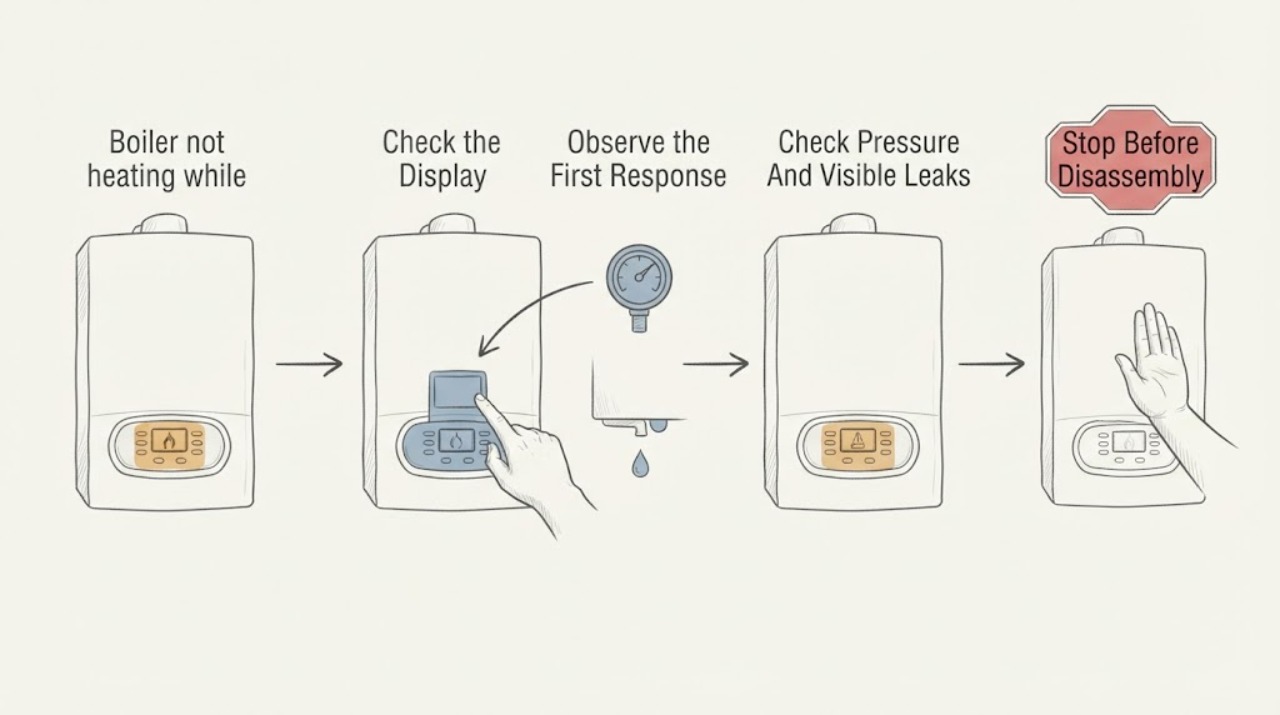
A visible boiler display proves that the appliance has some electrical power, not that it is receiving a heating request or successfully transferring heat to the radiators. First read the display without guessing at an unfamiliar symbol, then check the room thermostat, schedule or programmer, boiler mode, power supply, and system pressure from the user-accessible controls. If the boiler shows a heating demand but the radiators stay cold, or if a fault or lockout returns, the cause may be circulation, a pump or valve, ignition, a sensor, low pressure, or another boiler fault that needs a qualified heating engineer. Do not open the casing, bypass controls, alter gas or wiring, or repeatedly reset an unresolved fault.
Before you begin
Safety first
- This article supports reading user-visible status, checking ordinary controls and gauges, and performing only a manual-directed consumer reset when safe. It does not authorize casing removal, gas or flue work, wiring changes, safety bypasses, combustion testing, pump or valve repair, or system draining.
Work through in order
Diagnostic checks
Use only checks that match the exact appliance or system and its official guide.
-
Check 1
From the normal user controls, record the exact display text, icon, temperature, and any fault or lockout code, then raise the room thermostat above the current room temperature and confirm that the programmer or schedule is set to heating on.
Expected result: Note whether the display changes to a heating-demand or operating state, remains in standby, shows a fault or lockout, or shows hot-water activity instead of central-heating activity.
Next step: Use the exact display wording and appliance manual to choose the controls, pressure, or service branch; do not infer a code's meaning from a similar-looking model.
Stop if: Do not remove the boiler cover, bridge thermostat terminals, change hidden service settings, or operate a control that requires electrical or gas access.
Why this matters
Why: A display that remains on but never acknowledges a heat call points first to the thermostat, receiver, schedule, mode, or control signal. A heating demand with a fault or lockout points to a boiler or system condition; a hot-water-only state points to the selected mode or a heating-zone control problem.
-
Check 2
Check only user-accessible controls: the room thermostat and its batteries if wireless, the programmer or timer, the boiler heating mode, the nearby boiler power switch or fused spur, and whether the household gas, electricity, and water supplies are available.
Expected result: Record whether the thermostat calls for heat, the schedule is active, the boiler mode permits central heating, power is present, a recent power cut reset the clock, and other gas appliances work when the boiler uses gas.
Next step: Restore only an accidentally changed user setting or power switch, then wait for the normal response described by the manual; arrange service if the display does not respond or the issue returns.
Stop if: Do not reset consumer-unit breakers repeatedly, alter fixed wiring, relight a pilot without the manual's exact procedure, or work on gas controls.
Why this matters
Why: A missing heat call, disabled schedule, incorrect mode, tripped supply, or depleted wireless battery can leave a live display with no heating request. If controls call for heat and supplies are available but the boiler remains idle, the control signal or boiler needs further diagnosis.
-
Check 3
Read the user-accessible pressure gauge or pressure display while the boiler is in the condition specified by its manual, and look around visible pipework, radiator valves, and the boiler exterior for fresh water or staining without removing any panel.
Expected result: Record whether pressure is within the appliance's marked or manual range, below or above it, falling over time, or accompanied by a visible leak or water damage.
Next step: If the exact manual provides a user filling procedure and there is no leak, follow that procedure only if competent; otherwise arrange service and provide the pressure reading and photos.
Stop if: Do not open the casing, disconnect safety components, repeatedly add water, or repressurize a system with a suspected leak or damaged pipework.
Why this matters
Why: Pressure outside the specified range can prevent heating or trigger a fault, but the cause may be a leak, sensor, expansion vessel, or circulation problem. A falling gauge or visible water changes the task from simple control checking to repair diagnosis.
-
Check 4
With a confirmed heating demand and safe user settings, observe whether the boiler starts its normal heating cycle and whether several radiators warm evenly; compare central-heating behavior with hot-water behavior if the system provides both, without touching hot pipes or burner parts.
Expected result: Record whether the boiler never fires, fires briefly then stops, heats visible flow pipework but not radiators, warms some radiators only, or provides hot water while central heating remains cold.
Next step: Stop at the observation and give the engineer the demand state, display, pressure, radiator pattern, and hot-water comparison; do not bleed, drain, or dismantle the system as a substitute for diagnosis.
Stop if: Do not touch hot surfaces, remove a pump or valve cover, bleed a sealed system to chase a pressure issue, or open the boiler to inspect combustion or circulation parts.
Why this matters
Why: No boiler response after a valid heat call points toward controls, power, fuel, or an appliance fault. A boiler that fires but does not move heat suggests circulation, pump, valve, air, blockage, or zone-control issues. Hot water working while radiators stay cold narrows the problem to the central-heating demand or distribution path rather than proving the entire boiler is healthy.
-
Check 5
Only after checking the displayed fault or status against the installed manual and confirming that no gas, flue, leak, overheating, or other safety concern is present, perform a consumer reset exactly as the manual allows; do not remove the casing or repeat the reset as a workaround.
Expected result: Record whether the display clears and the boiler completes a heating cycle, the same fault returns, the boiler remains in standby, or it locks out again shortly afterward.
Next step: Arrange a qualified heating engineer when the fault remains, returns, or requires more than the manual's permitted reset; provide the exact code and the sequence of observations.
Stop if: Do not repeatedly reset a lockout, bypass a safety device, change gas pressure, alter wiring, inspect the flue, or continue using the boiler when combustion or carbon-monoxide safety is in doubt.
Why this matters
Why: A single successful reset may clear a transient lockout, but a returning fault or repeated reset requirement indicates an unresolved condition. A persistent standby state after a valid heat call keeps control, circulation, or appliance diagnosis open rather than proving the reset failed.
Use your observations
Decision map
Find the observation that best matches what you see, then follow the next safe action.
-
PATH 01Safety boundary
What you see
The screen is visible but stays in standby or does not show a central-heating demand when the room is cold.
Do this next
Check the thermostat setting and batteries, schedule, boiler heating mode, and recent power-cut clock reset using only user controls; request heating-controls service if the demand signal never reaches the boiler.
Why this path and its safety boundary
Why it matters: The boiler has power but may not be receiving a request from the thermostat, receiver, programmer, or selected mode.
Safety stop: Do not bridge terminals, rewire the receiver, or open the boiler to force a heat call.
-
PATH 02Safety boundary
What you see
The thermostat and programmer call for heat, but the boiler shows a fault or lockout, fails to ignite, or stops and returns to the same status.
Do this next
Record the exact code and follow the manual's user-level instructions once; arrange a qualified engineer if it persists or returns.
Why this path and its safety boundary
Why it matters: The appliance may be protecting itself from an ignition, fuel, flue, pressure, sensor, overheating, or circulation condition.
Safety stop: Do not open the casing, repeatedly reset, adjust gas controls, inspect the flue, or bypass a safety device.
-
PATH 03Safety boundary
What you see
The display is live but pressure is outside the appliance's specified range, falls again, or is accompanied by a visible leak.
Do this next
If the manual clearly permits user repressurization and no leak is present, follow it once; otherwise isolate the decision at the gauge and arrange service.
Why this path and its safety boundary
Why it matters: Low pressure can inhibit heating, while a recurring drop may indicate a leak or component fault; high or unstable pressure also needs system-specific assessment.
Safety stop: Do not keep topping up, open the casing, or use the boiler when water is leaking onto electrical equipment or building materials.
-
PATH 04Safety boundary
What you see
A valid heating demand is visible and the boiler fires, but radiators remain cold or only some areas warm while hot water may still work.
Do this next
Stop user troubleshooting at the comparison and arrange heating-system service with the radiator pattern, display state, pressure, and hot-water result.
Why this path and its safety boundary
Why it matters: The fault is more likely in circulation, a pump, zone or diverter valve, air or blockage, radiator controls, or the distribution circuit than in the display itself.
Safety stop: Do not remove pump or valve covers, alter zone wiring, drain the system, or force a valve.
-
PATH 05Safety boundary
What you see
There is a gas smell, unusual flame appearance, soot or staining, flue concern, carbon-monoxide alarm, or someone has compatible symptoms such as headache, dizziness, nausea, or breathlessness.
Do this next
Leave the area if carbon monoxide is suspected, ventilate only if safe, follow the local gas-emergency process, seek urgent medical help for symptoms, and do not re-enter until qualified responders say it is safe.
Why this path and its safety boundary
Why it matters: This is a combustion and life-safety concern, not a normal no-heat diagnosis.
Safety stop: Do not operate, relight, reset, inspect, or repair the boiler until the safety concern has been assessed by the appropriate emergency or qualified service.
Helpful context
Understand the symptom
A display is not the same as a heat call
The screen may stay on in standby while the timer, room thermostat, wireless receiver, or boiler mode is not asking for central heating. It may also show a status message while the boiler has locked out for a safety reason. Record the exact words, icon, or code and compare it with the installed manual instead of treating every visible symbol as an error. If hot water works but radiators do not, the heating-control or circulation path becomes a more focused check.
Start with user-accessible controls and pressure
Southwark Council's heating guidance lists gas, electricity, water, pressure, pilot light where fitted, room thermostat, timer, power-cut timer reset, frozen pipes, and a consumer reset switch as preliminary checks. A pressure gauge can be read without opening the boiler, but the correct range depends on the appliance and system. If pressure is low, follow the exact manual only when the filling procedure is clearly user-accessible; a leak or recurring pressure loss needs an engineer.
Do not turn a visible status into a DIY boiler repair
Vaillant explains that a lockout is a safety shutdown and that the cause should be understood before resetting. Its fault guidance assigns sensor, circulation, overheating, ignition, flue, and persistent-pressure problems to an installer or engineer and warns that opening the casing is dangerous. For a fuel-burning boiler, any suspected gas leak, abnormal flame, soot, flue concern, or carbon-monoxide symptom is an emergency safety issue rather than a troubleshooting experiment.
Safety boundary
Stop conditions
- Do not remove the boiler casing, alter gas pressure, inspect combustion parts, bypass safety devices, bridge thermostat wiring, or open fixed electrical connections.
- Do not repeatedly reset a lockout or keep using the boiler when the same fault returns, pressure falls, water leaks, or overheating is suspected.
- Stop for a gas smell, abnormal flame, soot or staining, flue concern, carbon-monoxide alarm, or compatible illness symptoms; follow the local emergency process and seek urgent medical help where needed.
- Do not use generic fault-code meanings, pressure values, filling procedures, or reset timings in place of the exact installed boiler manual.
- Arrange qualified heating service when a valid heat call is present but the boiler will not run, the boiler fires without warming radiators, hot water works but heating does not, pressure is abnormal or recurring, or any circulation, sensor, valve, pump, ignition, flue, or wiring work is indicated.
Only after diagnosis
Potential parts
- wireless room-thermostat batteries
Consider this category only if the thermostat is wireless, its low-battery indication is present, and the boiler does not receive a heat request while other user settings are correct.
Confirm the thermostat's exact battery type and instructions; do not treat battery replacement as evidence that the boiler or receiver is compatible with another control. - compatible room thermostat or receiver
Consider replacement only after a control-signal test identifies the thermostat or receiver as the cause and a qualified person confirms the system arrangement.
Confirm the exact boiler, control protocol, wiring, receiver, and installation requirements before ordering; never bypass the control circuit.
When checks do not resolve it
Need a professional?
Arrange a qualified heating engineer when the display remains visible but the boiler does not respond to a confirmed heat call, a fault or lockout persists or returns, pressure is outside the appliance's specified range or keeps falling, the boiler fires but radiators stay cold, hot water works while heating does not, or diagnosis would require the casing, gas, flue, pump, valve, sensor, wiring, or system drain. Treat gas, combustion, flue, and carbon-monoxide warnings as urgent safety issues rather than routine heating service.
Safety scope: This article supports reading user-visible status, checking ordinary controls and gauges, and performing only a manual-directed consumer reset when safe. It does not authorize casing removal, gas or flue work, wiring changes, safety bypasses, combustion testing, pump or valve repair, or system draining.
Common questions
FAQ
Does a visible boiler display mean the boiler is working?
No. A live display shows that some power reaches the controls. The thermostat, programmer, boiler mode, pressure, ignition, circulation, and safety state still determine whether heat reaches the radiators.
Can I reset a boiler that is not heating?
Only when the installed manual provides a consumer reset and no gas, flue, leak, overheating, or carbon-monoxide concern is present. Check the displayed cause first, perform the permitted reset once, and call a qualified engineer if the fault returns or the boiler still will not heat.
Why can hot water work while the radiators stay cold?
That pattern can isolate the problem to the heating demand, zone or diverter valve, pump, circulation path, radiator controls, or a blockage. It does not prove that the boiler and all heating components are healthy.
Read the exact guide
Official sources
- Gas safety - Carbon monoxide awareness frequently asked questionsHealth and Safety Executive · HSE safety guidance for gas and other carbon-based fuel appliances; emergency contacts and local procedures depend on the user's location.
- How to reset a boilerVaillant · Vaillant homeowner guidance; reset controls, pressure ranges, and permitted user actions vary by boiler and must be checked in the installed manual.
- Boiler fault codes listVaillant · Vaillant fault-code reference; code meanings and user actions do not transfer to another brand or model without its manual.
- Heating and hot water troubleshootingSouthwark Council · Southwark Council guidance for domestic central-heating users; the installed boiler manual and qualified engineer instructions control a particular appliance.
Community feedback
Share a repair observation
Share a plain-text repair observation. Accepted observations are published automatically; this page may take a moment to update.