
On this page
Start here
Quick answer
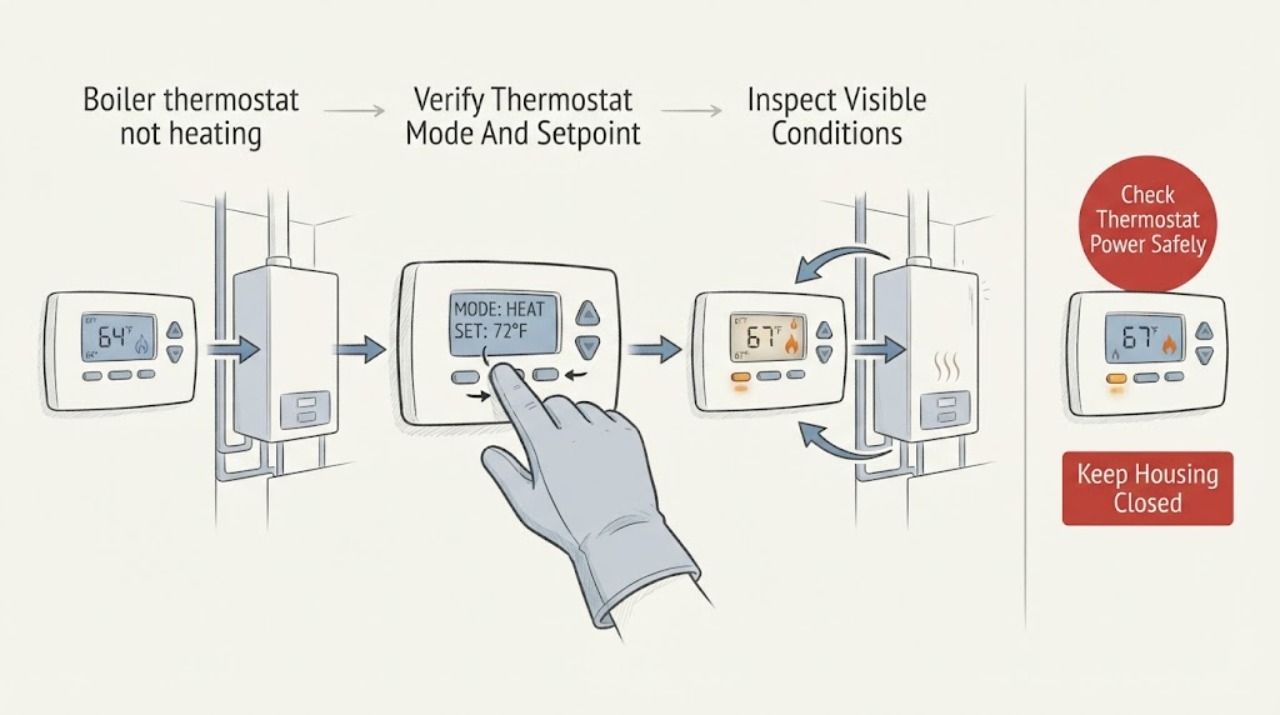
If a Buderus boiler thermostat is not heating, first verify that the thermostat is in heat mode, its setpoint is above the room temperature, and its schedule or setback is not active. Then note whether the thermostat shows a heat demand and whether the boiler responds, while checking only visible boiler indicators, pressure indication, leaks, and error messages. If the thermostat is blank, the call for heat never appears, a boiler alarm returns, there is a gas odor, water leak, scorching, or the system remains cold after a valid demand, stop changing settings and arrange qualified HVAC service; do not open the boiler or test wiring.
Before you begin
Safety first
- This article covers ordinary thermostat controls, visible display and indicator observations, safe room and zone comparison, and documentation. It does not authorize thermostat-terminal access, boiler-cover removal, live electrical testing, gas or combustion adjustment, safety-device reset, pressure filling or draining, radiator bleeding, pump or valve work, or sealed-system service.
Work through in order
Diagnostic checks
Use only checks that match the exact appliance or system and its official guide.
-
Check 1
Read the thermostat display and record heat mode, room temperature, requested temperature, schedule or setback indicator, hold or vacation state, and any lock or warning. Raise the requested temperature only enough to create a clear demand and do not change installer or advanced settings.
Expected result: The thermostat is off, in cooling or an inactive schedule, set below the room temperature, locked, blank, or showing a heat-demand indicator after the setpoint is raised.
Next step: Correct only the ordinary user mode, schedule, or setpoint described by the thermostat instructions. If the display cannot show a demand or remains blank, use the thermostat-power branch and arrange service if it does not recover.
Stop if: Stop if the thermostat or wall plate is hot, smells scorched, shows damaged wiring, or the display behaves erratically with sparks or a hot connection.
Why this matters
Why: An incorrect operating state can prevent a call for heat even when the room feels cold. A clear heat-demand indicator moves the investigation to the control and boiler response rather than further thermostat adjustments.
-
Check 2
With a confirmed heat demand, observe from outside the boiler cabinet whether the Buderus control display changes, a heat or burner indicator appears, or the boiler remains idle. Do not remove the cover, touch terminals, or attempt to bridge the thermostat connection.
Expected result: The thermostat shows heat demand and the boiler responds; the thermostat shows demand but the boiler shows an error or remains idle; or the thermostat never shows demand.
Next step: Record the exact display and indicator pattern. Use the matching branch below and arrange qualified service for an error, no response, or any need to inspect wiring or safety circuits.
Why this matters
Why: A response suggests the thermostat signal reached the control, although circulation or heat delivery can still fail. No boiler response with a valid demand makes the thermostat circuit, control state, safety lockout, or boiler-side fault more likely. No demand points back to the thermostat or its settings and power.
-
Check 3
If the thermostat is blank or intermittently resets, check only the ordinary user power condition specified for that exact thermostat, such as its visible batteries or a visible system power indicator. Do not pull the thermostat from its base, expose terminals, or substitute a power source unless the product instructions explicitly make that a user step.
Expected result: A permitted battery replacement or user-level power check restores the display; the display stays blank; or the display is active but the heat-demand indicator is missing.
Next step: Follow the exact thermostat manual for a user-level power step only. If the display remains blank or the call is absent, stop at the wiring boundary and arrange qualified HVAC or electrical service.
Stop if: Do not remove a wall-mounted thermostat, touch exposed conductors, or work on a low-voltage transformer or fuse.
Why this matters
Why: A restored display points to a thermostat power issue. A blank display after the permitted check points to installation wiring, transformer, fuse, or thermostat failure. An active display without a call for heat points to mode, schedule, configuration, or sensing rather than a boiler burner diagnosis.
-
Check 4
Read and record any Buderus boiler error text, symbol, or reset indication from the normal user display, and look from a safe position for a visible leak, damaged venting, unusual smell, or pressure indication far outside the model's normal operating guidance. Do not reset a safety device or remove any panel.
Expected result: An error or lockout is present, the pressure indication is abnormal, a leak or venting concern is visible, or the display is clear and the boiler appears to operate.
Next step: Use the exact model manual and error text for service handoff; keep the boiler off for gas odor, combustion concern, active leak, scorching, or unsafe venting. Do not add water, open a drain, or alter gas controls unless a qualified professional directs and performs the work.
Stop if: Stop immediately for gas odor, flue or combustion odor, smoke, scorching, an active leak near electrics, a ruptured pipe, or a pressure indication in a dangerous range.
Why this matters
Why: A boiler-side error, abnormal pressure, leak, or venting concern can prevent heating independently of the thermostat. A clear display does not prove that the thermostat signal, pump, zone valve, sensor, or burner is healthy.
-
Check 5
After a confirmed thermostat demand, compare the affected room with other rooms or zones: note whether radiators or convectors are cold, warm only at one end, or heating normally, and whether domestic hot water is being produced while space heating is absent. Touch only normal room-side surfaces and do not bleed radiators or open boiler valves as part of this check.
Expected result: Only one zone or room is cold; all zones are cold while the boiler responds; radiators warm but the room does not; or domestic hot water works while space heating does not.
Next step: Document the zone pattern and arrange qualified hydronic HVAC service for anything beyond ordinary room-side controls. Do not open valves, bleed a sealed system, or alter the heating curve or priority settings without the exact manual and professional direction.
Why this matters
Why: A single cold zone points toward a room thermostat, zone valve, pump, radiator valve, or local air or flow issue. All zones cold with a boiler response suggests circulation, heating-curve, priority, or boiler-side diagnosis. Hot water working alone can indicate a control priority or space-heating circuit issue.
-
Check 6
Create a service record with the Buderus model, thermostat and control type, thermostat display and setpoint, schedule state, heat-demand indicator, boiler display or error text, pressure indication, room and zone pattern, hot-water status, recent power or service work, and any leak, smell, noise, or unusual temperature.
Expected result: The system resumes heat after an ordinary user setting correction; the boiler remains cold despite a valid demand; or the issue is intermittent and the display or error changes between attempts.
Next step: Monitor only after safe normal operation returns. Otherwise arrange qualified service and provide the record; keep the heating system off for any hazard listed in the stop guidance.
Why this matters
Why: A resolved setting issue is different from a recurring call-for-heat failure. A valid demand with no heat, or an intermittent control state, requires model-specific testing of thermostat wiring, control logic, safety status, pump or valves, and boiler operation.
Use your observations
Decision map
Find the observation that best matches what you see, then follow the next safe action.
-
PATH 01Next step
What you see
The thermostat is active but does not show a heat request after the mode, schedule, and setpoint are checked, or its display is blank after the permitted user-level power check.
Do this next
Follow only the thermostat's ordinary user instructions. If the display or heat demand remains absent, stop at the thermostat wiring boundary and arrange qualified HVAC or electrical service.
Why this path and its safety boundary
Why it matters: The boiler may not be receiving a valid call for heat. The thermostat's mode, schedule, sensor, power, base, or installation wiring is more likely than a burner fault.
-
PATH 02Next step
What you see
The thermostat clearly requests heat, but the Buderus boiler shows no response or a recurring error from the normal display.
Do this next
Record the exact display and arrange qualified service. Do not jumper terminals, reset safety devices repeatedly, remove the cover, or work on gas, combustion, or energized wiring.
Why this path and its safety boundary
Why it matters: A thermostat signal may be reaching a control that is locked out, in a protection or priority state, or unable to start the boiler. The thermostat alone is no longer the complete explanation.
-
PATH 03Next step
What you see
The boiler shows a heat response, but all or one zone remains cold, or the radiators warm unevenly while the thermostat is still requesting heat.
Do this next
Use the zone comparison record to request hydronic HVAC diagnosis. Do not bleed a sealed system, open boiler valves, or adjust installer heating-curve settings as a substitute for diagnosis.
Why this path and its safety boundary
Why it matters: Heat generation is not the only possible failure. Circulation, zone valves, radiator-side flow, air, heating-curve settings, or control priority may be limiting delivery.
-
PATH 04Next step
What you see
The thermostat shows a demand, the boiler display is otherwise normal, domestic hot water is active, a setback or warm-weather state is displayed, or the control uses outdoor reset and the space-heating response is delayed or reduced.
Do this next
Record the control mode and consult the exact Buderus operating manual. If the mode is not an ordinary user selection or the room remains cold after the documented state ends, arrange qualified control and hydronic service.
Why this path and its safety boundary
Why it matters: Logamatic control logic can reduce or interrupt space heating during setback, domestic-hot-water priority, protection, or outdoor-temperature conditions. This pattern does not establish a failed thermostat.
-
PATH 05Next step
What you see
Gas odor, combustion or flue odor, smoke, scorching, active water leakage, damaged venting, exposed wiring, repeated lockout, or an unsafe pressure indication accompanies the no-heat complaint.
Do this next
Stop using the boiler, leave the area and contact the appropriate emergency or qualified service provider from a safe location. Do not relight, reset, open the cabinet, or continue thermostat tests until the hazard is cleared.
Why this path and its safety boundary
Why it matters: This is a gas, combustion, electrical, pressure, or water-safety event, not a thermostat-setting problem.
Helpful context
Understand the symptom
Start with the thermostat's actual demand
A room that is cold does not by itself prove that the thermostat is calling for heat. A schedule, setback, warm-weather shutdown, incorrect mode, low setpoint, blank display, or loss of thermostat power can prevent a demand from reaching the boiler. The first useful distinction is whether the display is active and visibly requesting heat, and whether that request is followed by any boiler response.
A valid call can still be held by the control
Buderus Logamatic controls can use outdoor temperature, heating-curve settings, setback periods, domestic-hot-water priority, and protection conditions when deciding how the boiler and heating circuits operate. Therefore, a thermostat that appears to request heat may not immediately produce hot radiators if another control condition is active. This is a reason to record the display and operating mode, not to change installer settings at random.
What the visible boiler response means
If the thermostat display is blank, the problem may be its power source or installation wiring. If the display shows a demand but the boiler stays idle, the fault may be in the thermostat signal, control, boiler safety state, or system-side response. If the boiler fires but rooms remain cold, circulation, zone valves, radiator valves, air, heating-curve configuration, or water-side faults become more likely. These possibilities cannot be separated safely by opening the boiler cabinet.
Stop at observation, then hand off clearly
The safe homeowner checks are limited to thermostat settings and display, visible boiler status, a readable pressure indication, room and radiator observations, and visible leaks or damage. Do not remove a Buderus boiler cover, jumper thermostat terminals, adjust gas or combustion controls, reset a high-limit device, or measure energized wiring. A technician can use the exact model, control type, error text, and demand pattern to test the control and heating system.
Safety boundary
Stop conditions
- Stop using the boiler for gas odor, combustion or flue odor, smoke, scorching, active water leakage near electrical parts, damaged venting, exposed wiring, repeated lockout, or an unsafe pressure indication.
- Do not remove the boiler cover, jumper thermostat terminals, probe energized wiring, adjust gas or combustion controls, reset safety devices repeatedly, or perform sealed-system work.
- If the thermostat has no display or no heat demand after its ordinary user checks, stop at the wiring boundary and arrange qualified HVAC or electrical service.
Only after diagnosis
Potential parts
- room thermostat or thermostat sensor
Consider only when service testing confirms that the thermostat does not sense room temperature or send a valid heat demand after settings and power are verified.
Confirm the exact Buderus control family, wiring method, and manufacturer fit information before ordering any component. - thermostat cable or low-voltage control component
Consider only when qualified testing finds an open, short, damaged connection, or failed control component between the thermostat and boiler.
Do not substitute wiring or controls based on appearance; verify the exact model and approved control arrangement. - Buderus boiler sensor
Consider only when a model-specific fault record and qualified testing identify an incorrect boiler or supply-temperature signal.
Sensor type and fit vary by boiler and control; confirm model-specific compatibility before ordering. - zone valve or circulation pump
Consider only when the boiler responds to a valid demand but service testing finds that one or more zones cannot circulate or deliver heat.
Select only after the technician identifies the system arrangement and confirms the exact component fit.
When checks do not resolve it
Need a professional?
Arrange qualified HVAC service when a Buderus thermostat cannot display or sustain a heat demand, the boiler does not respond to a clear demand, a code or lockout returns, all or one heating zone remains cold, or settings and visible checks do not restore heat. Use emergency or qualified gas and electrical help for gas odor, combustion concern, smoke, scorching, active leaks near electrics, damaged venting, exposed wiring, or unsafe pressure indications.
Safety scope: This article covers ordinary thermostat controls, visible display and indicator observations, safe room and zone comparison, and documentation. It does not authorize thermostat-terminal access, boiler-cover removal, live electrical testing, gas or combustion adjustment, safety-device reset, pressure filling or draining, radiator bleeding, pump or valve work, or sealed-system service.
Common questions
FAQ
Why does my Buderus thermostat show heat but the boiler does not start?
A heat demand does not prove that the boiler can start. Buderus control logic may be in setback, domestic-hot-water priority, outdoor-temperature shutdown, protection, or an error state, and the thermostat signal or wiring may also be faulty. Record the display and arrange qualified service rather than bridging terminals or opening the boiler.
What if the Buderus thermostat display is blank?
Check only the ordinary user-level power step specified for that exact thermostat. A display that stays blank can indicate insufficient thermostat power, installation wiring, or thermostat failure and should be handed to qualified HVAC or electrical service without exposing terminals.
Why does hot water work while my radiators stay cold?
Buderus controls can give domestic hot water priority and temporarily interrupt or reduce space-heating circuits. If radiators remain cold after that state ends, or the control shows an error, request service for the control, pump, zone valve, sensor, and boiler response.
When should I stop using a Buderus boiler?
Stop for gas or combustion odor, smoke, scorching, active leakage near electrical parts, damaged venting, exposed wiring, repeated lockout, or an unsafe pressure indication. Leave the cabinet closed and obtain appropriate qualified emergency, gas, electrical, or HVAC help from a safe location.
Read the exact guide
Official sources
- Logamatic 2107 Controls Applications ManualBuderus / Bosch Home Comfort · Buderus Logamatic 2107 heating calls, room and outdoor sensors, heating curves, setback, domestic-hot-water priority, and space-heating circuits
- Thermostats & Controls FAQBosch Home Comfort · Buderus and Bosch thermostat and control behavior, display power, wiring boundary, and Logamatic control questions
- Condensing Gas Boilers TroubleshootingBosch Home Comfort · Buderus boiler heat-call, control, pump, sensor, error, and professional service diagnosis
Community feedback
Share a repair observation
Share a plain-text repair observation. Accepted observations are published automatically; this page may take a moment to update.