
On this page
Start here
Quick answer
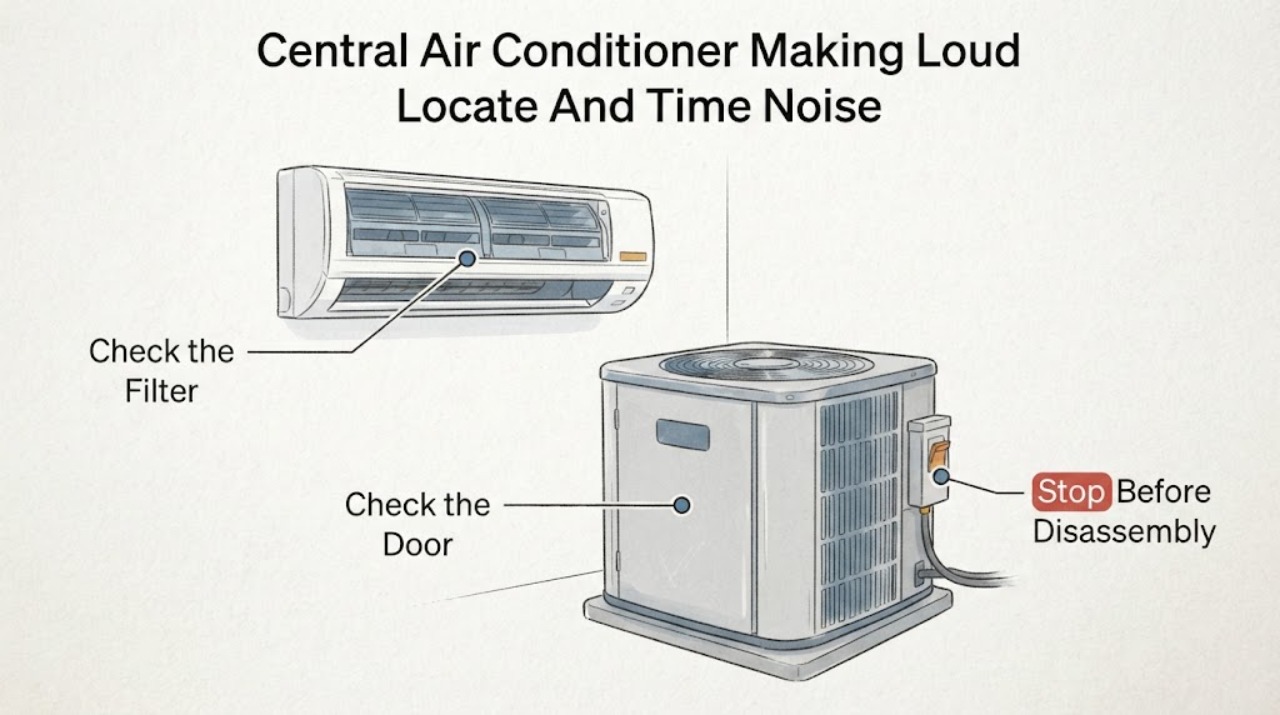
A loud Carrier central-air-conditioner noise should be diagnosed by location, timing, and system behavior—not by replacing a part from the sound alone. Turn the system off promptly for grinding, scraping, banging, loud buzzing, burning odor, smoke, water, or a noise that starts with abnormal vibration. From a safe position, note whether the sound comes from the indoor air handler or outdoor condenser, whether it occurs at startup, during the run, or at shutdown, and whether airflow and cooling changed. With power left off, inspect only visible outdoor debris and the fan guard, and check the indoor filter and accessible vents. A dirty filter or blocked airflow can strain the system, while a cracked or loose outdoor fan blade can be unbalanced or strike nearby parts; Carrier also identifies capacitors, motors, compressors, refrigerant, and coils as professional diagnostic areas. Do not open electrical covers, touch a capacitor, bend a fan blade, add refrigerant, or run the unit to reproduce a dangerous noise. Arrange HVAC service for persistent or mechanical noise, weak airflow, reduced cooling, ice, repeated breaker trips, or any electrical or refrigerant concern.
Work through in order
Diagnostic checks
Use only checks that match the exact appliance or system and its official guide.
-
Check 1
From a safe position and without opening either unit, note whether the loud noise comes from the indoor air handler, the outdoor condenser, the ductwork, or a nearby grille. Record whether it occurs at startup, during cooling, when the fan changes speed, or at shutdown, and describe its character.
Expected result: The sound is indoor or outdoor; steady or intermittent; rattling, scraping, grinding, buzzing, humming, or banging; and tied to startup, steady run, airflow, or shutdown.
Next step: If the noise is loud, abnormal, worsening, or paired with heat, odor, smoke, water, or vibration, turn the system off and skip repeated tests. Otherwise continue with the filter and external visual checks only.
Stop if: Do not stand beside an unstable outdoor unit, remove a guard, or run the system repeatedly to reproduce a grinding or banging sound.
Why this matters
Why: Location and timing narrow the system area but do not identify a part. Outdoor noise keeps the condenser fan, blade, motor, compressor, and mounting issues possible; indoor noise keeps blower, filter, duct, and coil airflow issues possible.
-
Check 2
Confirm the thermostat is calling for cooling in the intended mode, then inspect the accessible return-air filter and replace it only with the specified type if it is visibly loaded with dust. Check accessible supply and return grilles for blocked airflow.
Expected result: The filter is clogged; grilles are blocked; airflow is weak; the thermostat is not calling for cooling; or airflow appears normal while the noise remains.
Next step: Correct only the thermostat setting, filter, or accessible grille obstruction. Make one cautious normal observation after the change; if the loud noise remains or cooling is abnormal, turn the system off and arrange HVAC service.
Stop if: Do not remove an air-handler panel, touch the blower, or keep operating if the filter is wet, there is ice, water, burning odor, or abnormal vibration.
Why this matters
Why: Restricted airflow can strain the system and contribute to coil or blower symptoms. Normal airflow does not clear an outdoor fan, motor, compressor, mounting, or duct noise.
-
Check 3
Turn the thermostat off and, only after the outdoor fan has stopped, inspect the condenser unit from outside its guard. Look for leaves, branches, loose panels, a visibly cracked or bent fan blade, shifted mounting, or debris contacting the cabinet; do not reach through the guard.
Expected result: Debris blocks the cabinet; the blade is cracked, bent, loose, or marked by contact; the cabinet vibrates or a panel rattles; or no exterior defect is visible.
Next step: Remove only loose debris that is safely outside the guard and leave the system off for a damaged blade, loose panel, abnormal vibration, or persistent noise. Arrange a Carrier-qualified HVAC inspection.
Stop if: Do not remove the fan guard, straighten or spin a blade, tighten internal hardware, spray water into the unit, or restore power while a blade or panel is damaged.
Why this matters
Why: An obstruction or damaged, unbalanced blade can create outdoor rattling or scraping. A clear exterior does not rule out a motor, capacitor, compressor, bearing, refrigerant, or internal mounting problem.
-
Check 4
With the system off, inspect only accessible indoor areas for weak airflow, ice on visible refrigerant lines or the coil cabinet, water around the air handler, a wet filter, or unusual blower vibration; do not open the air-handler cabinet.
Expected result: Airflow is weak; ice is present; water is pooling; the filter is wet; the blower sounds abnormal; or no indoor warning sign is visible.
Next step: Leave cooling off for ice, water, wet insulation, or abnormal blower noise and arrange service. For a clean, dry system with normal airflow but persistent loud noise, continue only to the power and service boundary.
Stop if: Do not chip ice, add refrigerant, remove the air-handler cover, touch the blower, or keep running the system with ice, water, or weak airflow.
Why this matters
Why: Carrier links restricted airflow and frozen evaporator coils with fan, refrigerant, or other system malfunctions, and identifies water or unusual noise as reasons for professional attention. No visible ice or water does not clear an internal blower or duct fault.
-
Check 5
From a dry, safe position, observe the HVAC breaker or clearly labeled disconnect only after the system is off. Note whether the circuit is tripped, has tripped repeatedly, or shows heat, arcing, water, or visible damage; do not open the disconnect or equipment cabinet.
Expected result: The breaker is normal; it is tripped once without visible damage; it trips again; the disconnect or wiring is hot or damaged; or power status cannot be confirmed safely.
Next step: If the condition is an ordinary tripped breaker with no warning sign, follow the equipment manual for one safe reset; if it trips again or any warning sign exists, leave it off and call an HVAC professional or electrician. Do not reset repeatedly.
Stop if: Do not touch live wiring, open a disconnect, bypass a safety switch, or reset a hot, wet, arcing, or repeatedly tripping circuit.
Why this matters
Why: A one-time power interruption can stop the system, but repeated trips, heat, arcing, water, or uncertain supply indicate an electrical or equipment fault. Power observations cannot distinguish a capacitor, motor, compressor, control, or wiring failure.
-
Check 6
Prepare a service report with the Carrier model and serial if accessible without opening the unit, noise location and description, timing, airflow and cooling result, filter condition, outdoor visual findings, ice or water observations, and breaker history. Keep the system off when the noise is abnormal or unexplained.
Expected result: The noise stops after a permitted external correction; the noise persists; the sound returns with cooling; the system has weak airflow or poor cooling; or electrical, refrigerant, or mechanical warning signs are present.
Next step: Call a qualified HVAC technician and provide the report, photos from outside the unit, and the conditions that trigger the sound. Do not order a motor, capacitor, compressor, or control board from the sound alone.
Stop if: Do not open panels, test capacitors, handle refrigerant, replace electrical parts, or operate the system while it is loud, hot, smoking, leaking, or mechanically unstable.
Why this matters
Why: A corrected obstruction or filter can explain a minor airflow-related symptom, but persistent noise or any mechanical, refrigerant, or electrical sign requires internal testing. Carrier identifies motors, capacitors, compressors, coils, and control issues as professional diagnostic areas.
Use your observations
Decision map
Find the observation that best matches what you see, then follow the next safe action.
-
PATH 01Next step
What you see
The noise comes from the outdoor condenser and a visible obstruction, cracked or bent blade, loose panel, or contact mark is present with the system off.
Do this next
Remove only loose debris outside the guard. Leave the unit off for blade, panel, vibration, or contact damage and arrange HVAC service; do not remove the guard or straighten the blade.
Why this path and its safety boundary
Why it matters: An external obstruction, blade imbalance, or mounting issue is more likely than an indoor airflow fault.
-
PATH 02Next step
What you see
The noise comes from the indoor air handler and is paired with a loaded or wet filter, weak airflow, ice, water, or reduced cooling.
Do this next
Turn cooling off for ice, water, weak airflow, or abnormal blower noise. Replace only a specified visibly dirty filter; arrange professional diagnosis for persistent symptoms or anything inside the cabinet.
Why this path and its safety boundary
Why it matters: Restricted airflow, blower trouble, frozen coil, condensate issue, or another indoor-system condition is more likely than an outdoor compressor-only fault.
-
PATH 03Next step
What you see
The outdoor unit makes loud buzzing, humming, grinding, or banging with normal external airflow checks, or the fan starts poorly, vibrates, or stops.
Do this next
Leave the system off and call an HVAC professional for internal electrical and mechanical testing. Do not touch or replace a capacitor, motor, compressor, or control board.
Why this path and its safety boundary
Why it matters: A fan motor, capacitor, compressor, bearing, mounting, or another high-voltage mechanical condition is more likely. The sound cannot select one of these parts reliably.
-
PATH 04Next step
What you see
The noise occurs with a repeated breaker trip, hot or damaged disconnect, burning odor, smoke, ice, water, or abnormal cooling.
Do this next
Turn the system off, leave a tripping circuit off, and call an HVAC technician or electrician as appropriate. Provide the exact warning signs and noise timing.
Why this path and its safety boundary
Why it matters: An electrical, refrigerant, airflow, coil, or equipment fault needs prompt professional attention rather than repeated operation.
-
PATH 05Next step
What you see
The system has normal visible airflow and no obvious obstruction, but loud or unusual noise persists, returns during cooling, or cannot be localized safely.
Do this next
Keep the system off if the sound is loud or worsening and arrange a Carrier-qualified HVAC inspection. Provide the model, sound description, timing, and external observations.
Why this path and its safety boundary
Why it matters: An internal fan, motor, compressor, duct, mounting, coil, or control problem remains possible; a clean filter and clear exterior do not clear the system.
Helpful context
Understand the symptom
First locate and classify the sound
A central split system has an indoor blower in the air handler and an outdoor condenser fan and compressor. Stand clear of both units and note which one produces the noise, whether it begins at startup or after the system has run, and whether the sound is rattling, scraping, grinding, buzzing, humming, or a sharp bang. This pattern changes the likely path: an outdoor fan noise keeps blade or motor issues possible, while an indoor noise with weak airflow keeps filter, blower, or coil conditions in play.
Use only low-risk visual and airflow checks
With the thermostat off, inspect the outdoor unit from outside the guard for leaves, branches, or a visibly damaged fan blade. Indoors, check the filter and accessible supply and return grilles. Do not remove panels or reach through a grille. A blocked filter or outdoor obstruction can affect airflow and load, but a component that is loose, rubbing, electrically failed, or refrigerant-related requires professional testing.
Noise plus heat, water, ice, or odor is a stop condition
Carrier advises shutting the system down for unusual noise, burning smell, smoke, water, or repeated breaker trips. Ice on the indoor coil or lines, water pooling, weak airflow, or a fan that will not start can point to an airflow, coil, motor, refrigerant, or electrical issue. Do not keep running the unit while waiting for a technician; record the symptom and leave clear access to the equipment.
Safety boundary
Stop conditions
- Stop the Carrier central air conditioner for loud or abnormal noise, scraping, grinding, banging, burning odor, smoke, water, ice, hot or damaged wiring, abnormal vibration, repeated breaker trips, weak airflow with overheating, or an unstable fan. Do not open electrical covers, touch capacitors, handle refrigerant, remove a fan guard, bend a blade, bypass a safety control, or replace a motor, compressor, capacitor, control board, or coil from the sound alone. Arrange qualified HVAC service for persistent or unexplained noise, internal mechanical or electrical symptoms, refrigerant or coil concerns, and any condition that cannot be safely inspected from outside.
Only after diagnosis
Potential parts
- outdoor condenser fan blade or fan assembly
Consider this only when a technician confirms a cracked, bent, unbalanced, or damaged outdoor fan blade or assembly as the cause of the noise.
Fan dimensions, motor, blade pitch, guard, and mounting vary by Carrier model. Confirm the complete model and official service documentation before selection. - condenser or blower fan motor
Consider this only after qualified testing confirms a failed or noisy fan motor rather than a blade, capacitor, bearing, mounting, airflow, or control problem.
Motor voltage, horsepower, speed, shaft, mounting, and controls are model-specific. Do not select or handle a motor from sound alone. - air conditioner run capacitor
Consider this only when a qualified technician tests and confirms the capacitor as the cause of buzzing, failed starting, or motor symptoms.
Capacitor ratings and terminals must match the exact system. Capacitors can retain hazardous charge; do not test or replace one as a homeowner. - Carrier evaporator or condenser coil
Consider this only when professional diagnosis confirms a damaged, leaking, blocked, or repeatedly failing coil after airflow and refrigerant checks.
Coil type, dimensions, refrigerant design, and system match are model-specific. Do not select a coil from unusual noise alone or handle refrigerant connections.
When checks do not resolve it
Need a professional?
Call a qualified HVAC technician when loud noise persists after safe filter and exterior-obstruction checks, the outdoor fan is damaged or vibrates, the indoor blower is abnormal, airflow or cooling is reduced, ice or water is present, a motor, capacitor, compressor, coil, refrigerant, or control problem is possible, or the cause is uncertain. Call an electrician for a hot, arcing, wet, damaged, or repeatedly tripping electrical circuit. Use urgent service for smoke, burning odor, exposed energized wiring, flooding, or an unstable fan or compressor.
Have this ready
- Provide the Carrier model and serial if safely accessible, indoor or outdoor noise location, sound description, startup or run timing, thermostat and cooling behavior, filter and airflow observations, outdoor obstruction or blade findings, ice or water, odor, vibration, and breaker history. Do not provide a guessed component as the diagnosis.
Common questions
FAQ
Why is my Carrier central air conditioner making a loud noise?
First locate the noise and note when it occurs. Outdoor noise can involve debris, a damaged or unbalanced condenser fan, motor, capacitor, compressor, or mounting; indoor noise can involve airflow, filter, blower, duct, or coil conditions. A loud or abnormal noise is not enough to choose a part.
Is it safe to run my Carrier AC when it is making a loud noise?
Turn it off for grinding, scraping, banging, loud buzzing, burning odor, smoke, water, abnormal vibration, ice, or repeated breaker trips. Do not keep cycling the unit to reproduce a dangerous sound. Arrange HVAC service and provide the noise location and timing.
Could a dirty filter cause a loud Carrier air conditioner?
A loaded filter can restrict airflow and strain the system, so check the accessible filter and replace it only with the specified type. If the noise remains, airflow is weak, ice or water is present, or the sound is mechanical, turn the system off and arrange professional diagnosis.
What if the loud noise comes from the outdoor Carrier unit?
Turn the thermostat off and inspect only from outside the fan guard for leaves, branches, a damaged blade, loose panels, or contact marks. Do not remove the guard or touch the blade. A clear exterior with persistent noise still requires a technician to test the fan, motor, capacitor, compressor, and mounting.
Can a damaged condenser fan blade make a Carrier AC loud?
Yes. Carrier explains that a cracked, loose, or broken outdoor fan blade can become unbalanced or strike another component and create unusual noise. Leave the system off and call an HVAC professional; do not straighten, spin, or replace the blade yourself.
Could ice or weak airflow be related to the noise?
Yes. Carrier links frozen evaporator coils with blower, airflow, refrigerant, and other system malfunctions, and identifies weak airflow and unusual noise as evaluation signs. Turn cooling off for ice or weak airflow and arrange service rather than chipping ice or adding refrigerant.
Can I replace the Carrier capacitor or motor because the AC is buzzing?
No. Buzzing can involve a motor, capacitor, compressor, fan, mounting, or electrical issue. Carrier identifies capacitors and motors as high-voltage components and directs those faults to professional diagnosis. Do not open the unit or handle a capacitor.
When should I call an HVAC technician for a loud Carrier AC?
Call when the noise persists after a safe filter and exterior-obstruction check, returns during cooling, comes with weak airflow or poor cooling, involves a damaged blade or vibration, or is paired with ice, water, odor, smoke, or a repeated breaker trip. Use urgent service for smoke, burning odor, flooding, exposed wiring, or an unstable unit.
Read the exact guide
Official sources
- What Is an AC Evaporator Coil & What Does It Do?Carrier · Official Carrier coil guide locating the evaporator coil in common central systems and identifying reduced airflow, uneven cooling, higher energy use, and unusual noise as signs needing coil or HVAC evaluation.
- Why is My Air Conditioner Fan Not Working?Carrier · Official Carrier fan troubleshooting page distinguishing indoor blower and outdoor condenser fan symptoms, linking unusual outdoor noise to a bad or damaged blade, and directing motor, capacitor, compressor, wiring, and frozen-coil faults to professional diagnosis.
- Troubleshoot an AC Not WorkingCarrier · Official Carrier residential troubleshooting guide listing thermostat, filter, breaker, coil, and outdoor-condensing checks and identifying loud or unusual noise, fan, motor, capacitor, and compressor symptoms requiring professional attention.
- Emergency HVAC RepairCarrier · Official Carrier emergency guidance directing users to turn off HVAC equipment for unusual noises, smells, smoke, water, or repeated breaker trips and to provide a clear symptom description to service.
Community feedback
Share a repair observation
Share a plain-text repair observation. Accepted observations are published automatically; this page may take a moment to update.