
On this page
Start here
Quick answer
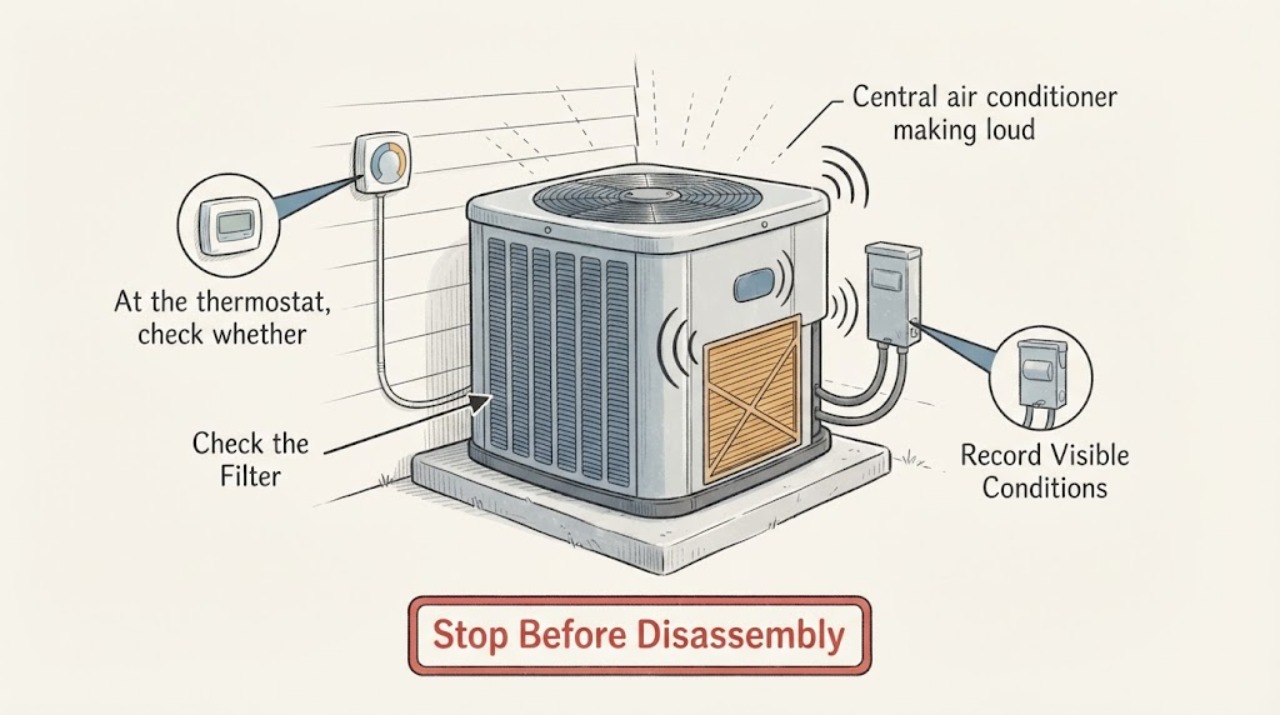
When a central air conditioner's loud sound changes as the indoor or outdoor fan starts, stops, or changes speed, first locate the source and distinguish airflow noise from a mechanical or electrical noise. Check whether the thermostat fan is set to Auto or On, inspect the filter and visible registers, and look at the outdoor unit from a safe distance for obstructions or a damaged blade. A new rattle, grinding, high-pitched sound, loud hum, vibration, burning odor, or fan that is slow, stopped, or striking something is a reason to turn the system off and call a qualified HVAC technician. Do not remove panels, touch a capacitor or wiring, or keep running the system to see whether a worsening fan noise goes away.
Before you begin
Safety first
- Homeowner checks are limited to thermostat settings, filter and register observation, loose visible debris, and ground-level listening or viewing. No cabinet removal, fan-blade contact, electrical testing, capacitor handling, or refrigerant work.
Work through in order
Diagnostic checks
Use only checks that match the exact appliance or system and its official guide.
-
Check 1
From a safe position, note where the sound is loudest: at a supply register or return, the indoor air handler, the outdoor condenser, or the refrigerant line area. Record whether it begins at startup, only while a fan runs, at shutdown, or continuously.
Expected result: A whistle or rush at a register differs from a rattle at the indoor cabinet, a blade-like noise outdoors, a hum at startup, or a hiss near refrigerant lines.
Next step: Record a short audio clip from a safe distance and continue only with the matching visible check. Turn the system off for grinding, scraping, burning odor, smoke, or a rapidly worsening sound.
Why this matters
Why: The sound location and timing identify which section to inspect next. A sound that changes with the indoor blower is more consistent with airflow, blower, or duct movement; an outdoor fan-linked sound shifts attention outside.
-
Check 2
At the thermostat, check whether the fan is set to Auto or On and whether the noise occurs when the system is calling for cooling versus when the fan runs by itself. Do not repeatedly toggle the system if the noise is severe.
Expected result: Noise only during fan operation differs from noise that continues with the fan off, and a sound that changes when the thermostat changes fan operation differs from a constant outdoor sound.
Next step: Leave the fan on Auto for normal demand if the sound is mild and unchanged, but turn the system off and call for service if the noise is new, intrusive, or accompanied by vibration, poor cooling, or a smell.
Why this matters
Why: Fan-linked noise makes the blower or condenser fan, airflow, or a fan-mounted component more likely. Noise that remains with the fan off may involve another HVAC component and needs a professional listen.
-
Check 3
Turn the system off at the thermostat and inspect the return-air filter and visible supply and return registers. Replace a loaded filter only with the size and type specified for the equipment, and make sure registers are not blocked by furniture.
Expected result: A visibly loaded filter, restricted return, or whistling register differs from a clean filter and open registers with normal airflow.
Next step: After the correct filter is installed, listen briefly only if there is no severe noise or safety symptom. If the sound remains, airflow is weak, or the filter loads unusually fast, arrange HVAC service.
Why this matters
Why: Restricted airflow can increase air noise and strain the blower, while normal airflow shifts attention toward a fan, motor, vibration, or outdoor component. A filter check does not diagnose an internal motor or coil.
-
Check 4
From the ground and without removing the outdoor grille, look at the condenser for leaves, tall grass, loose debris, a visibly damaged fan blade, or a unit that vibrates or sits unevenly. Observe only while the unit is stopped or from a safe distance during operation.
Expected result: A clear, steady unit differs from a rattling or vibrating cabinet, a fan blade that looks damaged, a fan that does not start, or a fan that turns slowly.
Next step: Remove only loose debris that is safely reachable without tools and without touching the unit. Turn the system off and call a qualified HVAC technician for a damaged, stopped, slow, or noisy fan; do not open the cabinet.
Why this matters
Why: Debris can affect airflow, while a damaged or unbalanced blade and abnormal vibration can create a fan-linked noise. A stopped or slow fan can also accompany motor or capacitor trouble that is not a homeowner repair.
-
Check 5
Check the indoor air handler area from outside the cabinet for a loose access-panel rattle, duct vibration, or a register that changes pitch when airflow changes. Do not remove panels or reach near the blower wheel, motor, wiring, or coil.
Expected result: A panel or duct that visibly vibrates differs from a deep motor hum, grinding from inside the cabinet, or noise with no visible movement.
Next step: Do not tighten hidden fasteners or open the air handler as a test. Turn the system off for internal or worsening noise and arrange professional diagnosis.
Why this matters
Why: Loose external sheet metal or duct vibration may transmit fan noise, while a deep hum, grinding, or internal rattle makes blower, motor, capacitor, or bearing trouble more likely.
-
Check 6
Record whether cooling, airflow, and condensate drainage remain normal and whether the noise returns after a filter or visible-obstruction check. Include the sound type, location, fan state, outdoor-unit behavior, and any smell or breaker event.
Expected result: A mild airflow noise with normal cooling differs from a new loud sound with weak airflow, warm air, water, intermittent operation, or a power trip.
Next step: Give the notes or audio clip to a qualified HVAC technician. Do not keep running the system to reproduce a severe noise or try a capacitor, motor, compressor, refrigerant, or live electrical repair.
Why this matters
Why: Noise plus another performance symptom makes a motor, fan, coil, refrigerant, drain, or electrical fault more likely than simple duct acoustics. A sound meter reading is less useful than a change from the system's normal sound and the exact operating moment.
Use your observations
Decision map
Find the observation that best matches what you see, then follow the next safe action.
-
PATH 01Next step
What you see
The sound is a whistle or rush at the registers or return and changes with the indoor fan, while the filter is loaded or airflow is weak.
Do this next
Correct only the specified filter or visible register obstruction. If airflow or noise does not improve, arrange HVAC service rather than altering the blower or ductwork.
-
PATH 02Next step
What you see
The noise is a new rattle, scrape, or vibration at the indoor unit and changes with the blower, with normal or weak airflow.
Do this next
Turn the system off if the sound is loud or worsening and call a qualified HVAC technician. Do not open the air-handler cabinet.
-
PATH 03Next step
What you see
The noise comes from the outdoor condenser and the fan is damaged, stopped, slow, rattling, or visibly striking another component.
Do this next
Leave the system off and arrange service. Do not remove the grille, touch the blade or capacitor, or attempt an electrical repair.
-
PATH 04Next step
What you see
The door and outdoor fan appear normal, but a loud hum, high-pitched sound, hissing, or vibration starts or stops with cooling and the home is not cooling normally.
Do this next
Turn the system off and call a qualified HVAC professional, especially for hissing, burning odor, poor cooling, or a repeated breaker trip.
-
PATH 05Next step
What you see
The sound is unchanged from the system's normal operation, cooling and airflow are normal, and no component vibrates or shows damage.
Do this next
Use the owner manual and routine maintenance guidance, then monitor for a change. Schedule service if the sound becomes louder, changes character, or is joined by a performance symptom.
-
PATH 06Next step
What you see
Smoke, burning odor, exposed wiring, water near electrical equipment, or a breaker trip occurs with the noise.
Do this next
Stop the system, keep clear of the equipment, and seek qualified HVAC or emergency help. Do not open panels or repeatedly reset the breaker.
Helpful context
Understand the symptom
Let the fan timing narrow the problem
A central system can make separate sounds at the indoor blower, ductwork, outdoor condenser fan, and compressor. If the sound follows the indoor fan, airflow restriction, blower wheel, motor, or duct vibration becomes more relevant. If it follows the outdoor fan, a blade, motor, capacitor, loose hardware, or condenser condition may be involved. A sound that is new or noticeably louder than the system's normal startup and shutdown should be treated as a service clue, not normalized.
Keep electrical and refrigerant work professional
Use only thermostat controls, a visible filter, clear registers, and a ground-level view of the outdoor unit. Do not remove an equipment cover, reach through a grille, test live voltage, handle a capacitor, or open a refrigerant circuit. Turn the system off when the noise is loud, worsening, accompanied by a smell or vibration, or associated with a stopped or damaged fan.
Only after diagnosis
Potential parts
- air filter
Consider this only when the installed filter is visibly loaded and the equipment documentation identifies the correct size and type.
Confirm the exact dimensions and filter specification from the existing filter or manual; do not assume a restrictive filter is suitable. - condenser fan blade or motor
Consider this only after a qualified diagnosis confirms a damaged blade, motor, or related outdoor fan fault from the sound and operating behavior.
Blade geometry, motor characteristics, mounting, and electrical requirements are system-specific; do not select a part from appearance alone. - blower motor or wheel
Consider this only when professional testing traces the fan-linked indoor noise to a worn, damaged, or misaligned blower assembly.
The blower assembly must match the air handler and control system. Confirm the complete model and technician diagnosis before ordering.
When checks do not resolve it
Need a professional?
Call a qualified HVAC technician for any new loud or unusual central-AC noise, especially grinding, scraping, high-pitched sound, hissing, repeated rattling, severe vibration, or a fan that is stopped, slow, or damaged. Stop using the system for burning odor, smoke, exposed wiring, water near electrical equipment, a breaker trip, poor cooling, or rapidly worsening noise. Do not open panels, touch capacitors or wiring, handle refrigerant, or keep running the unit to reproduce a severe sound.
Safety scope: Homeowner checks are limited to thermostat settings, filter and register observation, loose visible debris, and ground-level listening or viewing. No cabinet removal, fan-blade contact, electrical testing, capacitor handling, or refrigerant work.
Common questions
FAQ
Why does my central AC get louder when the fan runs?
The noise may come from restricted airflow, a filter or register, duct vibration, the indoor blower, or the outdoor condenser fan. Locate the sound and note whether it changes with indoor or outdoor fan operation before calling for service.
Is a rattling outdoor AC fan dangerous?
A new rattle, vibration, slow fan, or damaged blade can indicate a fan or motor problem. Turn the system off and call a qualified HVAC technician rather than reaching through the grille or opening the cabinet.
Can a dirty filter make a central AC noisy?
A loaded or restrictive filter can reduce airflow and increase air noise or blower strain. Replace it only with the documented size and type; persistent noise or weak airflow needs professional diagnosis.
Should I keep running an AC that makes a loud hum or grinding sound?
No. Turn it off for a new, loud, grinding, scraping, high-pitched, or strongly vibrating sound, especially with poor cooling, odor, smoke, or a breaker trip, and arrange qualified HVAC service.
Read the exact guide
Official sources
- Air Conditioner Troubleshooting: Why Your AC Is Not CoolingTrane · central air-conditioner airflow, filter, condenser, thermostat, refrigerant, drain, and professional troubleshooting
- AC Fan Not Working? Reasons Why It Stopped SpinningTrane · central split-system indoor blower and outdoor condenser fan operation, damaged fan blade, airflow, and professional electrical boundary
- Is This Normal? HVAC Smells and Sounds, ExplainedTrane · residential HVAC abnormal sounds, fan and motor noise, outdoor-unit noise, and service escalation
Community feedback
Share a repair observation
Share a plain-text repair observation. Accepted observations are published automatically; this page may take a moment to update.