
On this page
Start here
Quick answer
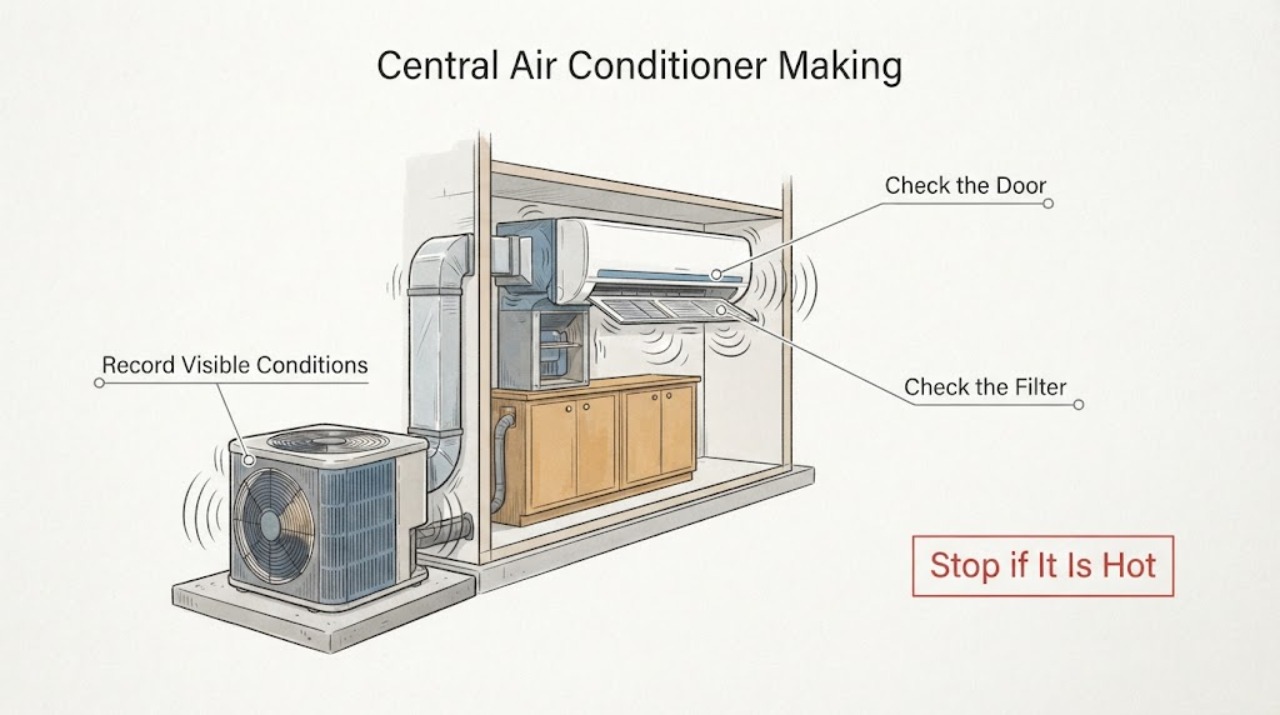
A central air conditioner that still cools while making a new or unusually loud noise should not be treated as normal simply because the temperature is falling. First note whether the sound is indoors or outdoors and whether it is humming, rattling, grinding, banging, hissing, clicking, or vibrating; turn the system Off for smoke, burning odor, arcing, refrigerant hissing, a damaged fan blade, severe vibration, or a noise that suddenly changed. From a safe position, check only the thermostat mode/fan setting, accessible filter, open registers, visible debris around the outdoor unit, and loose-looking external panels without touching the fan or opening the cabinet. Do not remove guards, test capacitors or wiring, oil a motor, or keep cycling the unit to compare sounds. If the noise returns, cooling continues with abnormal sound, airflow changes, the outdoor fan is not moving normally, or the source is unclear, leave the system off and arrange qualified HVAC service.
Work through in order
Diagnostic checks
Use only checks that match the exact appliance or system and its official guide.
-
Check 1
Turn the thermostat to Off and listen from a safe position for a new or unusually loud indoor or outdoor sound. Look without touching for smoke, burning odor, sparks, arcing, a hot disconnect, refrigerant hissing, water, a damaged fan blade, or severe vibration; keep people away from a hazardous unit.
Expected result: The noise is accompanied by smoke, burning odor, arcing, a hot connection, refrigerant hissing, water near electricity, a loose/broken blade, or violent vibration.
Next step: Leave the system Off and arrange qualified HVAC service. Use local emergency guidance for smoke, fire, active arcing, or an immediate electrical hazard; isolate power only from a safe, dry location without approaching the equipment.
Stop if: Stop immediately for smoke, active arcing, burning odor, a hot electrical component, refrigerant hissing, exposed wiring, water near electrics, or unstable equipment.
Why this matters
Why: These signs can indicate an electrical, refrigerant, mechanical, or physical hazard. Continued cooling is not a reason to keep the system operating.
-
Check 2
Record where and when the noise occurs: indoor air handler or outdoor condenser, startup, shutdown, continuously, only with the blower, or only while the compressor runs. Note the sound description, whether cooling continues, airflow at the registers, thermostat demand, and any short cycling.
Expected result: The sound is a steady familiar hum, a new loud hum, rattling/vibration, grinding/banging, clicking, high-pitched noise, or hissing; it may begin at startup or persist during cooling.
Next step: If the sound is new, loud, or worsening, keep the system Off and provide the recording and timing to an HVAC technician. Do not remove a guard or panel to make the sound easier to hear.
Stop if: Stop listening if the unit begins to shake, scrape, smell hot, hiss, spark, leak, or change speed unpredictably.
Why this matters
Why: Location and timing narrow the safe service path but do not identify a part. Trane links distinct sound patterns to possible blower, fan, compressor, capacitor, contactor, loose-hardware, duct, or refrigerant conditions.
-
Check 3
With the system Off, check the thermostat for Cool/Auto mode, fan setting, setpoint, and schedule/hold. Inspect the accessible filter and clear furniture or drapes from return grilles and supply registers; do not enter the air handler or infer a motor fault from the thermostat display.
Expected result: The fan is set to On and runs constantly, the filter is dirty or collapsed, a register/return is blocked, the schedule is unexpected, or those accessible conditions are normal.
Next step: Correct only the documented thermostat setting or accessible filter/room obstruction, then make at most one supervised test if no hazard remains. If the loud noise returns or airflow is still abnormal, turn the system Off and schedule service.
Stop if: Stop if the filter is wet, access requires a panel, the thermostat is damaged, airflow is absent, or the noise includes heat, scraping, arcing, or vibration.
Why this matters
Why: A fan setting, filter, or blocked airflow path can change perceived airflow and operating sound, but a new grinding, banging, rattling, or electrical noise is not explained away by a setting. A normal accessible path shifts attention to mechanical or electrical diagnosis.
-
Check 4
From outside and without removing the guard, inspect the area around the outdoor unit for leaves, branches, ice, fencing, or other visible obstructions and look for a loose-looking exterior panel or unit that is visibly unlevel. Do not reach through the grille, touch fan blades, straighten fins, or open the electrical compartment.
Expected result: Debris is obstructing the cabinet, a panel appears loose, the unit vibrates or is visibly unlevel, the fan blade appears damaged, or the exterior looks clear but the noise continues.
Next step: Clear only loose debris that can be removed without touching the unit or grille. Leave the system Off for a damaged blade, vibration, loose panel, or persistent noise and arrange HVAC service.
Stop if: Stop for a moving or damaged blade, exposed electrical parts, refrigerant/oily residue, severe vibration, a hot cabinet, or any need to remove a guard or panel.
Why this matters
Why: Obstructions, physical imbalance, loose hardware, or an unlevel unit can create noise, but a clear exterior does not rule out a fan motor, capacitor, compressor, contactor, refrigerant, or internal fault.
-
Check 5
If the system is dry, stable, free of hazard signs, and the sound was plausibly tied to a corrected control or room-level obstruction, perform no more than one brief supervised cooling test. Observe whether the sound returns, whether the outdoor fan spins normally, whether airflow changes, and whether cooling continues without short cycling or water.
Expected result: The sound stays at the system's known normal level and cooling/airflow are stable, or the loud noise returns, the fan stops or wobbles, airflow drops, the unit short-cycles, or water/odor appears.
Next step: Turn the system Off at the first return of the abnormal noise or any new symptom. Leave it Off and request qualified service; do not keep restarting it to compare sounds or test a suspected capacitor, motor, compressor, or refrigerant circuit.
Stop if: Stop the test for renewed loud noise, grinding, rattling, banging, hissing, burning odor, abnormal vibration, fan stoppage, water, or repeated cycling.
Why this matters
Why: One quiet test supports a temporary obstruction or setting explanation but does not prove the system is repaired. Recurrence or a new operating symptom makes mechanical, electrical, refrigerant, or duct trouble more likely.
Use your observations
Decision map
Find the observation that best matches what you see, then follow the next safe action.
-
PATH 01Safety boundary
What you see
Is the loud noise new or accompanied by smoke, odor, heat, arcing, hissing, water, fan damage, or severe vibration?
Do this next
Turn the system Off, keep clear, and arrange qualified HVAC service; use local emergency guidance for smoke, fire, active arcing, or an immediate electrical hazard.
Why this path and its safety boundary
Why it matters: A new loud sound or hazard sign changes the task from comfort troubleshooting to equipment protection and safety isolation.
Safety stop: Classify the sound location and timing, then perform only the thermostat, filter, register, and visible-debris checks.
-
PATH 02Next step
What you see
The noise is a familiar, brief startup or shutdown sound that has not changed, with stable airflow and no odor, heat, vibration, or cooling problem.
Do this next
Record the sound and monitor without opening the unit. If the pattern changes or cooling performance shifts, turn the system Off and arrange service.
Why this path and its safety boundary
Why it matters: Some systems have normal startup or shutdown sounds, but a sound that becomes louder, longer, or newly intrusive should not be treated as normal.
-
PATH 03Next step
What you see
A rattling, grinding, banging, or vibration comes from the outdoor unit, or the fan blade stops, wobbles, or appears damaged while cooling may continue.
Do this next
Leave the system Off, keep hands outside the grille, and arrange qualified HVAC service. Do not remove the guard, hold the fan, oil it, or run the unit with a damaged blade.
Why this path and its safety boundary
Why it matters: The pattern makes fan-blade, fan-motor, loose-hardware, compressor, or unlevel-unit trouble more likely; moving fan and high-voltage parts are hazardous to inspect.
-
PATH 04Next step
What you see
A loud hum, click, or hissing sound comes from the indoor/outdoor unit, especially with weak airflow, delayed startup, continuous running, poor cooling, frost, or a thermostat demand that never satisfies.
Do this next
Turn the system Off and request qualified HVAC diagnosis. Do not test capacitors, wiring, refrigerant pressure, or compressor operation as a homeowner check.
Why this path and its safety boundary
Why it matters: The combined pattern can involve a blower, capacitor, contactor, compressor, refrigerant condition, frozen coil, or control; the sound cannot identify which component is at fault.
Helpful context
Understand the symptom
Cooling can continue while a serious noise develops
A running compressor, blower, or fan can keep moving air and lowering the room temperature even when a bearing, fan blade, capacitor, contactor, loose panel, duct, or refrigerant system is beginning to fail. The most useful first distinction is location and timing: inside or outside, at startup or shutdown, continuously, or only when the thermostat calls for cooling. A new loud noise is more important than the fact that cooling still works.
Use sound as a triage clue, not a part diagnosis
Humming can involve the indoor blower or outdoor electrical/fan components; rattling can involve a fan, blower wheel, compressor, loose fastener, or an unlevel unit; grinding or banging can indicate physical interference or mechanical trouble; and hissing near refrigerant lines needs prompt service. These are patterns, not proof that one named component has failed. Keep hands, tools, and clothing away from moving equipment and leave sealed or high-voltage work to a qualified technician.
Low-risk checks are limited to the controls and visible airflow path
Carrier recommends checking thermostat settings and an accessible filter as basic troubleshooting, while Trane notes that blocked registers, restrictive filters, and outdoor debris can affect airflow and noise. A homeowner can document those conditions and clear a room-level obstruction without opening the system. Fan blades, capacitors, motors, contactors, compressors, refrigerant lines, and internal panels require professional diagnosis.
Safety boundary
Stop conditions
- Stop operation for smoke, burning odor, arcing, a hot electrical component, water near electricity, refrigerant hissing, a damaged or wobbling fan blade, or severe vibration; keep clear and use local emergency guidance as appropriate.
- Do not remove fan guards or panels, touch moving blades, test capacitors or wiring, oil a motor, probe refrigerant lines, or attempt compressor/refrigerant repair.
- Do not keep cycling the unit to compare sounds. After the first return of a loud or abnormal noise, leave the system Off and arrange qualified HVAC service.
- Do not treat cooling that continues as proof that a loud noise is safe; persistent cooling with abnormal sound still requires diagnosis.
Common questions
FAQ
Can I keep running my central AC if it is still cooling but making a loud noise?
Do not assume it is safe. Turn the system Off for a new or unusually loud noise, especially grinding, banging, rattling, hissing, severe vibration, smoke, burning odor, fan damage, or poor airflow. A system can continue cooling while a fan, blower, compressor, capacitor, duct, or refrigerant problem develops.
What does a loud hum from a central air conditioner mean?
The location matters. Trane associates a loud indoor hum with a possible blower or inducer problem and an outdoor hum with capacitor, contactor, or fan-motor trouble. The sound is not proof of one failed part; leave the system Off and arrange qualified HVAC diagnosis if it is new, loud, or persistent.
What causes rattling, grinding, or banging in the outdoor unit?
Possible causes include a damaged or unbalanced fan blade, loose hardware, blower/fan trouble, compressor trouble, debris, or an unlevel unit. Look only from outside with the system Off; do not remove the guard or touch the fan. Leave the unit Off and call HVAC service for recurring or loud sound.
Is hissing from an air conditioner normal?
Trane says hissing near the indoor coil or outdoor refrigerant lines is not normal and may indicate a refrigerant leak; hissing beneath normal outdoor-unit sound can also indicate compressor or electrical issues. Shut the system Off, keep clear, and arrange HVAC service rather than handling refrigerant lines.
What can I check before calling an HVAC technician for a loud AC?
Record the sound and location, verify the thermostat mode and fan setting, inspect an accessible filter, clear room-level register obstructions, and remove loose debris around the outdoor unit without touching the equipment. If the noise returns, cooling is poor, airflow changes, or any hazard sign appears, leave the system Off and arrange qualified service.
Read the exact guide
Official sources
- Troubleshoot an Air Conditioner: 6 Steps to Fix an AC Not WorkingCarrier · Carrier residential central AC troubleshooting for thermostat state, filter/airflow, refrigerant, breakers, frozen coils, outdoor operation, and loud-noise service boundary
- What is an AC Condenser Unit? | Function, Cost & RepairCarrier · Carrier residential AC condenser guidance on loud outdoor noise, leaks, blocked coils, fan/compressor/electrical issues, and professional diagnosis
- Is This Normal? HVAC Smells and Sounds, ExplainedTrane · Trane residential HVAC guidance on abnormal noise types, normal startup/shutdown caveats, safety shutdown, and professional diagnosis
- Why is My Air Conditioner Fan Not Working?Carrier · Carrier central AC fan guidance on damaged blades, unusual outdoor noise, blower/evaporator interaction, capacitors, and professional service
Community feedback
Share a repair observation
Share a plain-text repair observation. Accepted observations are published automatically; this page may take a moment to update.