
On this page
Start here
Quick answer
A new or unusually loud central-AC sound should be treated as a service clue, especially if it is grinding, scraping, rattling with vibration, hissing, or accompanied by a burning smell, ice, weak airflow, or poor cooling. From a safe distance, record the sound type, whether it comes from the indoor or outdoor unit, when it occurs, and any airflow, ice, water, or odor changes. Do not open panels, touch fans, test electrical parts, add refrigerant, or keep operating the system under a grinding or burning condition. Shut the system off and arrange HVAC service for hazardous or worsening symptoms.
Work through in order
Diagnostic checks
Use only checks that match the exact appliance or system and its official guide.
-
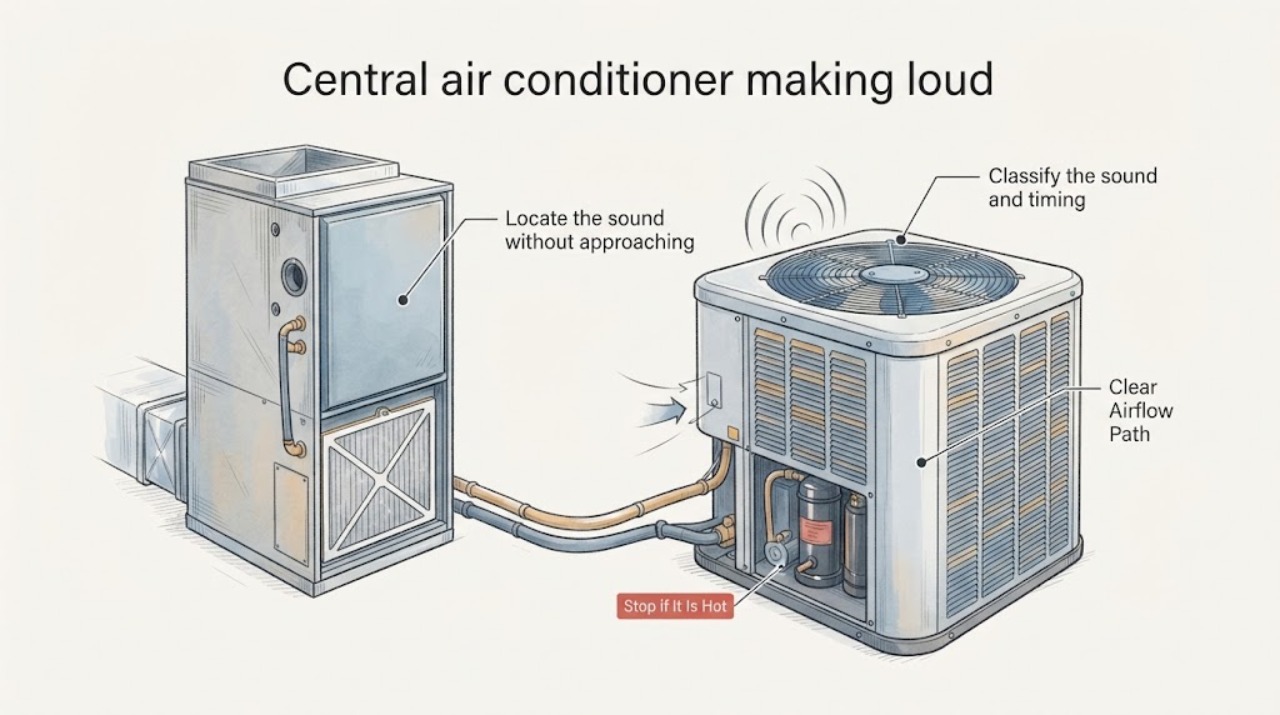
Classify the sound and timing
Record the sound as the closest plain-language description—hum, buzz, click, rattle, squeal, scraping, grinding, hissing, or a brief pop—and note whether it occurred at startup, shutdown, continuously, or only intermittently. Use the last observed occurrence; do not repeatedly start the system to reproduce it.
Expected result: Note whether the sound changed from the system’s normal hum or startup sound, whether it is getting louder, and whether it is synchronized with a thermostat call, a fan change, or a shutdown.
Next step: Save a short audio recording only from a safe location if one already exists and write the timing in the service request. Keep the system off for grinding, scraping, hissing, or any worsening noise.
Stop if: Stop operation immediately for grinding, scraping, a loud electrical buzz, a burning smell, smoke, sparks, or a noise that is rapidly worsening.
Why this matters
Why: Trane says a sudden loud noise from a normally quiet indoor or outdoor unit warrants shutting the system off and calling for repair. Carrier groups grinding, rattling, and humming with possible fan or compressor issues, but the sound category alone does not identify the failed component.
-
Locate the sound without approaching moving parts
From a clear indoor floor or outdoor position, identify whether the sound is strongest at a supply vent, return or air-handler area, refrigerant-line route, or outdoor condenser. Do not put hands, tools, or listening devices against the cabinet, grille, fan guard, or line set.
Expected result: Record indoor-only, outdoor-only, or both locations. Note visible vibration of the cabinet or nearby trim from a distance, and whether the sound travels through ductwork or the wall rather than originating at the unit.
Next step: Include the location and any visible vibration in the technician’s notes. Do not remove an access panel or attempt to steady the cabinet while it runs.
Stop if: Stop and leave the system off if the cabinet shakes, a grille or panel appears loose, the sound includes impact, or equipment is near water or exposed wiring.
Why this matters
Why: Trane distinguishes the indoor blower from the outdoor condenser fan and notes that loud humming can have different indoor and outdoor causes. A duct or trim vibration may be a different service path from a noise directly at the condenser or air handler.
-
Check airflow and visible ice or water clues
Without touching the equipment, compare the airflow at accessible supply vents with the usual airflow and look from a safe distance for ice on visible refrigerant lines, a frozen outdoor or indoor surface, condensate water, or a full drain pan. Do not open the cabinet or handle ice or refrigerant tubing.
Expected result: Record normal, weak, or absent airflow; visible ice; water under or around the indoor unit; or no visible temperature or moisture change. Note whether cooling has weakened at the same time as the noise.
Next step: Turn cooling off and arrange HVAC service when ice, water, or weak airflow accompanies the noise. Do not force-thaw ice, add refrigerant, or attempt coil or drain work.
Stop if: Stop immediately if ice is extensive, water is near electrical equipment, airflow has stopped, or a drain pan is overflowing.
Why this matters
Why: Trane links a frozen evaporator coil, fan problems, and low airflow with AC trouble, while Carrier treats ice, hissing, and persistent cooling problems as reasons for professional service. Ice or water alongside a loud sound makes continued operation less appropriate than a prompt assessment.
-
Observe the filter and nearby air path
If the filter is a plainly accessible user-service item, look at its condition without opening the air handler or reaching into the blower. Check whether vents and return grilles are visibly blocked by furniture or stored items. Do not remove a panel or inspect the blower wheel.
Expected result: Record a clean or visibly loaded filter, blocked or clear grilles, and whether weak airflow or a high-pitched sound was present. Note the filter size and replacement date only if already printed or recorded, without guessing a specification.
Next step: Replace a filter only with the exact type and size specified for the system and only when the system is safely off; otherwise give the observation to the technician. If the noise persists or is mechanical, do not keep testing.
Stop if: Stop if filter access requires opening the equipment, the filter is wet, there is mold-like contamination, or the sound is grinding, burning, or accompanied by no airflow.
Why this matters
Why: A dirty or restrictive filter can affect airflow and system noise, but it cannot explain every loud sound. Carrier and Trane both identify filter or airflow conditions as possible contributors while reserving coil, motor, capacitor, and refrigerant work for professionals.
-
Record odor and electrical warning clues
From a safe position, note any burning-plastic, electrical, musty, gas-like, or refrigerant-like odor and whether a breaker has tripped or lights have flickered. Do not reset a repeatedly tripping breaker or investigate inside the cabinet.
Expected result: A burning electrical odor, smoke, sparks, repeated breaker trip, or hot-plastic smell is different from a brief ordinary dust odor. A musty smell with weak airflow or water suggests a moisture or coil concern; a hissing sound near refrigerant lines needs professional attention.
Next step: Leave the system off and contact HVAC service. For smoke, fire, or a gas-like odor, leave the area and use the appropriate emergency or utility response from a safe location.
Stop if: Stop immediately for smoke, sparks, fire, a strong gas-like odor, a burning electrical smell, or a breaker that trips again.
Why this matters
Why: Trane advises shutting the HVAC system off for burning electrical or plastic odors and unusual hissing, while Carrier treats burning smells, tripped breakers, and flickering lights as serious electrical warning signs. These are not homeowner parts-selection clues.
Use your observations
Decision map
Find the observation that best matches what you see, then follow the next safe action.
-
PATH 01Safety boundary
What you see
The sound is a new grinding, scraping, high-pitched, or impact-like noise, or the cabinet vibrates noticeably.
Do this next
Turn cooling off and request HVAC service. Provide the sound recording or description, location, timing, and any airflow or temperature change.
Why this path and its safety boundary
Safety stop: Do not run the system to see whether the sound clears and do not touch the fan, blower, compressor, or cabinet hardware.
-
PATH 02Safety boundary
What you see
The sound is a normal brief startup or shutdown characteristic, has not changed, and there are no airflow, ice, water, odor, or cooling problems.
Do this next
Document the normal pattern and mention it at the next scheduled HVAC maintenance visit. If it becomes louder, longer, or accompanied by another symptom, move to a service call.
Why this path and its safety boundary
Safety stop: Stop operation if a previously stable sound changes or becomes intrusive, continuous, or mechanical.
-
PATH 03Safety boundary
What you see
Noise is accompanied by weak airflow, ice, water, or loss of cooling.
Do this next
Leave cooling off and arrange professional HVAC assessment. A filter observation may be useful, but coil, blower, refrigerant, and drain work are service tasks.
Why this path and its safety boundary
Safety stop: Do not force-thaw ice, add refrigerant, open panels, or keep operating a system with water or frozen components.
-
PATH 04Safety boundary
What you see
Noise is accompanied by burning smell, smoke, sparks, repeated breaker trips, or a strong gas-like odor.
Do this next
Leave the system off and use the appropriate HVAC, electrical, gas, or emergency response from a safe location. Keep people and pets away from the equipment.
Why this path and its safety boundary
Safety stop: Do not reset breakers repeatedly, re-energize the system, or approach equipment that is smoking, sparking, or near a fire or gas hazard.
Helpful context
Understand the symptom
Sound is a symptom, not a part diagnosis
A hum, rattle, click, squeal, hiss, and grinding sound can come from different parts of a split system. The same sound also means something different at the indoor air handler than at the outdoor condenser. A useful service report combines the sound with location, timing, airflow, temperature, ice, water, and odor instead of naming a motor or capacitor from sound alone.
Use a safe observation boundary
Observe from outside the equipment enclosure and from a clear floor or path. Do not reach through a grille, remove a cover, touch a moving blade, check a capacitor, handle refrigerant lines, or use a tool near the unit. If the noise is grinding or there is a burning electrical smell, stop the system and leave it off for the technician.
Only after diagnosis
Potential parts
- condenser fan motor
Only consider this category after an HVAC technician confirms an outdoor fan-motor fault rather than a capacitor, blade, bearing, control, or airflow issue.
Match the system model, motor specifications, rotation, mounting, electrical rating, and manufacturer guidance; do not infer fit from a similar-looking motor. - HVAC blower wheel
Only consider a blower wheel after a technician confirms that the indoor noise and airflow symptom come from a damaged, obstructed, or out-of-balance wheel.
Confirm the air-handler model, wheel dimensions, hub, rotation, and balancing requirements; installation requires access and safe isolation. - fan capacitor
Only consider a capacitor after a qualified technician tests the de-energized system and identifies the capacitor as the failed component.
Capacitors can retain hazardous electrical charge; match the exact electrical specifications and never select or replace one from sound alone.
When checks do not resolve it
Need a professional?
Call an HVAC professional for any new loud or mechanical noise, especially grinding, rattling with vibration, high-pitched noise, hissing, weak airflow, ice, water, burning odor, or repeated electrical interruption. Shut the system off for hazardous or worsening symptoms.
Have this ready
- Provide the sound type, indoor or outdoor location, startup or running timing, audio recording if safely captured, airflow and cooling changes, ice or water observations, filter condition, odor, and any breaker history.
Common questions
FAQ
Should I keep running the AC to see whether the loud noise stops?
No if the noise is new, mechanical, grinding, scraping, hissing, or accompanied by vibration, ice, water, a burning smell, or weak airflow. Turn cooling off and arrange service. A brief unchanged startup sound without other symptoms can be documented for the next maintenance visit.
Can I replace the capacitor or fan motor after hearing a hum?
No. A hum can involve a capacitor, motor, compressor, control, or another condition, and capacitors can retain hazardous charge. Record the location and symptoms and have a qualified HVAC professional test and match the component.
What does a loud rattling sound with weak airflow suggest?
It may involve the blower, fan, airflow restriction, mounting, or another mechanical issue, but sound alone cannot identify the cause. Keep clear of the equipment, note indoor or outdoor location, check only an accessible filter if safe, and request service if the symptom persists or is worsening.
Read the exact guide
Official sources
- AC Fan Not Working? Reasons Why It Stopped SpinningTrane · Supports distinguishing indoor blower and outdoor condenser observations and keeping clear of fan and capacitor service.
- Air Conditioner Repair GuideCarrier · Supports professional escalation for grinding, rattling, humming, ice, hissing, burning smells, tripped breakers, and refrigerant or electrical concerns.
- Air Conditioning ServiceCarrier · Supports treating noise, weak airflow, ice, and persistent cooling problems as reasons for service and recording symptoms for the technician.
- Is This Normal? HVAC Smells and Sounds, ExplainedTrane · Supports documenting sound type and timing and stopping a normally quiet system that becomes unusually loud; it does not diagnose this specific unit.
Community feedback
Share a repair observation
Share a plain-text repair observation. Accepted observations are published automatically; this page may take a moment to update.