
On this page
Start here
Quick answer
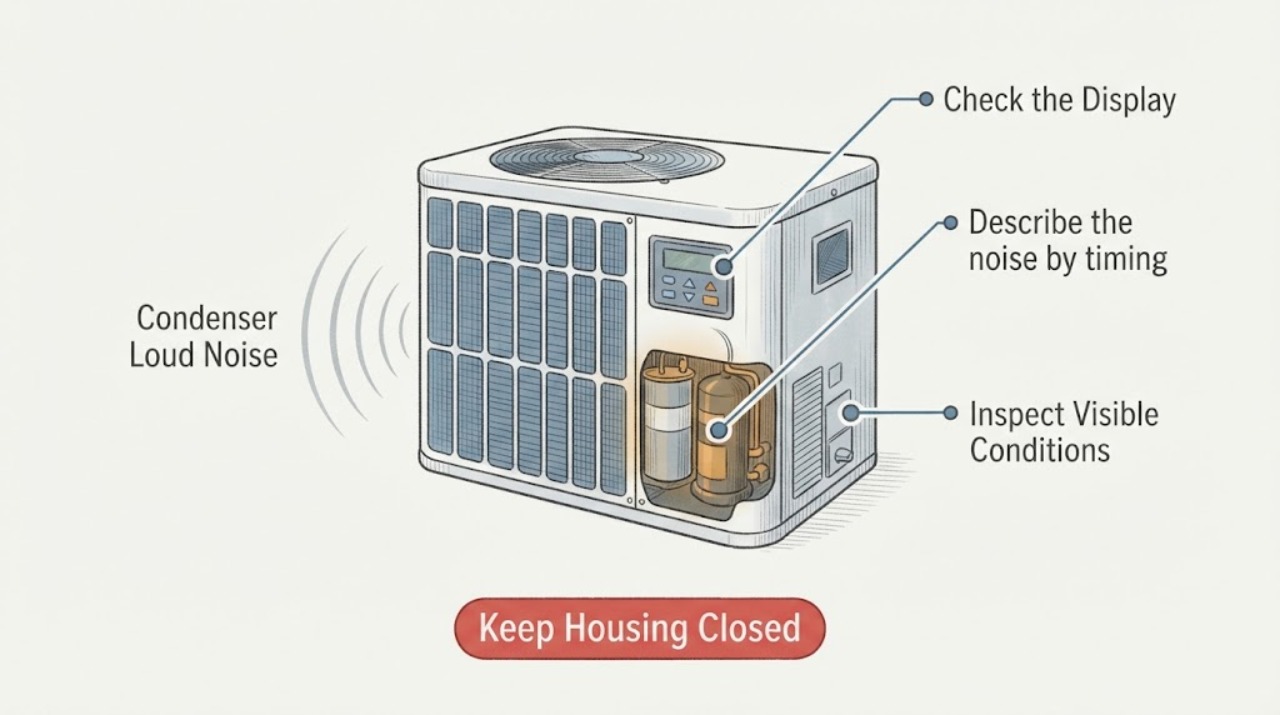
A loud condenser may be reacting to loose debris, a fan or cabinet vibration, or a normal startup sound, but grinding, banging, repeated clicking, or a heavy hum can indicate a fan, capacitor, or compressor problem. From a safe distance, identify the sound, when it occurs, whether the outdoor fan runs, and whether cooling changes. Do not open the cabinet or handle the capacitor: it can retain a dangerous charge after power is removed. Stop the system for burning odor, smoke, arcing, oil or refrigerant residue, severe vibration, or a compressor that repeatedly fails to start, and call a qualified HVAC technician.
Before you begin
Safety first
- Do not open the condenser cabinet, handle or discharge the capacitor, touch wiring or moving parts, test live electrical circuits, or open the refrigerant circuit.
Work through in order
Diagnostic checks
Use only checks that match the exact appliance or system and its official guide.
-
Check 1
From a safe distance, listen to the condenser without touching the cabinet. If there is a burning smell, smoke, a spark, visible arcing, or a sharp electrical sound, stop the system from a safe control point and leave it off; do not approach the cabinet.
Expected result: The sound is a mild airflow or brief startup sound, or it is grinding, banging, repeated clicking, a heavy hum, or accompanied by a warning sign.
Next step: If there is no warning sign, continue with the sound and system observations. For any warning sign, keep the equipment off and call qualified HVAC or emergency help from a safe location.
Stop if: Stop immediately for smoke, sparks, arcing, burning odor, a hot cabinet, or a sharp electrical noise.
Why this matters
Why: A mild, brief sound can be part of normal operation, while a new harsh sound or any heat, smoke, odor, or arc raises the likelihood of a mechanical or electrical fault and a fire or shock risk.
-
Check 2
Describe the noise by timing and character: only at startup, only at shutdown, continuous while running, or intermittent. From outside the unit, note whether it sounds like a loose panel or debris, a fan scrape or rattle, a rhythmic click, a heavy hum, or grinding near the compressor area.
Expected result: The sound is limited to startup, follows fan operation, repeats every few seconds, stays continuous, or changes with vibration.
Next step: Record a short description or safe recording for the technician and do not keep cycling the system to reproduce the sound.
Stop if: Stop if the sound becomes grinding, banging, metallic, louder, or is joined by heat, odor, smoke, or a protection-device trip.
Why this matters
Why: Timing helps distinguish a start circuit or compressor attempt from a fan or cabinet vibration. A repeating click or heavy hum with no normal start can be consistent with a capacitor or motor-start problem, but it is not a safe basis for opening the cabinet.
-
Check 3
Observe the outdoor fan and the indoor comfort result from a safe position during one normal call for cooling, without reaching through the grille. Note whether the fan turns, whether the air indoors becomes cool, and whether the system starts and stops unusually often.
Expected result: The fan runs and cooling is normal, the fan does not start while a hum or click is present, or the system runs without cooling and cycles abnormally.
Next step: Keep the system off if the fan will not start, the compressor repeatedly attempts to start, or cooling is lost; arrange HVAC diagnosis rather than forcing another cycle.
Stop if: Stop for a stalled fan, repeated start attempts, severe vibration, smoke, burning odor, or a condenser that becomes unusually hot.
Why this matters
Why: A running fan with normal cooling shifts attention toward cabinet vibration or a sound source that may be separate from a failed capacitor. A non-starting fan with hum or clicking raises a motor-start or capacitor possibility; poor cooling or abnormal cycling can involve the compressor, airflow, refrigerant, or other HVAC causes.
-
Check 4
Inspect only the area around the condenser from outside the cabinet for leaves, branches, loose objects, bent guards, shifted pads, blocked airflow, visible oil-like residue, or a wet-looking line. Do not remove a panel, reach through the grille, move the unit, or disturb any refrigerant tubing.
Expected result: Debris or a loose object is outside the cabinet, the unit is vibrating on its pad, airflow is blocked, or residue and physical damage are visible.
Next step: Only clear loose material that is well away from the cabinet and can be removed without touching the unit. Leave residue, tubing damage, a shifted unit, and any inaccessible obstruction for an HVAC technician.
Stop if: Stop for a leaking or damaged line, severe rust, exposed wiring, a sharp edge, unstable equipment, or any need to reach inside the grille.
Why this matters
Why: An external object or unstable pad can create rattling and vibration, while blocked airflow can increase operating stress. Oil-like residue or damaged tubing may indicate a refrigerant-system problem that cannot be confirmed or repaired from outside.
-
Check 5
Read the visible equipment label from a safe position and note the system type, brand, model, and whether the noise began after a power interruption, service visit, storm, or extended hot-weather run. Do not infer a capacitor size or compressor part from a generic symptom.
Expected result: The model and recent event are known, or the label is missing and the trigger is unknown.
Next step: Give the model, event history, sound timing, fan response, and cooling result to the HVAC technician; do not order or install an unverified capacitor or compressor part.
Stop if: Stop if gathering the label would require opening the cabinet, climbing unsafely, moving the equipment, or touching tubing or wiring.
Why this matters
Why: Capacitor arrangements and condenser designs vary, and a generic loud-noise symptom cannot establish the correct part or refrigerant procedure. A precise model and event history help the technician choose the correct diagnostic path.
-
Check 6
Keep the outdoor disconnect and cabinet closed and observe whether the noise stops when the thermostat is no longer calling for cooling, without repeatedly switching the system or disconnect. Note whether the sound continues, stops immediately, or returns on the next normal call.
Expected result: The noise stops with the cooling call, continues after the call ends, or returns immediately with a hum, click, or failed start.
Next step: Leave the system off when the noise is abnormal and arrange HVAC service. Do not use a repeated on-off sequence as a substitute for diagnosis.
Stop if: Stop for a noise that continues unexpectedly, a second failed start, a trip, burning odor, smoke, or worsening vibration.
Why this matters
Why: A noise tied to the call is likely operating-system related; a sound that continues after the call or returns with a failed start needs service. A persistent noise can indicate a stuck control, fan, compressor, or other fault and is not a reason to open the unit.
-
Check 7
Prepare a service handoff with the condenser model, noise recording or description, exact timing, fan response, indoor cooling result, recent weather or service event, visible debris or residue, and any trip, odor, heat, smoke, or vibration. Take photos only from a safe distance.
Expected result: The symptom sequence is complete and repeatable, or the condenser cannot be safely approached.
Next step: Request qualified HVAC service and ask the technician to assess the capacitor, compressor, fan, electrical controls, airflow, and refrigerant system as indicated by the observations.
Stop if: Do not open the cabinet, handle the capacitor, touch wiring or refrigerant tubing, or restart after a hazardous symptom.
Why this matters
Why: This information helps separate a fan or cabinet noise from a capacitor-start, compressor, refrigerant, or electrical-control issue without exposing the reader to stored charge, moving parts, or refrigerant.
Use your observations
Decision map
Find the observation that best matches what you see, then follow the next safe action.
-
PATH 01Next step
What you see
The sound is brief, mild, and the fan runs with normal cooling and no warning signs.
Do this next
Arrange qualified service and follow the exact model guidance.
Why this path and its safety boundary
Why it matters: Record it and monitor without opening the cabinet; arrange service if it becomes louder, changes character, or affects cooling.
-
PATH 02Next step
What you see
The condenser hums or clicks but the fan does not start, or the compressor repeatedly tries to start.
Do this next
Arrange qualified service and follow the exact model guidance.
Why this path and its safety boundary
Why it matters: Leave the system off and call an HVAC technician. A capacitor or motor-start fault is possible, but the stored charge makes capacitor diagnosis and replacement professional work.
-
PATH 03Next step
What you see
The sound is grinding, banging, or metallic rattling and follows fan operation or cabinet vibration.
Do this next
Arrange qualified service and follow the exact model guidance.
Why this path and its safety boundary
Why it matters: Keep the unit off and arrange service for the fan, guard, pad, cabinet, or other mechanical source; do not reach through the grille.
-
PATH 04Next step
What you see
The condenser is loud and cooling is poor, the unit short cycles, or visible oil-like residue or tubing damage is present.
Do this next
Arrange qualified service and follow the exact model guidance.
Why this path and its safety boundary
Why it matters: Stop operation and request HVAC diagnosis. Refrigerant and compressor work are not user repairs, and residue should not be wiped or investigated inside the cabinet.
-
PATH 05Next step
What you see
There is a burning smell, smoke, arcing, a hot cabinet, severe vibration, or repeated protective-device operation.
Do this next
Arrange qualified service and follow the exact model guidance.
Why this path and its safety boundary
Why it matters: Leave the system off, keep clear, and obtain urgent HVAC or electrical help from a safe location; use emergency services if there is fire or immediate danger.
Helpful context
Understand the symptom
The outdoor condenser cabinet contains the compressor and condenser fan. A brief start or stop sound can be normal, but a new or worsening grinding, banging, rattling, or strong hum is a symptom rather than proof of one failed part. The sound's location, timing, and effect on cooling help separate a cabinet or airflow issue from a motor, capacitor, or compressor fault.
The capacitor helps the compressor and fan motors start and keep running. A failed capacitor can be associated with clicking, a motor hum, a fan that does not start, or repeated starting attempts, but the same observations can come from other faults. Capacitors can retain stored electrical energy after the system is switched off, so inspection, testing, discharge, and replacement belong to a trained HVAC professional.
Keep every check outside the condenser cabinet. You can observe the unit, thermostat response, sound pattern, airflow, and visible surroundings without touching a panel, wiring, capacitor, compressor, or refrigerant circuit.
Only after diagnosis
Potential parts
- Condenser fan or fan motor
Consider this only after a qualified HVAC technician confirms that the fan or motor is the source of the noise and identifies the correct equipment requirements.
Confirm the exact condenser model and manufacturer requirements; do not select a motor from noise alone. - Run or start capacitor
Consider this only when a technician confirms a capacitor fault and identifies the correct device for the compressor and fan arrangement.
Capacitors store dangerous energy and must be handled by a qualified HVAC professional; do not infer specifications from appearance or sound. - Compressor
Consider compressor work only after the technician rules out the fan, capacitor, controls, airflow, and refrigerant causes and confirms compressor failure.
Compressor selection, refrigerant handling, and system compatibility require exact equipment information and qualified HVAC service.
When checks do not resolve it
Need a professional?
Safety scope: Do not open the condenser cabinet, handle or discharge the capacitor, touch wiring or moving parts, test live electrical circuits, or open the refrigerant circuit.
Common questions
FAQ
Is a loud condenser always a bad compressor?
No. Loose debris, cabinet vibration, a fan problem, capacitor-start trouble, airflow restriction, and compressor or refrigerant faults can sound similar. The timing, fan response, cooling result, and warning signs determine the next safe step.
Can I check or replace the condenser capacitor myself?
No. HVAC capacitors can retain dangerous stored energy after power is removed. Inspection, testing, discharge, and replacement should be done by a trained HVAC professional.
What does a loud hum or repeated click mean?
A hum or click with a fan or compressor that does not start can be consistent with a capacitor or motor-start problem, but it can also have another cause. Leave the system off and arrange HVAC diagnosis instead of cycling it repeatedly.
When should I stop using a noisy condenser?
Stop for grinding, banging, severe vibration, a stalled fan, repeated start attempts, loss of cooling, smoke, sparks, arcing, burning odor, unusual heat, a trip, or visible oil-like residue or tubing damage. Keep clear and call qualified HVAC service.
Read the exact guide
Official sources
- What is an AC Capacitor? | Cost, Signs of Failure & ReplacementCarrier · Carrier residential AC capacitor symptoms, stored-energy warning, and qualified replacement guidance
- 1910.333 - Selection and use of work practices.Occupational Safety and Health Administration · Electrical de-energizing, stored-energy, and qualified-person work boundaries
- All About Heat Pump Capacitors and Signs of TroubleTrane · Residential HVAC capacitor function, startup symptoms, and professional-service boundary
- What is an AC Condenser Unit? | Function, Cost & RepairCarrier · Carrier residential AC condenser function, loud-noise symptoms, airflow, electrical, and refrigerant issue guidance
Community feedback
Share a repair observation
Share a plain-text repair observation. Accepted observations are published automatically; this page may take a moment to update.