
On this page
Start here
Quick answer
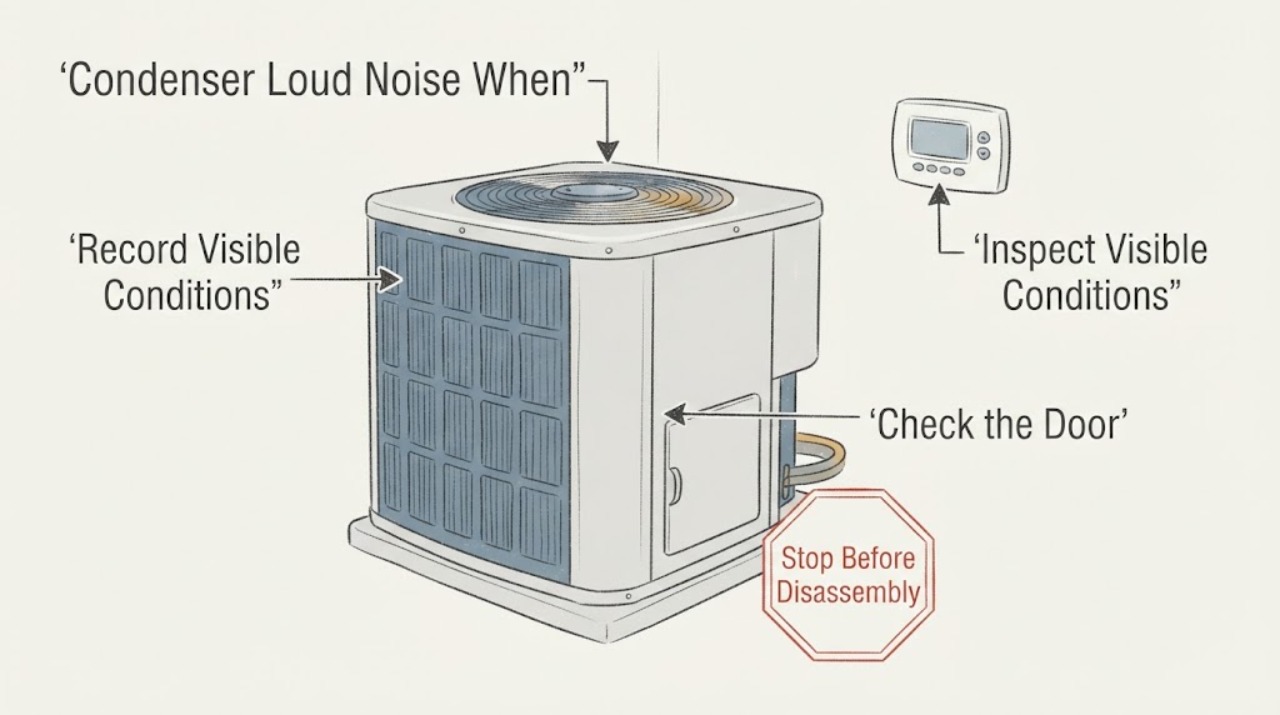
If an outdoor condenser becomes loud when the thermostat calls for cooling, use the thermostat as the timing trigger, not as proof that the thermostat is the noisy part. From a safe position, record whether the sound starts with the cooling call, whether it comes from the outdoor cabinet or indoor air handler, and whether the outdoor fan moves normally. Grinding, scraping, banging, repeated hard starting, loud humming, clicking without startup, or a sound that continues after the cooling call ends can involve the fan, compressor, contactor, capacitor, loose panel, or airflow around the condenser. Check only the thermostat settings, an accessible filter and registers, and visible clearance around the outdoor unit. Do not open the condenser, touch the grille or wiring, test a contactor or capacitor, measure voltage, or work on refrigerant. Turn cooling off for abnormal or escalating noise and call a qualified HVAC professional, especially for smoke, burning odor, arcing, heat, vibration, a refrigerant smell or residue, or a breaker trip.
Work through in order
Diagnostic checks
Use only checks that match the exact appliance or system and its official guide.
-
Check 1
At the thermostat, record the mode, setpoint, room temperature, fan setting, and whether the noise begins immediately when COOL calls or only after the system has been running. Make one observation from a normal location; do not repeatedly force starts to reproduce the sound.
Expected result: Note whether the indoor blower runs, whether the outdoor noise follows the cooling call, whether the sound stops when the call ends, and whether the thermostat shows a delay, alert, or blank display.
Next step: Keep the settings unchanged for the report. If the noise is loud, new, worsening, or accompanied by poor cooling, switch COOL off and arrange HVAC service rather than repeating the start cycle.
Why this matters
Why: A sound synchronized with a cooling call points to a component in the start or running sequence, but it does not prove the thermostat is defective. A fan set to ON can create indoor airflow without cooling, while a delayed or absent response may involve controls, power, or protection.
-
Check 2
From a safe standing position, compare the sound location: beside the outdoor condenser, at the indoor air handler or supply registers, or along the refrigerant lines. Do not put a hand on the cabinet, grille, pipes, or ductwork while the system is operating.
Expected result: Record whether the sound is a low hum, click, rattle, scrape, grind, bang, whine, vibration, or airflow roar, and whether it is strongest indoors or outdoors.
Next step: Make a short recording from a safe distance if it can be done without approaching moving or energized equipment. Turn cooling off for grinding, scraping, banging, harsh vibration, or any sound that escalates.
Why this matters
Why: A sound strongest at the outdoor cabinet may involve the condenser fan, compressor, contactor, cabinet, or outdoor airflow. A sound strongest indoors may be the blower or duct system instead. Sound quality and location narrow the service investigation but cannot safely identify a part.
-
Check 3
Observe the outdoor unit only from outside its service clearance. Look for normal-looking fan movement, visible leaves or debris around the cabinet, objects touching the enclosure, and whether warm air is discharged, without removing the grille or reaching into the unit.
Expected result: Record fan moving or not moving, irregular movement, a cabinet that visibly shakes, a blocked air inlet or outlet, or no visible motion during an otherwise valid cooling call.
Next step: Clear only loose objects that are well away from the equipment and do not require opening, climbing, or touching the cabinet. For abnormal fan behavior, vibration, or persistent noise, leave COOL off and call HVAC.
Why this matters
Why: A blocked or dirty outdoor coil area can restrict heat rejection, while no, uneven, or noisy fan movement can accompany a fan, control, capacitor, or compressor issue. The visible fan does not prove that the compressor or electrical controls are safe or functional.
-
Check 4
Check an accessible indoor filter and open supply and return registers after cooling is off or from their normal access points. Do not remove an air-handler cover or clean an internal coil.
Expected result: Record a visibly loaded filter, blocked return, weak airflow, or a normal filter with normal airflow, and note whether the loud outdoor sound occurs with restricted airflow.
Next step: Replace only a clearly dirty filter with the exact model-approved type and restore registers. If the condenser remains loud or cooling is inadequate, do not compensate by lowering the thermostat; request HVAC diagnosis.
Why this matters
Why: Poor indoor airflow can make the system run longer and may increase stress, but a normal filter does not clear the outdoor fan, compressor, contactor, capacitor, or refrigerant circuit. An indoor airflow sound can also be mistaken for condenser noise.
-
Check 5
Without opening a panel, observe any visible thermostat, disconnect, or breaker status and note whether there was a recent outage, storm, maintenance event, or power interruption. Do not reset a breaker or disconnect repeatedly.
Expected result: Record a normal or tripped handle, a delayed restart, flickering controls, a hot-looking or discolored enclosure, or a breaker that trips again after a safe permitted reset.
Next step: If there is no odor, heat, water, damage, or other hazard and the product instructions allow it, make at most one normal reset. If it trips again or looks abnormal, leave it off and call HVAC or an electrician.
Why this matters
Why: A power or control event can change when the condenser starts and can produce clicking or humming, but a repeated trip indicates a fault rather than a noise to ignore. A handle position cannot prove that internal high-voltage parts are de-energized.
-
Check 6
Check from a safe position for cooling-related warning signs: weak or warm airflow, ice on visible tubing, water near the indoor unit, oily residue, a rapidly cycling condenser, or a sound that persists after the thermostat no longer calls.
Expected result: Record each sign and whether it occurs at startup, during steady operation, at shutdown, or independently of a cooling call.
Next step: Turn COOL off for ice, water, residue, poor cooling with abnormal noise, or persistent sound. Do not touch the refrigerant lines, drain pan, compressor, or any internal component; provide the pattern to HVAC service.
Why this matters
Why: Ice, water, oily residue, poor cooling, or short cycling can indicate airflow, condensate, coil, compressor, or refrigerant trouble. A continuing sound after the call ends can indicate a control, fan, or mechanical issue and is not a reason to keep the system operating.
-
Check 7
Prepare the service handoff: write the thermostat demand and fan settings, sound type and location, start or stop timing, visible outdoor fan behavior, filter and airflow state, power events, and any photos or recording taken without approaching the equipment.
Expected result: Include whether the system still cools, whether the sound is getting worse, and whether a previous reset changed it. Do not list a capacitor, contactor, compressor, or fan motor as a confirmed diagnosis.
Next step: Schedule qualified HVAC service for persistent or abnormal condenser noise. Ask the technician to inspect the complete start and run sequence and to explain the evidence for any proposed part or refrigerant work.
Why this matters
Why: A structured symptom record lets the professional distinguish a thermostat/control trigger from outdoor fan, compressor, contactor, capacitor, cabinet, airflow, or refrigerant investigation without unsafe testing.
Use your observations
Decision map
Find the observation that best matches what you see, then follow the next safe action.
-
PATH 01Safety boundary
What you see
Do this next
Record the sound type and fan movement from a safe distance, then turn COOL off for grinding, banging, harsh humming, vibration, or poor cooling and call HVAC. Do not infer that the thermostat is the failed component.
Why this path and its safety boundary
Safety stop: Use the indoor-source, sound-independent-of-call, or safety branch based on the observed timing.
-
PATH 02Safety boundary
What you see
Do this next
Leave cooling off and request HVAC service; the fan, compressor, control, capacitor, contactor, or power path may require professional testing. Do not open the grille or touch the equipment.
Why this path and its safety boundary
Safety stop: A normally moving fan does not rule out compressor, cabinet, airflow, or refrigerant trouble; continue only with safe location and timing observations.
-
PATH 03Safety boundary
What you see
Do this next
Stop cooling promptly and keep clear of the unit. Arrange HVAC service rather than allowing the compressor or fan to run until it fails.
Why this path and its safety boundary
Safety stop: For a brief click or normal airflow-related sound with stable cooling, document when it occurs and monitor without opening the equipment; escalate if it becomes loud, persistent, or changes character.
-
PATH 04Safety boundary
What you see
Do this next
Turn COOL off and call HVAC. These signs may involve airflow, condensate, coil, compressor, or refrigerant conditions and should not be tested by opening the system.
Why this path and its safety boundary
Safety stop: Continue with the symptom record and safe filter or register check, but do not use normal cooling to prove that a new loud noise is harmless.
-
PATH 05Safety boundary
What you see
Do this next
Stop immediately, do not reset or restart, keep people away, and request appropriate licensed electrical or HVAC help from a safe location. Use emergency response for an active fire or immediate danger.
Why this path and its safety boundary
Safety stop: If the area is dry and intact and instructions allow it, no more than one ordinary reset may be attempted; leave the equipment off if the noise remains abnormal.
Helpful context
Understand the symptom
The thermostat identifies when the noise is requested, not which part is failing
A thermostat call can start several events at once: the indoor blower, the outdoor condenser fan, the compressor, and control switching. That makes timing useful, but it does not make the thermostat the source of a grinding, rattling, or humming sound from the outdoor cabinet. A thermostat may be set to COOL with the fan on AUTO or ON, and a system may also delay or stop in response to protection controls. Record the call and the sound without repeatedly changing settings or cycling the equipment.
Locate the sound before naming a component
The outdoor condenser is designed to reject heat through an outdoor coil and fan, while the compressor and electrical controls operate inside the cabinet. A loose object or blocked clearance can make a normal motor sound louder; a scraping, metallic knock, electrical buzz, or hard-start hum can indicate a service issue. The homeowner's safe job is to identify the location, timing, and visible pattern. Do not remove the grille to prove whether the noise is a fan, compressor, contactor, or capacitor.
Safety boundary
Stop conditions
- Stop immediately for smoke, sparks, arcing, burning odor, a hot or melted enclosure, exposed wiring, severe vibration, a breaker or disconnect that trips again, or water contacting electrical equipment.
- Turn cooling off for grinding, scraping, banging, repeated hard-start humming, a fan that does not move normally, a sound that continues after the cooling call ends, ice, oily residue, or rapidly worsening noise.
- Do not open the outdoor grille, cabinet, disconnect, thermostat wiring, or air-handler panel; do not touch a fan, compressor, contactor, capacitor, terminals, or refrigerant lines.
- Do not measure live voltage, discharge or test a capacitor, bypass a control, add or release refrigerant, or repeatedly reset a breaker or restart the condenser to reproduce the noise.
When checks do not resolve it
Need a professional?
Call a qualified HVAC professional for a new, loud, persistent, or worsening condenser noise, especially when it starts with a thermostat demand and is accompanied by poor cooling, short cycling, an abnormal fan, ice, water, residue, or a power event. Use an electrician for a hot, damaged, arcing, or repeatedly tripping electrical supply. Provide the sound location, timing, thermostat state, visible fan behavior, airflow, and power history instead of guessing the failed component.
Common questions
FAQ
Does a loud condenser when the thermostat calls mean the thermostat is bad?
Not necessarily. The thermostat is useful for recording when the cooling sequence starts, but an outdoor sound is more often investigated at the fan, compressor, contactor, capacitor, cabinet, airflow, controls, or refrigerant system. Record the timing and location and do not replace the thermostat based on sound alone.
What outdoor AC noises mean I should turn it off?
Turn cooling off for grinding, scraping, banging, harsh or repeated humming, severe rattling or vibration, a fan that does not move normally, or noise with poor cooling, ice, smoke, burning odor, or a power trip. Do not open the cabinet or keep restarting it to listen again.
Can blocked airflow make an outdoor condenser sound louder?
Yes, debris or blocked inlet and outlet space can interfere with heat rejection and increase system stress or noise. From a safe position, note visible clearance and remove only loose objects that do not require touching or opening the unit. Coil cleaning and internal inspection belong to HVAC service.
Can I test the capacitor or contactor after turning off the breaker?
No. Do not open the condenser, touch terminals, measure voltage, discharge or test a capacitor, or handle refrigerant. A breaker handle cannot prove that internal equipment is safe; electrical and refrigerant diagnosis should be performed by qualified professionals.
Read the exact guide
Official sources
- Homeowners and Consumers: Frequently Asked QuestionsU.S. Environmental Protection Agency · EPA homeowner guidance on certified refrigerant service, leak repair, and prohibitions on intentional refrigerant release or unqualified circuit work.
- What is an AC Condenser Unit? | Function, Cost & RepairCarrier · Carrier explanation of the outdoor condenser, compressor and condenser fan roles, outdoor airflow, loud-noise symptoms, and professional condenser troubleshooting.
- Maintenance ChecklistENERGY STAR · ENERGY STAR maintenance guidance on thermostat settings, electrical connections, condensate drains, coils, refrigerant, blower airflow, and filter maintenance.
- Troubleshooting an AC Not WorkingCarrier · Carrier homeowner guidance on thermostat and filter observations, electrical reset boundaries, outdoor condensing-unit symptoms, frozen coils, and professional escalation.
- Owner's Operation ManualTrane · Manufacturer operating and safety guidance on outdoor-unit clearance, blocked airflow, abnormal operation, frequent protective trips, and service escalation.
Community feedback
Share a repair observation
Share a plain-text repair observation. Accepted observations are published automatically; this page may take a moment to update.