
On this page
Start here
Quick answer
First separate an indoor-airflow problem from an outdoor-condenser problem: set the thermostat to Cooling with a temperature below the room temperature, then listen and look from a safe distance for the outdoor unit to start. Check only user-accessible conditions such as a blank thermostat, a dirty filter, visible debris around the cabinet, and whether a breaker appears tripped. If a breaker trips again, there is ice, burning odor, buzzing, damaged wiring, water near electrical equipment, or the unit stays silent, switch the system off and arrange qualified HVAC service. The outdoor cabinet contains high-voltage parts and a charged run capacitor; do not remove panels, touch wiring, test a capacitor, add refrigerant, or bypass a safety switch.
Before you begin
Safety first
- Homeowner checks stop at thermostat controls, normal filter access, a visual exterior obstruction check, and—only when safe and comfortable—one normal breaker-handle reset. Do not open the condenser or disconnect, touch wiring, test voltage, handle a capacitor, remove a fan grille, add or release refrigerant, bypass drain/pressure/door safety controls, or work on the compressor or motor.
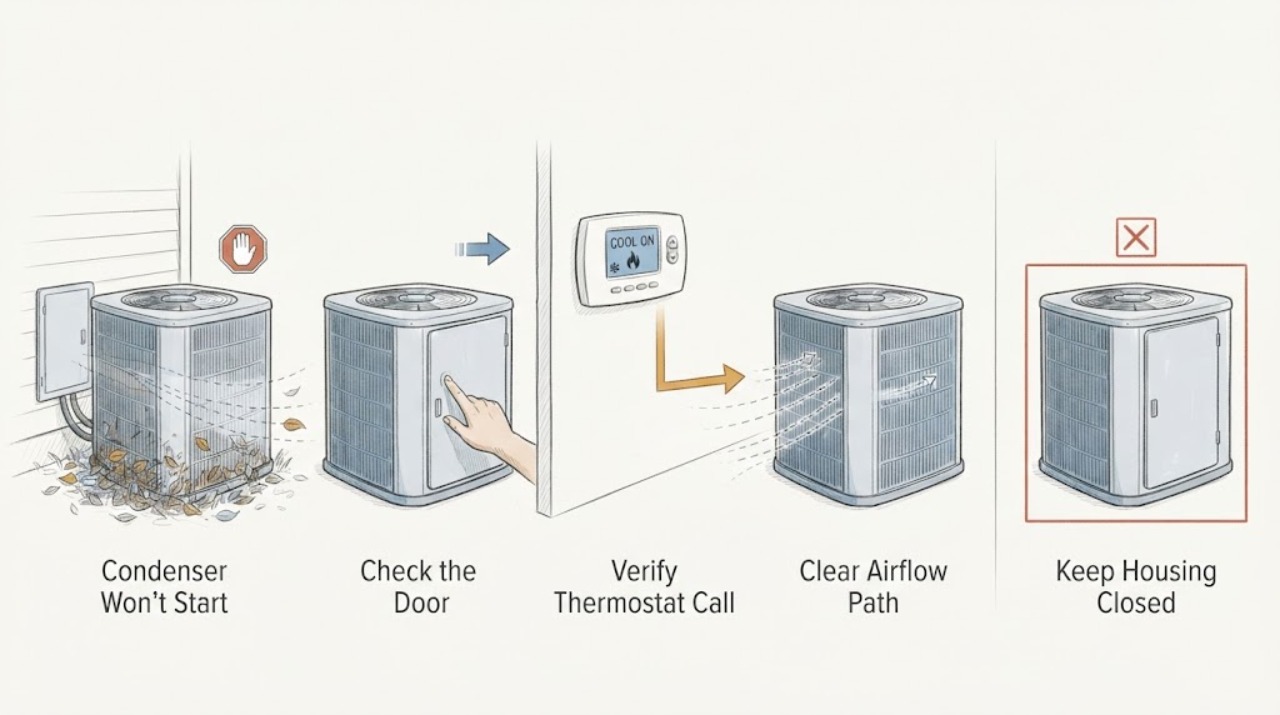
Work through in order
Diagnostic checks
Use only checks that match the exact appliance or system and its official guide.
-
Check 1
From indoors and from a safe distance outdoors, request cooling at the thermostat and note whether the thermostat display is on, whether air is moving at a supply register, whether the outdoor condenser fan is turning, and whether the condenser is silent, humming, or making an unusual sound. Do not open the cabinet or place a hand near the fan.
Expected result: The thermostat is blank; the indoor blower runs while the condenser is silent; the condenser hums but the fan does not turn; the fan runs but the compressor seems absent; or neither unit runs.
Next step: Continue only with the matching thermostat, filter, and visible-obstruction checks below. Treat humming, burning odor, smoke, sparking, or a damaged cabinet as a stop condition and arrange HVAC service.
Stop if: Stop immediately for smoke, burning odor, sparks, exposed or chewed wiring, a loose panel, water at electrical equipment, an unusually hot cabinet, or any need to reach through the grille.
Why this matters
Why: The symptom split narrows the next safe check. A blank thermostat suggests control power or batteries. An indoor blower with a silent condenser points toward the outdoor power path, cooling signal, safety control, or internal fault. Humming or abnormal noise can indicate a motor or capacitor problem and is not a user-repair condition.
-
Check 2
Check the thermostat without removing its base: select Cooling, set the target below the current room temperature, confirm the display is active, and replace batteries only if the thermostat manufacturer specifies user-replaceable batteries. Wait through the thermostat's normal short delay before judging the condenser.
Expected result: The thermostat was Off, set to another mode, above room temperature, blank from depleted batteries, or already making a cooling call with no outdoor response.
Next step: After correcting a setting or battery, observe one normal cooling call. If the condenser still does not start, continue with a filter and exterior visual check; do not remove thermostat wiring or jumper terminals.
Stop if: Stop if the thermostat base is loose, wiring is visible or damaged, the display behaves unpredictably, or the unit starts and stops abnormally; arrange qualified service.
Why this matters
Why: A wrong mode, target, schedule, or blank battery-powered display can prevent a cooling call. If the display is active and correctly calling for cooling but the condenser remains silent, the fault is less likely to be a simple setting and needs the outdoor/power decision path.
-
Check 3
Turn the thermostat to Off, then inspect the air filter only at its normal user access point. If it is visibly loaded with dust or airflow has been weak, replace it with the type and size specified for the system. Look for ice on accessible refrigerant tubing or around the indoor unit, but do not scrape or melt ice with heat.
Expected result: The filter is clogged; airflow is weak; ice is present; or the filter and airflow look normal.
Next step: If ice is present, leave cooling off and arrange HVAC service after allowing the system to remain off as directed by the technician. If the filter was replaced and no ice is visible, proceed to a safe exterior obstruction check.
Stop if: Do not operate the system with visible ice, open the air handler, add refrigerant, or use a tool or heat source to force thawing.
Why this matters
Why: A restricted filter can reduce airflow and contribute to freezing or a protective shutdown, but a clean filter does not rule out a condenser electrical or refrigerant fault. Ice suggests an airflow or refrigerant problem rather than a reason to keep calling for cooling.
-
Check 4
With the thermostat Off, look from outside around the condenser for leaves, grass, sticks, blocked air openings, or a visibly damaged fan blade. Clear only loose debris that is plainly outside the cabinet and reachable without tools; never remove the grille, reach inside, bend coil fins, or wash the unit while power status is uncertain.
Expected result: Loose debris is blocking the exterior, a fan blade appears damaged, the coil is heavily fouled, or the cabinet looks clear and intact.
Next step: After loose debris is removed and the cabinet is intact, make one normal cooling call. If the fan remains stopped, the unit hums, or the problem returns, leave it off and call HVAC service.
Stop if: Do not touch the fan, coil, wires, grille, or cabinet interior; stop for a damaged blade, oil residue, refrigerant odor, exposed wiring, or any obstruction that requires tools or panel removal.
Why this matters
Why: Obstructions can restrict heat rejection or physically interfere with the fan, but a damaged blade or heavily fouled coil can also involve balance, motor, or electrical damage. A clear cabinet with no startup still points toward the control, power, motor, capacitor, compressor, or safety circuit.
-
Check 5
If you are comfortable doing so, look at the labeled HVAC breaker from outside the panel and the exterior disconnect enclosure without opening or touching its conductors. A breaker visibly in a tripped or middle position may be returned to ON once using the panel's normal handle; do not remove fuses or open the disconnect box.
Expected result: The breaker appears normal; the breaker is tripped; the breaker trips again; the disconnect enclosure is open or damaged; or the unit remains silent after one safe reset.
Next step: If a single reset restores normal operation, monitor one cooling cycle and stop if the symptom returns. If the breaker trips again, remains off, or the condenser stays silent, leave the system off and arrange qualified HVAC service.
Stop if: Do not reset repeatedly, replace a fuse, open the disconnect, touch wiring, test voltage, or continue after a trip, smell, spark, heat, or visible damage.
Why this matters
Why: A power interruption can prevent the condenser from starting, but a repeat trip indicates an overload, short, compressor, capacitor, or another electrical fault. An open or damaged disconnect is itself a service condition; the condenser is not safe to investigate by touch.
-
Check 6
After the thermostat, filter, exterior visual check, and at most one safe power reset, decide whether the condenser starts and completes a normal cooling cycle without abnormal sound, odor, ice, or repeated trips. Record the thermostat state, indoor/outdoor fan behavior, breaker result, filter condition, visible obstruction, and any recent storm or outage for the technician.
Expected result: The condenser starts normally and cooling returns; or it remains silent, only hums, trips power, runs without cooling, stops again, or shows ice, odor, water, or damage.
Next step: If the unit completes a normal cycle, monitor it and arrange service if the no-start symptom returns. Keep the recorded observations in case the technician needs the sequence.
Stop if: Leave the system off for smoke, burning odor, sparks, repeated breaker trips, exposed wiring, ice, refrigerant leak signs, water near electrical equipment, or a damaged fan or cabinet.
Why this matters
Why: A normal cycle after a simple setting or obstruction correction supports monitoring, but it does not prove a capacitor, contactor, motor, compressor, refrigerant charge, or safety circuit is healthy. Persistent symptoms require measurements and diagnosis beyond a homeowner visual check.
Use your observations
Decision map
Find the observation that best matches what you see, then follow the next safe action.
-
PATH 01Next step
What you see
The thermostat is blank, Off, not in Cooling, or set above the room temperature.
Do this next
Restore the thermostat setting or its user-replaceable batteries as specified by its manual, wait through the normal delay, and observe one cooling call. If the display remains blank or the call does not reach the condenser, arrange service.
-
PATH 02Next step
What you see
The indoor blower runs during a cooling call, but the outdoor condenser is silent.
Do this next
Check only the visible breaker/disconnect state and thermostat settings. If power is normal, the unit remains silent, or a breaker trips, leave it off and have a technician diagnose the contactor, control, motor, capacitor, compressor, and safety circuit.
-
PATH 03Next step
What you see
The condenser hums, the fan does not turn, or the fan turns slowly or makes an unusual sound.
Do this next
Turn the system off and call HVAC service. Do not push the fan, remove the grille, or attempt capacitor or motor work; the run capacitor can retain an electrical charge.
-
PATH 04Next step
What you see
Ice is visible or indoor airflow is weak.
Do this next
Leave cooling off, inspect or replace the accessible filter if appropriate, and arrange professional diagnosis for airflow, drain, or refrigerant causes. Do not add refrigerant or force the ice off.
-
PATH 05Next step
What you see
The HVAC breaker trips again after one normal reset, or the disconnect is open or damaged.
Do this next
Do not reset again or open the disconnect. Leave the system off and arrange qualified HVAC/electrical service to identify the fault safely.
-
PATH 06Next step
What you see
The condenser remains off after accessible checks, or there are signs of refrigerant, compressor, capacitor, contactor, motor, wiring, or control trouble.
Do this next
Stop user troubleshooting and arrange qualified HVAC service. Provide the equipment model, symptom split, breaker result, visible ice or leak signs, sounds, and recent outage or storm information.
Helpful context
Understand the symptom
What 'won't start' tells you
A condenser is the outdoor part of a split air-conditioning system. If the indoor blower runs but the outdoor cabinet is silent, the cooling call may not be reaching the outdoor unit, its power may be interrupted, or an internal control, motor, capacitor, or safety condition may be preventing startup. If neither indoor nor outdoor unit runs, start with the thermostat and system power symptoms rather than opening the condenser. A humming sound without fan movement is not a cue to push the fan or replace a capacitor; it is a reason to stop and call a professional.
Keep the homeowner checks outside the cabinet
Use the thermostat, filter access, and a visual check from outside the unit. Do not remove the service panel or disconnect cover, pull wires, reach through the grille, measure live voltage, or handle the run capacitor. Carrier and Trane describe breaker, thermostat, filter, and visible outdoor-unit checks as preliminary observations; electrical, refrigerant, motor, and control faults belong with a qualified HVAC technician.
A reset is not a repair
One normal thermostat restart or one cautious breaker reset may distinguish a transient control state from a recurring fault, but repeated cycling can hide an electrical problem. If a breaker trips again, the outdoor unit remains silent, or the system shows ice, odor, water, or abnormal noise, leave it off. Refrigerant circuits and internal electrical components require professional handling; EPA advises owners to use technicians certified for the refrigerant work involved.
Only after diagnosis
Potential parts
- condenser run capacitor
Consider this component only after a qualified technician confirms a capacitor fault from the no-start or humming symptom; the same symptom can come from a motor, contactor, compressor, wiring, or control problem.
Confirm the exact outdoor-unit model and the manufacturer's service specification with the technician before ordering; do not use a generic rating or install it yourself.
When checks do not resolve it
Need a professional?
Arrange qualified HVAC service when the condenser remains off after the thermostat, filter, exterior, and one safe power-state check; immediately stop for repeated breaker trips, smoke, burning odor, sparks, exposed wiring, ice, refrigerant leak signs, water near electrical equipment, a damaged fan, or abnormal humming.
Safety scope: Homeowner checks stop at thermostat controls, normal filter access, a visual exterior obstruction check, and—only when safe and comfortable—one normal breaker-handle reset. Do not open the condenser or disconnect, touch wiring, test voltage, handle a capacitor, remove a fan grille, add or release refrigerant, bypass drain/pressure/door safety controls, or work on the compressor or motor.
Have this ready
- Provide the equipment model from its normal label location without removing panels, whether the indoor blower runs, what the outdoor fan does, the thermostat setting, filter and ice observations, breaker/disconnect result, sounds or odors, and any recent storm, outage, or maintenance.
Common questions
FAQ
Why does the indoor fan run while the condenser stays off?
That symptom can reflect an outdoor power interruption, thermostat signal or safety control, or an internal capacitor, contactor, motor, compressor, or control fault. Check only the thermostat and visible power-state symptoms; persistent silence needs HVAC diagnosis.
Can a dirty filter stop a condenser from starting?
A clogged filter restricts airflow and can contribute to a frozen coil or protective shutdown, but it does not prove the outdoor condenser itself is faulty. Replace a filter only at its normal user access point and call service if ice or no-start persists.
What if the AC breaker trips again?
Do not keep resetting it. A repeat trip can indicate an overload or electrical fault. Leave the system off and arrange qualified HVAC or electrical service; do not open the disconnect or touch wiring.
Is a humming condenser a reason to replace the capacitor?
No. Humming with a stopped fan can be consistent with a capacitor problem, but the motor, contactor, compressor, wiring, or controls can produce similar symptoms. Stop the system and have a technician test it; do not touch or replace the capacitor.
Can I add refrigerant when the condenser will not start?
Do not add or release refrigerant yourself. A no-start symptom does not establish a low charge, and EPA advises using technicians certified to handle the refrigerant involved. Have the system diagnosed for leaks and other causes.
Read the exact guide
Official sources
- Outdoor AC unit not turning onLennox · General Lennox residential outdoor AC guidance; exact model and local electrical rules control.
- Purchasing and Repairing Home Air-Conditioners or Heat PumpsU.S. Environmental Protection Agency · U.S. homeowner and stationary residential air-conditioning refrigerant handling guidance.
- AC Unit Not Turning On? Troubleshooting Steps & SolutionsCarrier · General Carrier residential split-system air-conditioning guidance; equipment-specific manual controls.
- Air Conditioner Troubleshooting: 5 Common IssuesTrane · General Trane residential air-conditioning troubleshooting; exact system instructions control.
- AC Fan Not Working? Reasons Why It Stopped SpinningTrane · General Trane residential split-system fan guidance; exact model service instructions control.
Community feedback
Share a repair observation
Share a plain-text repair observation. Accepted observations are published automatically; this page may take a moment to update.