
On this page
Start here
Quick answer
An ecobee thermostat can appear to cause short cycling when its temperature reading, sensor participation, schedule, hold, equipment configuration, or call for heating or cooling does not match the HVAC system. First confirm that the equipment is actually starting and stopping rapidly before satisfying the setpoint, and check the ecobee mode, active climate, sensor reading, schedule, and any compressor-protection delay. Then inspect the user-accessible filter and visible airflow. Short cycling can also come from an oversized or malfunctioning HVAC system, restricted airflow, low refrigerant, a safety limit, wiring, or a control fault, so do not assume the thermostat is the failed part. Stop for smoke, burning odor, unsafe wiring, repeated breaker trips, refrigerant or electrical work, or rapid cycling that continues after the basic checks, and arrange qualified HVAC service.
Before you begin
Safety first
- This article covers observing cycle behavior, reviewing user-level ecobee modes and climates, comparing sensor readings, cleaning an accessible filter, checking visible airflow, and one supervised reassessment. A qualified technician must handle installer settings, wiring, live measurements, safety controls, coils, blowers, refrigerant, compressor, sizing, and internal HVAC diagnosis.
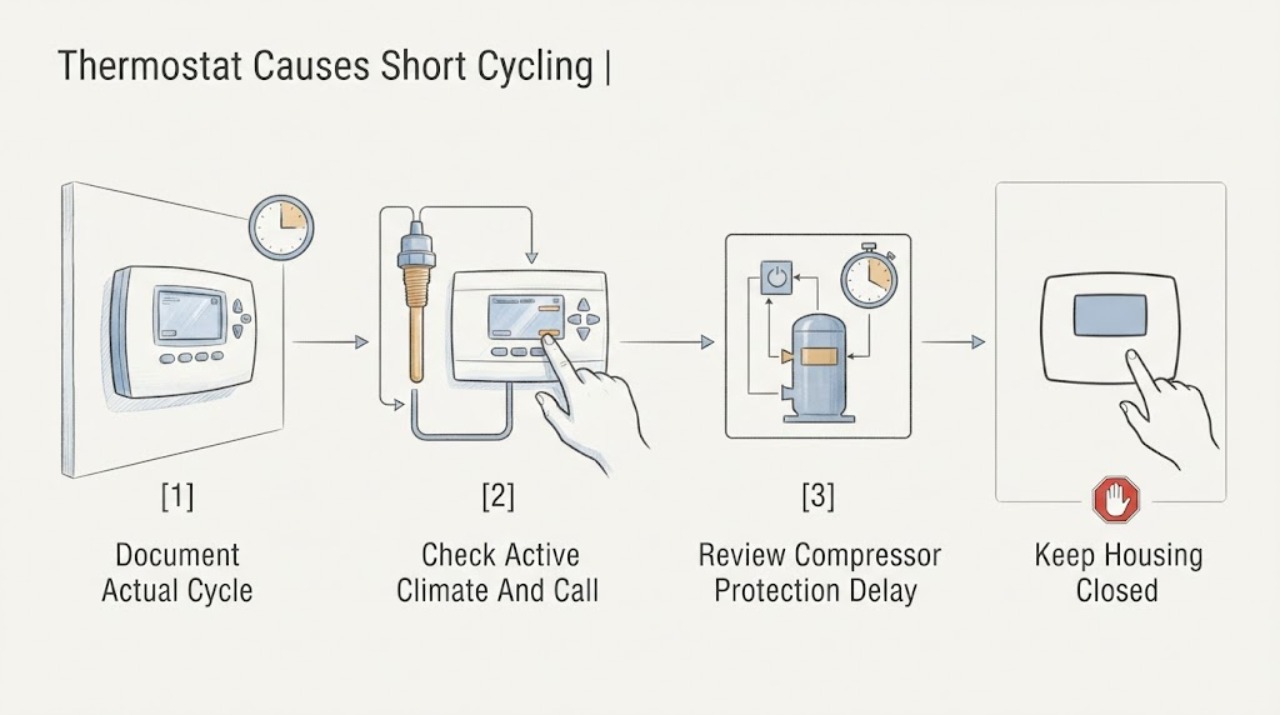
Work through in order
Diagnostic checks
Use only checks that match the exact appliance or system and its official guide.
-
Check 1
Watch one heating or cooling call from a safe position and record when the ecobee shows an active call, when the indoor blower and outdoor equipment start, how soon they stop, and whether the room has reached the target. Do not repeatedly change the setpoint to force a cycle.
Expected result: The HVAC equipment stops before reaching the target and restarts soon after; only the indoor fan continues; the ecobee call ends because the target is reached; or the ecobee shows a call while the equipment does not respond.
Next step: Record the timing and continue with the ecobee climate and sensor checks. If the compressor or furnace repeatedly starts and stops, leave the system at a stable setting and arrange service if the pattern persists; do not use repeated manual holds as a test.
Stop if: Stop for smoke, burning odor, arcing, a gas odor, overheating, water near electrical equipment, or a repeated breaker trip.
Why this matters
Why: Rapid equipment starts and stops before satisfaction support true short cycling. A fan continuing alone may be normal fan dissipation rather than compressor cycling. A call that ends at the target points toward normal control, while an active call with no equipment response raises a wiring, safety, or HVAC control question.
-
Check 2
On the ecobee display or app, review the current HVAC mode, active comfort setting, target temperature, schedule event, hold, and any eco+ or occupancy adjustment. Check whether a SmartSensor is included in the active comfort setting and whether its room differs materially from the thermostat location.
Expected result: A temporary hold, schedule transition, occupancy change, sensor selection, or mode change coincides with the starts and stops; the active reading is stable and expected; or settings change without a user command.
Next step: Return only to the intended user schedule or climate setting and observe one normal call. Do not disable safety protections or change installer equipment configuration; escalate if the call changes unexpectedly or rapid cycling continues.
Stop if: Do not remove thermostat wiring, open the wall plate, or make installer-level equipment changes without the exact ecobee and HVAC documentation or a qualified technician.
Why this matters
Why: The ecobee may be responding correctly to the active climate or to a sensor in a different room, making a thermostat failure less likely. Unexpected changes can indicate an app, schedule, sensor, or configuration issue. Stable settings with rapid equipment cycling shift attention to airflow, equipment sizing, or HVAC fault.
-
Check 3
Review the ecobee equipment settings or service record for compressor protection and minimum-off behavior, using the ecobee documentation and the installed system's manual. Compare a delay after shutdown with a true restart, and do not shorten or bypass a protective delay.
Expected result: The equipment waits before restarting and then runs a normal cycle; it restarts rapidly despite protection; the setting is unavailable or unclear; or the thermostat is controlling equipment that does not use a compressor.
Next step: Leave the documented protective behavior unchanged and log the delay and cycle pattern. Ask a qualified HVAC technician to verify the equipment configuration and control wiring if rapid restarts continue or the thermostat setting does not match the installed system.
Stop if: Do not alter installer settings, jumper terminals, bypass compressor protection, or test control voltage.
Why this matters
Why: A deliberate minimum-off delay is a protective control and can explain why the compressor does not restart immediately. Rapid restarts despite the protection setting, an unclear configuration, or a non-compressor system requires equipment-specific interpretation rather than an ecobee replacement assumption.
-
Check 4
Turn the HVAC equipment off and inspect the user-accessible air filter, return grille, supply vents, and visible outdoor unit clearance. Clean or replace the filter only as the equipment manual directs, keep vents open, and remove only loose debris that is plainly safe to reach.
Expected result: The filter is dirty, return or supply airflow is blocked, the outdoor unit is obstructed, airflow is weak, or all visible paths are clear.
Next step: Restore only the visible filter and airflow conditions, then allow one normal call. If the equipment still cycles rapidly, runs briefly, ices, overheats, or fails to reach the target, stop and arrange HVAC diagnosis.
Stop if: Do not remove blower or coil panels, touch moving parts, clean a live unit, or operate without the required filter or guards.
Why this matters
Why: Restricted airflow can cause a furnace safety shutdown or make cooling performance abnormal, producing starts and stops that mimic a thermostat problem. A clear visible path makes an airflow explanation less likely but does not rule out a dirty internal coil, blower fault, low refrigerant, or other equipment issue.
-
Check 5
Compare the ecobee's displayed temperature with a separate thermometer placed nearby, and note whether the thermostat is near sunlight, a draft, a supply vent, kitchen heat, or another local influence. Record room size, recent installation or replacement, hot or cold spots, and whether the equipment reaches the target unusually quickly.
Expected result: The ecobee reading differs substantially from the nearby room, the thermostat location is influenced by a draft or heat source, the home has uneven temperatures, or the equipment reaches the target very quickly and shuts off.
Next step: Move only an independent thermometer for comparison; do not relocate the wired thermostat or alter calibration without documentation. Give the location, readings, room pattern, and equipment history to a technician for sizing, airflow, sensor, and control evaluation.
Stop if: Do not open the thermostat, change calibration repeatedly, disconnect sensors, or alter wiring to make the reading match a preferred value.
Why this matters
Why: A local temperature bias or sensor placement can end a call too soon, while a system that satisfies a small zone rapidly may be oversized or poorly matched. Hot or cold spots can also reflect airflow or distribution problems. None of these observations alone proves that the ecobee thermostat is defective.
-
Check 6
After the active climate is correct and any safe filter or visible airflow issue is corrected, observe one complete call without repeated overrides. Record whether the equipment reaches the target, the number and approximate length of starts, any delay message, and any sound, odor, frost, or safety indication.
Expected result: The system completes a normal call and remains stable; the equipment still starts and stops rapidly; the ecobee ends or creates calls unexpectedly; or an abnormal sound, odor, frost, overheating, water, or error appears.
Next step: Use the system only when it operates normally and safely. Otherwise leave the equipment in a stable mode or off as conditions require and arrange qualified HVAC service with the recorded ecobee settings and cycle history.
Stop if: Stop immediately for smoke, burning odor, gas odor, arcing, exposed wiring, repeated breaker trips, a frozen coil, water near electrical parts, or unsafe heat.
Why this matters
Why: A stable complete call supports a schedule, sensor, setpoint, or airflow cause. Persistent rapid cycling with correct settings points to HVAC sizing, airflow, refrigerant, compressor, safety, wiring, or control diagnosis. Unexpected calls point to thermostat, sensor, configuration, or control communication, but not to a specific replaceable part.
Use your observations
Decision map
Find the observation that best matches what you see, then follow the next safe action.
-
PATH 01Next step
What you see
The compressor waits before restarting, or the indoor fan continues after the call while the equipment does not repeatedly restart and the home reaches the target.
Do this next
Leave the protective setting unchanged and monitor a complete call. Arrange service if starts become rapid, the target is not reached, or the delay is inconsistent with the installed equipment manual.
Why this path and its safety boundary
Why it matters: ecobee compressor protection or fan dissipation is more likely than short cycling; the timing is serving an equipment-protection or temperature-sensing function.
-
PATH 02Next step
What you see
Rapid-looking changes coincide with a schedule, hold, occupancy feature, or SmartSensor reading that differs from the thermostat location.
Do this next
Confirm the intended climate, schedule, sensor participation, and mode; observe one normal call without repeated overrides. Escalate if settings change without command or the equipment still short cycles with stable settings.
Why this path and its safety boundary
Why it matters: The ecobee may be changing the call in response to its active climate and selected sensor rather than malfunctioning.
-
PATH 03Next step
What you see
The filter or visible airflow path is restricted, the indoor fan is weak, the outdoor unit is obstructed, or the home has unusual heat gain or uneven distribution.
Do this next
Correct only the user-accessible filter, vents, or loose visible debris and reassess once. Call a qualified technician for weak airflow, recurring overheating or icing, persistent short cycling, or internal coil and blower work.
Why this path and its safety boundary
Why it matters: Airflow, heat load, or distribution is more likely than an ecobee-only fault, although the thermostat call should still be checked.
-
PATH 04Next step
What you see
The ecobee settings and sensor reading are stable, airflow is reasonable, but the equipment satisfies unusually fast, never reaches the target, ices, or repeatedly stops and restarts.
Do this next
Stop repeated testing and arrange qualified HVAC diagnosis. Provide the cycle log, target and room readings, filter and airflow findings, equipment age or installation history, and any frost or performance change.
Why this path and its safety boundary
Why it matters: Oversizing, refrigerant, compressor, safety, coil, blower, or another HVAC equipment fault is more likely; a thermostat replacement cannot be selected from the symptom alone.
-
PATH 05Safety boundary
What you see
The ecobee shows an active call but equipment does not respond, calls appear without a user change, the display is unstable, or a breaker, odor, wiring, or safety symptom accompanies cycling.
Do this next
Leave the system off when unsafe and arrange qualified HVAC or electrical service. Do not open the wall plate, test live terminals, bypass a safety, or continue cycling power.
Why this path and its safety boundary
Why it matters: Thermostat configuration, sensor, wiring, HVAC control, safety switch, or electrical fault is possible, and the equipment should not be repeatedly restarted.
Safety stop: Stop immediately for smoke, burning or gas odor, arcing, exposed wiring, overheating, water near electrical parts, or repeated breaker trips.
Helpful context
Understand the symptom
Confirm that it is really short cycling
Short cycling means the heating or cooling equipment starts and stops repeatedly before the home reaches the active target. A normal compressor-protection delay, a fan that continues after a cycle, or a brief change caused by a schedule is not the same as the equipment repeatedly restarting. Record the thermostat's displayed call, the equipment sound or airflow, the room temperature, and whether the target was reached before each stop.
The ecobee may be responding to a different sensor or climate
ecobee thermostats can use remote SmartSensors and schedules to manage comfort in selected rooms, and eco+ features can adjust temperature settings. A sensor in a warmer or cooler location, an active hold, a schedule transition, or a comfort feature can change when the thermostat calls. That does not prove the thermostat is defective; compare the active reading and target with the room and equipment behavior before changing installer settings.
Protect the equipment while finding the cause
ecobee exposes a compressor minimum-off setting to prevent rapid restarts, but that setting is not a repair for an HVAC fault. A dirty filter, poor airflow, incorrect equipment setup, low refrigerant, an oversized system, or a safety control can all create rapid cycles. Homeowners can review settings and clean an accessible filter; wiring, refrigerant, live measurements, control changes, and equipment diagnosis belong to a qualified HVAC professional.
Safety boundary
Stop conditions
- Stop and arrange prompt service for smoke, burning or gas odor, arcing, exposed or overheating wiring, repeated breaker trips, water near electrical equipment, unsafe heat, or a frozen coil.
- Do not remove the thermostat wall plate, open HVAC panels, handle wiring, test live terminals, bypass a safety, or change installer equipment configuration as a homeowner.
- Do not disable or shorten compressor protection, repeatedly reset the breaker, or force rapid calls with repeated holds or extreme setpoints.
- Do not add refrigerant, open the sealed system, clean internal coils or blowers, or select a thermostat, sensor, compressor, or control board from cycling symptoms alone.
- After the active climate, sensor, filter, and visible airflow checks, stop testing if the equipment still short cycles or does not reach the target; arrange qualified HVAC diagnosis and provide the cycle log.
Only after diagnosis
Potential parts
- ecobee thermostat
Consider this category only if professional testing confirms the thermostat or its temperature sensing is faulty after HVAC equipment, wiring, power, configuration, and sensor causes are checked.
Confirm the exact ecobee model, HVAC equipment, wiring, accessory support, and compatibility requirements before ordering or installing. - ecobee SmartSensor
Consider this category only if a documented sensor or communication fault is confirmed and the selected room sensor is causing an incorrect temperature decision.
Confirm the thermostat generation, sensor model, pairing requirements, placement, and active comfort-setting behavior before ordering. - HVAC air filter
Consider this category only if the existing filter is damaged, missing, or due for replacement under the HVAC equipment manual; a filter is not a remedy for every short-cycle cause.
Confirm the equipment's required filter dimensions, type, airflow rating, and replacement instructions before ordering. - HVAC control or safety component
Consider this category only after a qualified technician confirms a control or safety component is causing the observed call and equipment cycling pattern.
Confirm the exact HVAC model, control revision, electrical ratings, wiring, and professional installation procedure before ordering.
When checks do not resolve it
Need a professional?
Arrange qualified HVAC service when rapid starts and stops continue with a correct ecobee climate, stable sensor reading, clean accessible filter, and clear visible airflow; when the equipment never reaches the target, ices, overheats, makes abnormal sounds, or an active ecobee call does not operate the equipment; or when sizing, refrigerant, coil, blower, wiring, safety, or control diagnosis is needed. Seek prompt help for smoke, burning or gas odor, arcing, exposed or overheating wiring, repeated breaker trips, water near electrical equipment, or unsafe heat.
Safety scope: This article covers observing cycle behavior, reviewing user-level ecobee modes and climates, comparing sensor readings, cleaning an accessible filter, checking visible airflow, and one supervised reassessment. A qualified technician must handle installer settings, wiring, live measurements, safety controls, coils, blowers, refrigerant, compressor, sizing, and internal HVAC diagnosis.
Common questions
FAQ
Can an ecobee thermostat cause short cycling?
It can contribute if its temperature reading, selected SmartSensor, schedule, hold, mode, or equipment configuration creates an incorrect call, but rapid cycling is not proof that the thermostat is defective. Airflow, sizing, refrigerant, safety, wiring, and HVAC equipment faults can produce the same pattern.
What does ecobee compressor protection do?
ecobee documents a minimum compressor-off setting intended to prevent short cycling. A protective delay after a stop is different from the compressor repeatedly starting and stopping before the home reaches the target. Leave that protection unchanged and ask a technician to investigate rapid restarts.
Can an ecobee SmartSensor make the HVAC cycle too often?
A selected SmartSensor can change which room temperature influences comfort, so a sensor in a warmer or cooler location may change when the thermostat calls. Check the active comfort setting and sensor participation first. Do not conclude that the sensor or thermostat needs replacement until the HVAC system and configuration are evaluated.
Is a fan running after the compressor stops short cycling?
Not necessarily. A fan may continue to move air after a heating or cooling call while the compressor or other equipment remains off. Confirm whether the compressor or furnace itself is restarting rapidly and whether the target was reached before each stop.
Can a dirty filter cause short cycling even when ecobee is working?
Yes. Restricted airflow can make HVAC equipment overheat or operate abnormally, which can look like a thermostat problem. Clean or replace only the user-accessible filter as the equipment manual directs. If rapid cycling continues, or ice, weak airflow, or overheating appears, arrange service.
When should I stop troubleshooting ecobee short cycling?
Stop for smoke, burning or gas odor, arcing, overheating or damaged wiring, repeated breaker trips, water near electrical equipment, unsafe heat, or a frozen coil. Also stop after the active climate, sensor, filter, and visible airflow checks fail to restore normal cycles; qualified HVAC diagnosis is needed.
Read the exact guide
Official sources
- Wi-Fi-enabled smart thermostatsecobee · Official ecobee smart thermostat product guidance; model-specific settings and the HVAC equipment manual control the final behavior.
- Settings Objectecobee · Official ecobee developer documentation for thermostat settings; the installed thermostat interface and HVAC equipment manual control available user options.
- Smart Thermostat Premiumecobee · Official ecobee product information for Smart Thermostat Premium; features and menus vary by ecobee model and configuration.
- Clean Heating and CoolingENERGY STAR · Government-backed ENERGY STAR heating and cooling guidance; equipment manuals and qualified contractors determine system-specific diagnosis.
- Thermostat compatibility checkerecobee · Official ecobee compatibility tool; exact equipment wiring and installation must be verified for the specific home and thermostat.
Community feedback
Share a repair observation
Share a plain-text repair observation. Accepted observations are published automatically; this page may take a moment to update.