
On this page
Start here
Quick answer
An Emerson thermostat can appear to cause short cycling when its cycle-rate setting, system configuration, schedule, sensor location, or control signal starts and stops the HVAC equipment too often, but the thermostat is not the only possible cause. First confirm that the system is actually starting and stopping rapidly rather than running a normal fan or protection delay, then note whether the thermostat still shows a heat or cool call when the equipment stops. Check the Emerson/Sensi cycle-rate and system-type settings in the model's app or manual, keep the thermostat away from sun, drafts, supply registers, and heat sources, and inspect the user-accessible air filter and vents. If the system continues to cycle with a correct configuration and clean airflow, or if it runs with the thermostat in Off, arrange HVAC service; do not open the thermostat, change wiring, bypass a safety, or adjust refrigerant or furnace controls.
Before you begin
Safety first
- This article covers thermostat controls, external observation, documented user settings, and user-accessible filter or grille checks only. Thermostat wiring, HVAC control boards, high voltage, gas, refrigerant, coils, compressors, furnace limits, and equipment sizing belong to a qualified HVAC professional.
Work through in order
Diagnostic checks
Use only checks that match the exact appliance or system and its official guide.
-
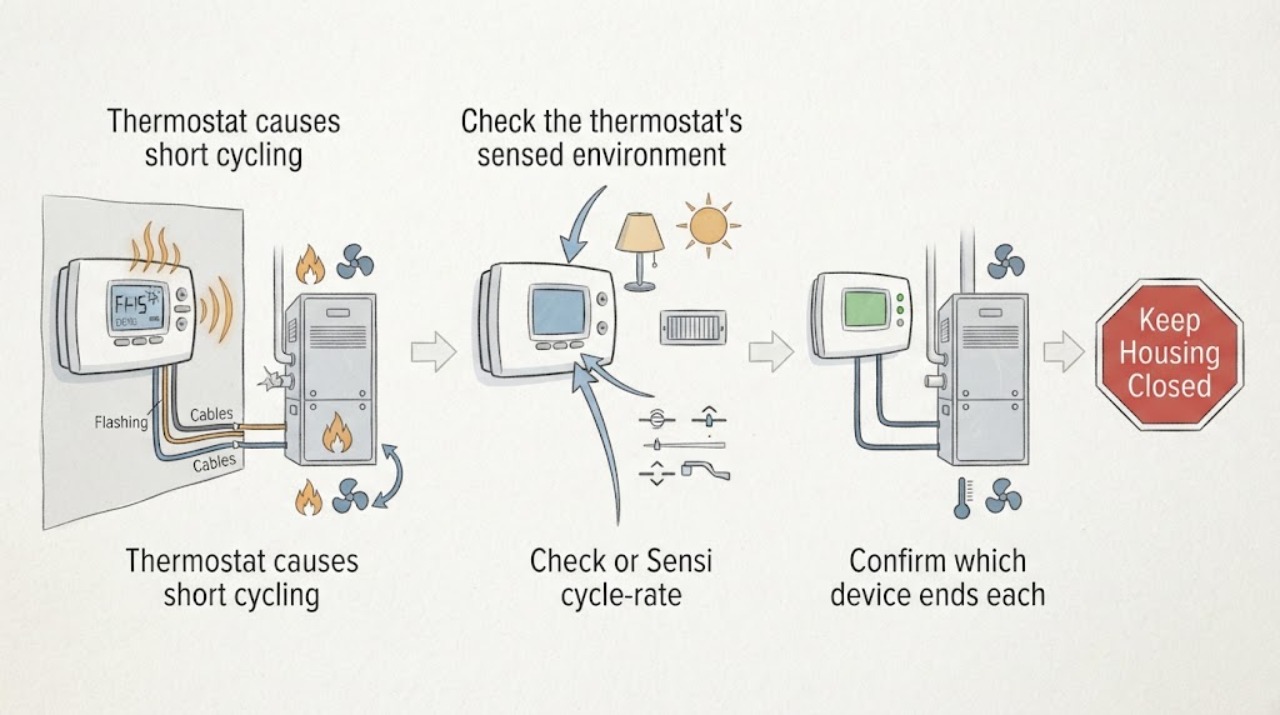
Confirm which device ends each cycle
From a safe position, observe one heating or cooling demand and compare the thermostat's heat/cool call indicator with the furnace, air handler, or outdoor unit sound and airflow. Do not remove panels or reach into equipment.
Expected result: The thermostat call disappears when the equipment stops, the call remains while the equipment stops, the fan runs without a heat/cool call, or the system restarts after a built-in delay.
Next step: Record the mode, call indicator, equipment response, room comfort, and restart behavior before changing any setting; use the corresponding branch below rather than repeatedly changing the set point.
Stop if: Stop for a burning smell, smoke, exposed wiring, gas odor, unusual electrical sound, or equipment that keeps operating when the thermostat is in Off.
Why this matters
Why: A call that ends early makes thermostat sensing, cycle-rate, schedule, or configuration more plausible. A call that remains while equipment stops points more toward an HVAC safety, airflow, power, or equipment issue. Fan-only operation or a delay can be normal and is not proof of a thermostat fault.
-
Check Emerson or Sensi cycle-rate and mode settings
In the Emerson/Sensi thermostat or its official app, review the active system mode, schedule or hold, and Cycle Rate setting without changing wiring or installer-only equipment settings. Use the exact model manual to identify which setting applies to heating and which applies to cooling.
Expected result: The cycle rate is set for faster or tighter control, the mode or schedule is changing unexpectedly, or the settings match the documented system type and intended comfort behavior.
Next step: If the setting was intentionally changed or is clearly inconsistent with the exact model guidance, make only the documented user-level adjustment and observe the system over normal operation. If cycling persists, stop adjusting and arrange HVAC service.
Stop if: Do not change terminal assignments, installer configuration, heat-pump reversing settings, cycle protection, or other advanced settings unless the exact manual and a qualified installer direct it.
Why this matters
Why: Sensi says a faster cycle rate produces shorter on/off cycles and a slower rate produces longer cycles with a wider temperature swing. An unexpected schedule or a mode/configuration mismatch can also create apparent rapid calls; matching settings make an HVAC-side cause more likely.
-
Check the thermostat's sensed environment
From normal access, note whether the thermostat is in direct sun, beside a supply register, near an oven or other heat source, on an exterior draft, behind a door, or covered by dust or an object. Gently clean only the exterior with the method allowed by the model instructions; do not remove the wall plate or disturb wires.
Expected result: The displayed temperature changes when sun, drafts, airflow, or a nearby heat source changes, or the thermostat is in a stable central location with a clean unobstructed exterior.
Next step: Remove only an external obstruction and document the location; do not relocate the thermostat as a test. Request professional assessment if the location is unsuitable or the displayed temperature remains implausible.
Stop if: Do not open the thermostat, pull wires, bridge terminals, drill a new mounting location, or work near exposed electrical conductors.
Why this matters
Why: A sensor exposed to a local hot or cold pocket can satisfy the thermostat early or call repeatedly even when other rooms disagree. A stable location with a persistent mismatch makes calibration, wiring, thermostat electronics, or the HVAC system more likely.
-
Rule out a basic airflow interruption
Inspect the user-accessible HVAC air filter and visible supply and return grilles. Replace a loaded filter only with the size and type specified by the equipment instructions, and clear furniture or coverings from grilles without opening the furnace, air handler, or coil cabinet.
Expected result: The filter is visibly loaded, multiple grilles are blocked or closed, airflow is weak, a cooling coil is visibly iced, or airflow is clear and strong.
Next step: After a user-approved filter change and grille clearance, observe one normal cycle. If cycling continues, if ice returns, or if airflow remains weak, stop the system as appropriate and arrange HVAC service; do not clean a coil, open a cabinet, or add refrigerant yourself.
Stop if: Do not bypass a filter, operate with an iced coil, remove equipment panels, touch a blower or electrical part, or troubleshoot refrigerant or furnace safety controls.
Why this matters
Why: Carrier identifies a clogged filter and restricted airflow as causes that can make equipment shut down early or mimic thermostat failure. Ice, weak airflow, or continued cycling after a clean filter points to an HVAC fault rather than a thermostat setting alone.
-
Use the thermostat's Off mode as a control check
With no immediate hazard, set the thermostat system mode to Off using the normal control, then observe whether the heating or cooling equipment stops. Restore the prior mode only if the system responds normally and the manual permits it.
Expected result: The equipment stops when the thermostat is Off, continues running, restarts immediately, or the display does not respond.
Next step: If the system does not stop, leave it Off when safe and arrange qualified HVAC service. If it stops, keep the recorded cycle observations and continue only with model-documented user settings and airflow checks.
Stop if: Do not pull the thermostat from its base, disconnect wires, repeatedly reset breakers, or attempt to force a relay or equipment control to open.
Why this matters
Why: A system that stops with Off is responding to the thermostat's mode command, so configuration, sensor, cycle-rate, or HVAC performance remains to be separated. Continued operation or an unresponsive control points to a stuck relay, wiring, control, or equipment issue and is not a user adjustment.
-
Document the pattern before service
For the next safe observation, record whether short cycling occurs in heat, cool, or both; whether it began after a thermostat change, schedule change, filter issue, or equipment work; and whether the thermostat call ends before the equipment stops.
Expected result: The issue is limited to one mode, follows a recent thermostat installation or setting change, occurs in all modes, or continues despite correct configuration and clear airflow.
Next step: Give the technician the model, mode, timing, call-indicator behavior, settings, location, filter result, and any fault message. Arrange qualified service rather than replacing the thermostat or changing wiring by guesswork.
Stop if: Stop all tests for smoke, burning odor, gas odor, exposed wiring, repeated breaker trips, frozen equipment, or abnormal equipment noise.
Why this matters
Why: A one-mode or post-installation pattern can focus diagnosis on configuration, staging, wiring, or mode-specific HVAC protection. A persistent all-mode pattern after basic checks makes equipment sizing, sensor/control failure, airflow, power, or another HVAC fault more likely than a simple cycle-rate preference.
Use your observations
Decision map
Find the observation that best matches what you see, then follow the next safe action.
-
PATH 01Next step
What you see
The thermostat call ends early and the cycle-rate, schedule, hold, or mode setting is different from the exact model's intended configuration.
Do this next
Apply only a documented user-level setting change, then observe normal operation. If calls remain unusually short or comfort is poor, request HVAC service rather than continuing to tune the setting.
Why this path and its safety boundary
Why it matters: The thermostat may be intentionally making shorter calls or changing set points; this is a settings path, not proof of a failed thermostat.
-
PATH 02Next step
What you see
The thermostat is exposed to direct sun, a draft, a register, a heat source, or local dust, and the displayed temperature changes with that local condition.
Do this next
Remove only external obstructions, document the location, and have the thermostat placement or sensing assessed professionally; do not relocate or rewire it as a DIY test.
Why this path and its safety boundary
Why it matters: The thermostat may be sensing a pocket that does not represent the occupied space, causing premature satisfaction or repeated calls.
-
PATH 03Next step
What you see
The thermostat continues to call while the furnace or air conditioner stops, and the filter is loaded, airflow is weak, vents are blocked, or an evaporator coil is icing.
Do this next
Correct only a user-accessible filter or grille issue specified by the equipment instructions. Stop and arrange service for icing, weak airflow, recurring shutdown, or any internal safety response.
Why this path and its safety boundary
Why it matters: The HVAC system may be shutting down on an airflow or equipment protection condition; the thermostat is reporting demand rather than causing the interruption.
-
PATH 04Next step
What you see
The problem began after thermostat installation or wiring work, is limited to a mode or stage, or the system does not stop when the thermostat is Off.
Do this next
Leave the system in the safest responsive mode or Off as appropriate and have a qualified HVAC professional verify configuration and control wiring; do not remove the thermostat or move wires.
Why this path and its safety boundary
Why it matters: A system-type configuration, staging, relay, wiring, or control issue is more likely than a user preference setting.
-
PATH 05Next step
What you see
Cycle-rate, mode, schedule, placement, filter, and grille checks are correct, but the system still starts and stops rapidly or only one HVAC mode short cycles.
Do this next
Arrange HVAC diagnosis and provide the complete observation record. Do not add refrigerant, bypass a limit, or replace the thermostat before the equipment and control signal are tested by a professional.
Why this path and its safety boundary
Why it matters: Equipment sizing, refrigerant, coil, furnace limit, compressor, control, or another HVAC-side fault remains possible; the thermostat alone is not established as the cause.
-
PATH 06Next step
What you see
There is smoke, a burning smell, gas odor, exposed or frayed wiring, repeated breaker trips, an iced or leaking unit, or heating/cooling continues with the thermostat Off.
Do this next
Stop using the affected system, leave the area for a gas or fire hazard when appropriate, and contact emergency, gas, or qualified HVAC service from a safe location.
Why this path and its safety boundary
Why it matters: This is a stop-use safety condition, not a cycle-rate adjustment. Continued operation can increase fire, electrical, gas, water, or equipment damage risk.
Helpful context
Understand the symptom
Confirm that it is really short cycling
Short cycling means the heating or cooling equipment starts and stops before completing a normal cycle, not merely that the fan runs after a call or that a thermostat briefly displays a protection delay. Watch the thermostat's call indicator and the equipment response together. If the thermostat continues to call while the furnace or air conditioner stops, the HVAC system or a safety limit may be interrupting the cycle; if the call disappears early, the thermostat setting, sensor, schedule, or control signal deserves closer attention.
Emerson thermostat settings are model and system dependent
Emerson's Sensi support describes Cycle Rate options and warns that the thermostat configuration must match the heating and cooling equipment. A cycle-rate choice that is suitable for one system type may be unsuitable for another. Do not copy a setting from a different thermostat or assume that a factory reset, temperature offset, or wiring change is a universal cure; use the exact model's app and manual, and leave installer-level configuration to a professional.
A thermostat symptom may be an HVAC safety response
A dirty filter, blocked return or supply path, frozen coil, refrigerant problem, oversized equipment, or a furnace limit response can make a healthy thermostat look guilty. Carrier and Trane both describe short cycling as a symptom with multiple possible causes. If airflow and basic thermostat checks do not change the behavior, stop treating it as a settings problem and have the HVAC system diagnosed.
Safety boundary
Stop conditions
- Stop immediately for smoke, a burning smell, gas odor, exposed or frayed wiring, repeated breaker trips, water leakage, an iced unit, or equipment that continues heating or cooling with the thermostat in Off.
- Do not remove the thermostat from its wall plate, pull or bridge wires, change terminal assignments, bypass a time delay or safety switch, or open an HVAC cabinet as an ordinary check.
- Do not add refrigerant, adjust gas or furnace controls, defeat a limit, touch high-voltage parts, or operate an iced system to see whether cycling improves.
- Do not use an unverified Cycle Rate, system-type, staging, reversing-valve, or installer setting from another model or equipment configuration.
- Stop repeated set-point changes when short cycling continues after a correct configuration and clear airflow; arrange qualified HVAC diagnosis.
Only after diagnosis
Potential parts
- Emerson or Sensi thermostat
Consider this category only if professional testing finds incorrect sensing, failed controls, or an incompatible thermostat after configuration, placement, wiring, and HVAC operation are checked.
Confirm the exact thermostat model, HVAC system type, stages, wiring requirements, and manufacturer compatibility guidance before ordering. - thermostat temperature sensor
Consider this category only when the exact model supports a replaceable sensor and qualified diagnosis confirms a sensing fault rather than a placement or airflow condition.
Confirm whether the sensor is serviceable for the exact model; do not substitute a generic sensor or disturb thermostat wiring. - HVAC air filter
Consider this category only if the user-accessible filter is loaded and the equipment manual specifies a compatible replacement filter.
Confirm the equipment's specified size, type, airflow rating, and installation direction; a filter change does not repair an internal HVAC fault. - HVAC control relay or control board
Consider this category only after a qualified technician confirms that the thermostat call, wiring, and HVAC control response implicate a relay or control board.
Confirm the exact equipment model and approved control part; electrical control replacement is professional work.
When checks do not resolve it
Need a professional?
Arrange qualified HVAC service when the system continues short cycling after the Emerson/Sensi cycle-rate, schedule, system-configuration, thermostat-location, filter, and grille checks; when the thermostat's call remains while equipment stops; when the system runs with thermostat Off; when a wiring or staging change preceded the problem; or when sizing, refrigerant, coil, furnace-limit, relay, or control faults are possible. Use emergency or gas assistance from a safe location for gas odor, smoke, fire, exposed wiring, or suspected carbon-monoxide danger.
Safety scope: This article covers thermostat controls, external observation, documented user settings, and user-accessible filter or grille checks only. Thermostat wiring, HVAC control boards, high voltage, gas, refrigerant, coils, compressors, furnace limits, and equipment sizing belong to a qualified HVAC professional.
Common questions
FAQ
Can an Emerson thermostat cause short cycling?
Yes, a cycle-rate setting, incorrect system configuration, sensor location, schedule, wiring, or control fault can shorten calls. But airflow restrictions, furnace safety limits, refrigerant or coil problems, equipment sizing, and other HVAC faults can look the same. Compare the thermostat call indicator with the equipment response before blaming the thermostat.
What should the Emerson or Sensi Cycle Rate be?
Use the exact model's official guidance and the HVAC system type rather than copying a setting. Sensi says faster cycle rates produce shorter on/off cycles and slower rates produce longer cycles with a wider temperature swing; the appropriate choice depends on the equipment and comfort goal.
Could thermostat placement make the HVAC system short cycle?
Yes. Direct sun, drafts, a supply register, an oven, or another heat source can make the thermostat sense a local pocket rather than the occupied space. Document the location and local conditions, but do not relocate or rewire the thermostat as a DIY test.
Can a dirty filter look like an Emerson thermostat problem?
Yes. Carrier explains that restricted airflow can cause equipment to shut down early or trigger a safety response that mimics a thermostat fault. Replace only a user-accessible filter specified by the equipment instructions and arrange service for weak airflow, icing, or recurring cycling.
When should I stop using the HVAC system?
Stop for smoke, a burning smell, gas odor, exposed wiring, repeated breaker trips, water leakage, an iced unit, or equipment that continues running with the thermostat Off. Leave for a gas or fire hazard when appropriate and contact emergency, gas, or qualified HVAC service from a safe location.
Read the exact guide
Official sources
- Understanding Furnace Short CyclingCarrier · Manufacturer furnace guidance used to separate thermostat demand from furnace safety shutdown; it does not replace a model-specific service diagnosis.
- Configuring ThermostatSensi US / Copeland · Official Sensi setup support used for configuration checks; exact thermostat and HVAC model documentation controls the installation.
- Thermostat Troubleshooting: Solutions for Common IssuesTrane · Manufacturer thermostat guidance used for general safe checks and escalation; it is not model-specific Emerson wiring instruction.
- Emerson Corporate Overview FY2019Emerson · Emerson corporate material used to establish the Emerson/Sensi product relationship; it is not a thermostat troubleshooting manual.
- Sensi Touch 2 smart thermostat Manual Operation GuideCopeland LP / Sensi · Official Sensi Touch 2 manual used as an example of model-specific controls; it is not a universal procedure for every Emerson or Sensi model.
- AC Short CyclingTrane · Manufacturer HVAC guidance used for general diagnostic distinctions; it does not diagnose a particular Emerson thermostat or HVAC installation.
- My system cycles too fast (or slow). What should I do?Sensi US / Copeland · Official Sensi support for Emerson's Sensi thermostat family; apply the exact model's settings and HVAC compatibility guidance.
- Common Thermostat Issues and How to TroubleshootCarrier · Manufacturer thermostat and HVAC troubleshooting guidance used for cross-brand symptom separation; exact Emerson/Sensi and equipment manuals control.
Community feedback
Share a repair observation
Share a plain-text repair observation. Accepted observations are published automatically; this page may take a moment to update.