
On this page
Start here
Quick answer
A Honeywell thermostat can influence cycling through its system configuration, cycle-rate setting, temperature sensing, wiring, or compressor-protection delay, but frequent short cycles are not proof that the thermostat is the cause. First time the actual equipment cycle and confirm whether the thermostat still shows a call for heat or cooling when the equipment stops. Check the selected system type, heat or cool mode, schedule, setpoint, sensor location, filter, and accessible airflow path without opening the equipment. A brief waiting message after a restart can be normal protection; a repeated short cycle, a flashing indicator, a stuck waiting state, frequent breaker trips, abnormal temperature, water, burning smell, or equipment shutdown needs qualified HVAC diagnosis. Do not change installer settings by guesswork, move thermostat wires, measure live voltage, bypass limits, or replace the thermostat before the equipment and wiring are checked.
Before you begin
Safety first
- This article covers owner-control checks, timing observations, model documentation, accessible filter care, and safe visual inspection only. Qualified HVAC service is required for wiring, live electrical tests, installer configuration, equipment limits, refrigerant, coils, compressors, control boards, sensors, and sealed-system diagnosis.
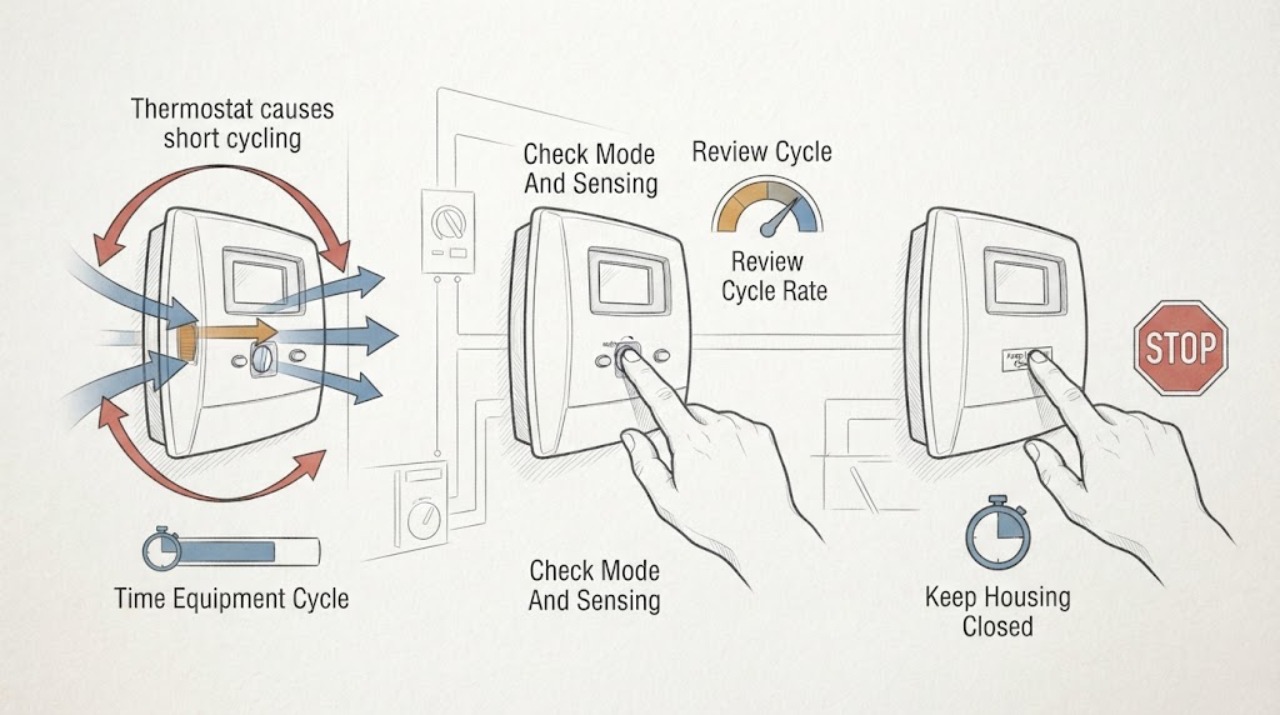
Work through in order
Diagnostic checks
Use only checks that match the exact appliance or system and its official guide.
-
Check 1
Use a clock or phone timer to record several starts and stops of the actual furnace, air conditioner, or heat pump, while also noting the Honeywell display message and the room temperature.
Expected result: Record whether the equipment stops when the thermostat ends its call, stops while the thermostat still calls, restarts immediately, shows a waiting message, or cycles only near the setpoint.
Next step: Keep the timing record and continue with display and configuration checks. If the equipment stops with a burning smell, abnormal noise, water, ice, repeated breaker trip, or an unresolved safety indication, turn it off as appropriate and arrange HVAC service.
Stop if: Do not force repeated starts, bypass an equipment limit, or continue operating equipment that is overheating, leaking, icing, or making an abnormal noise.
Why this matters
Why: A normal call ending near the setpoint points toward sensing, schedule, setpoint, or cycle-rate behavior. Equipment stopping while the call remains active points toward equipment protection, power, wiring, airflow, or a control fault rather than proving the thermostat is defective.
-
Check 2
On the thermostat display, verify the intended heat or cool mode, setpoint, schedule, fan setting, sensor selection, and any hold, lock, alert, or equipment-status message; keep the thermostat mounted normally.
Expected result: Note whether the room reading is plausible, the setpoint is being changed by a schedule or hold, a remote sensor is selected, the thermostat shows an active call, or the display reports a lockout or alert.
Next step: Correct only an obvious mode, schedule, or hold error using the owner controls and allow one normal cycle. If the reading remains implausible or the thermostat and equipment disagree, document the display and arrange qualified diagnosis.
Stop if: Do not relocate the thermostat, alter sensor wiring, remove the faceplate to expose terminals, or change installer configuration without the exact manual and equipment information.
Why this matters
Why: A schedule, incorrect mode, selected sensor, or implausible reading can make calls start and end unexpectedly. A thermostat that calls continuously while the equipment cycles independently suggests the equipment or wiring needs assessment.
-
Check 3
Find the exact Honeywell model manual and review the displayed cycle-rate or equipment-type setting without changing it first; compare the configured equipment type and stages with the actual system documentation.
Expected result: Record whether the cycle-rate setting is available, whether the thermostat has been recently replaced or reconfigured, and whether the selected equipment type and stages are known to match the installed system.
Next step: If the setting is unknown or does not clearly match the equipment, stop at documentation and ask the installer or HVAC professional to verify it. Do not choose a new cycle rate from a generic chart.
Stop if: Do not enter an installer menu, change cycle limits, jumper terminals, or use a setting intended for another heating or cooling system as an experiment.
Why this matters
Why: A wrong equipment type or cycle-rate configuration can affect call timing, but a matching configuration does not rule out airflow, sizing, limit, compressor, or sensor faults. Recent thermostat replacement raises configuration and wiring as possibilities.
-
Check 4
From ordinary safe access, inspect the HVAC filter and visible return and supply openings, and note whether the indoor or outdoor equipment shows ice, water, a blocked air path, unusual noise, or a fault indicator; do not open equipment panels.
Expected result: Record whether the filter is loaded, airflow is weak, the furnace or air handler door is closed, the outdoor unit is running during a cooling call, or any leak, ice, or abnormal sound is present.
Next step: Replace or clean the filter only as the equipment manual allows and clear only loose, safe obstructions. If abnormal equipment symptoms remain, turn the system off as appropriate and call qualified HVAC service.
Stop if: Do not remove equipment covers, touch wiring or capacitors, thaw ice with heat, bypass a limit, or keep running a leaking or overheating system.
Why this matters
Why: Restricted airflow or a blocked path can make equipment cycle abnormally. Ice, water, abnormal noise, an outdoor unit that does not run, or a fault indicator points to equipment diagnosis rather than a thermostat setting.
-
Check 5
After the permitted control and filter checks, observe one complete call and record whether the Honeywell thermostat ends the call normally, remains in a waiting state, or displays a recurring fault while the equipment short cycles.
Expected result: Record the model, display text, cycle times, room and setpoint readings, recent installation or wiring work, breaker behavior, and any water, ice, noise, or odor.
Next step: Provide the record to a qualified HVAC professional and request a thermostat-and-equipment diagnosis. Keep the system off as appropriate if the abnormal cycle or safety symptom returns.
Stop if: Do not repeatedly reset the thermostat or breaker, measure live voltage, bypass wiring, or replace the thermostat before the complete system is tested.
Why this matters
Why: A brief protection delay can be normal, but a delay that persists beyond the model guidance or repeated cycling with a continuous call can indicate power, wiring, configuration, thermostat-sensor, or HVAC equipment trouble.
Use your observations
Decision map
Find the observation that best matches what you see, then follow the next safe action.
-
PATH 01Safety boundary
What you see
The thermostat ends its call near the setpoint, the equipment stops with it, and there is no alert, leak, ice, noise, or breaker problem.
Do this next
Verify the schedule, sensor selection, equipment type, and exact model guidance; monitor a complete cycle without changing installer settings by guesswork.
Why this path and its safety boundary
Why it matters: The behavior may be normal control response, a sensor or schedule effect, or a cycle-rate configuration issue rather than a failed thermostat.
Safety stop: Do not lower or raise the setpoint repeatedly to force longer cycles or change cycle rate without confirming equipment compatibility.
-
PATH 02Safety boundary
What you see
The thermostat continues to show a heating or cooling call, but the furnace, air conditioner, or heat pump stops and restarts independently.
Do this next
Stop repeated restarts, inspect only the filter and visible air paths, record the display and equipment behavior, and arrange qualified HVAC diagnosis.
Why this path and its safety boundary
Why it matters: An equipment limit, airflow issue, power interruption, wiring fault, compressor protection, sensor, or equipment control is more likely than a thermostat simply ending the call.
Safety stop: Do not bypass limits, bridge thermostat terminals, open equipment panels, or operate a system that overheats, ices, leaks, or trips a breaker.
-
PATH 03Safety boundary
What you see
The thermostat shows a waiting message after startup, power loss, a setpoint change, or compressor shutdown, and the equipment has not yet restarted.
Do this next
Allow the delay specified by the exact thermostat and equipment manual, avoid repeated power cycling, and escalate if the message persists beyond that guidance or returns abnormally.
Why this path and its safety boundary
Why it matters: Honeywell describes a minimum-off or short-cycling protection delay that prevents equipment from restarting too quickly.
Safety stop: Do not defeat the delay, reset the breaker repeatedly, or assume a thermostat replacement is needed from a single normal waiting period.
-
PATH 04Safety boundary
What you see
Short cycling began after thermostat replacement or setup, and the equipment type, stages, sensor, cycle-rate setting, or wiring configuration is unknown or mismatched.
Do this next
Stop changing settings, gather the exact thermostat and equipment models, and ask the installer or HVAC professional to verify configuration and wiring against the equipment.
Why this path and its safety boundary
Why it matters: A configuration or installation mismatch is plausible, but the thermostat setting may be exposing an existing equipment problem.
Safety stop: Do not move wires, install jumpers, enter an installer menu, or select a different equipment type as a trial.
-
PATH 05Safety boundary
What you see
The filter or air path is restricted, airflow is weak, the outdoor unit does not run, or ice, water, unusual noise, or equipment fault indicators appear.
Do this next
Perform only permitted filter care and safe obstruction removal, then turn the system off as appropriate and arrange qualified HVAC service for persistent symptoms.
Why this path and its safety boundary
Why it matters: The HVAC equipment has a condition that can cause abnormal cycling; the thermostat alone cannot establish or safely correct the cause.
Safety stop: Do not open panels, touch electrical components, thaw ice with heat, or keep operating a leaking, damaged, or overheating system.
-
PATH 06Safety boundary
What you see
The display or equipment indicator flashes, the waiting message persists beyond model guidance, breakers trip frequently, or short cycling continues after correct settings and permitted filter care.
Do this next
Turn the system off as appropriate and arrange qualified HVAC service with the model, display message, timing record, and recent-work history.
Why this path and its safety boundary
Why it matters: A power, wiring, thermostat-sensor, control, or HVAC equipment fault remains unresolved and needs professional testing.
Safety stop: Do not repeatedly reset the system, measure live voltage, bypass a safety device, or replace parts based only on the short-cycle symptom.
Helpful context
Understand the symptom
Confirm that it is truly short cycling
Record when the furnace, air conditioner, or heat pump starts and stops, rather than counting only a fan change. Compare the equipment sound and the thermostat display: a thermostat may end a call normally, while a furnace limit, compressor protection, power interruption, or equipment fault may stop the equipment while the thermostat still calls. A short waiting message immediately after a restart can be intentional protection.
Check the thermostat's configuration without guessing
Honeywell thermostats vary by model and equipment. Confirm the system type, number of stages, heat or cool mode, schedule, setpoint, cycle-rate configuration, and any lockout or alert. A cycle-rate option controls how often the thermostat may call at a stated load; it is not a universal cure for a furnace, compressor, airflow, sizing, or wiring fault. Use the exact model's manual before changing an installer setting.
Use the equipment symptoms to set the service boundary
A dirty filter or blocked return or supply path can affect equipment operation, but the thermostat cannot correct an overheating furnace, iced coil, failing compressor, weak airflow, low refrigerant, bad sensor, or safety-limit trip. If the thermostat display is blank, its indicator flashes, a breaker trips, the equipment leaks, or the cycle remains abnormal after permitted checks, turn the system off as appropriate and have a qualified HVAC professional diagnose the complete system.
Safety boundary
Stop conditions
- Do not enter installer settings, change cycle rate, move thermostat wires, add jumpers, or bypass equipment limits without exact system documentation and qualified guidance.
- Do not measure live voltage, open electrical or HVAC equipment covers, or touch capacitors, terminals, or wiring as a homeowner check.
- Do not repeatedly reset the thermostat or breaker, thaw ice with heat, or keep operating equipment that leaks, overheats, trips, or makes an unusual noise.
- Stop for a persistent waiting state, flashing indicator, frequent breaker trips, water, ice, burning smell, abnormal temperature, or exposed wiring.
- Call qualified HVAC service when correct owner settings and permitted filter care do not stop the repeated cycles or when the thermostat and equipment disagree.
Only after diagnosis
Potential parts
- model-specific thermostat temperature sensor
Consider this category only after qualified diagnosis confirms a sensor or temperature-reading fault and the exact Honeywell model supports that replacement.
Confirm the thermostat model, sensor location, remote-sensor arrangement, and system configuration; do not replace the thermostat from short cycling alone. - compatible thermostat
Consider replacement only when testing identifies a failed thermostat or an incompatible unit after equipment, wiring, and configuration are checked.
Confirm stages, heat type, cooling or heat-pump equipment, power requirements, sensors, and installer configuration with a qualified professional. - replacement HVAC air filter
Consider this category only when the installed filter is loaded or damaged and the equipment documentation identifies the correct size and type.
Confirm the equipment's required dimensions and airflow direction; a filter change does not substitute for diagnosis of persistent short cycling.
When checks do not resolve it
Need a professional?
Arrange qualified HVAC service when short cycling continues after confirming the mode, schedule, sensor, equipment configuration, and permitted filter or airflow checks, or when the thermostat still calls while the equipment stops. Call promptly for a persistent waiting message, flashing indicator, frequent breaker trips, water, ice, burning smell, abnormal noise, overheating, exposed wiring, or any need to open the thermostat or HVAC equipment. Honeywell guidance directs professional verification for persistent delays, wiring concerns, and equipment faults.
Safety scope: This article covers owner-control checks, timing observations, model documentation, accessible filter care, and safe visual inspection only. Qualified HVAC service is required for wiring, live electrical tests, installer configuration, equipment limits, refrigerant, coils, compressors, control boards, sensors, and sealed-system diagnosis.
Common questions
FAQ
Can a Honeywell thermostat cause short cycling?
It can influence call timing through configuration, sensing, wiring, or a protection delay, but short cycling is not proof the thermostat is defective. Time the actual equipment and compare it with the thermostat call before replacing anything.
Is a waiting message on a Honeywell thermostat short cycling?
A brief waiting message can be the thermostat's compressor-protection delay after shutdown, startup, power loss, or a setpoint change. If it persists beyond the exact model guidance or accompanies repeated cycling, arrange professional diagnosis.
Should I change the cycles-per-hour setting?
Do not change it by guesswork. The setting depends on the thermostat model and installed equipment. Confirm the system type and stages with the exact manual or have an HVAC professional verify the configuration.
What else causes short cycling besides the thermostat?
Airflow restriction, equipment limits, power or wiring problems, compressor or furnace faults, sensors, controls, sizing, and other HVAC conditions can stop equipment while the thermostat is still calling. Those causes need qualified diagnosis.
When should I stop running the system?
Stop as appropriate and call HVAC service for a persistent waiting state, flashing indicator, frequent breaker trip, water, ice, burning smell, overheating, unusual noise, exposed wiring, or cycling that continues after correct owner settings and permitted filter care.
Read the exact guide
Official sources
- Thermostat Cycles Per Hour SetupHoneywell Home · Honeywell Home guidance for the Lyric thermostat family; other models and HVAC equipment may expose different settings and requirements.
- Troubleshooting and SupportHoneywell Home · Honeywell Home thermostat user-manual support page; menus and wiring differ by model, so it is not a substitute for the installed thermostat and equipment manuals.
- Why is my cooling not working?Honeywell Home · Honeywell Home cooling troubleshooting guidance; wiring and equipment details vary by installation and must be verified by a qualified professional.
- Why is my thermostat display showing ‘wait,’ ‘waiting for equipment,’ or flashing ‘cool on’?Honeywell Home · Honeywell Home support guidance for thermostats that display a waiting or flashing cooling message; exact delay behavior varies by model and equipment.
Community feedback
Share a repair observation
Share a plain-text repair observation. Accepted observations are published automatically; this page may take a moment to update.