
On this page
Start here
Quick answer
An ecobee temperature sensor can influence which room the thermostat uses for comfort, but a sensor reading alone does not prove it is causing short cycling. First record the ecobee displayed temperature, the active comfort setting or schedule, which sensors are participating, the heat or cool call, equipment start and stop times, and whether the HVAC system actually satisfies the setpoint. Check that the thermostat and remote sensor are placed away from sunlight, drafts, supply vents, doors, and heat sources; confirm a remote sensor is connected and reporting a plausible temperature; and replace a sensor battery only when the exact model instructions call for it. Also inspect the air filter, registers, and outdoor unit for restricted airflow or ice. ecobee describes SmartSensor as a way to use temperatures in important rooms and describes thermostat features such as staging, thermal protection, fan dissipation, and schedule-based recovery; Carrier and other HVAC guidance cannot diagnose an ecobee-specific sensor fault, so persistent cycling needs a qualified HVAC technician. Do not jumper terminals, open the thermostat or equipment, change installer wiring, disable equipment protection, or replace a sensor or control by appearance.
Before you begin
Safety first
- Keep equipment off for electrical or burning signs, severe icing, refrigerant concerns, repeated trips, loss of airflow, or unsafe operation. Do not open cabinets, jumper controls, alter installer settings, perform electrical tests, or replace a sensor or HVAC component yourself.
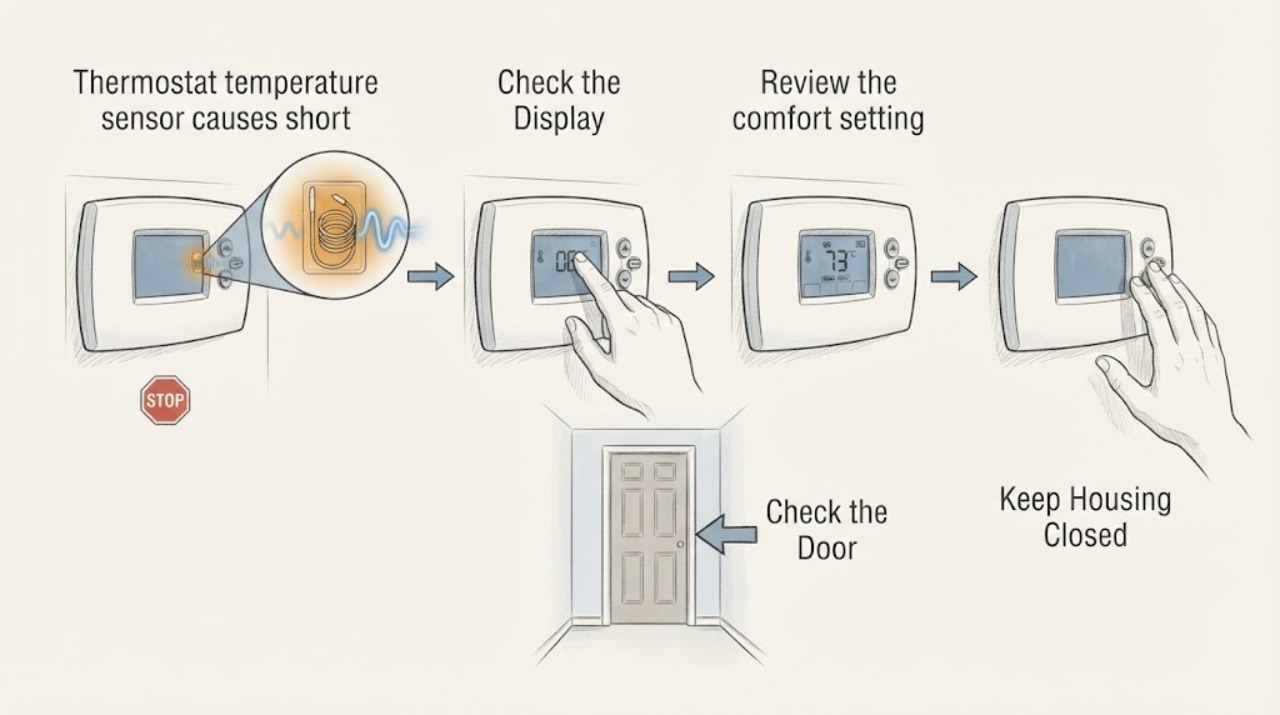
Work through in order
Diagnostic checks
Use only checks that match the exact appliance or system and its official guide.
-
Check 1
Create a timeline for several events from the ecobee screen or app: active comfort setting, sensor(s) included, displayed temperatures, setpoint, heat or cool call, indoor-fan state, equipment start and stop times, and any delay or alert. Do not remove the thermostat from its wall plate.
Expected result: The equipment stops when the active sensor reaches its setpoint, stops while a call remains, starts again quickly, runs after the equipment stops, or the active sensor changes with occupancy or schedule.
Next step: Preserve the timeline and continue with low-risk checks. Stop for burning odor, smoke, exposed wiring, repeated breaker trips, or unsafe equipment and obtain qualified or emergency help.
Why this matters
Why: A satisfied sensor or fan overrun can be normal control behavior. Equipment stopping during a continuing call or restarting repeatedly is more consistent with an HVAC, airflow, control, or safety issue than an ordinary sensor selection.
-
Check 2
Review the ecobee comfort setting and schedule without changing installer configuration. Check which sensors are participating, whether Follow Me or occupancy-based behavior is active, whether Smart Home or Away changed the target, and whether a recovery or staging event coincides with the cycling.
Expected result: One remote room controls the call, the participating sensor changes, the call follows an occupancy or schedule change, a recovery event is active, or the same sensor controls every call.
Next step: For testing, use only an ordinary user comfort setting documented for the ecobee model; do not disable protection, bridge terminals, or change equipment type or staging. If cycling continues, provide the setting and sensor timeline to service.
Why this matters
Why: A changing sensor group or schedule can change the temperature the system is trying to satisfy and may explain different run patterns without a defective sensor. A repeatable rapid cycle with a stable sensor group needs broader diagnosis.
-
Check 3
Check each participating sensor's reported temperature and connection status in the ecobee app or thermostat. Compare the reading with a nearby thermometer placed away from sunlight, drafts, supply vents, doors, and heat-producing appliances; inspect the sensor's physical placement without opening it.
Expected result: A sensor is offline, its reading jumps or is implausible, the nearby thermometer disagrees consistently, the sensor is in a draft or sun, or readings are reasonable and stable.
Next step: Move only an obviously poorly placed sensor as the model instructions permit and address a low-battery notice using the exact model guidance. Do not alter wiring or sensor calibration; request service for an offline, damaged, or persistently implausible sensor.
Why this matters
Why: An offline or locally biased sensor can create an inappropriate call and makes sensor placement, battery, connection, or device diagnosis more likely. A stable plausible reading makes a sensor-only explanation less likely and shifts attention toward airflow, equipment, wiring, or protection.
-
Check 4
Inspect the HVAC basics that can mimic a sensor fault: the air filter, open supply and return registers, visible outdoor-unit clearance, and any ice on the outdoor coil. Replace a visibly loaded filter or clear loose debris only when the system is off and the task is an owner maintenance step; do not scrape ice or open equipment.
Expected result: The filter is clogged, registers are blocked, the outdoor unit is obstructed or iced, airflow is weak, or airflow and outdoor clearance are normal.
Next step: Make only the low-risk filter, register, and loose-debris correction. Stop for a frozen coil, weak airflow that persists, refrigerant concern, or repeated cycling and obtain qualified HVAC service.
Why this matters
Why: Restricted airflow, blocked heat transfer, or a frozen coil can make equipment shut down or fail to satisfy the room even when ecobee's sensor is accurate. Normal airflow makes sensor, control, refrigerant, compressor, or other HVAC causes more relevant.
-
Check 5
Check normal power indicators and thermostat alerts from a dry, safe position. Note a blank screen, equipment error, repeated breaker trip, red or burning wiring, or a sudden loss of the sensor or HVAC connection. Do not remove covers, reset a tripping circuit repeatedly, or perform electrical tests.
Expected result: Power is stable and no alerts appear, the ecobee reboots, a breaker trips again, wiring is damaged or hot, or an HVAC or sensor alert persists.
Next step: Use only the normal user reset described for the exact ecobee model once. Stop for repeated trips, exposed or hot wiring, smoke, or burning odor and obtain qualified HVAC or electrical service.
Why this matters
Why: A power, wiring, or persistent error can interrupt calls independently of the temperature sensor and can create a safety risk. A normal display with repeated cycling keeps HVAC performance and sensor-control interaction in question.
-
Check 6
Prepare a service record containing the ecobee model, HVAC equipment type and stages, sensor names and readings, participating comfort setting, setpoint, cycle durations, filter condition, airflow and outdoor-unit observations, alerts, power events, and any recent thermostat or sensor installation. Keep installer settings unchanged.
Expected result: The problem began after adding or moving a sensor, after thermostat installation, only in one schedule or mode, after a wiring change, or with every call regardless of sensor.
Next step: Give the complete record to a qualified HVAC professional or ecobee support path. Do not order a sensor, thermostat, control board, or HVAC part from the symptom alone.
Why this matters
Why: A post-installation or sensor-change pattern raises pairing, placement, compatibility, staging, or configuration questions. An every-call pattern with a plausible reading makes a broader HVAC fault more likely than a single room sensor.
Use your observations
Decision map
Find the observation that best matches what you see, then follow the next safe action.
-
PATH 01Next step
What you see
Cycling follows a normal comfort setting change, occupancy or schedule transition, or a remote sensor reaching its target, while equipment completes calls and no safety or airflow signs appear.
Do this next
Record the participating sensors and schedule and monitor under a stable ordinary user setting. If the equipment still starts and stops rapidly before satisfying the call, request HVAC diagnosis.
Why this path and its safety boundary
Why it matters: The active sensor group or ecobee comfort logic is more likely changing the demand than a defective temperature sensor.
-
PATH 02Next step
What you see
A participating sensor is offline, has a low-battery notice, reports a jumping or implausible temperature, or sits in sunlight, a draft, a vent, or beside a heat source.
Do this next
Correct only placement or battery issues permitted by the exact model instructions. Request ecobee or HVAC service for an offline, damaged, or persistently implausible sensor; do not change wiring or calibration.
Why this path and its safety boundary
Why it matters: Sensor placement, battery, connection, or sensor fault is more plausible than a normal room-temperature demand.
-
PATH 03Next step
What you see
The sensor readings are stable and plausible, but the filter is clogged, registers are blocked, airflow is weak, the outdoor unit is obstructed, or the coil is frozen.
Do this next
Correct a user-accessible filter or loose obstruction only with equipment off. Do not scrape or heat ice; if cycling or icing persists, stop and request qualified HVAC service.
Why this path and its safety boundary
Why it matters: An airflow or heat-transfer problem can cause premature equipment shutdown or failure to reach the target and can mimic a sensor fault.
-
PATH 04Next step
What you see
The ecobee screen or app shows an equipment error, the equipment stops while a call remains, the breaker trips again, or wiring is exposed, hot, or burning.
Do this next
Stop the system from a safe location and obtain qualified HVAC or electrical service, with emergency help for smoke or fire. Do not repeatedly reset power, bypass a safety, or open a cabinet.
Why this path and its safety boundary
Why it matters: A control, electrical, safety, refrigerant, or equipment failure is more likely than a simple sensor reading issue.
-
PATH 05Next step
What you see
Basic settings, sensor placement and connection, filter, registers, outdoor clearance, and power are normal, but rapid cycling continues or began after a thermostat, sensor, or equipment installation.
Do this next
Request qualified HVAC diagnosis with the complete ecobee history and exact equipment models. Do not replace the sensor or thermostat by appearance or change installer settings to hide the cycling.
Why this path and its safety boundary
Why it matters: Compatibility, staging, wiring, equipment capacity, refrigerant, defrost, control-board, or a sensor input problem remains possible and cannot be identified from the display alone.
Helpful context
Understand the symptom
A sensor may change the call without being defective
ecobee SmartSensor is designed to use temperature and occupancy information from selected rooms to manage comfort. If a bedroom sensor is included in the active comfort setting, the thermostat may run until that room reaches the target, while the wall thermostat may already show a different temperature. That can look like a short-cycle problem or a long run. First identify the active sensor and schedule, then compare its reading with the actual room conditions.
What short cycling looks like
A true short cycle is repeated equipment start and stop before the call is satisfied. A fan that runs after a cycle, a staged heat-pump transition, a schedule recovery, or a normal equipment protection delay is not automatically the same thing. Log the thermostat call, indoor fan, outdoor unit or furnace, and setpoint separately so a sensor decision can be distinguished from an equipment safety response.
Sensor placement and connection matter
A SmartSensor near a supply vent, window, exterior door, direct sun, appliance, or draft can report a local condition rather than the room average. ecobee describes wireless connection, occupancy detection, and placement in important rooms or hot and cold spots. A sensor that disappears from the app, reports an implausible value, or has a weak battery is a different branch from a correctly reporting sensor that triggers a normal comfort call.
Do not bypass HVAC protection
The thermostat is only one part of the system. Restricted filters, blocked registers, outdoor icing, low refrigerant, an unsafe control response, or equipment wiring can cause rapid shutdowns even when ecobee's displayed temperature is accurate. Leave installer settings and equipment wiring alone; persistent cycling should be diagnosed at the thermostat and HVAC equipment together.
Safety boundary
Stop conditions
- Stop immediately for smoke, burning odor, exposed or hot wiring, repeated breaker trips, refrigerant concerns, severe icing, water near electrical equipment, or unsafe equipment operation. Keep clear and obtain qualified or emergency help.
- Do not remove the thermostat faceplate or HVAC covers, jumper terminals, change equipment type or staging, disable protection, alter installer wiring, perform electrical tests, or adjust refrigerant as a user-level sensor check.
- Do not keep resetting or running equipment that repeatedly starts and stops, remains frozen, loses airflow, or stops while a call remains. A reset does not prove the sensor or HVAC system is healthy.
- Stop when a sensor is offline or implausible after the model-approved battery or placement check, the active sensor group is unclear, or cycling persists under stable settings. Request ecobee and qualified HVAC diagnosis.
Only after diagnosis
Potential parts
- ecobee SmartSensor or compatible remote temperature sensor
Consider this category only if the exact ecobee model and qualified diagnosis confirm that a failed or non-reporting remote sensor is creating an incorrect comfort temperature after placement and battery checks.
Sensor compatibility and supported features vary by ecobee thermostat generation. Confirm the exact model and pairing requirements before selecting a sensor. - sensor battery
Consider this category only when the model reports a low battery or the sensor stops reporting and the exact model instructions identify a replaceable battery.
Battery type and replacement procedure are model-specific. Confirm the model instructions and do not substitute a battery by appearance alone. - ecobee thermostat or power accessory
Consider this category only if qualified diagnosis finds a thermostat power, compatibility, or control fault after sensor readings, wiring, and HVAC operation are checked.
Heat-pump stages, accessories, power wiring, and communication features require exact compatibility verification; do not select a thermostat from symptom alone. - HVAC control, sensor, or airflow component
Consider this category only when qualified HVAC testing links persistent cycling to an equipment sensor, control, airflow, defrost, or other internal component rather than ecobee room-sensor behavior.
HVAC components are system- and model-specific and may involve hazardous voltage or refrigerant. Confirm diagnosis and exact equipment before selecting a part.
When checks do not resolve it
Need a professional?
Request ecobee support or qualified HVAC service when a participating sensor is offline or persistently implausible, rapid cycling continues after basic placement and airflow checks, the issue follows a thermostat or sensor installation, the equipment is iced, an alert persists, or the system stops during an active call. Treat smoke, burning odor, exposed wiring, repeated breaker trips, refrigerant concerns, and severe icing as urgent.
Safety scope: Keep equipment off for electrical or burning signs, severe icing, refrigerant concerns, repeated trips, loss of airflow, or unsafe operation. Do not open cabinets, jumper controls, alter installer settings, perform electrical tests, or replace a sensor or HVAC component yourself.
Common questions
FAQ
Can an ecobee SmartSensor cause short cycling?
It can change which room temperature ecobee is trying to satisfy, but a sensor is not proven defective just because the equipment cycles. Check the active comfort setting, participating sensors, schedule, displayed reading, and equipment timeline; if equipment stops while a call remains or rapidly restarts, have the HVAC system diagnosed too.
Where should I place an ecobee temperature sensor?
ecobee describes placing SmartSensor in important rooms and areas with hot or cold spots. Avoid direct sunlight, drafts, supply vents, exterior doors, and heat-producing appliances so the reading represents the room rather than a local temperature pocket.
What should I check before replacing an ecobee sensor?
Check whether the sensor is reporting, whether its reading is plausible, whether its battery or connection status is normal, and whether it is in a poor location. Also check the filter, registers, outdoor clearance, and equipment icing because HVAC airflow and safety responses can mimic a sensor fault.
Should I turn off ecobee protection or change staging to stop the cycling?
No. ecobee documents thermal protection, staging, and fan behavior as part of thermostat operation. Do not disable protection or alter installer settings as a trial; persistent rapid cycling needs a qualified review of sensor input, wiring, airflow, refrigerant, and equipment controls.
When should I call for ecobee or HVAC service?
Call when a sensor stays offline or implausible, cycling continues after basic placement and airflow checks, the issue began after installation, the equipment ices or stops during a call, an alert persists, or a breaker trips. Treat smoke, burning odor, exposed wiring, refrigerant concerns, and severe icing as urgent.
Read the exact guide
Official sources
- Heat Pump Repair: Troubleshooting & Professional SolutionsCarrier · Official Carrier heat-pump repair guidance used for general HVAC safety context, not as an ecobee-specific procedure.
- Remote occupancy and temperature sensorecobee · Official ecobee SmartSensor product and support information; compatibility and behavior must be confirmed for the installed thermostat.
- Common Thermostat Issues and How to TroubleshootCarrier · Official Carrier guidance used only for general HVAC context; it is not an ecobee-specific repair procedure.
- Temperature, motion and contact sensorsecobee · Official ecobee sensor overview; supported functions and settings vary by thermostat model and subscription.
- Heat Pump Service & Maintenance TipsCarrier · Official Carrier maintenance guidance used only for general HVAC airflow context; equipment-specific procedures vary.
- Heat Pump Not Heating? Here’s How to TroubleshootCarrier · Official Carrier residential heat-pump guidance used only for general HVAC context, not for ecobee-specific sensor repair.
- Smart Thermostat Enhancedecobee · Official ecobee Smart Thermostat Enhanced product information; not every feature or setting applies to other ecobee models.
- Thermostat compatibility checkerecobee · Official ecobee compatibility checker; use the installed HVAC and thermostat details rather than assuming compatibility from brand alone.
Community feedback
Share a repair observation
Share a plain-text repair observation. Accepted observations are published automatically; this page may take a moment to update.