
On this page
Start here
Quick answer
First determine whether the ecobee screen is asleep or truly without power: approach it, tap the display, and check the ecobee app only as a status comparison. If it remains blank, check the HVAC service switch and the correct breaker from a safe position, and make sure the furnace or air-handler cover is seated. A wired ecobee normally depends on the HVAC power path and, depending on the installation, a C wire or Power Extender Kit. If the display stays blank after power is restored, the breaker trips again, the HVAC cover or wiring is loose, the system is leaking or overheating, or the thermostat was recently installed, turn the HVAC system off as appropriate and call a qualified HVAC professional. Do not pull the thermostat off the wall, move wires, measure live voltage, or rewire the Power Extender Kit unless the exact ecobee installation instructions and a qualified person make that work appropriate.
Before you begin
Safety first
- This article covers waking the display, owner-control checks, safe visual inspection, and an obvious HVAC switch or breaker check only. Qualified service is required for terminal wiring, C-wire or PEK work, voltage tests, transformer diagnosis, equipment controls, and thermostat replacement.
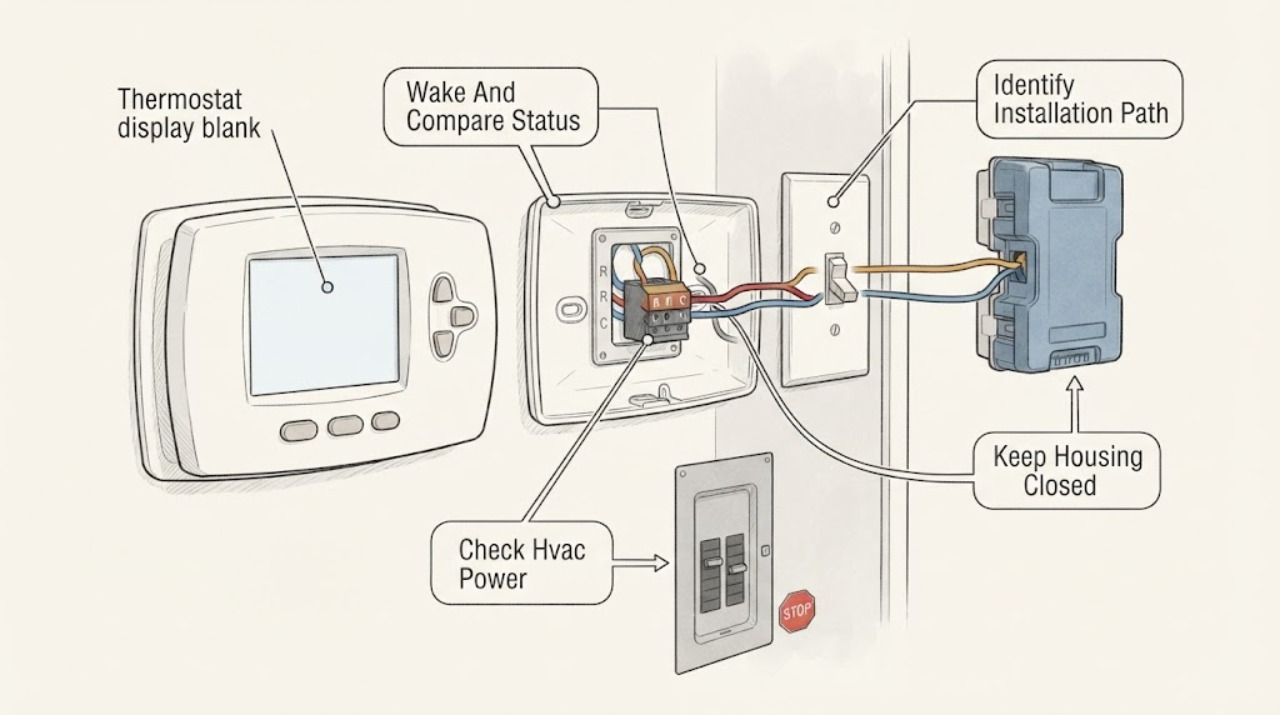
Work through in order
Diagnostic checks
Use only checks that match the exact appliance or system and its official guide.
-
Check 1
Approach the ecobee, tap the display once, and compare the wall screen with the ecobee app or another known status indicator without removing the thermostat from its plate.
Expected result: Record whether the screen wakes, remains completely blank, shows a startup screen, or the app shows the thermostat online, offline, or unavailable.
Next step: If the screen wakes, review display and sleep preferences in the owner controls. If it stays blank, leave the thermostat mounted and check the HVAC switch and breaker from a safe position.
Stop if: Do not pry at the screen, remove the thermostat, or treat an app status as proof that the wall unit has safe power.
Why this matters
Why: A screen that wakes points to display sleep or brightness behavior. An app-connected thermostat with a dark screen is different from a thermostat and app that both lost power. A completely unresponsive screen makes the HVAC power path more likely.
-
Check 2
From a safe position, check that the HVAC service switch is on, the relevant breaker is not tripped, and the furnace or air-handler cover is closed securely; do not open the equipment cabinet.
Expected result: Record whether the switch or breaker was off, whether it trips again, whether the equipment has power signs, and whether the cover is visibly mis-seated or damaged.
Next step: Restore an obviously off switch only when there is no odor, water, damage, or other hazard and the installation permits it. If the breaker trips again, the cover will not seat, or power remains absent, turn the system off and arrange qualified HVAC service.
Stop if: Do not repeatedly reset a breaker, bypass a door switch, open the equipment cabinet, or touch wiring and terminals.
Why this matters
Why: An off switch, tripped breaker, or open cover can interrupt the thermostat power path. A breaker that trips again or equipment that shows damage indicates an HVAC or electrical fault, not a screen setting.
-
Check 3
Use the installation record, app, or visible model information to determine whether the ecobee installation uses a C wire or a Power Extender Kit, without pulling the thermostat from the wall or opening the HVAC control compartment.
Expected result: Record the ecobee model, HVAC type, whether a C wire was documented, whether a PEK was installed, and whether the blank screen began after installation or wiring work.
Next step: Use ecobee's compatibility and exact installation guidance to identify the intended power arrangement. If the arrangement is unknown or recently changed, stop and ask the installer or qualified HVAC professional to verify it.
Stop if: Do not remove the faceplate, move R, Rc, Rh, or C wires, or rewire a PEK while power status and compatibility are uncertain.
Why this matters
Why: A recent installation or a PEK or C-wire change raises a connection or compatibility issue. The same blank screen with no installation change may instead reflect HVAC power loss, a loose connection, a thermostat fault, or a system-side problem.
-
Check 4
Inspect only the visible thermostat and HVAC surroundings for water, burning smell, damaged plastic, loose wall plate, exposed wire, unusual equipment noise, or an HVAC cover that cannot close normally.
Expected result: Classify the area as dry and intact, showing a recent installation concern, showing an electrical or water hazard, or unsafe to inspect further.
Next step: If any hazard is present, stop using the system and arrange qualified HVAC or electrical service. If intact, continue only with the documented power-path check and one controlled restart.
Stop if: Do not touch wet equipment, exposed conductors, burned parts, or a damaged wall plate; do not energize a visibly unsafe system.
Why this matters
Why: A dry intact installation supports limited power-path checks. Water, burning smell, exposed wiring, damaged parts, or abnormal equipment behavior makes continued energizing unsafe and can explain a blank display.
-
Check 5
After an obvious safe switch or breaker correction and a securely closed equipment cover, allow one normal restart and observe the ecobee startup screen and HVAC response without repeated power cycling.
Expected result: Record whether the display returns, the system starts normally, the display remains blank, the breaker trips, or the HVAC shows an alert or abnormal behavior.
Next step: If the display returns and operation is normal, monitor it and keep the model and power arrangement recorded. If it stays blank or the fault returns, turn the HVAC system off as appropriate and arrange qualified diagnosis.
Stop if: Do not repeat resets, measure live voltage, rewire terminals, or replace the thermostat before the power path and equipment are tested.
Why this matters
Why: A restored startup screen after a safe power correction supports an interrupted power path. A recurring blank screen or repeated trip leaves wiring, PEK, transformer, equipment, or thermostat failure unresolved.
Use your observations
Decision map
Find the observation that best matches what you see, then follow the next safe action.
-
PATH 01Safety boundary
What you see
The display wakes when approached or tapped, or the app shows the thermostat online and controllable.
Do this next
Review owner display and sleep preferences and observe whether the screen behaves normally during a temperature change.
Why this path and its safety boundary
Why it matters: The screen may be asleep or dimmed rather than without power; a blank appearance alone does not prove a wiring fault.
Safety stop: Do not remove the thermostat or disturb wiring to change brightness or sleep behavior.
-
PATH 02Safety boundary
What you see
The HVAC service switch or breaker is off, while the equipment area is dry and intact and the breaker does not trip again after one safe correction.
Do this next
Restore the switch or breaker only when safe, confirm the equipment cover is closed, and allow one normal startup.
Why this path and its safety boundary
Why it matters: An interrupted HVAC power path can explain the blank ecobee display.
Safety stop: Do not repeatedly reset a breaker or energize equipment with water, damage, burning smell, or exposed wiring.
-
PATH 03Safety boundary
What you see
The breaker trips again, there is water, burning smell, exposed wiring, damaged equipment, or the HVAC cover cannot close securely.
Do this next
Leave the HVAC system off and arrange qualified HVAC or electrical service.
Why this path and its safety boundary
Why it matters: An electrical, equipment, or installation fault is present; the thermostat display is only a symptom of an unsafe or interrupted system.
Safety stop: Do not reset again, bypass a cover switch, touch wet or burned parts, or open the equipment cabinet.
-
PATH 04Safety boundary
What you see
The blank screen began after ecobee installation, HVAC work, or a C-wire or Power Extender Kit change, and the intended wiring path is unknown.
Do this next
Keep power off as appropriate and have the installer or qualified HVAC professional verify the exact ecobee model, equipment compatibility, and wiring.
Why this path and its safety boundary
Why it matters: A loose connection, wrong terminal, PEK arrangement, or compatibility issue is plausible, but terminal changes cannot be safely inferred.
Safety stop: Do not move R, Rc, Rh, C, or PEK wires or power the system with uncertain connections.
-
PATH 05Safety boundary
What you see
The switch and breaker appear correct, the cover is closed, but the ecobee remains blank and the app is offline or unavailable.
Do this next
Stop at visual checks and arrange qualified HVAC diagnosis; provide the model, power arrangement, and breaker history.
Why this path and its safety boundary
Why it matters: A power supply, transformer, wiring, PEK, thermostat connection, or thermostat fault remains possible.
Safety stop: Do not remove the thermostat, measure voltage, or substitute a C wire or PEK connection as an experiment.
-
PATH 06Safety boundary
What you see
The screen returns after one safe power correction, the equipment starts normally, and no hazard, trip, alert, or abnormal behavior remains.
Do this next
Monitor normal operation and keep the exact model and installation power arrangement available if the symptom returns.
Why this path and its safety boundary
Why it matters: An interrupted switch, breaker, or cover condition may have caused the blank screen, but recurrence should not be ignored.
Safety stop: Do not keep cycling power or ignore another blank display, trip, leak, odor, or exposed wire.
Helpful context
Understand the symptom
A blank screen may be sleep or loss of power
Approach or tap the thermostat and check whether the display wakes. If the app still shows a connected thermostat while the wall display is dark, record that distinction rather than assuming the HVAC power is gone. If neither the display nor the app responds, treat it as a power-path problem until the HVAC switch, breaker, cover, wiring, and thermostat connection are checked safely.
Check the HVAC power path before the thermostat
A furnace or air-handler service switch, breaker, or improperly seated equipment cover can interrupt thermostat power. ecobee's installation material also distinguishes installations with a C wire from those using a Power Extender Kit. Do not remove covers or disturb terminals just to make the screen light; the correct model, equipment, and wiring arrangement must be confirmed first.
Treat wiring and PEK work as an installation boundary
If the blank display began after installation, maintenance, a power outage, or HVAC work, a loose terminal, incorrect R connection, C-wire issue, or Power Extender Kit connection is possible. ecobee's instructions require power to be off before installation and provide model-specific wiring guidance. Persistent loss of power, a returning breaker trip, or an uncertain wire arrangement needs qualified service rather than a guessed terminal change.
Safety boundary
Stop conditions
- Do not remove the thermostat, move wires, measure live voltage, or rewire a C wire or Power Extender Kit as a generic blank-screen fix.
- Do not repeatedly reset a breaker, bypass an HVAC cover switch, or energize equipment with water, burning smell, exposed wiring, or visible damage.
- Do not open the furnace or air-handler control compartment or touch terminals unless the exact installation procedure and qualified supervision make it appropriate.
- Stop for a breaker that trips again, a cover that will not close, a persistent blank screen, or an unknown recent wiring or installation change.
- Arrange qualified HVAC or electrical service when safe switch, breaker, cover, and owner-control checks do not restore the display.
Only after diagnosis
Potential parts
- compatible ecobee thermostat
Consider replacement only after qualified testing confirms the existing thermostat has failed or is incompatible with the installation; a blank screen alone does not prove this.
Confirm the ecobee model, HVAC equipment, stages, sensors, power arrangement, and compatibility documentation before ordering. - ecobee Power Extender Kit
Consider this category only when the exact ecobee model and HVAC compatibility check identifies a no-C-wire installation that requires a PEK and a qualified installer confirms the connection fault or missing kit.
The PEK is installed at the furnace or air-handler control board; do not select or wire it by appearance or while power status is uncertain. - compatible thermostat wall plate
Consider this category only when the wall plate or terminal base is physically damaged and qualified inspection confirms it is interrupting the thermostat connection.
Confirm the exact ecobee model and wiring arrangement; replacement of a plate requires power isolation and correct terminal verification.
When checks do not resolve it
Need a professional?
Arrange qualified HVAC service when the ecobee remains blank after safe switch, breaker, cover, and owner-control checks, or when the app is offline, the system will not respond, the wiring or Power Extender Kit arrangement is unknown, or the display failed after installation. Call promptly for a repeated breaker trip, water, burning smell, exposed wiring, damaged equipment, or a cover that will not close. Do not diagnose a live thermostat circuit by moving wires or measuring voltage unless qualified.
Safety scope: This article covers waking the display, owner-control checks, safe visual inspection, and an obvious HVAC switch or breaker check only. Qualified service is required for terminal wiring, C-wire or PEK work, voltage tests, transformer diagnosis, equipment controls, and thermostat replacement.
Common questions
FAQ
Why is my ecobee thermostat screen blank?
It may be asleep, or the HVAC power path may be interrupted by a switch, breaker, cover, wiring, C-wire, Power Extender Kit, transformer, or thermostat fault. Wake the screen, check safe external power indications, and stop for professional diagnosis if it remains blank.
Can I reset the breaker for a blank ecobee display?
Check the correct HVAC breaker from a safe position, but do not repeatedly reset it. If it trips again, there is water, burning smell, damage, or exposed wiring, leave the system off and call qualified HVAC or electrical service.
Does an ecobee need a C wire?
The required power arrangement depends on the ecobee model and HVAC system. ecobee documents installations with a C wire and some no-C-wire installations using a Power Extender Kit; verify compatibility and exact instructions instead of moving wires by guesswork.
Should I pull the ecobee off the wall to check the wires?
Not as a generic blank-screen step. Wiring work requires power isolation and exact model instructions. If the display remains blank after safe external checks, have a qualified professional verify the wall plate, terminals, C wire or PEK, transformer, and HVAC equipment.
When is a blank ecobee screen urgent?
Treat it as urgent when the breaker trips again, there is water, burning smell, exposed wiring, damaged equipment, an HVAC cover that will not close, or another electrical or heating-and-cooling hazard. Turn the system off as appropriate and seek qualified service.
Read the exact guide
Official sources
- Installing your Smart Thermostat Essentialecobee · ecobee Smart Thermostat Essential installation guidance; verify compatibility and exact wiring for the installed model and HVAC system.
- Thermostat compatibility checkerecobee · ecobee's compatibility checker; it does not replace model-specific wiring instructions or qualified diagnosis of a powered installation.
- Installing your Smart Thermostat Premiumecobee · ecobee Smart Thermostat Premium installation guidance; other ecobee models may use different terminals or installation requirements.
Community feedback
Share a repair observation
Share a plain-text repair observation. Accepted observations are published automatically; this page may take a moment to update.