
On this page
Start here
Quick answer
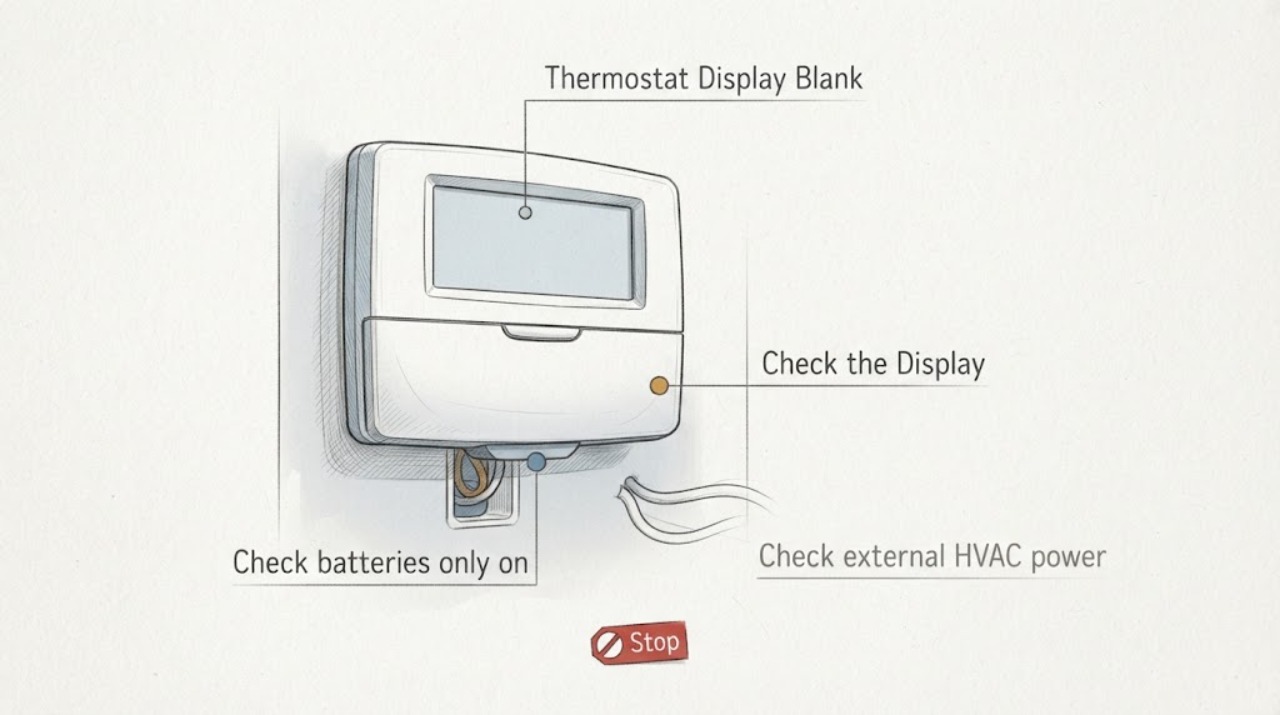
Start by identifying the Emerson thermostat model. A battery-powered model may have dead or poorly seated batteries, while a touchscreen or other model may depend on HVAC power and a correctly connected C wire. Check the HVAC switch and labeled breaker from a safe position, confirm that the thermostat face and base are seated, and replace batteries only when the model uses them. If the display remains blank, the system has lost power, a breaker trips again, a wire is loose, or the thermostat was recently installed, stop moving wires and call a qualified HVAC professional. Do not measure live voltage, bridge terminals, or open the furnace or air-handler panel as a first-line check.
Before you begin
Safety first
- This article supports identifying the model, replacing batteries in a battery-designated thermostat, checking an external labeled switch or breaker from a safe position, confirming normal faceplate seating without moving conductors, and using a model-approved reset. A qualified professional should handle C-wire and terminal verification, live electrical testing, equipment panels, control boards, wiring, and power or HVAC diagnosis.
Work through in order
Diagnostic checks
Use only checks that match the exact appliance or system and its official guide.
-
Identify the thermostat model and display type
Read the model number from the thermostat, label, box, or official manual lookup before changing anything. Note whether it is a battery-powered non-touchscreen model, a touchscreen model, or an older programmable thermostat, and whether the display is completely dark or only partially missing.
Expected result: The model has a battery compartment; the model is a touchscreen that requires system power; the display is partial or frozen; or the model number is unavailable.
Next step: Use the exact model manual for the next check. If the model cannot be identified, do not remove the thermostat or move wires; use the model-finder guidance or request professional help.
Stop if: Do not guess the model from its appearance, press hidden installer controls, or pull the thermostat from its base while the system power status is unknown.
Why this matters
Why: Battery replacement and reset steps depend on the model. A touchscreen with no battery backup points toward HVAC power or C-wire supply, while a partial or frozen display may indicate a reset or display fault rather than a simple dead battery.
-
Check batteries only on a battery-powered model
If the identified Emerson or White-Rodgers model uses batteries, remove and inspect them according to the model manual, check for leakage or corrosion without touching residue, and install the specified fresh set with the correct orientation. If there is visible battery damage, keep the thermostat out of use and seek service.
Expected result: The display returns immediately; batteries were depleted or incorrectly seated; the battery compartment has corrosion or fluid; or the display stays blank with known-good batteries.
Next step: If the display returns, verify the heat and cooling modes without repeatedly cycling the system. If it stays blank or battery damage is present, stop and arrange thermostat or HVAC service.
Stop if: Do not install batteries in a model that has no battery compartment, mix battery types, scrape corrosion into the thermostat, or keep using a leaking battery compartment.
Why this matters
Why: A restored display makes a battery or contact issue more likely. Corrosion, fluid, or a blank display after correct replacement suggests damage, a poor contact, an internal fault, or a separate HVAC power issue.
-
Check external HVAC power and equipment status
From a dry, safe position, check whether the HVAC equipment switch and the labeled thermostat or equipment breaker are on. Look for an outage, a breaker in an abnormal position, a recently opened furnace or air-handler panel, or visible smoke, scorching, water, or a burning odor. Do not open the equipment panel.
Expected result: The breaker or HVAC switch is off; the breaker trips again; the equipment panel is not fully closed; other HVAC controls are also dead; or power appears normal but the thermostat remains blank.
Next step: If the labeled switch or breaker is clearly off and there is no hazard, follow the equipment manual for one safe restoration attempt. If it trips again, the system is damaged, or power is uncertain, leave it off and call qualified HVAC or electrical service.
Stop if: Do not repeatedly reset a breaker, touch wet or scorched equipment, remove an air-handler panel, or continue after smoke, arcing, or a burning odor.
Why this matters
Why: A touchscreen thermostat can lose its display when the HVAC system loses power. A repeated trip, damaged connection, open panel, smoke, water, or burning odor is a safety or equipment fault, not a normal reset condition.
-
Consider C-wire and base seating without moving conductors
For a touchscreen or system-powered model, use the exact installation guide to determine whether a C wire is required. Look only for an obviously loose faceplate or an incomplete seating of the thermostat on its base; do not pull it off, tug wires, or expose the control board. If the thermostat was recently installed, compare the recorded configuration with the installer guide without changing terminals.
Expected result: The model requires a C wire that was never connected; the thermostat was recently installed or rewired; the faceplate is not seated; a wire or base appears damaged; or the connection history is unknown.
Next step: Stop at the visual check and have the installer or qualified HVAC technician verify the C-wire path, terminals, base, system power, and configuration. If the faceplate is visibly damaged or cannot seat normally, do not force it.
Stop if: Do not move thermostat wires, bridge terminals, measure live voltage, expose the HVAC control board, or add a C wire as a trial.
Why this matters
Why: Missing system power or an incorrect C-wire connection can leave a touchscreen blank. Recent installation makes configuration or terminal errors more likely, but a visual observation cannot prove a safe electrical repair.
-
Use a model-approved reset only when instructed
After recording the model, battery or power observations, and any recent settings, follow the exact Emerson or Copeland reset instruction for that model if support directs it. For a battery model, use only its documented battery reset; for a smart or touchscreen model, use the model's documented reset and note whether app reconnection or configuration restoration is required.
Expected result: The display returns after the reset; it remains blank; it returns briefly and goes dark again; or the reset clears settings that cannot be restored confidently.
Next step: If the display remains blank or goes blank again, stop resetting and request qualified service. Provide the model, battery or C-wire type, breaker observations, installation history, and reset result.
Stop if: Do not repeatedly factory-reset the thermostat, guess at installer settings, or use a reset sequence from another Emerson, White-Rodgers, or Sensi model.
Why this matters
Why: A one-time recovery can indicate a transient control state, while recurrence points toward power, wiring, base, display, or HVAC faults. A reset that changes configuration is not evidence that the underlying power problem is fixed.
-
Separate a thermostat display fault from an HVAC fault
If the display returns, test one normal mode change using the thermostat itself and observe whether the HVAC system responds. If the display remains blank, do not swap wires or remove the thermostat as a test; record whether the HVAC equipment also lost operation and whether another known-compatible thermostat is available for a professional to evaluate.
Expected result: The display works but the HVAC does not respond; the display is blank while the HVAC operates; both thermostat and HVAC are dead; or the display repeatedly resets.
Next step: Stop user testing and arrange qualified HVAC service, especially after a recent installation, repeated breaker event, or recurring blank screen. Do not assume replacing the thermostat will repair the system.
Stop if: Do not bypass the thermostat, apply external power, test live terminals, or open furnace, air-handler, or thermostat wiring compartments.
Why this matters
Why: A working display with no equipment response points toward HVAC power, wiring, configuration, or equipment service. A blank display while the system has power points toward the thermostat, base, or low-voltage supply. A repeated reset or total loss of both suggests an unstable supply or control fault.
Use your observations
Decision map
Find the observation that best matches what you see, then follow the next safe action.
-
PATH 01Next step
What you see
The Emerson thermostat has a battery compartment and its display returns after the correct fresh batteries or model-approved battery reset.
Do this next
Confirm the model settings and make one normal call for heat or cooling. Arrange service if the display goes blank again, the battery compartment is damaged, or the HVAC does not respond.
Why this path and its safety boundary
Why it matters: Depleted batteries, poor seating, or a transient battery-powered control state was more likely than loss of HVAC low-voltage power.
-
PATH 02Safety boundary
What you see
The thermostat is a touchscreen model, the screen is blank, and the HVAC switch, breaker, equipment panel, or system power appears off or unstable.
Do this next
Restore only a clearly off external switch or breaker when safe and permitted by the equipment instructions. If power is absent, the breaker trips, or the display stays blank, use qualified HVAC or electrical service.
Why this path and its safety boundary
Why it matters: System power or the C-wire supply is more likely than a failed touchscreen.
Safety stop: Do not access the control board or measure voltage as a homeowner test.
-
PATH 03Next step
What you see
The blank display began after an Emerson thermostat installation or rewiring, the model requires system power, or the faceplate and C-wire path are uncertain.
Do this next
Stop moving conductors and have the installer or qualified HVAC professional verify the model, base, C-wire path, system power, and equipment configuration.
Why this path and its safety boundary
Why it matters: A missing or incorrectly connected C wire, wrong configuration, loose terminal, or base-seating issue is more likely than an unrelated display failure.
-
PATH 04Next step
What you see
The display returns and responds to local commands, but the furnace, air conditioner, or fan does not respond or the HVAC control shows a fault.
Do this next
Arrange qualified HVAC service with the system type, terminal configuration, equipment behavior, and any fault indicator. Do not bridge the thermostat to force operation.
Why this path and its safety boundary
Why it matters: The thermostat display is less likely to be the root cause; HVAC power, wiring, configuration, equipment, or a safety condition is more likely.
-
PATH 05Safety boundary
What you see
The display remains blank after correct battery or model-approved reset, repeatedly goes dark, the breaker trips, wiring or the base is damaged, or smoke, scorching, water, or a burning odor is present.
Do this next
Leave the HVAC system off and request qualified HVAC or electrical service. For smoke, active arcing, or suspected fire, leave the area and contact emergency services from a safe location.
Why this path and its safety boundary
Why it matters: A thermostat, low-voltage supply, wiring, HVAC control, or electrical fault remains possible and cannot be safely separated by further homeowner checks.
Safety stop: Do not keep resetting, bypass the thermostat, open panels, or touch wet, scorched, or exposed electrical parts.
Helpful context
Understand the symptom
Model type determines the first check
Emerson, White-Rodgers, and Sensi thermostats do not all power their displays the same way. Classic battery models can go blank when batteries are depleted, while touchscreen models may have no battery backup and depend on the HVAC system's low-voltage power. Find the model number on the thermostat or its documentation before opening the base or following a reset sequence from a different product family.
A blank display can mean the HVAC system is also unpowered
A thermostat display that loses power may not be able to call for heat or cooling. Copeland's Sensi guidance recommends checking system power, the HVAC equipment switch, breakers, closed equipment panels, and the C-wire path for touchscreen models. These are observations and model-dependent checks; a homeowner should not expose a control board or probe wiring to prove a voltage value.
Reset only after recording the model and settings
Emerson manuals provide different reset behaviors. A battery model may reset by removing its batteries for the documented interval, while a smart thermostat reset may clear user settings or require app reconnection. Use the exact manual or official support instruction, and do not use a factory reset as a substitute for finding a tripped breaker, a missing C-wire connection, or a wiring fault.
Do not confuse a dark display with an HVAC fault you can safely repair
If a battery replacement or model-approved reset does not restore the display, the remaining possibilities include power loss, a loose or incorrect connection, a damaged base or display, or an HVAC control problem. A blank display after a recent installation deserves installer or HVAC review. Do not pull wires, bridge terminals, remove equipment panels, or perform live electrical tests to narrow the cause.
Safety boundary
Stop conditions
- Stop and seek qualified help for smoke, burning odor, arcing, exposed wiring, a hot or damaged connection, water near electrical equipment, or a breaker that trips again.
- Do not bridge thermostat terminals, test live voltage or continuity, open furnace or air-handler panels, pull or move wires, or add a C wire as a trial.
- Do not force a thermostat faceplate, scrape battery corrosion into the device, mix battery types, or continue using a damaged battery compartment.
- Do not repeatedly reset the thermostat, guess at installer configuration, or use a reset sequence from a different Emerson, White-Rodgers, or Sensi model.
- Arrange qualified HVAC or electrical service when a correct battery or model-approved reset does not restore the display, when the screen repeatedly goes blank, or when the HVAC system does not respond.
Only after diagnosis
Potential parts
- thermostat batteries
Consider this category only if the exact thermostat model has a battery compartment and the display returns or the manual identifies battery replacement as the remedy.
Confirm the complete model and specified battery type; touchscreen models and system-powered models may not use battery backup. - Emerson or White-Rodgers thermostat
Consider replacement only after correct batteries or system power, a model-approved reset, and qualified diagnosis indicate a failed thermostat or display.
Confirm the exact HVAC system type, stages, wiring, accessories, and approved model compatibility before replacement; a blank screen alone is not enough. - thermostat base or low-voltage wiring component
Consider this category only when qualified inspection confirms a damaged base, terminal, C-wire path, or low-voltage connection after external power checks.
Confirm the exact thermostat and HVAC equipment configuration; wiring and low-voltage repairs require qualified service.
When checks do not resolve it
Need a professional?
Arrange qualified HVAC service when a battery-powered Emerson thermostat stays blank after correct batteries and the model reset, when a touchscreen has no system power or C-wire supply, when the display repeatedly resets, when the HVAC does not respond, or when installation, wiring, base, display, or control-board problems are possible. Use qualified electrical service for unstable or damaged power. Stop immediately for smoke, arcing, exposed wiring, a hot connection, water near electrical parts, or repeated breaker trips.
Safety scope: This article supports identifying the model, replacing batteries in a battery-designated thermostat, checking an external labeled switch or breaker from a safe position, confirming normal faceplate seating without moving conductors, and using a model-approved reset. A qualified professional should handle C-wire and terminal verification, live electrical testing, equipment panels, control boards, wiring, and power or HVAC diagnosis.
Common questions
FAQ
Why is my Emerson thermostat display blank?
The likely first checks depend on the model. A battery-powered model may need fresh, correctly seated batteries; a touchscreen or system-powered model may have lost HVAC power or C-wire supply. Check the external switch or labeled breaker safely and use the exact model manual before touching the base or wiring.
Will replacing Emerson thermostat batteries fix a blank display?
It can if the model has a battery compartment and the batteries were depleted or poorly seated. If the display stays blank after the correct replacement, or the compartment has corrosion or fluid, stop and arrange service. Do not install batteries in a model that does not use them.
Does an Emerson touchscreen thermostat need a C wire?
Power requirements are model-specific. Copeland's Sensi Touch guidance says its touchscreen models require system power and a C wire, while an Emerson or White-Rodgers model must be checked in its own manual. If a touchscreen went blank after installation or a power event, have the C-wire path and HVAC power verified by a qualified professional.
Should I reset an Emerson thermostat with a blank screen?
Only after identifying the exact model and following its official reset instruction. Battery models and smart or touchscreen models can use different resets, and a smart reset may clear settings or require reconnection. If one permitted reset does not restore the display, stop repeating it and request service.
What if the Emerson thermostat display returns but the HVAC does not run?
That points away from a display-only problem and toward HVAC power, system configuration, wiring, equipment controls, or a safety condition. Check only the external labeled switch or breaker from a safe position, then arrange qualified HVAC service if the equipment does not respond or a fault indicator appears.
When should I call a professional for a blank Emerson thermostat?
Call when correct batteries or a model-approved reset do not restore the display, when the thermostat went blank after installation, when a breaker trips again, when wiring or the base is damaged, when the HVAC does not respond, or when smoke, arcing, a burning odor, exposed wiring, water, or a hot connection is present.
Read the exact guide
Official sources
- Thermostat HelperCopeland · Official Copeland model-selection tool listing Emerson and White-Rodgers thermostat families; use it only to identify the model before applying its manual.
- Why Isn't My Cooling Turning On?Sensi by Copeland · Official Sensi support guidance across Sensi models; used here for the thermostat-versus-HVAC response distinction, not as Emerson-specific wiring instructions.
- 1F80-361 Programmable Electronic Digital Thermostat Installation and Operation InstructionsEmerson and White-Rodgers, Copeland · Official Copeland-hosted manual for the 1F80-361 and documented Classic 80 family; other Emerson thermostat models may differ.
- My screen is blank (Sensi Touch, Touch 2)Sensi by Copeland · Official Copeland support guidance for Sensi Touch and Touch 2 touchscreen models; it is relevant to system-powered touchscreen behavior, but Emerson model wiring and power requirements must be confirmed separately.
- How to reset your Sensi thermostatSensi by Copeland · Official Copeland Sensi support page; cited to support the general model-specific reset boundary, not to prescribe a Sensi reset for Emerson models.
- 1F83H-21NP (Non-Programmable) InstructionsEmerson and White-Rodgers, Copeland · Official Copeland-hosted manual for the 1F83H-21NP Emerson and White-Rodgers thermostat family; exact model instructions control for other thermostats.
- Thermostat ManualsCopeland · Copeland's official thermostat manual directory; use the full model number to select the applicable installation and operation instructions.
- Call for ServiceSensi by Copeland · Official Copeland Sensi support guidance; cited for the service boundary when a thermostat or HVAC system does not respond normally.
Community feedback
Share a repair observation
Share a plain-text repair observation. Accepted observations are published automatically; this page may take a moment to update.