
On this page
Start here
Quick answer
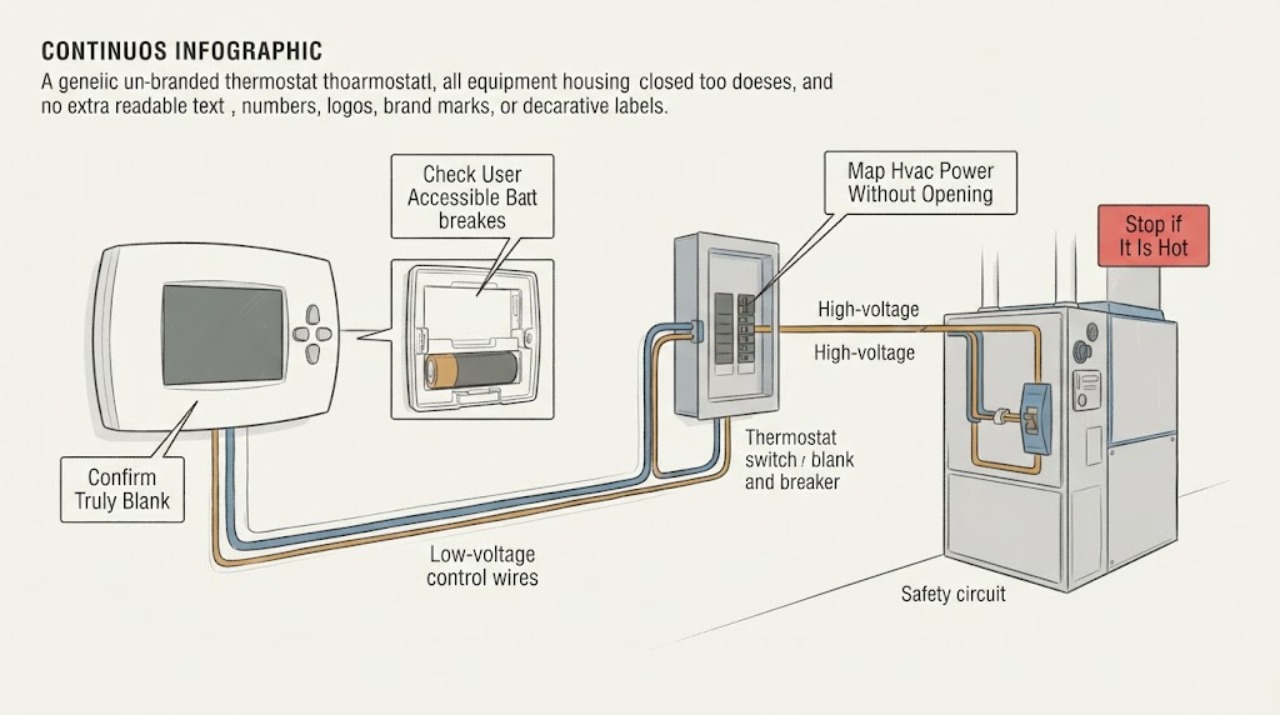
A thermostat display that is truly blank and does not respond usually means the thermostat is not receiving power, but a screen that only sleeps is different from a dead display. First tap or press the control once and check for a response; if the model uses replaceable batteries, use only its normal battery access and the exact battery instructions. Without opening anything, identify whether the HVAC equipment has power at its labeled service switch and electrical panel, and look for a breaker handle that is clearly off or sitting between positions. Do not guess at an unlabeled breaker, open the panel, remove the thermostat wallplate, touch low-voltage terminals, or repeatedly reset a protective device. If a single safe power check does not restore the display, if the breaker immediately trips again, or if there is heat, smoke, burning odor, buzzing, water, exposed wiring, or gas odor, leave the system alone and arrange qualified HVAC or electrical service.
Work through in order
Diagnostic checks
Use only checks that match the exact appliance or system and its official guide.
-
Check 1
From a normal standing position, tap or press the thermostat once and observe the display without removing its cover or wallplate; note whether it wakes, shows a low-battery or error message, or stays entirely dark and unresponsive.
Expected result: Record a normal wake-up, a battery warning, a partial or flickering display, or no light and no response at all.
Next step: Use the exact thermostat manual for any user setting or battery compartment. If there is no response, continue with external power observations and do not expose wiring.
Stop if: Stop if the thermostat is hot, wet, cracked, smells burned, sparks, or has exposed conductors; keep clear and arrange appropriate electrical or HVAC help.
Why this matters
Why: A display that wakes may be in an idle mode rather than without power. A battery warning points toward the model's user-accessible battery procedure. A continuously blank or unstable display makes a power-path, thermostat, or equipment-control issue more likely, but does not identify which part has failed.
-
Check 2
If the exact thermostat is designed for user-replaceable batteries, use only its normal battery door or display access and inspect for the specified battery type, orientation, corrosion, moisture, or damage; do not pry off a wallplate to look for a battery.
Expected result: Record fresh correctly installed batteries that restore the display, depleted or missing batteries, or a compartment that is corroded, wet, scorched, or damaged.
Next step: If the display returns, verify that the HVAC responds normally without repeatedly changing the setpoint. If it stays blank or the compartment is damaged, leave the thermostat closed and request service.
Stop if: Do not substitute an unlisted battery, bridge contacts, scrape corrosion while energized, or continue if there is liquid, heat, swelling, burning, or damaged plastic.
Why this matters
Why: A display restored by the specified batteries makes a battery supply issue more likely. A blank display despite correct batteries, or a damaged compartment, points beyond a simple battery replacement and may involve the thermostat or HVAC power path.
-
Check 3
From a dry, stable location, look only at the outside of the electrical panel and at any clearly labeled HVAC service switch near the furnace or air handler; record the label, visible handle position, and whether the equipment area has heat, smell, buzzing, water, or damage.
Expected result: Record a clearly on switch and normal-looking breaker, a handle that is clearly off or between positions, an unlabeled or uncertain control, or any heat, odor, noise, moisture, smoke, or scorching.
Next step: If the circuit or switch cannot be identified confidently, leave it alone and include the observation in a service request. If a protective device appears tripped, do not repeatedly reset it; use the breaker-safety branch below.
Stop if: Do not open the panel cover, touch a breaker bus or fuse, remove equipment doors, or investigate any panel or equipment with heat, smoke, burning odor, buzzing, water, or exposed wiring.
Why this matters
Why: A clearly interrupted HVAC supply could explain a blank thermostat, while an uncertain label does not prove that a breaker feeds the thermostat. A hazard sign or equipment-area damage means the issue is not a routine thermostat reset. A gas-furnace service switch may look like an ordinary light switch, so do not flip an unidentified switch by guesswork.
-
Check 4
Without forcing a call or opening equipment, note whether heating or cooling stopped at the same time as the blank display, whether the indoor equipment is silent, and whether another known HVAC control or app shows a status.
Expected result: Record a blank display with no heating or cooling, a blank display after a house-wide outage, equipment that still runs unexpectedly, or a display restored while the HVAC remains abnormal.
Next step: Write down the sequence and any app or equipment indication, then request HVAC diagnosis if the display or system response is not normal after the safe checks. Do not use an app status as proof that the wall thermostat has power.
Stop if: Stop immediately for gas odor, smoke, burning smell, arcing, a hot enclosure, water near electrical equipment, rapid cycling, or a harsh equipment sound.
Why this matters
Why: A display and HVAC failure appearing together makes an upstream system-power or control issue more likely. A blank display after an outage may reflect a depleted thermostat battery or interrupted supply. Equipment that continues, short-cycles, or fails independently means the thermostat may not be the only fault.
-
Check 5
If a breaker is visibly and confidently identified as the HVAC circuit, there are no heat, odor, water, smoke, buzzing, or damage signs, and local instructions permit homeowner operation, record its current position before any single normal reset; do not open the panel or repeat the reset if it trips.
Expected result: Record that the HVAC breaker was already on, that one normal reset restored the thermostat, that the handle would not stay on, or that the circuit identity was uncertain.
Next step: Leave a repeatedly tripping or unidentifiable circuit alone and arrange qualified electrical or HVAC service. If power returns, observe the system once for normal startup and keep the trip history for the technician.
Stop if: Never bypass a breaker, replace a fuse with a different rating, hold a breaker on, reset repeatedly, or touch exposed electrical parts. Stop for any abnormal heat, smell, smoke, noise, moisture, or shock sensation.
Why this matters
Why: Restored display after one safe reset makes a prior power interruption more likely, but does not explain why the protective device operated. A breaker that will not stay on or trips again indicates an unresolved electrical or equipment fault; an uncertain breaker means the test did not establish a diagnosis.
-
Check 6
Prepare a service handoff with the thermostat brand/model if visible without removal, whether the display wakes, battery observations, the last known heating or cooling cycle, outage timing, visible switch and breaker labels/positions, any trip or reset, and all hazard symptoms.
Expected result: Confirm that the record contains external observations only and that no thermostat terminals, equipment cabinet, fuse, panel interior, or live circuit was disturbed.
Next step: Request qualified HVAC diagnosis for the thermostat and equipment power path; request qualified electrical service when the breaker, panel, service switch, or building wiring is implicated.
Stop if: Stop all homeowner troubleshooting when the next step requires wiring access, voltage measurements, fuse or transformer checks, equipment-door removal, or a protective-device investigation beyond a safe visual observation.
Why this matters
Why: This separates a battery or display issue from an HVAC supply interruption, low-voltage control fault, equipment safety shutdown, or electrical-panel problem. It also tells the technician whether HVAC service, electrical service, or both are needed.
Use your observations
Decision map
Find the observation that best matches what you see, then follow the next safe action.
-
PATH 01Next step
What you see
The display wakes normally when pressed and there is no battery warning, system outage, or abnormal HVAC behavior.
Do this next
Use the exact thermostat guide for display behavior and monitor the system. Escalate if it stops waking, resets, or loses HVAC control.
-
PATH 02Next step
What you see
The thermostat uses accessible replaceable batteries and the display returns after the exact specified batteries are installed, with normal HVAC response.
Do this next
Follow the model instructions and record any repeat blank display. Arrange service if the batteries deplete unusually quickly or the HVAC response remains abnormal.
-
PATH 03Next step
What you see
The HVAC breaker or service switch is confidently identified as interrupted, there are no hazard signs, and one permitted normal reset restores the display.
Do this next
Observe one normal heating or cooling call and arrange HVAC or electrical diagnosis if the breaker trips again, the display drops out, or equipment behavior is abnormal.
-
PATH 04Next step
What you see
The breaker label is uncertain, the handle will not remain on, or the protective device trips again after a normal attempt.
Do this next
Leave the control alone and request qualified electrical or HVAC service. Give the technician the panel label, handle position, timing, and any equipment symptoms.
-
PATH 05Next step
What you see
The display stays blank after the normal battery check, and heating/cooling is also unavailable, intermittent, or behaving unexpectedly.
Do this next
Arrange qualified HVAC diagnosis and do not remove the thermostat base or equipment panels to test the possibilities.
-
PATH 06Next step
What you see
There is smoke, burning odor, arcing, a hot panel or thermostat, buzzing, exposed wiring, water near electrical equipment, gas odor, or a repeated breaker trip.
Do this next
Stop using the system, keep clear, and contact the appropriate emergency, gas-safety, electrical, or HVAC service from a safe location. Do not restart it to test the theory.
Helpful context
Understand the symptom
Separate a sleeping screen from a loss of power
Some thermostats turn the display off when idle, so press or tap the control once and note whether it wakes, shows a battery warning, or remains completely unresponsive. Google describes a thermostat with no light and no response as a possible drained-battery or system-power condition, while a smart thermostat generally needs a consistent low-voltage supply to keep its display and connected features available. That makes the first decision the display response, not the breaker label.
An unknown breaker label is an identification problem
A blank thermostat can result from power being interrupted upstream at the HVAC equipment, but an unlabeled or unfamiliar panel does not justify guessing. Carrier separates a blank display caused by batteries from one associated with the HVAC breaker or, for a gas furnace, a nearby service switch. CPSC notes that a tripped breaker may be fully off or near the on position, so a casual glance may not settle its status. Record the labels and visible handle positions from a dry, safe location; do not remove the panel cover or keep resetting a breaker that trips again.
Do not turn a blank-display check into thermostat rewiring
A display can remain blank when a fuse, transformer, control board, safety switch, wiring connection, or equipment fault interrupts the thermostat's low-voltage supply. Google recommends professional service when power and wiring checks do not resolve the condition. A homeowner can provide the technician with the display response, battery result, service-switch and breaker observations, recent outage, and whether heating or cooling also stopped; exposing terminals or measuring voltage belongs to qualified service personnel.
Safety boundary
Stop conditions
- Do not open the electrical panel, remove the thermostat wallplate, pull low-voltage wires, measure live voltage, inspect a fuse or transformer, or remove an HVAC equipment door as a homeowner.
- Do not guess at an unlabeled breaker or service switch, hold a breaker on, bypass protection, change fuse ratings, or repeatedly reset a device that trips.
- Stop immediately for smoke, fire, burning odor, arcing, a hot thermostat or enclosure, exposed wiring, water near electrical equipment, gas odor, shock, or a harsh/rapidly cycling HVAC response.
Only after diagnosis
Potential parts
- thermostat batteries
Consider batteries only when the exact thermostat has a user-accessible battery compartment and the display or model instructions indicate a depleted battery; a blank screen on a hard-wired model needs a power-path diagnosis instead.
Use only the battery type, orientation, and replacement procedure specified by the thermostat manufacturer. - thermostat
Consider replacing the thermostat only after a qualified technician confirms the thermostat itself is faulty rather than the breaker, service switch, low-voltage supply, wiring, or equipment safety circuit.
Confirm system type, wiring, power requirements, heat-pump or conventional configuration, and manufacturer-approved compatibility before selecting a model. - low-voltage HVAC fuse or control component
Consider this class only if qualified service confirms an open low-voltage protection device or failed control component in the equipment power path; a blank display alone does not identify it.
The technician must verify the equipment model, control-board requirements, protection rating, and the cause of the failure before replacement.
When checks do not resolve it
Need a professional?
Call qualified HVAC service when the display remains blank after the model's normal battery check, the thermostat and HVAC lose power together, heating or cooling does not respond, the display repeatedly resets, or diagnosis would require thermostat or equipment wiring access. Call qualified electrical service when the breaker or service switch is unidentifiable, will not stay on, trips again, or the panel/building wiring is implicated. Treat smoke, burning odor, arcing, a hot enclosure, exposed wiring, water near electrical equipment, or gas odor as an immediate safety stop and use the appropriate emergency response.
Have this ready
- Provide the thermostat brand/model if safely visible, display response, battery result, outage and symptom timeline, visible switch/breaker labels and positions, any single reset and repeat trip, HVAC response, and all heat, odor, noise, moisture, smoke, or gas observations.
Common questions
FAQ
Does a blank thermostat always mean the breaker tripped?
No. A blank display can also come from idle behavior, depleted batteries on a battery model, a service switch, low-voltage fuse or transformer, wiring, equipment safety shutdown, or a failed thermostat. A breaker position that is unknown is not proof of any one cause.
How can I tell whether the thermostat screen is sleeping or dead?
Press or tap it once without opening it. A screen that wakes normally is likely using an idle display mode; a screen that stays dark and unresponsive is consistent with a power or device problem and needs the safe battery and external power checks described above.
Can I reset the HVAC breaker to bring the thermostat back?
Do not guess at an unlabeled breaker or repeatedly reset one. If a qualifiedly identified HVAC breaker is visibly tripped and there are no hazard signs, local instructions may allow one normal reset; if it will not stay on or trips again, leave it alone and call qualified HVAC or electrical service.
Should I remove the thermostat cover to check for power?
No. Do not remove the wallplate, touch terminals, jumper wires, or measure live voltage as a homeowner. Give the technician the display, battery, outage, switch, breaker, and HVAC-response observations instead.
When is a blank thermostat an emergency?
Treat smoke, burning odor, arcing, a hot thermostat or electrical enclosure, exposed wiring, water near electrical equipment, gas odor, shock, or a repeatedly tripping breaker as a stop condition. Keep clear and use the appropriate emergency, gas-safety, electrical, or HVAC response from a safe location.
Read the exact guide
Official sources
- Common Thermostat Issues and How to TroubleshootCarrier · Carrier residential guidance used for general symptom triage; exact equipment and thermostat instructions govern the user's system.
- CPSC Guide to Home Wiring HazardsU.S. Consumer Product Safety Commission · U.S. consumer electrical-safety guidance used for the breaker-status and stop boundary, not as a substitute for local electrical code or diagnosis.
- Smart ThermostatsENERGY STAR · ENERGY STAR consumer guidance used to explain why a smart thermostat may lose display or connected features when HVAC control power is unreliable; not all thermostats are smart or wired identically.
- Troubleshoot when your thermostat won’t turn onGoogle Home and Nest Help · Google Nest-specific steps are used for general power-path reasoning; the exact thermostat model's instructions govern model-specific access and battery behavior.
Community feedback
Share a repair observation
Share a plain-text repair observation. Accepted observations are published automatically; this page may take a moment to update.