
On this page
Start here
Quick answer
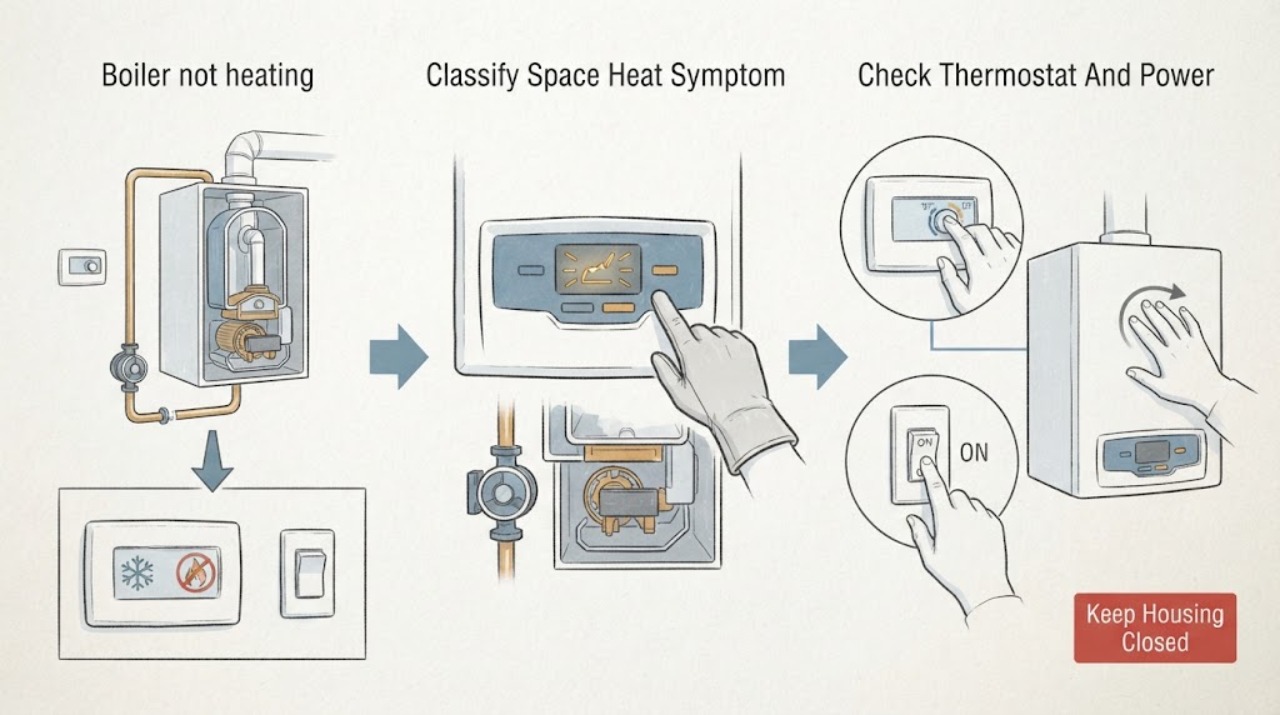
First separate a no-heat call from a boiler that fires but cannot move heat: check whether the thermostat is calling for space heat, whether the Navien display has power or an error message, whether domestic hot water still works, and whether any radiator, baseboard, or radiant zone warms. Navien's user guidance allows only limited homeowner troubleshooting because the unit combines water, electricity, and gas. You can check the thermostat mode and setpoint, a clearly identified boiler power switch, visible system status, and the model and error message without opening the cabinet or changing gas, wiring, pressure, or safety controls. A single reset is appropriate only when the exact manual directs it and no unsafe symptom is present; a repeated lockout, no response, abnormal noise, gas odor, exhaust concern, water leak, or no heat after the basic checks needs a qualified Navien service professional.
Before you begin
Safety first
- This article supports observing the thermostat and display, checking an obvious mode or setpoint, identifying a clearly labeled power control, recording visible status and gauge information without adjustment, and following one model-manual reset when permitted and safe. A qualified technician should open the cabinet, inspect gas, combustion, venting, wiring, sensors, pumps, valves, filters, pressure, and heating distribution, and perform repairs.
Work through in order
Diagnostic checks
Use only checks that match the exact appliance or system and its official guide.
-
Check 1
From a safe position, record whether the thermostat is calling for space heat, whether the Navien boiler display responds, whether domestic hot water is available, and whether all zones or only one room remain cold; do not raise settings repeatedly to force a cycle.
Expected result: The thermostat may show no heat call, the boiler may be dark or in standby, domestic hot water may work while space heat does not, or one zone may be cold while others heat.
Next step: Record the exact pattern, check the thermostat mode and setpoint once, and keep the boiler closed while proceeding to the display and power observations.
Stop if: Stop immediately for gas odor, a carbon-monoxide alarm, smoke, exhaust concern, water leakage, scalding surfaces, abnormal combustion noise, or a cracked or flooded appliance.
Why this matters
Why: No thermostat demand or one cold zone points toward controls or distribution rather than a whole-boiler failure. Hot water with no space heat can indicate a heating-side control, flow, or priority condition. A dark boiler or no hot water broadens concern to power, fuel, lockout, or appliance failure.
-
Check 2
Confirm that the thermostat is in its heating mode with a requested temperature above the room, and check only a clearly labeled boiler power switch, plug, or breaker from a dry safe position; do not open the electrical panel or boiler cabinet.
Expected result: The thermostat may be off, in another mode, not powered, set below room temperature, or calling normally; the boiler may be powered, in standby, or completely dark.
Next step: Restore only an obviously switched-off, accessible control if the manual and installation make its purpose clear; otherwise leave the system as found and arrange qualified service.
Stop if: Do not reset a tripped breaker repeatedly, remove covers, test live wiring, alter thermostat wiring, or touch a wet, hot, sparking, or damaged switch or appliance.
Why this matters
Why: A missing heat call or dark thermostat can prevent the boiler from starting. A normal call with a powered but inactive boiler shifts concern toward control communication, standby, lockout, or a boiler-side fault. A dark boiler needs safe power diagnosis rather than repeated control changes.
-
Check 3
Read the front display without opening the cabinet and record the operating state, heating demand, standby indication, error message, and any recent lockout; photograph the screen before using a reset described by the exact manual.
Expected result: The display may show normal standby, a heating cycle, a user-adjustable setting, an error message, repeated lockout, or no display at all.
Next step: Follow only the exact model manual's basic user remedy, such as one permitted reset when no unsafe symptom exists; if the message returns or the unit remains cold, leave it off and contact a licensed technician or Navien specialist.
Stop if: Do not bypass an error, alter installer parameters, bridge a sensor, remove the cover, or repeatedly reset a lockout.
Why this matters
Why: A normal display with no heating demand makes thermostat or zone control more likely. A documented error narrows the service conversation but does not identify a homeowner-replaceable part. Repeated or safety-related errors, or no display with confirmed power, require professional diagnosis.
-
Check 4
Without touching hot pipes or opening valves, observe whether the boiler starts during a heat call, whether visible supply or return piping changes temperature, whether the circulator or zone control indicates operation, and whether one or all emitters remain cold; record the pressure-gauge indication without adjusting it.
Expected result: The boiler may not fire, may fire but fail to circulate, may heat one zone only, may show a pressure or flow warning, or may have a cold loop despite a normal-looking display.
Next step: Keep the cabinet closed and arrange HVAC or hydronic service for any no-circulation, single-zone, pressure, flow, or repeated cold-emitter pattern; do not drain, bleed, refill, or clean internal components as a test.
Stop if: Stop for hot-water discharge, a leak, unusual vibration, scalding surfaces, a damaged vent, a pressure-relief event, or any need to open a valve or service port.
Why this matters
Why: No firing points toward demand, power, fuel, ignition, or lockout. Firing with cold emitters makes zone control, circulator, air, filter, or distribution issues more likely. A model-specific pressure or flow warning requires the manual and a technician; a gauge reading alone does not identify the repair.
-
Check 5
Record the Navien model and serial information, thermostat and zone arrangement, display message, last known heating cycle, domestic-hot-water behavior, visible gauge indication, and any leak or vent observation; do not order or replace a part from the symptom alone.
Expected result: The service history may show a no-demand condition, a recurring error, domestic-hot-water priority, one-zone failure, circulation restriction, or a boiler-wide lockout.
Next step: Contact the original installer, a licensed HVAC professional, or a Navien Service Specialist and provide the recorded information; keep the boiler off when a safety symptom is present.
Stop if: Do not open the combustion cabinet, adjust gas or water settings, remove the vent, bypass safety controls, or substitute a part based only on a similar model.
Why this matters
Why: Navien has multiple boiler and combi-boiler families with different controls and service parts. The exact model, serial, installation, and symptom sequence are needed to identify a compatible component and a safe diagnostic path.
Use your observations
Decision map
Find the observation that best matches what you see, then follow the next safe action.
-
PATH 01Safety boundary
What you see
The thermostat is off, in the wrong mode, below room temperature, not powered, or not calling while the boiler itself has normal standby power.
Do this next
Correct only the obvious thermostat mode or setpoint according to its instructions; if it still does not call or the zone remains cold, arrange HVAC control service.
Why this path and its safety boundary
Why it matters: A missing heat demand or thermostat communication issue is more likely than a failed burner or heat exchanger.
Safety stop: Do not jumper thermostat wires, alter installer settings, or open the boiler to force a demand.
-
PATH 02Safety boundary
What you see
The thermostat calls for heat but the Navien display is dark and an accessible power switch or breaker does not clearly explain the loss.
Do this next
Leave the unit off and arrange qualified electrical or HVAC diagnosis; do not repeatedly reset the breaker or remove the cabinet.
Why this path and its safety boundary
Why it matters: A power supply, control, fuse, or appliance fault is possible; the burner and gas train should not be investigated by the homeowner.
Safety stop: Stop for a wet appliance, burning odor, sparking, damaged cord, or a hot or discolored disconnect.
-
PATH 03Safety boundary
What you see
Domestic hot water works, but radiators, baseboards, or radiant zones remain cold when the thermostat calls for heat.
Do this next
Keep the cabinet closed, record whether one or all zones are affected, and arrange hydronic service; do not bleed, drain, refill, or clean a heating-side component as a guess.
Why this path and its safety boundary
Why it matters: The boiler can produce heat, so a space-heating demand, zone valve or pump, heating-side filter, air, or distribution problem is more likely than a total appliance outage.
Safety stop: Stop for a leak, pressure-relief discharge, scalding pipe, unusual pump noise, or a repeated lockout.
-
PATH 04Safety boundary
What you see
The boiler indicates a heating cycle or its nearby piping warms, but the connected emitters remain cold or only one zone heats.
Do this next
Leave valves and service ports alone, document the affected zone and display state, and arrange qualified hydronic diagnosis.
Why this path and its safety boundary
Why it matters: Circulation, zone control, air management, restricted filter, closed or failed distribution component, or a system-side issue is more likely than a thermostat-only problem.
Safety stop: Do not open drain or purge valves, handle hot piping, adjust system pressure, or remove a filter without model-specific professional direction.
-
PATH 05Safety boundary
What you see
The display shows an error, the boiler locks out repeatedly, or a permitted single reset does not restore stable heating.
Do this next
Photograph the message, leave the unit in the safe state prescribed by the manual, and arrange an authorized technician or licensed professional.
Why this path and its safety boundary
Why it matters: The code may involve flow, ignition, flame, venting, temperature sensing, or another protected condition; the code narrows the service report but does not prove a failed part.
Safety stop: Do not clear a recurring lockout by repeated resets, bypass sensors, change gas settings, or open the combustion area.
-
PATH 06Safety boundary
What you see
There is gas odor, a sound of leaking gas, a carbon-monoxide alarm, smoke, soot, exhaust odor, damaged venting, or abnormal combustion noise.
Do this next
Leave immediately for suspected gas leakage or a carbon-monoxide alarm, avoid operating electronics inside, and contact emergency or gas authorities from outside; arrange qualified heating inspection before use.
Why this path and its safety boundary
Why it matters: This is a fuel or combustion safety event, not a routine no-heat diagnosis. Continued operation can expose occupants to fire or combustion products.
Safety stop: Do not relight, reset, adjust gas valves, inspect the vent, or re-enter until the relevant emergency or qualified professional says it is safe.
Helpful context
Understand the symptom
Start with the heat call, not the burner
A cold room does not always mean a failed Navien boiler. The thermostat may be in cooling, off, schedule, vacation, or another mode; a zone control may not be calling; or the boiler may be heating domestic water while space heating waits. Record what the thermostat requests, what the boiler display shows, and whether hot water is normal before touching any service component.
Use the display as evidence
Check whether the display is dark, in standby, showing a heating demand, or displaying an error message. Photograph the message and status before resetting. Navien manuals contain model-specific error meanings and user remedies, but a code does not authorize opening the cabinet, testing gas pressure, bypassing a sensor, or replacing a part without diagnosis.
A hot boiler with cold rooms is a circulation or zone question
If the boiler fires or its supply piping warms but radiators, baseboards, or radiant zones stay cold, the restriction may be in the heating loop, a zone control, a circulator, air management, or a filter. Do not bleed, drain, refill, or open a filter unless the exact model instructions and your training make that a permitted task; these systems can contain hot water and pressure.
Gas and combustion symptoms end homeowner checks
Gas odor, exhaust odor, unusual combustion noise, soot, a carbon-monoxide alarm, repeated ignition or flame-loss messages, or a blocked or damaged vent is not a reset-and-retry problem. Leave the area for a gas leak or alarm, keep clear of the boiler, and use qualified emergency or heating service as appropriate.
Safety boundary
Stop conditions
- Stop homeowner troubleshooting for gas odor, a gas-leak sound, carbon-monoxide alarm, smoke, soot, exhaust odor, damaged venting, abnormal combustion noise, or fire; leave as appropriate and obtain emergency or gas-authority help from outside.
- Do not open the Navien cabinet, test live wiring or gas pressure, adjust gas or water settings, bypass sensors or safety controls, or remove combustion or vent components.
- Do not drain, bleed, refill, purge, or clean a heating loop or internal filter as a generic fix; hot water, pressure, electricity, and gas make the exact model and technician boundary important.
- A single reset is only a model-manual user remedy when no unsafe symptom is present. Stop if the error returns, the unit locks out again, the display is abnormal, or heating does not recover.
- Arrange qualified Navien or licensed HVAC service for no heat after basic thermostat and power observations, a cold zone, no circulation, a pressure or flow warning, a recurring code, a leak, or any uncertain diagnosis.
Only after diagnosis
Potential parts
- thermostat or zone control component
Consider this only when diagnosis shows that the thermostat, zone controller, or communication path is not sending a valid space-heating demand.
Match the boiler model, control protocol, wiring, zones, and installation instructions; a generic thermostat change can create a new control or safety problem. - heating-side circulator or zone valve
Consider this only when service confirms that heat is being produced but the affected zone is not circulating or opening.
Match the boiler and system design, flow requirements, electrical control, valve orientation, and zone arrangement; do not open hot or pressurized piping. - heating-side filter or air-management component
Consider this only when the exact model and system diagnosis identify a restricted filter or failed air-management component.
The technician must confirm the component, isolation, temperature, pressure, and refill or purge procedure; a filter symptom does not authorize draining the system. - Navien ignition, flame, sensor, or control assembly
Consider this only after a qualified technician interprets the exact model error and confirms the failed assembly.
Gas, combustion, wiring, and safety parts require exact model compatibility and qualified installation; do not substitute a part based on a code alone.
When checks do not resolve it
Need a professional?
Arrange qualified Navien or licensed HVAC service when the thermostat calls but the boiler does not respond, domestic hot water works while space heating does not, the boiler fires but emitters remain cold, one zone fails, a display code returns, a reset does not restore heat, or any water, pressure, vent, gas, or electrical symptom appears. For gas odor, a gas-leak sound, carbon-monoxide alarm, smoke, or fire, leave and contact emergency or gas authorities from outside rather than operating the boiler or electronics.
Safety scope: This article supports observing the thermostat and display, checking an obvious mode or setpoint, identifying a clearly labeled power control, recording visible status and gauge information without adjustment, and following one model-manual reset when permitted and safe. A qualified technician should open the cabinet, inspect gas, combustion, venting, wiring, sensors, pumps, valves, filters, pressure, and heating distribution, and perform repairs.
Common questions
FAQ
Why does my Navien boiler make hot water but not heat the house?
That pattern makes a space-heating demand, zone control, circulator, heating-side filter, air, or distribution issue more likely than a total boiler outage. Check the thermostat and display without opening the boiler, then arrange hydronic service if the heating zones stay cold.
Can I reset a Navien boiler that is not heating?
Only use a reset described by the exact model manual and only when there is no gas odor, carbon-monoxide alarm, leak, vent concern, smoke, or other unsafe symptom. Photograph the display first; if the code returns or heat does not recover, stop resetting and call a qualified technician.
Should I add water or bleed the radiators when the boiler is not heating?
Do not do that as a generic first step. Record the visible gauge indication without adjustment and use the exact manual or a qualified technician to determine whether pressure, air, circulation, or another system condition is involved.
Read the exact guide
Official sources
- FAQs | Residential Boilers | ResidentialNavien · Navien's residential boiler FAQ applies broadly to its boiler families; the installed model manual and system design control any specific setting or repair.
- CPSC Issues Winter Weather Safety Tips to Prevent Fires and Carbon Monoxide PoisoningU.S. Consumer Product Safety Commission · CPSC household safety guidance used for the gas and combustion emergency boundary; it does not diagnose a Navien boiler or replace local emergency instructions.
- NFC-H User's Information ManualNavien · Opened Navien NFC-H combi-boiler user manual used for documented examples of space-heating checks and the reset boundary; the user's exact Navien model manual takes precedence.
- NHB-55H Ultra-High Efficiency Heating BoilerNavien · Navien product information for one NHB-H heating-boiler family used to explain the roles of controls, pumps, and zoning; it does not identify the user's model or a failed component.
Community feedback
Share a repair observation
Share a plain-text repair observation. Accepted observations are published automatically; this page may take a moment to update.