
On this page
Start here
Quick answer
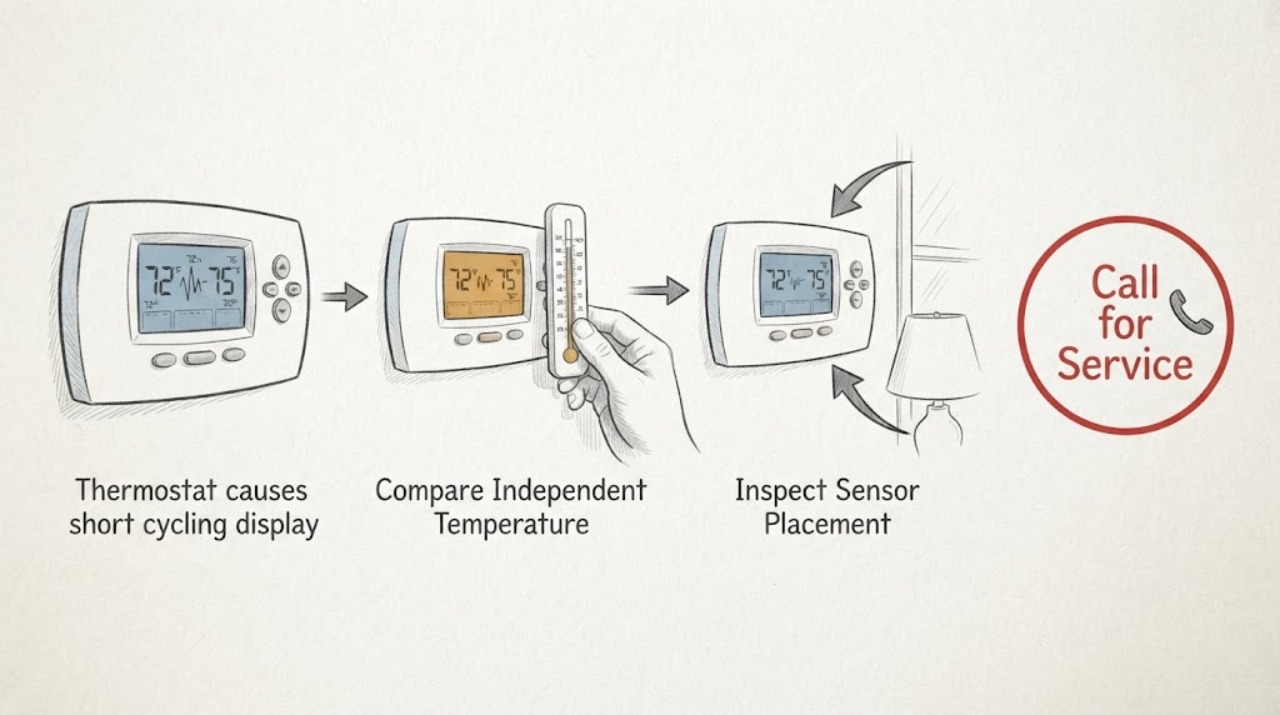
A thermostat can contribute to short cycling when its sensor reads the room inaccurately, its placement is exposed to sun, a draft, a vent, or a nearby heat source, or its control or power is unstable. A jumping display does not prove the thermostat is bad: normal temperature swing, schedules, remote-sensor changes, a dirty filter, a frozen coil, refrigerant trouble, or another HVAC safety control can also make the system start and stop. Compare the display with a separate thermometer, inspect placement and settings, replace batteries only if the model uses them, and check the filter without opening wiring. Do not remove thermostat wires, bypass a safety control, change advanced cycle settings blindly, or work inside HVAC equipment. If cycling continues, the display is inaccurate, the thermostat loses power, an error returns, airflow is weak, ice or burning smell appears, or wiring is loose or exposed, stop and arrange qualified HVAC service.
Before you begin
Safety first
- Owner checks are limited to recording symptoms, comparing a nearby thermometer, inspecting placement, changing documented batteries or settings, replacing a filter as directed, and using a model-documented supervised test. A qualified HVAC technician or electrician must handle thermostat wiring, calibration beyond user settings, cabinet access, live testing, refrigerant, control boards, safety switches, and equipment repairs.
Work through in order
Diagnostic checks
Use only checks that match the exact appliance or system and its official guide.
-
Check 1
Write down the thermostat's displayed room temperature, target temperature, mode, and the times the HVAC starts and stops for several observed cycles. Note whether the display changes while the system is running, immediately after it stops, or when a schedule or remote sensor becomes active.
Expected result: Record a small gradual change, a sudden jump that does not match the room, repeated starts before the target is reached, a normal time delay, a schedule-driven setpoint change, or a system that runs continuously instead.
Next step: Continue with the independent thermometer and placement checks while avoiding repeated manual starts and stops.
Stop if: Stop observing and turn the system off if there is smoke, burning odor, exposed wiring, water near electrical parts, a loud abnormal sound, or rapid cycling with equipment overheating.
Why this matters
Why: A small change can be normal sensing or temperature swing. A sudden display jump combined with premature starts makes sensor, placement, power, schedule, or thermostat control more likely, but repeated cycling can still originate in the HVAC equipment or a safety control.
-
Check 2
Place a separate room thermometer near the thermostat but out of direct supply air, sunlight, drafts, and heat sources. Let both readings settle without touching thermostat wiring, then compare the readings in the same mode and location.
Expected result: Record readings that are close and stable, a persistent difference, a thermostat value that jumps while the separate thermometer stays steady, or both readings changing with the room.
Next step: If the thermostat-only reading remains inaccurate, check placement and power, then arrange service if it persists. Do not recalibrate beyond the model's documented user setting.
Stop if: Stop if the display is blank, flickering, hot, wet, or emitting an odor, or if wires are visible or loose.
Why this matters
Why: Close stable readings make a gross sensor error less likely and shift attention to cycling controls, airflow, equipment, or settings. A persistent mismatch or thermostat-only jump supports sensor placement, calibration, power, or thermostat failure; it is not enough to identify a replacement part.
-
Check 3
Inspect the thermostat's surroundings without removing it: note direct sun, a supply or return vent, a stove or appliance, a drafty door or window, an exterior wall, blocked airflow, or a remote sensor located in another room or zone. Keep nearby doors and vents in their normal safe position; do not relocate a wired thermostat yourself.
Expected result: Record a heat source, draft, sunlight, blocked wall area, remote sensor schedule, sensor outside the controlled zone, or a neutral placement away from local influences.
Next step: Remove only ordinary nearby obstructions and review the model's sensor schedule or placement guidance. Arrange HVAC or thermostat service if relocation, wiring, or calibration is required.
Stop if: Do not move the thermostat, open the wall plate, pull wires, close many supply vents, or place a heat source near the sensor to test it.
Why this matters
Why: A local heat or cold source can make the thermostat call too early or stop too soon and can make the display jump as the local air changes. A remote sensor or schedule can legitimately change which temperature controls the system. Neutral placement makes a sensor or HVAC fault more likely if the mismatch continues.
-
Check 4
Review the thermostat's visible power indication, battery warning if applicable, operating mode, schedule, hold or away state, and any displayed alert. Replace batteries only with the type and procedure in the model instructions; do not remove the thermostat faceplate to inspect wires unless the manual explicitly makes that safe.
Expected result: Record a low-battery indication, blank or flickering display, unexplained schedule or mode change, recurring alert, stable power with a jumping reading, or no user-accessible power information.
Next step: Correct only documented user settings or batteries, then observe one normal cycle. If the alert, temperature jump, or short cycling returns, keep settings stable and request service.
Stop if: Do not bypass an alert, jumper terminals, change wiring, repeatedly reboot a failing thermostat, or continue if the display is hot, sparking, or damaged.
Why this matters
Why: Low batteries or unstable power can make readings or control erratic. A schedule, away state, or sensor schedule can change the target and apparent cycle. A stable display with correct settings shifts attention to sensor calibration, HVAC equipment, or communication wiring.
-
Check 5
With the HVAC equipment off and safe to approach, inspect the return-air filter and replace or clean it only as the equipment manual directs. Note weak airflow, blocked returns, unusual icing, or a supply vent that is not delivering air; do not open the furnace, air handler, compressor, or refrigerant circuit.
Expected result: Record a heavily loaded filter, normal filter and airflow, weak airflow, ice, continuous operation, or an equipment area that cannot be safely accessed.
Next step: After documented filter care, keep the system under supervised observation only if it is otherwise safe. Request HVAC service for recurring short cycles, icing, weak airflow, or unchanged symptoms.
Stop if: Stop for ice, water, burning odor, smoke, exposed wiring, a hot motor or cabinet, or any need to remove an equipment panel.
Why this matters
Why: Restricted airflow can make equipment cycle off on a safety limit or freeze a coil, mimicking a thermostat failure. Normal airflow with a continuing inaccurate display makes thermostat sensing or HVAC control more likely; ice, weak airflow, or continuous operation requires equipment diagnosis.
-
Check 6
If the thermostat, filter, airflow, and equipment area are safe, use only the model's documented manual test or a single normal call for heat or cooling. Observe whether the system responds, whether the display changes with the nearby thermometer, and whether the cycle stops prematurely; do not force a call or defeat a built-in delay.
Expected result: Record normal response and stable readings, no response, rapid on-off cycling, a built-in waiting message, a cycle that completes, or an error or safety shutdown.
Next step: Stop the test when any abnormal result occurs and provide the timeline to a qualified HVAC technician. Do not repeat the test to make the system fail again.
Stop if: Stop immediately for burning odor, smoke, sparking, exposed wiring, ice, water, abnormal noise, a hot cabinet, or a safety shutdown that repeats.
Why this matters
Why: A normal response with stable readings makes an active thermostat fault less likely. No response, rapid cycling, a recurring error, or safety shutdown may involve wiring, control board, equipment protection, sensor failure, or HVAC faults; a time-delay message can be protective rather than a failure.
-
Check 7
Prepare a service handoff with thermostat brand and model if safely visible, display and thermometer readings, target and mode, cycle timestamps, schedule or sensor state, battery or power alerts, placement conditions, filter and airflow observations, ice or odor, and recent wiring or equipment work. Do not remove covers or wires to add detail.
Expected result: Confirm that the record contains external observations and documented user settings, not live measurements, a guessed calibration, a bypassed control, or an assumed failed thermostat.
Next step: Arrange qualified HVAC service when short cycling continues, the display remains inaccurate, the thermostat loses power, an error returns, or diagnosis needs wiring, calibration, control-board, refrigerant, or equipment access.
Stop if: Stop all owner troubleshooting when the next step requires opening the wall plate or HVAC cabinet, touching wiring, measuring live circuits, handling refrigerant, or bypassing a safety device.
Why this matters
Why: The combined pattern helps a technician separate sensor or placement error from a thermostat power or control problem, airflow restriction, refrigerant or coil issue, equipment safety limit, or system sizing and control issue.
Use your observations
Decision map
Find the observation that best matches what you see, then follow the next safe action.
-
PATH 01Next step
What you see
The thermostat display jumps or differs from a nearby thermometer, the system starts or stops around those changes, and the thermostat or active remote sensor is near sun, a draft, a vent, a heat source, an unconditioned room, or another zone.
Do this next
Remove ordinary nearby obstructions and review the model's sensor placement or schedule guidance. If the sensor cannot be moved safely or the mismatch persists, arrange thermostat or HVAC service; do not relocate wires or recalibrate blindly.
-
PATH 02Next step
What you see
The separate thermometer is stable, the room placement is neutral, but the display flickers or jumps, batteries are low, settings change unexpectedly, or a recurring thermostat alert accompanies short cycling.
Do this next
Replace batteries or correct only documented user settings, then observe without repeated reboots. If the issue returns, keep the system off when unsafe and request thermostat or HVAC service for power, control, or sensor diagnosis.
-
PATH 03Next step
What you see
The thermostat readings are close to the reference, but cycling persists with a dirty filter, weak airflow, ice, long runs, poor cooling or heating, or a safety shutdown.
Do this next
Service the filter only as directed and stop operating the system for ice, weak airflow, or recurring safety shutdown. Request HVAC diagnosis; a thermostat replacement alone may not resolve the equipment cause.
-
PATH 04Next step
What you see
The display changes gradually with the room, the system responds normally, a schedule or active sensor explains the target change, or the thermostat shows a protective waiting message.
Do this next
Leave the documented settings stable and observe a normal cycle. Do not bypass a time delay. If the system still starts and stops rapidly or fails to reach the target, request service.
-
PATH 05Next step
What you see
There is exposed or loose wiring, burning smell, smoke, sparking, water near equipment, a hot cabinet or thermostat, repeated breaker or safety trips, or an unsafe need to access the unit.
Do this next
Stop using the HVAC system, keep clear, and arrange qualified HVAC or electrical help from a safe location. Do not restore power, bypass protection, or open the equipment.
Helpful context
Understand the symptom
A jumping number and a short cycle are related clues, not a diagnosis
Short cycling means heating or cooling starts and stops rapidly without completing a normal cycle. A thermostat may cause this if its sensor is inaccurate, its placement sees a local heat source or draft, or its power or control is unstable. The HVAC system can also short-cycle from restricted airflow, a frozen coil, refrigerant trouble, a safety switch, an oversized system, or another equipment fault. A display that changes by a small amount as the thermostat samples or uses a control differential can be normal; a large jump that does not match the room or a system that stops before reaching the target deserves investigation.
Start with observations that do not expose wiring
Record the displayed room temperature, target, mode, time, and system run pattern. Compare the display with a separate thermometer placed nearby and away from direct sun, supply air, windows, doors, or appliances. Check the thermostat's visible power status, batteries if applicable, schedule, and filter. These checks can separate a sensing or setting issue from an HVAC airflow, power, or equipment issue without removing the thermostat from its wall plate.
Do not defeat the equipment's protection
Short cycling can stress heating and cooling equipment. Do not bypass a time delay, safety switch, low-pressure control, or wiring protection to keep the system running. Do not open the thermostat base or HVAC cabinet to tighten wires or measure live circuits unless you are a qualified technician following the exact equipment procedure. A persistent cycle, recurring error, exposed wire, burning smell, ice, or abnormal airflow needs professional diagnosis.
Safety boundary
Stop conditions
- Do not remove thermostat wires, open the HVAC cabinet, measure live circuits, handle refrigerant, bypass a safety switch or time delay, or jumper controls as an owner check.
- Do not keep restarting a rapidly cycling system, operate through ice, ignore a burning smell or error, close many vents to test the sensor, or relocate a wired thermostat without model-specific qualified guidance.
- Stop for exposed wiring, smoke, sparks, burning odor, water near electrical parts, a hot thermostat or cabinet, repeated breaker or safety trips, or an unsafe access position; arrange qualified HVAC or electrical service.
Only after diagnosis
Potential parts
- thermostat temperature sensor
Consider this category only when a persistent display mismatch or sensor fault is confirmed after placement, power, schedule, and reference-temperature checks.
Confirm the exact thermostat model, whether the sensor is integrated or remote, supported zones, calibration process, and manufacturer-approved replacement path before sourcing. - thermostat or wall control
Consider a thermostat replacement only when qualified diagnosis confirms control, sensor, or power failure and the HVAC system's equipment and wiring requirements are known.
Verify system type, stages, heat-pump or conventional configuration, power requirements, wiring, and manufacturer compatibility before replacement; do not assume a universal thermostat. - thermostat batteries or power connector
Consider this category only when the model uses replaceable batteries or an approved power accessory and low or unstable power is documented as part of the symptom.
Follow the exact model instructions for battery type or power accessory; do not alter wiring or add a connector without qualified guidance. - HVAC air filter or airflow service
Consider filter or airflow service when a loaded filter, weak airflow, ice, or a safety shutdown supports an equipment airflow cause rather than a thermostat sensor fault.
Confirm the equipment's filter size, orientation, airflow requirements, and maintenance instructions; deeper coil, blower, duct, and safety work requires qualified service.
When checks do not resolve it
Need a professional?
Call a qualified HVAC technician when short cycling continues after safe filter and setting checks, the display does not agree with a nearby thermometer, sensor placement or calibration is needed, batteries or power are unstable, an error returns, airflow is weak, ice forms, cooling or heating is abnormal, or diagnosis requires wiring, cabinet access, control-board, refrigerant, or safety-device work. Seek electrical help for exposed wiring, burning smell, smoke, sparking, water near equipment, or repeated breaker trips. Stop immediately for unsafe equipment, a hot cabinet, or any uncertainty about power isolation.
Safety scope: Owner checks are limited to recording symptoms, comparing a nearby thermometer, inspecting placement, changing documented batteries or settings, replacing a filter as directed, and using a model-documented supervised test. A qualified HVAC technician or electrician must handle thermostat wiring, calibration beyond user settings, cabinet access, live testing, refrigerant, control boards, safety switches, and equipment repairs.
Have this ready
- Provide thermostat brand and model if safely visible, display and reference readings, target and mode, cycle timestamps, schedule or remote-sensor state, battery or power alerts, placement conditions, filter and airflow status, ice, error messages, odors or sounds, and recent installation or wiring work.
Common questions
FAQ
Can a thermostat cause HVAC short cycling?
Yes, an inaccurate or poorly placed sensor, unstable power, faulty control, or changing schedule can cause premature starts or stops. But clogged filters, frozen coils, refrigerant problems, safety switches, and other HVAC faults can produce the same short cycle.
Why does my thermostat temperature display jump?
The sensor may be seeing a draft, sun, vent, appliance, exterior wall, or a different remote-sensor room. Power, batteries, schedules, calibration, or a failing sensor can also be involved. Compare it with a nearby thermometer before choosing a repair.
Is a small thermostat temperature change normal?
Small gradual changes can reflect normal room movement, sensor sampling, or the thermostat's control differential. A sudden thermostat-only jump, a large mismatch with the room, or repeated system cycling before the target is reached should be investigated.
Could a dirty filter look like a thermostat problem?
Yes. Restricted airflow can cause an HVAC safety shutdown or coil icing, which may look like the thermostat is ending cycles early. Check and service the filter only as the equipment manual directs; recurring short cycling, weak airflow, or ice needs HVAC service.
Should I replace the thermostat first?
Not automatically. Confirm the display against a reference thermometer, inspect placement, check documented power or battery status, and review settings first. If the reference is stable or equipment symptoms are present, the HVAC system may be the cause.
Can I move my thermostat to stop short cycling?
Do not relocate a wired thermostat or remove its wires as a casual test. You can remove ordinary nearby obstructions and review model-specific placement guidance; relocation, wiring, or calibration should be handled by qualified service.
What does a waiting or time-delay message mean?
Many modern thermostats use a delay to protect HVAC equipment from rapid restarting. Do not bypass it. If the delay repeats with rapid cycling, an error, poor airflow, ice, or failure to reach the target, have the system diagnosed.
When should I stop using the HVAC system?
Stop for exposed wiring, smoke, sparks, burning odor, water near electrical parts, a hot thermostat or cabinet, ice, repeated breaker or safety trips, rapid equipment cycling, or any unsafe access condition. Keep clear and arrange qualified HVAC or electrical help.
Read the exact guide
Official sources
- Common Thermostat Issues and How to TroubleshootCarrier · Carrier manufacturer resource used to distinguish thermostat symptoms from airflow, refrigerant, coil, wiring, safety, and control-board causes.
- Test your system with a Nest thermostatGoogle Home and Nest Help · Google Nest test guidance used only as an example of a documented, supervised thermostat system test; exact thermostat and HVAC instructions govern.
- Bad Thermostat: How to Identify the Problem and Fix ItCarrier · Carrier manufacturer thermostat guidance used for general symptom triage; exact thermostat and HVAC equipment instructions govern.
- Troubleshooting when a Nest Temperature Sensor isn't in a good spotGoogle Home and Nest Help · Google Nest guidance used for general remote-sensor placement reasoning; other thermostat products and exact model instructions differ.
Community feedback
Share a repair observation
Share a plain-text repair observation. Accepted observations are published automatically; this page may take a moment to update.