
On this page
Start here
Quick answer
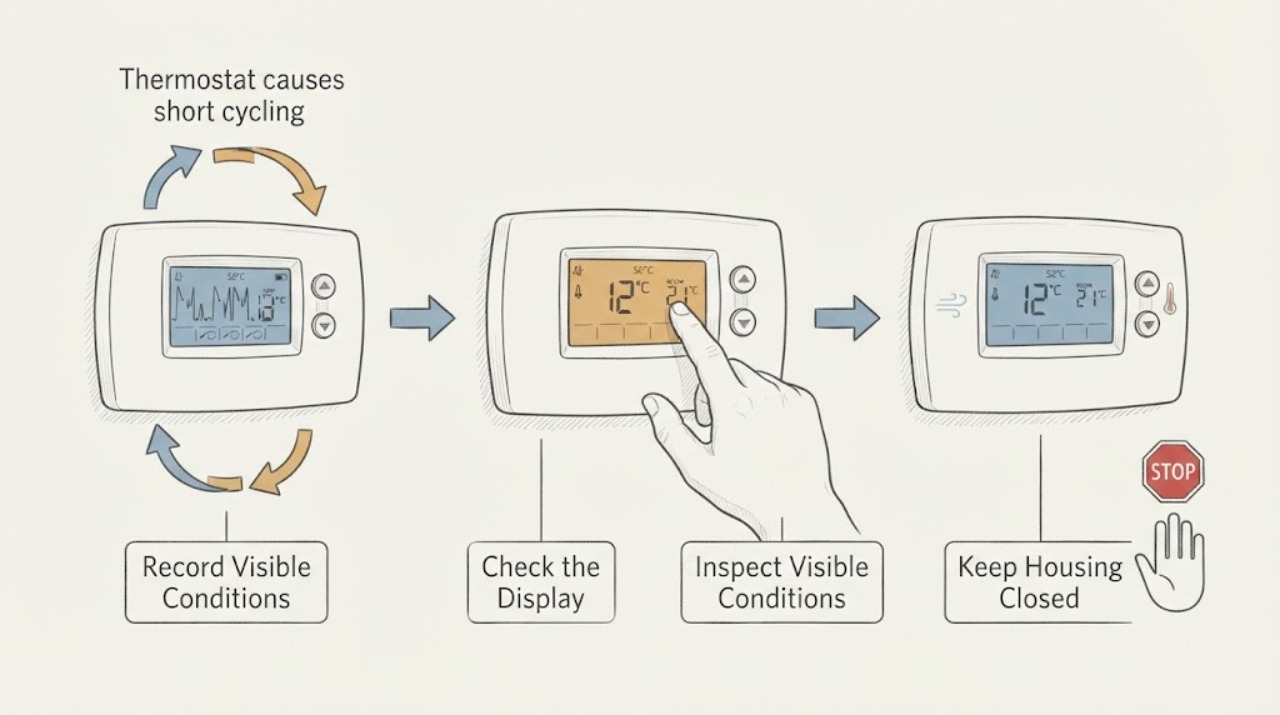
Short cycling is a system symptom, not proof that the thermostat itself is defective. From the normal thermostat display and safe room position, record the actual run/stop timeline, mode, setpoint, schedule, displayed room temperature, alerts, and whether the reading changes when the nearby environment changes. Also note airflow, outdoor-unit behavior, unusual sounds or odors, and whether the app is connected. Do not open the thermostat, remove its faceplate, bridge terminals, move wiring, change installer configuration, or repeatedly force the HVAC to run. Arrange prompt HVAC service when rapid cycling persists, comfort is not reached, an alert returns, airflow is weak, or any burning odor, exposed wiring, refrigerant/ice clue, or abnormal equipment sound is present.
Before you begin
Safety first
- This is a user-interface and external-observation guide. Do not open the thermostat or HVAC equipment, bridge terminals, move wiring, test live circuits, alter installer settings, bypass safety controls, or repeatedly force cycles.
Work through in order
Diagnostic checks
Use only checks that match the exact appliance or system and its official guide.
-
Check 1
Use the thermostat display, app history, or a simple written log to record when the system starts and stops, the displayed room temperature, and whether the setpoint is reached, without changing wiring or opening the thermostat.
Expected result: Note whether the stops are rapid and repeatable, whether the thermostat still calls for heating or cooling after the equipment stops, and whether the pattern occurs in heat, cool, or both modes.
Next step: Share the timeline and screenshots with an HVAC professional and avoid repeated manual starts to reproduce the symptom.
Stop if: Stop observing for burning odor, smoke, abnormal heat, exposed wiring, water near equipment, or a critical alert.
Why this matters
Why: A thermostat that continues to show a demand while the equipment stops can point away from a simple setpoint change and toward airflow, safety, equipment, or communication diagnosis; a changing demand needs control and schedule review.
-
Check 2
Read the thermostat's mode, setpoint, schedule, hold or setback state, fan setting, and any displayed delay or alert from the normal user interface without entering installer configuration.
Expected result: Note whether an automatic schedule, geofencing event, mode change, compressor-protection delay, or error message coincides with each stop.
Next step: Save the exact text and time, restore only an accidentally changed user-level setting if clearly understood, and contact service if cycling continues.
Stop if: Stop if the interface asks for installer-only changes, shows a safety fault, or the display is blank with signs of electrical damage.
Why this matters
Why: A scheduled change or normal protective delay can look like a thermostat-caused cycle, while a recurring alert or unexpected mode change needs professional diagnosis rather than a wiring experiment.
-
Check 3
From the room, observe the thermostat's location and surroundings without removing it: note direct sun, a nearby supply register, cooking or appliance heat, a draft, blocked air movement, or a recently changed wall condition.
Expected result: Record whether the displayed temperature seems inconsistent with the room and whether the short cycling follows sunlight, cooking, a door opening, or another local condition.
Next step: Give the placement and timing context to the HVAC professional and leave the thermostat mounted and undisturbed.
Stop if: Stop if the thermostat is loose, cracked, hot, wet, or has visible exposed conductors.
Why this matters
Why: A local heat or draft source can make the sensor see a different condition from the rest of the room; this is a placement clue, not permission to relocate or open the thermostat.
-
Check 4
Review the connected thermostat app or portal for communication status, equipment-use history, software notices, and recurring alerts without changing system configuration or repeatedly restarting the equipment.
Expected result: Note whether the app is offline, data is delayed or incomplete, other devices are affected, or the short-cycle entries match the wall display.
Next step: Export or screenshot the history and provide it to the installer or HVAC technician; do not bypass alerts or use an unauthorized reset procedure.
Stop if: Stop if the app reports a critical equipment, electrical, refrigerant, or safety condition.
Why this matters
Why: A communication or data problem can make cycling appear different from the actual equipment behavior; matching wall and app records strengthen the service timeline.
-
Check 5
From safe locations, observe airflow at occupied-room registers and the outdoor unit's normal sound and visible condition without opening panels, touching the unit, or deliberately changing the load.
Expected result: Note weak or changing airflow, ice visible from a normal viewpoint, unusual noise, water, odor, or an outdoor unit that stops while the thermostat still shows a demand.
Next step: Keep the record external and arrange HVAC inspection; do not attempt refrigerant, electrical, coil, fan, or control-board work.
Stop if: Stop immediately for smoke, burning odor, exposed wiring, abnormal heat, active leak, loud mechanical distress, or rapidly recurring shutdowns.
Why this matters
Why: These clues can indicate an HVAC or safety problem that is not caused by the thermostat alone and may require equipment-level service.
Use your observations
Decision map
Find the observation that best matches what you see, then follow the next safe action.
-
PATH 01Next step
What you see
The thermostat display, schedule, and demand remain stable while the HVAC equipment stops and restarts repeatedly.
Do this next
Treat the thermostat as only one possible input and arrange HVAC service to evaluate airflow, safety controls, refrigeration/combustion components, sizing, and equipment history.
-
PATH 02Next step
What you see
The display or app changes mode, setpoint, schedule, or communication state at the same time as each cycle.
Do this next
Save the exact timeline and contact the thermostat installer or HVAC professional; do not open the thermostat or alter installer wiring/configuration.
-
PATH 03Next step
What you see
Airflow is weak, ice is visible, humidity remains high, or the system stops with an equipment alert.
Do this next
Stop repeated operation and arrange prompt HVAC inspection; do not thaw, test refrigerant, open panels, or bypass a safety control.
-
PATH 04Next step
What you see
There is burning odor, smoke, exposed wiring, abnormal heat, water, or severe mechanical noise.
Do this next
Stop the system if this can be done safely from the normal user control, keep clear, and obtain urgent HVAC or emergency assistance as appropriate.
Helpful context
Understand the symptom
A thermostat can misread room conditions or send an unexpected request, but short cycling can also come from airflow restriction, a frozen coil, refrigerant or safety conditions, equipment sizing, or another HVAC fault. The most useful first distinction is whether the thermostat display and schedule are stable while the equipment stops, or whether the control itself changes unexpectedly.
Smart thermostats may apply schedules, learning behavior, communication delays, or equipment protection delays. Record the display and app history rather than repeatedly changing the setpoint. A stable record helps the technician separate a control request from a system safety shutdown.
Short cycling places additional stress on heating and cooling equipment. Keep observations external and stop for burning smells, exposed or damaged wiring, unusual heat, smoke, refrigerant-like clues, ice, or a recurring critical alert.
Only after diagnosis
Potential parts
- HVAC thermostat
Consider a replacement thermostat only if a qualified technician confirms the thermostat or compatibility is the cause after checking the wider HVAC system.
Confirm system type, stages, heat-pump or conventional configuration, power requirements, accessories, and manufacturer compatibility before ordering. - thermostat temperature sensor
Consider this category only if the manufacturer and technician identify a replaceable sensor and confirm that the displayed temperature is inaccurate.
Sensor design and calibration are model-specific; do not open or modify a thermostat to fit a generic sensor. - thermostat wire kit
Consider this category only if a qualified professional confirms a damaged or insufficient low-voltage cable and plans the replacement safely.
Confirm system terminals, conductor requirements, routing, and power isolation with the installer; never use a wire kit to bridge or bypass controls.
When checks do not resolve it
Need a professional?
Arrange prompt HVAC service when short cycling persists, the system does not reach the setpoint, a thermostat alert returns, airflow is weak, or the display and equipment behavior disagree. Escalate immediately for burning odor, smoke, exposed wiring, abnormal heat, water, severe noise, or a critical equipment alert.
Safety scope: This is a user-interface and external-observation guide. Do not open the thermostat or HVAC equipment, bridge terminals, move wiring, test live circuits, alter installer settings, bypass safety controls, or repeatedly force cycles.
Common questions
FAQ
Does short cycling prove the thermostat is bad?
No. Airflow, refrigeration, safety, sizing, equipment, communication, and thermostat conditions can all produce rapid starts and stops. Record the display and equipment timeline and have the HVAC system assessed.
Can I bridge thermostat terminals to test the system?
No. Do not bridge, move, or touch thermostat wiring. Low-voltage controls can still damage equipment or expose you to hazards; use qualified HVAC service.
Why does the thermostat show a delay after stopping?
Many modern controls include protective delays, but a persistent rapid-cycle pattern or recurring alert still needs evaluation. Record the exact display and timing rather than repeatedly restarting the system.
What should I do if there is a burning smell?
Stop using the system, keep clear, and obtain urgent HVAC or emergency assistance as appropriate. Do not open the thermostat or equipment to investigate an odor.
Read the exact guide
Official sources
- Common Thermostat Issues and How to TroubleshootCarrier · Carrier explains that short cycling can be caused by thermostat or wider HVAC conditions, that smart thermostats may show alerts and protective delays, and that exposed wiring, persistent errors, and burning smells require professional help.
- What Is AC Short Cycling: Causes, Effects, and TroubleshootingCarrier · Carrier identifies thermostat reading or wiring issues, airflow restrictions, refrigeration, equipment sizing, and electrical components as possible causes, so a thermostat symptom should not be treated as a thermostat-only diagnosis.
- Smart ThermostatsENERGY STAR · ENERGY STAR notes that smart thermostats can learn preferences, adjust schedules, provide equipment-use and temperature data, update software, and require system compatibility; this supports checking user-level history before service.
Community feedback
Share a repair observation
Share a plain-text repair observation. Accepted observations are published automatically; this page may take a moment to update.