
On this page
Start here
Quick answer
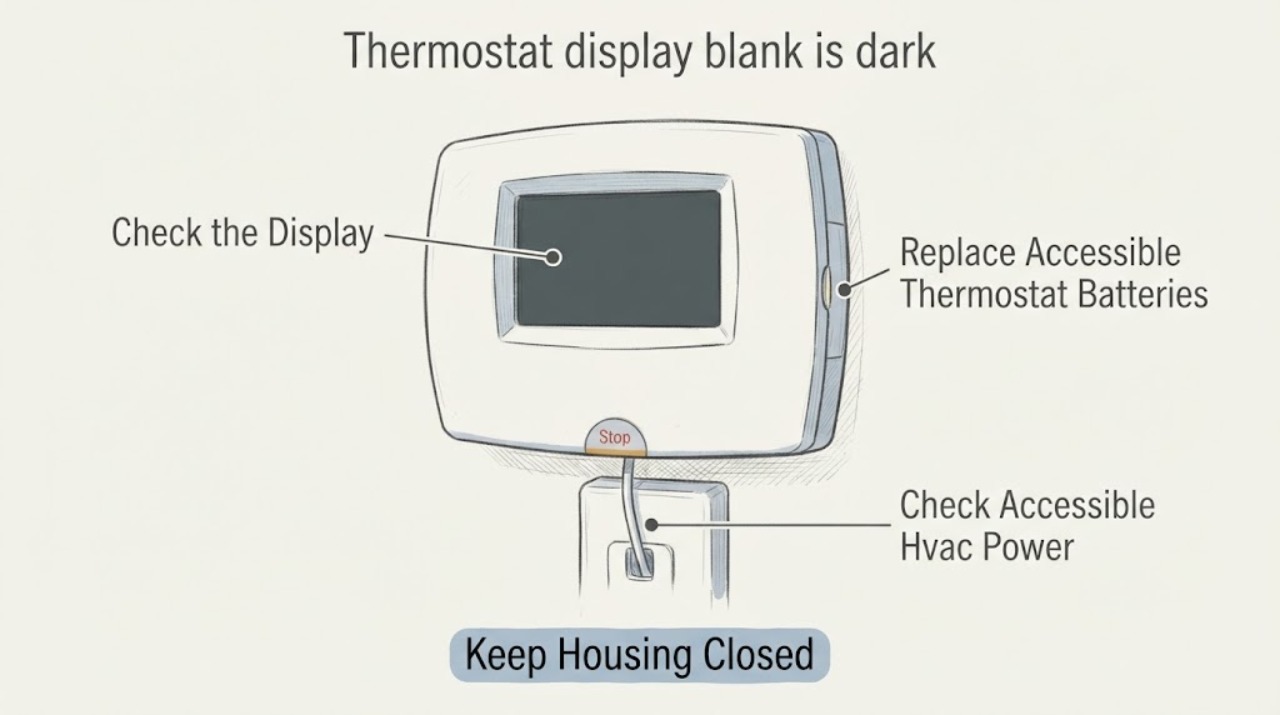
A dark thermostat display most often means depleted batteries, a tripped HVAC breaker or service switch, a loss of low-voltage power, or a thermostat or wiring fault. If the model uses accessible batteries, replace them with the type specified in its manual, then check the accessible HVAC breaker or service switch without opening covers. If the display returns, confirm the mode, setpoint, and equipment operation; if it stays dark, keeps rebooting, or goes dark again, the thermostat power path or HVAC control needs professional diagnosis. Do not remove the thermostat base, pull wires, open the furnace or air-handler cabinet, or repeatedly reset a breaker. Stop for burning odor, smoke, sparks, a hot or damaged control, water, gas odor, or a carbon-monoxide alarm and obtain appropriate emergency or qualified help.
Before you begin
Safety first
- This article supports observing the display, replacing user-accessible batteries, checking an accessible breaker or service switch without opening covers, and following exact-model user restart instructions. It does not authorize thermostat-base or HVAC-panel removal, wiring, live testing, fuse or transformer work, safety bypass, control-board replacement, or operation near gas, carbon-monoxide, electrical, water, or fire hazards.
Work through in order
Diagnostic checks
Use only checks that match the exact appliance or system and its official guide.
-
Check 1
Look at the thermostat from a safe position and note whether the screen is completely dark, faint, flickering, rebooting, or showing only a low-battery indication. Listen from a safe location for the furnace, air handler, heat pump, or air conditioner, and note whether any equipment is running while the display is dark. Do not touch exposed wiring or open HVAC covers.
Expected result: Record a continuously dark screen, a display that returns when a button is pressed, repeated resets, a display that is dark while equipment runs, or a display that is dark while the whole HVAC system is off. Note recent power outage, storm, service, or thermostat work.
Next step: Use the symptom pattern to choose the battery, power, or professional-service branch. Stop for smoke, burning odor, gas odor, sparks, water, a carbon-monoxide alarm, a hot control, or a repeatedly tripping breaker.
Stop if: Do not remove covers, touch conductors, keep equipment running near a hazard, or repeatedly press controls to force a response.
Why this matters
Why: A completely dark screen with no equipment operation points first toward batteries or loss of HVAC power. Flickering or repeated resets suggest unstable thermostat power or a control fault. Equipment that runs while the screen is dark may indicate a display or thermostat fault rather than a completely dead HVAC supply, while equipment that also stops may share the same power or safety interruption.
-
Check 2
If the thermostat has a user-accessible battery compartment or the exact owner manual says it uses batteries, replace them with fresh batteries of the specified type and orientation. Handle only the removable thermostat face or battery door; do not loosen the wall base or disturb any wires.
Expected result: Check whether the display returns and remains stable, whether it shows a low-battery or setup screen, or whether nothing changes. Note corrosion, moisture, heat, or damage in the battery compartment without scraping or repairing it.
Next step: If the display stays on, confirm the clock, mode, setpoint, and equipment response using the exact manual. If it remains dark or unstable, continue with the accessible power check and arrange service if the problem persists.
Stop if: Do not force the faceplate, use an unlisted battery type, bridge battery contacts, scrape corrosion, or open the thermostat base.
Why this matters
Why: A stable display after correct battery replacement supports depleted batteries as the immediate cause. No change, a display that quickly goes dark again, or corrosion or moisture points to a thermostat fault, an unsuitable battery path, or another power problem. Battery replacement cannot restore a thermostat that depends on HVAC low-voltage power.
-
Check 3
If the thermostat remains dark, look at the accessible electrical panel for the breaker labeled for the furnace, fan coil, heat pump, or air conditioner, and look for an accessible service switch near the indoor unit. Do not remove a panel cover. If a breaker is visibly tripped and there is no heat, moisture, damage, odor, or other hazard, follow the home's electrical safety practice for one reset; do not keep resetting it.
Expected result: Record whether the breaker or service switch was off, whether one safe reset restores the thermostat, whether the breaker trips again, or whether the thermostat stays dark with power apparently on. Note buzzing, heat, discoloration, smoke, or water near the panel or switch.
Next step: If power returns, observe the thermostat and one normal call without repeatedly changing settings. If the breaker trips again or shows a hazard, leave it off and arrange qualified electrical or HVAC service. If power appears normal but the display remains dark, proceed to professional service rather than opening the equipment.
Stop if: Do not open the panel or indoor unit, repeatedly reset protection, bypass a fuse, or investigate a hot, wet, sparking, or damaged power source.
Why this matters
Why: A single power interruption can darken the thermostat and stop the HVAC system. A repeat trip, hot or damaged control, or a breaker that will not hold indicates an electrical or equipment fault. If the breaker and switch remain on but the display is dark, low-voltage power, a fuse, wiring, the thermostat, or the HVAC control board may need testing.
-
Check 4
After a battery replacement or a safe single power restoration, let the thermostat complete its normal startup and check only user-visible settings: time, mode, heat or cool setpoint, fan setting, schedule, and any displayed alert. Use a model-specific user reset or power-cycle procedure only when the owner manual documents it and the HVAC equipment is not running.
Expected result: Note whether the display remains stable, asks for time or setup, shows a waiting or equipment alert, loses settings, or goes dark again when heating or cooling is requested. Note whether the equipment responds to a normal call without rapid cycling.
Next step: Restore only documented user settings and observe one call. If the display goes dark again, the equipment does not respond, or an alert persists, keep the system off as appropriate and arrange qualified HVAC service.
Stop if: Do not change installer-only configuration, disable time-delay or safety settings, jumper terminals, or continue cycling power to clear an alert.
Why this matters
Why: A stable screen that lost its clock or schedule may reflect a power interruption rather than a failed display. Repeated loss of settings or a dark screen during a call points to unstable power, wiring, a control-board or safety interruption, or a thermostat fault. A waiting message can be a built-in equipment-protection delay; it is not a reason to disable protection.
-
Check 5
Arrange qualified HVAC or electrical service when the display stays dark after the specified batteries and accessible power checks, goes dark again, or the HVAC behaves abnormally while the display is blank. Give the technician the thermostat model, battery result, breaker or switch result, equipment type, recent work, and any alert, odor, noise, water, ice, or breaker behavior.
Expected result: The remaining pattern is a display-only fault, intermittent low-voltage power, a control or wiring fault, a furnace or heat-pump safety interruption, or another HVAC equipment problem.
Next step: Have the professional test thermostat power and call behavior, HVAC controls and safeties, and the equipment's operation before approving thermostat replacement. Keep the system off when a hazard or repeated trip is present.
Stop if: Do not remove the thermostat base, test live or low-voltage conductors without training, open HVAC panels, bypass safeties, or replace a transformer, fuse, or control board as a trial.
Why this matters
Why: A dark display does not identify a replaceable thermostat by itself. The technician may need to distinguish batteries, transformer or low-voltage power, wiring, a fuse, control board, safety switch, thermostat display, or equipment fault before selecting a part.
Use your observations
Decision map
Find the observation that best matches what you see, then follow the next safe action.
-
PATH 01Safety boundary
What you see
The thermostat uses accessible batteries and the display returns and remains stable after the correct batteries are installed.
Do this next
Confirm the mode, setpoint, schedule, and one normal heating or cooling call. If the screen goes dark again or the equipment behaves abnormally, arrange service instead of continuing battery swaps.
Why this path and its safety boundary
Why it matters: Depleted batteries were the most likely immediate cause, although a recurring dark screen can still indicate a thermostat or equipment power issue.
Safety stop: Do not use an unlisted battery type or continue operating if heat, odor, sparks, water, or a breaker trip appears.
-
PATH 02Safety boundary
What you see
The display and HVAC system were dark or off, an accessible breaker or service switch was off, and one safe restoration brings the display back.
Do this next
Observe one normal call and record any alert, noise, odor, heat, water, or repeat trip. Leave the circuit off and arrange qualified service if protection trips again or the switch or panel is damaged.
Why this path and its safety boundary
Why it matters: A power interruption explains the symptom, but the reason for the interruption remains unknown. A single transient trip may not recur; a repeated trip or abnormal control is not normal operation.
Safety stop: Do not repeatedly reset protection or open the electrical panel or HVAC cabinet.
-
PATH 03Safety boundary
What you see
Specified batteries do not restore the display, and the accessible HVAC breaker or service switch appears on and holds without a hazard.
Do this next
Keep the thermostat and HVAC system from being repeatedly power-cycled and arrange qualified HVAC or electrical diagnosis. Do not order a replacement thermostat until power and wiring are tested.
Why this path and its safety boundary
Why it matters: A low-voltage supply, transformer or fuse, wiring, thermostat, control board, or equipment safety interruption is more likely than a simple battery problem. The visible breaker cannot prove that low-voltage power reaches the thermostat.
Safety stop: Do not remove the wall base, pull wires, jumper terminals, or open the indoor unit to find a fuse or transformer.
-
PATH 04Safety boundary
What you see
The display returns briefly but flickers, loses its settings, or goes dark when the furnace, air conditioner, or heat pump starts or while a call is active.
Do this next
Stop repeated cycling and arrange qualified HVAC or electrical service. Tell the technician whether the equipment starts, stops, hums, trips protection, or shows an alert at the same time as the display change.
Why this path and its safety boundary
Why it matters: Intermittent thermostat power, a loose or damaged low-voltage connection, control-board or safety interruption, or an equipment electrical fault is more likely than a dead battery alone.
Safety stop: Do not operate through burning odor, sparks, heat, water, a repeated breaker trip, or exposed wiring, and do not perform live testing.
Helpful context
Understand the symptom
A dark screen is a power symptom first
A blank thermostat cannot show whether the system is calling for heat or cooling, so begin with the least invasive checks: battery condition if applicable, the accessible HVAC breaker or service switch, and signs of a recent power interruption. Some thermostats are powered by the HVAC's low-voltage circuit rather than batteries, and a dark screen in that arrangement can come from a wiring, fuse, control-board, or safety interruption. Do not assume a new thermostat will solve the problem.
Restore power only within the user-level boundary
Carrier and Trane describe battery, breaker, and controlled power-cycle checks, but model instructions differ. Check only a reachable breaker or service switch and follow the thermostat owner's manual for a user-level restart. Do not remove the wall plate, pull conductors, jumper terminals, or open HVAC panels; those actions require electrical and equipment knowledge.
Treat a recurring dark display as a fault
If the screen returns briefly and then goes dark, or the HVAC starts and stops with the display losing power, record that behavior rather than repeatedly rebooting it. Intermittent low-voltage power, a loose connection, a control-board issue, or an equipment safety event can be involved. A repeated breaker trip, heat, odor, smoke, water, or gas or carbon-monoxide hazard is a stop condition.
Safety boundary
Stop conditions
- Obtain appropriate emergency or qualified help for gas odor, smoke, a carbon-monoxide alarm, sparks, burning odor, a hot or damaged control, water near electrical equipment, or a repeatedly tripping breaker.
- Do not remove the thermostat base, pull or jumper wires, open furnace or air-handler panels, test live conductors, bypass a fuse or safety switch, or replace a transformer or control board as a trial.
- Do not repeatedly reset the breaker or cycle HVAC power when the display remains dark, the system behaves abnormally, or the reason for the interruption is unknown.
- Do not relocate or replace the thermostat based only on a dark screen; verify the model, power method, wiring, controls, and equipment fault first.
- Arrange qualified HVAC or electrical service when specified batteries and accessible power checks do not restore a stable display, or when it goes dark again during equipment operation.
Only after diagnosis
Potential parts
- HVAC thermostat
Consider a thermostat only after testing confirms its display, sensor, power input, or output has failed and the equipment configuration is documented.
Match equipment type, stages, heat-pump or conventional configuration, power requirements, accessories, and approved wiring; a dark screen alone does not prove compatibility or failure. - thermostat battery
Consider this only when the thermostat model uses user-accessible batteries and the specified replacement restores or is expected to restore a stable display.
Use the battery type and orientation stated by the exact thermostat manual; do not substitute based on size alone or bridge the contacts. - HVAC low-voltage power or control component
Consider this category only after a qualified technician confirms that thermostat power is absent or unstable because of a transformer, fuse, control board, wiring, or safety component.
Verify the equipment model, electrical specification, safety function, and manufacturer-approved repair before replacing any component.
When checks do not resolve it
Need a professional?
Arrange qualified HVAC or electrical service when the thermostat remains dark after its specified batteries and a safe accessible power check, when it flickers or loses settings, or when it goes dark during a heating or cooling call. Obtain urgent help for gas odor, smoke, a carbon-monoxide alarm, sparks, burning odor, hot or wet controls, exposed wiring, a repeated breaker trip, or a water or ice condition near electrical equipment.
Safety scope: This article supports observing the display, replacing user-accessible batteries, checking an accessible breaker or service switch without opening covers, and following exact-model user restart instructions. It does not authorize thermostat-base or HVAC-panel removal, wiring, live testing, fuse or transformer work, safety bypass, control-board replacement, or operation near gas, carbon-monoxide, electrical, water, or fire hazards.
Common questions
FAQ
Why is my thermostat display blank or dark?
The usual possibilities are depleted batteries, a tripped HVAC breaker or service switch, loss of low-voltage power, a thermostat or wiring fault, or an HVAC control or safety interruption. Replace specified accessible batteries and check accessible power without opening covers. If the display stays dark or returns only briefly, arrange qualified diagnosis rather than replacing it by guesswork.
Can a thermostat be blank when the HVAC system is still running?
Yes. A display or thermostat fault can occur while equipment continues a previous call, while some systems can operate from another control or safety state. Note whether the furnace, heat pump, air conditioner, or air handler is running, and do not touch wiring. A dark screen during equipment operation should be professionally evaluated if it does not recover with the specified battery check.
Should I reset the breaker when the thermostat is dark?
You may look for a visibly tripped, accessible HVAC breaker or service switch. If there is no heat, moisture, damage, odor, or other hazard, follow local safety practice for one reset; do not repeatedly reset it. If it trips again or the panel or switch is hot, buzzing, discolored, wet, or sparking, leave it off and arrange qualified electrical or HVAC service.
What if new thermostat batteries do not restore the display?
Not every thermostat uses batteries as its operating power, and a correct battery change cannot repair lost low-voltage power, a fuse or transformer, wiring, a control board, or the display itself. Check only the accessible HVAC breaker or service switch, then arrange qualified service if the screen remains dark. Do not remove the wall base or pull wires.
When is a blank thermostat an emergency?
Obtain appropriate emergency or qualified help for gas odor, smoke, a carbon-monoxide alarm, sparks, burning odor, a hot or damaged control, water near electrical equipment, or a breaker that repeatedly trips. Keep people away from unsafe equipment and do not keep resetting power. A continuously dark screen without those hazards still needs HVAC or electrical service if batteries and accessible power checks do not restore it.
Read the exact guide
Official sources
- What Is AC Short Cycling? Causes & TroubleshootingCarrier · Carrier residential air-conditioning guidance; the assigned topic is a thermostat display symptom, so AC-specific causes are conditional examples rather than a universal diagnosis.
- Common Thermostat Issues and How to TroubleshootCarrier · Carrier residential thermostat guidance; battery, menu, and wiring details vary by model.
- Thermostat Troubleshooting: Solutions for Common IssuesTrane · Trane residential thermostat guidance; exact controls and power arrangements vary by model and HVAC system.
Community feedback
Share a repair observation
Share a plain-text repair observation. Accepted observations are published automatically; this page may take a moment to update.